
But the social media aggregation market has changed significantly since Juicer first launched. Businesses now expect more from their social feeds, better design quality, smarter pricing models, deeper customization, and modern layouts that actually look good on a professional website. Juicer has not kept pace with these expectations, and a growing number of users are looking for alternatives that offer more value without the compromises.
If you are currently using Juicer and running into its limitations, or if you are evaluating aggregators for the first time and want to understand how the options compare, this guide breaks down eight Juicer.io alternatives in detail. We cover what each tool does well, where it falls short, and how the pricing stacks up against what Juicer offers. Unlike other "alternatives" articles, this one includes original test data: render architecture, CSS isolation results, and dollar-per-source pricing math you can check against every vendor's own pricing page. (Full testing methodology is documented in our Instagram feed widget comparison. If you are still deciding whether you need a widget at all, start with how to embed an Instagram feed on your website.)
I'll start with the tool I believe offers strong overall value, then work through the rest of the field.
Why People Look for Juicer.io Alternatives
Before we get into the tools, it helps to understand the specific friction points that push users away from Juicer. These are not hypothetical complaints, they show up consistently in user reviews across G2, Capterra, WordPress.org, and Trustpilot.
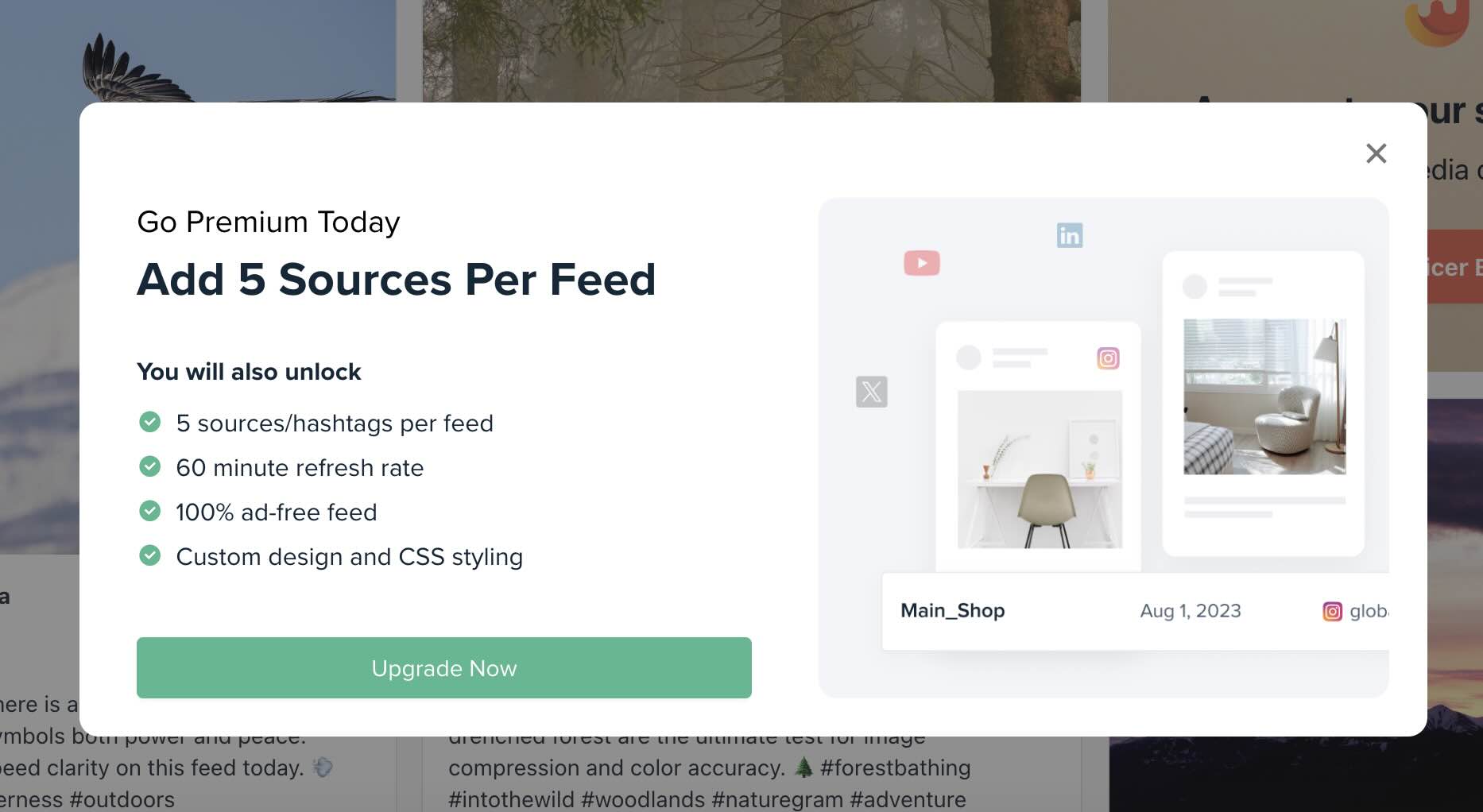
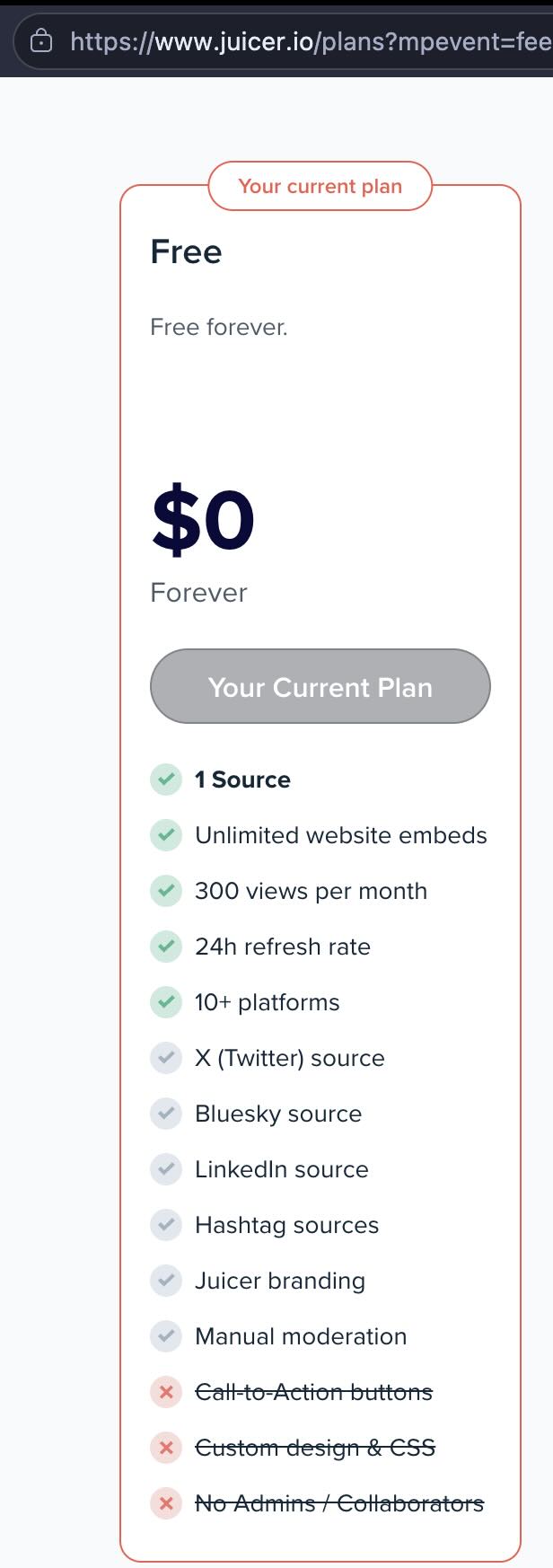
The free plan is too restrictive to be useful. Juicer's free tier allows only one social media source with a single embeddable feed. Your feed updates just once every 24 hours, and Juicer's branding is displayed prominently inside your feed. For any business that wants to show more than a single Instagram account on their site, the free plan is effectively a demo, not a usable product. Our own free plan connects one source too, so the difference is not the source count: it is unlimited feeds rather than a single embed, a small credit link rather than branding inside the feed, and a 7-day trial that opens three sources before it settles.
Source limits create artificial ceilings. Even on paid plans, Juicer restricts how many sources you can connect. The Lite plan at $15 per month gives you just three sources at $5 per source. The Starter plan at $25 per month gives you five sources, still $5 per source. To get below $4 per source, you jump straight to the 30-source Pro plan. There is no mid-tier option for businesses that need, say, 10 or 15 sources without paying for 30. (We break down the full dollar-per-source math in the pricing comparison table below. For an even deeper look at every Juicer plan, see our Juicer.io pricing analysis.)
Design options have not kept up with modern web standards. Juicer currently offers around nine built-in styles. While you can apply custom CSS on paid plans, the default templates feel dated compared to what the category ships now. If you do not have a developer on staff to write custom CSS, you are working with designs that may not match the quality of the rest of your website. For a tool whose entire purpose is to display content on your site, this is a significant shortcoming.
Slow refresh rates on lower plans. The free plan refreshes content once per day. The Lite and Starter plans update every hour. If you are posting actively on social media and want your website feed to reflect that in near-real-time, you need the Pro plan or higher. An hour-long delay might not matter for a personal blog, but for a business running a product launch or an event, hourly updates are too slow.
No live chat support. Juicer relies on email-based support for all plan tiers. Several competitors now offer live chat, and users frequently cite Juicer's support response times as a pain point, particularly when dealing with disconnection issues between social accounts and the platform.
Content disappears when sources are removed. If you delete or disconnect a source on Juicer, the content associated with that source is removed from your feed. For businesses that run seasonal campaigns, switch hashtags, or rotate social accounts, this means losing your content archive every time you make a change.
These issues do not make Juicer unusable. But they are the reasons a growing segment of the market is looking for something better. Understanding these pain points will help you evaluate the alternatives below more effectively.
Why design matters for Juicer users
Click through 5 layouts × 5 themes = 25+ combinations, zero CSS. This interactive animation lets you test-drive CollectSocials' design system. Click any layout button (Grid, Masonry, Carousel, Coverflow, Marquee) and any theme button (Minimal, Shadow, Neon, Brutalist, Sunset) to see the feed transform instantly. Sample posts from Google, Instagram, YouTube, and Facebook populate the preview, showing exactly how your content would look with each combination.
The most common complaint from Juicer users isn't about functionality, it's that their feed doesn't look professional enough to match their website. Juicer launched when "it works" was enough. Today, businesses expect intentional design, not generic templates. This interactive playground demonstrates the gap: modern aggregators deliver polished results out of the box, no custom CSS required.
We Tested Juicer.io: Here Is What We Found
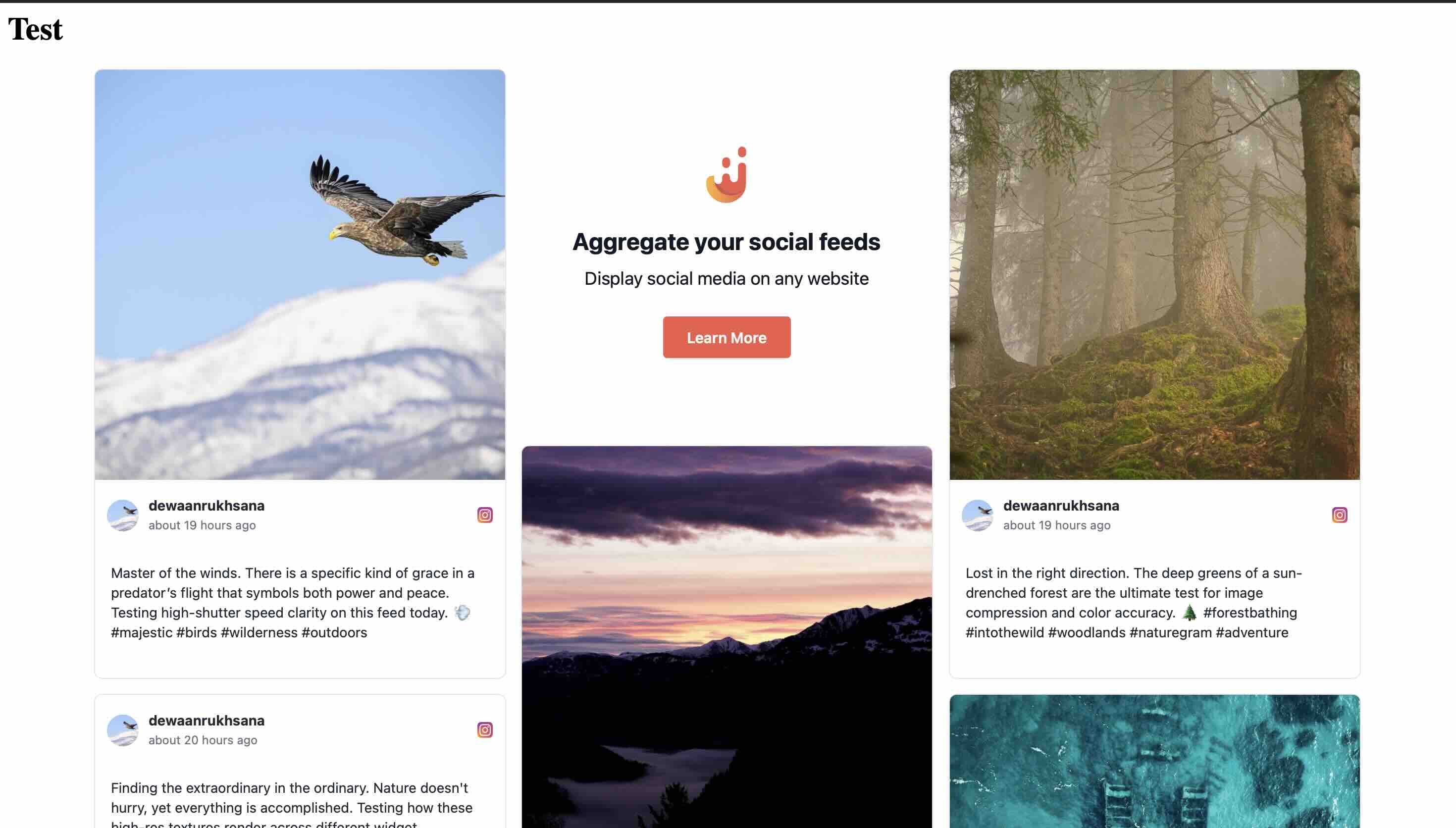
Most "Juicer alternatives" articles list features from marketing pages. We did something different: I installed Juicer.io on a blank HTML test page, recorded how it renders and how many files it loads, measured JavaScript bundle sizes, and tested CSS isolation with intentionally aggressive stylesheets. The data below is from our actual testing. (Full methodology and results for all tools are documented in our Instagram feed widget comparison. For a detailed breakdown of what each Juicer plan costs, see our Juicer.io pricing analysis.)
We Signed Up for Juicer Free: Here Is the Evidence
The article above mentions that Juicer's free plan is too restrictive. Rather than assert this, I signed up and documented the friction points firsthand.
How Each Widget Renders
We installed each widget on the same blank test page in incognito mode and recorded what it loads and how it isolates its styles. Here is how Juicer compared to alternatives I tested:
| Widget | Render method | Files loaded | Style isolation |
|---|---|---|---|
| Flockler | Script embed | 2 | None (iframe optional) |
| Curator.io | Script embed | 4 | None |
| CollectSocials | Script embed | 1 | Shadow DOM |
| Juicer.io | Script embed | 2 | None |
| Taggbox/Tagembed | Script embed | 22 | None (iframe optional) |
| EmbedSocial | Cross-origin iframe | 10 | Iframe (full) |
| Walls.io | Cross-origin iframe | 11 | Iframe (full) |
| Elfsight | Script embed | 2 | None |
hx-swap="innerHTML", and injected content has no reserved height. It also serves full-resolution JPEGs rather than thumbnails sized for the slot.CSS Isolation: Your Styles Will Break Juicer (and Vice Versa)
We tested CSS isolation by injecting aggressive styles into the host page (Comic Sans fonts, yellow backgrounds, red image borders, magenta strikethrough links) to see which widgets survive and which break. Juicer's default script embed rendered entirely in the global DOM with no Shadow DOM boundary. Our test CSS broke the widget completely.
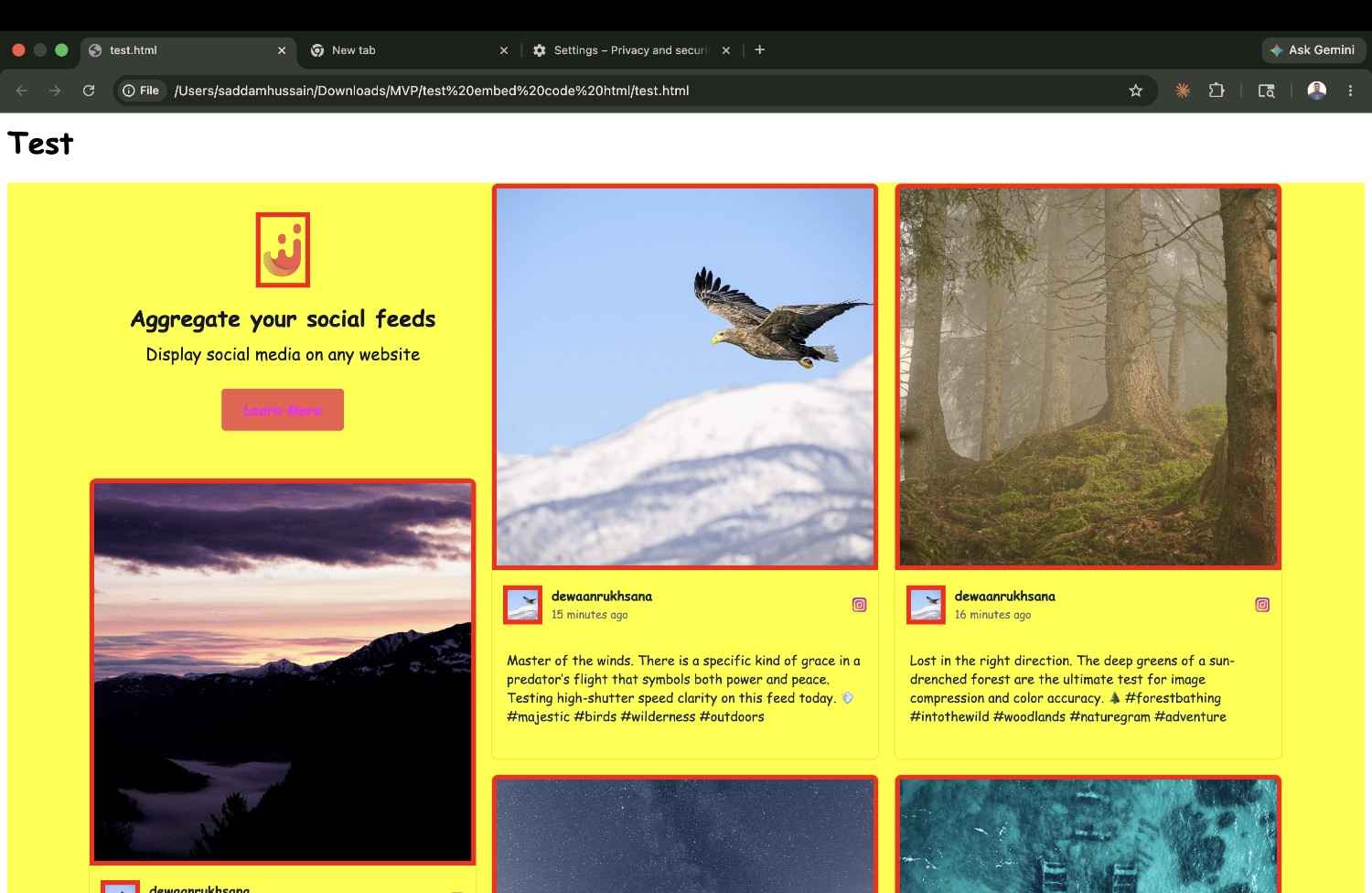
Worse, the style leakage is bidirectional. Juicer injects its own Tailwind CSS (tailwind_embed.css) with --tw-* variables on the global * selector, meaning Juicer's styles can interfere with your page elements too. The HTMX-based innerHTML injection pattern means even dynamically loaded post content lands unprotected in the global DOM.
The good news: Juicer also offers an iframe embed option, and the iframe code provided full CSS isolation in our testing: our aggressive test styles had zero effect on the widget. This is the same pattern I found with Flockler and Taggbox: both offer a default script embed (no isolation) and an iframe embed (full isolation). If you use any of these tools, make sure you are using the iframe embed code.
| Widget | Isolation Method | Page CSS Breaks Widget? | Widget CSS Leaks Out? |
|---|---|---|---|
| CollectSocials | Shadow DOM | No ✓ | No ✓ |
| Walls.io | Iframe | No ✓ | No ✓ |
| Flockler (iframe) | Iframe (optional) | No ✓ | No ✓ |
| Taggbox (iframe) | Iframe (optional) | No ✓ | No ✓ |
| Juicer.io (iframe) | Iframe (optional) | No ✓ | No ✓ |
| Juicer.io (default script) | None (global CSS) | Yes ✗ | Yes ✗ |
| Curator.io | None (global CSS) | Yes ✗ | Yes ✗ |
| Elfsight | None (global CSS) | Yes ✗ | Yes ✗ |
The Real Cost: Dollar-Per-Source Pricing Comparison
Source limits are the primary pricing lever in social media aggregation. But raw source counts are misleading. What matters is how much you pay per source at each tier:
| Tool | Plan | Sources | Price | $/Source | Feeds Included |
|---|---|---|---|---|---|
| Juicer | Lite | 3 | $15/mo | $5.00 | Unlimited embeds |
| Juicer | Starter | 5 | $25/mo | $5.00 | Unlimited embeds |
| Juicer | Pro | 30 | $99/mo | $3.30 | Unlimited embeds |
| CollectSocials | Pro | 5 | $29/mo | $5.80 | Unlimited |
| CollectSocials | Business | 15 | $59/mo | $3.93 | Unlimited |
| Curator.io | Professional | 5 | $25/mo | $5.00 | Tied to sources |
| Curator.io | Business | 15 | $59/mo | $3.93 | Tied to sources |
| EmbedSocial | Pro | 3 | $29/mo | $9.67 | Varies |
| EmbedSocial | Pro Plus | 6 | $49/mo | $8.17 | Varies |
| Taggbox/Tagembed | Starter | ~5 | $19/mo | ~$3.80 | 2 |
1. CollectSocials: Modern Design and a Free Plan You Can Ship
Best for: Businesses that want premium design quality, a free plan that works in production, and consent tracking on every tier rather than none.
CollectSocials turns one curated feed of posts, reviews and video into both a widget on your website and a full-screen wall the whole room can post to, with consent recorded on every post. It pulls from ten live platforms today: Google Reviews, YouTube, X/Twitter, TikTok, Instagram, Pinterest, RSS feeds, Vimeo, Tumblr, and Facebook, with LinkedIn is not live yet. Against Juicer specifically, the differentiation comes down to three things: design, pricing structure, and how it handles feeds and sources. The event wall is the fourth, and it runs on the same $59 Business account as the website feed rather than a second subscription.
Where CollectSocials wins
The design library is the most immediately visible difference. CollectSocials offers forty professionally designed layouts, including Grid, Masonry, Carousel, List, Mosaic, Slider, Marquee, Compact, Tetris, Stack, Coverflow, Panel, Stagger, and Layers, paired with sixteen themes including Minimal, Bold, Elegant, Glass, Neon, Brutalist, Midnight, and more. Each combination produces a genuinely polished result without requiring any custom CSS. For businesses that do not have a developer available to tweak code, the quality of default templates is what determines how professional their social feed looks to visitors. CollectSocials treats this as a core product priority, not an afterthought.
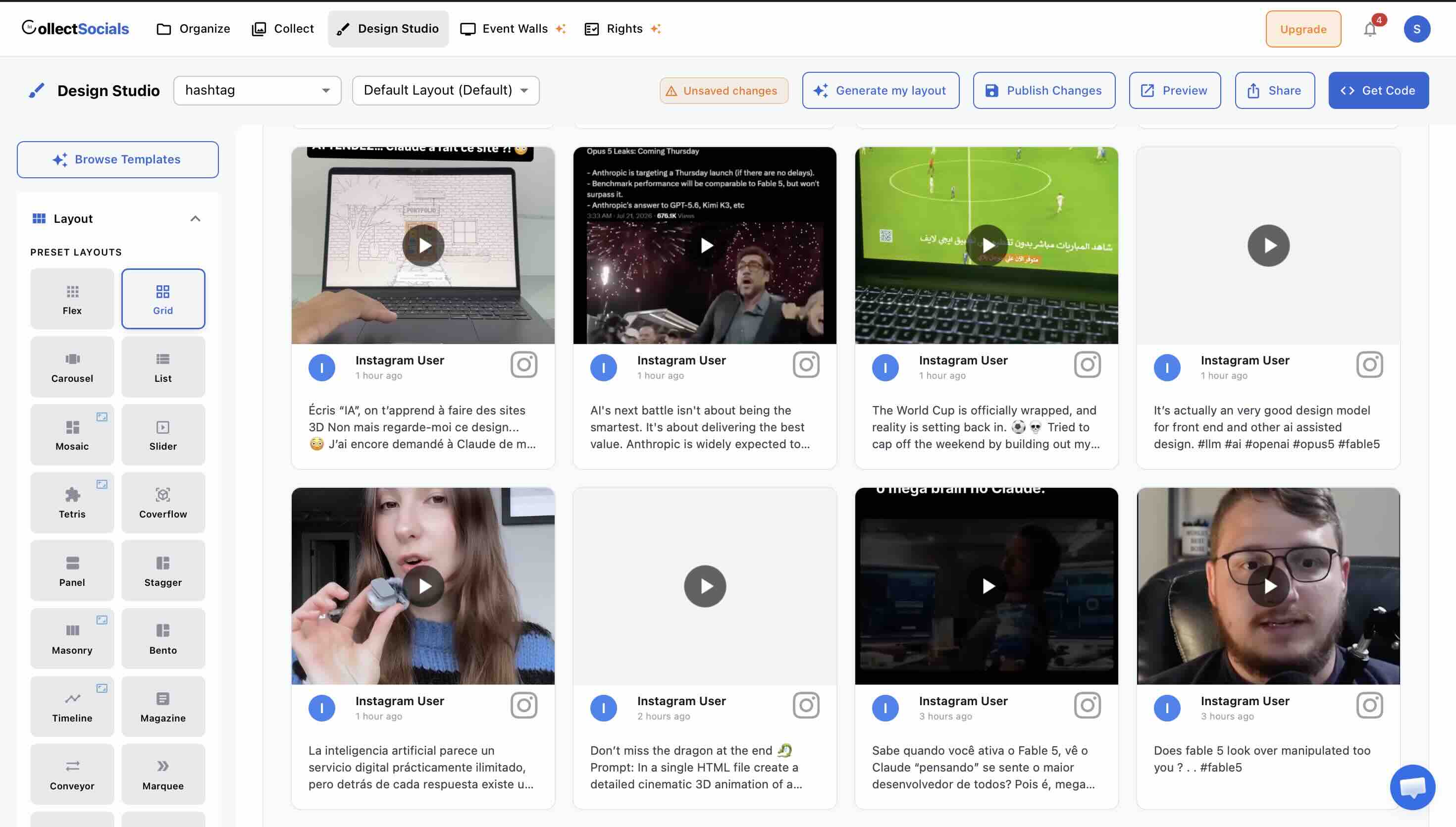
Feeds are unlimited on every plan, including the free tier. This is a structural difference from Juicer that changes how you think about your social content. On Juicer, you pay for both sources and feeds, and feed limits push you toward expensive plans quickly. On CollectSocials, you can create as many feeds as you need (different feeds for different pages, campaigns or website sections) and you only pay based on the number of sources you connect. This means a business on the free plan can still point separate feeds at its homepage, about page and testimonials page without hitting a paywall, all drawn from the one source it has connected. (See our guide on how to embed social feeds on any website for practical examples.)
The upgrade path is built around sources, and most of the feature list is not on it. CollectSocials' free plan includes one connected source, unlimited feeds, and 2,000 monthly page views with seven layouts and all 16 themes. Every new account starts with a 7-day trial that opens three sources and the full design studio, all 40 layouts plus the custom card builder, so you can design the whole widget before deciding. When the trial ends, the oldest source stays live (X sources need a paid plan after the trial) and the others pause with their posts and settings kept. The Pro plan at $29 per month unlocks all 40 layouts, five sources, 30,000 page views, a separate mobile layout, and removes CollectSocials branding. Juicer's Starter plan carries the same five sources for a few dollars less on an hourly refresh; what the difference buys is the design library, Shadow DOM isolation, a larger page-view allowance and UGC rights and consent tracking. Business at $59 per month includes 15 sources, unlimited page views, premium platform access, AI vision moderation and the event wall. Scale is $119 per month for 30 sources, and Enterprise is priced by conversation. Annual billing is two months free on every tier: $290, $590 and $1,190 a year. Keyword and profanity filters, all 16 themes and the theme builder, custom colours and fonts, and caption editing are absent from that upgrade path because they are not gated: every one of them runs on the free plan. UGC rights and consent tracking runs on the free plan too, at five requests a month on Free and Pro and uncapped from Business. Pinning a post to the top is the one curation control that is paid, and the 7-day trial includes it.
Multiple layouts per source is a feature that saves real money. One of the most common frustrations with many social media aggregators is that if you want to display the same content in a different layout on a different page, you need to add the source again, which consumes another source slot. CollectSocials allows you to apply multiple layouts and themes to the same source feeds, so you can show your Google Reviews in a Carousel on your homepage and in a Grid on your testimonials page without using an extra source. This alone can save businesses from needing to upgrade to a higher pricing tier.
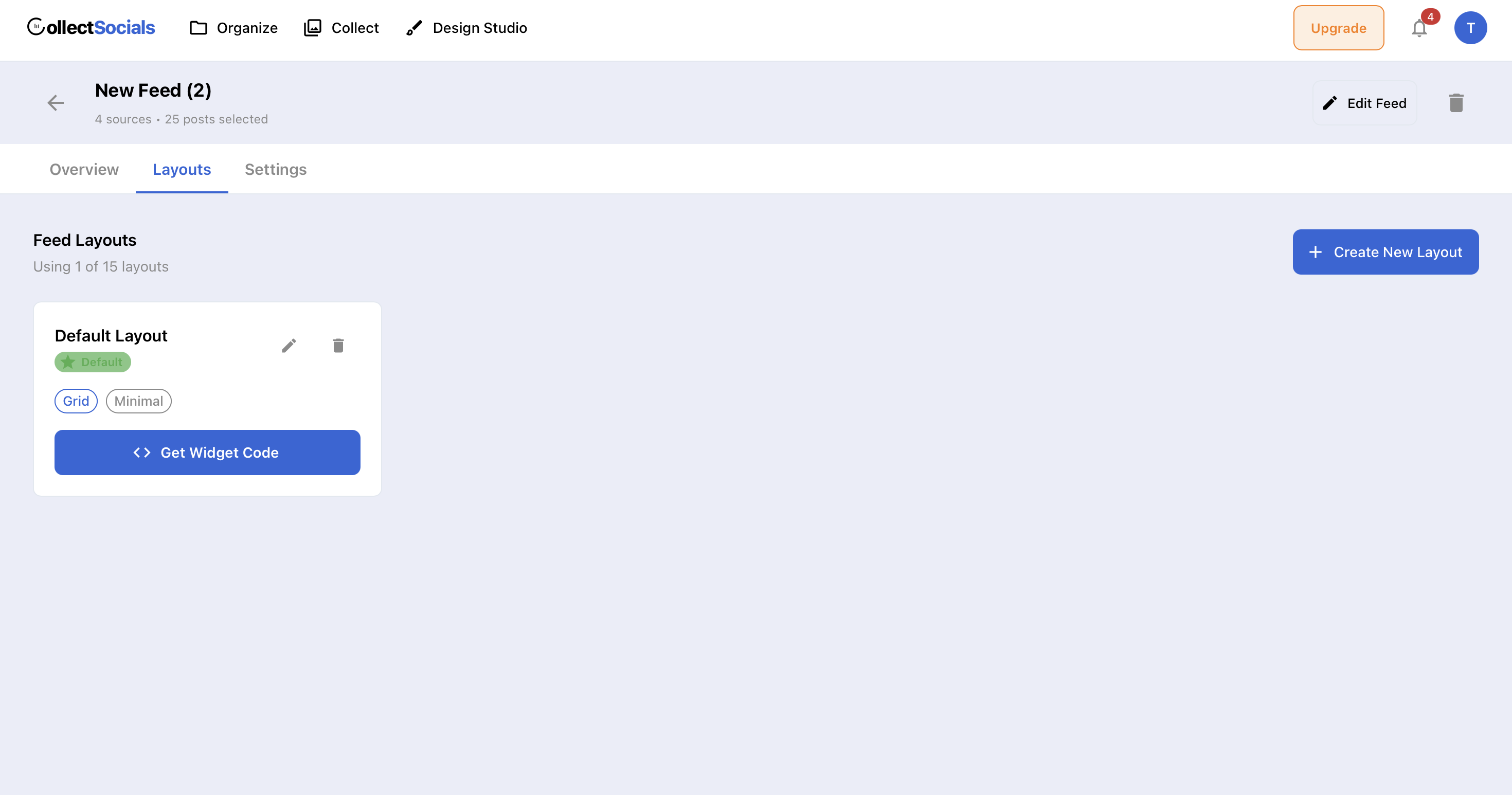
The embed process is straightforward. Make your feed public, copy one script tag, paste it on your website. The widget renders inside a Shadow DOM, meaning its CSS is completely isolated from your site's styles, so there are no conflicts or broken layouts. It works with any website platform: WordPress, Shopify, Wix, Squarespace, custom HTML, or anything else that allows script tags.
Where to keep in mind
CollectSocials gates by connected source, so Pro carries five sources and Business fifteen. If you need more accounts than that on the cheapest paid tier, check the limits before you switch. LinkedIn is not live yet, and there is no SSO and no data processing agreement to sign, which rules it out of some enterprise procurement. There are no branded photo frames or stickers to composite onto an attendee's photo, no emoji reactions, and no named integrations with event or signage platforms. For collecting social content, making it look right, putting it on your site and putting the same feed on a screen at an event, CollectSocials does more with the feed than Juicer does, and it does it from one subscription.
Pricing
- Free ($0/mo): 1 source, unlimited feeds, 7 layouts and all 16 themes, 2,000 page views, plus a 7-day trial that opens 3 sources and the full design studio
- Pro ($29/mo): 5 sources, unlimited feeds, 30,000 page views
- Business ($59/mo): 15 sources, unlimited feeds, unlimited page views
- Scale ($119/mo): 30 sources, unlimited page views
2. Curator.io: Best for Source Variety
Best for: Businesses that need to aggregate from a large number of niche social platforms and content sources.
Curator.io is one of Juicer's most direct competitors and has been in the market long enough to build broad platform support. It currently supports over a dozen content sources, including Instagram, Facebook, YouTube, X/Twitter, TikTok, LinkedIn, Pinterest, Tumblr, RSS, and more. The free plan includes three sources, which is already more generous than Juicer's one-source free tier.
Where Curator.io works well. The breadth of supported platforms is its strongest selling point. If you need to pull content from Tumblr, Slack, DeviantArt, or other niche sources alongside your main social accounts, Curator.io likely supports it. The branding on the free plan is also notably minimal, a small watermark rather than a prominent logo embedded in your feed, which makes the free tier more usable for professional sites than Juicer's branded approach. Setup is straightforward, and its niche-network coverage reaches further than anything else on this list. (If you want a deeper comparison, check out our full Curator.io alternatives guide.)
Where it falls short. The design templates, while functional, have not evolved as quickly as the rest of the market. Newer tools like CollectSocials offer significantly more modern layouts and themes out of the box. Curator.io also ties each layout to its content source, so displaying the same content in different layouts across different pages requires adding the source again, consuming your source limit. Pricing starts at $25 per month for the Professional plan (five sources, 15,000 page views), a few dollars under CollectSocials' Pro plan at the same source count and with half the page-view allowance. The Business plan at $59 per month for 15 sources is level with ours, so at that price the question is what comes with it: UGC rights and consent tracking is standard on every CollectSocials plan and a rights-management add-on on theirs.
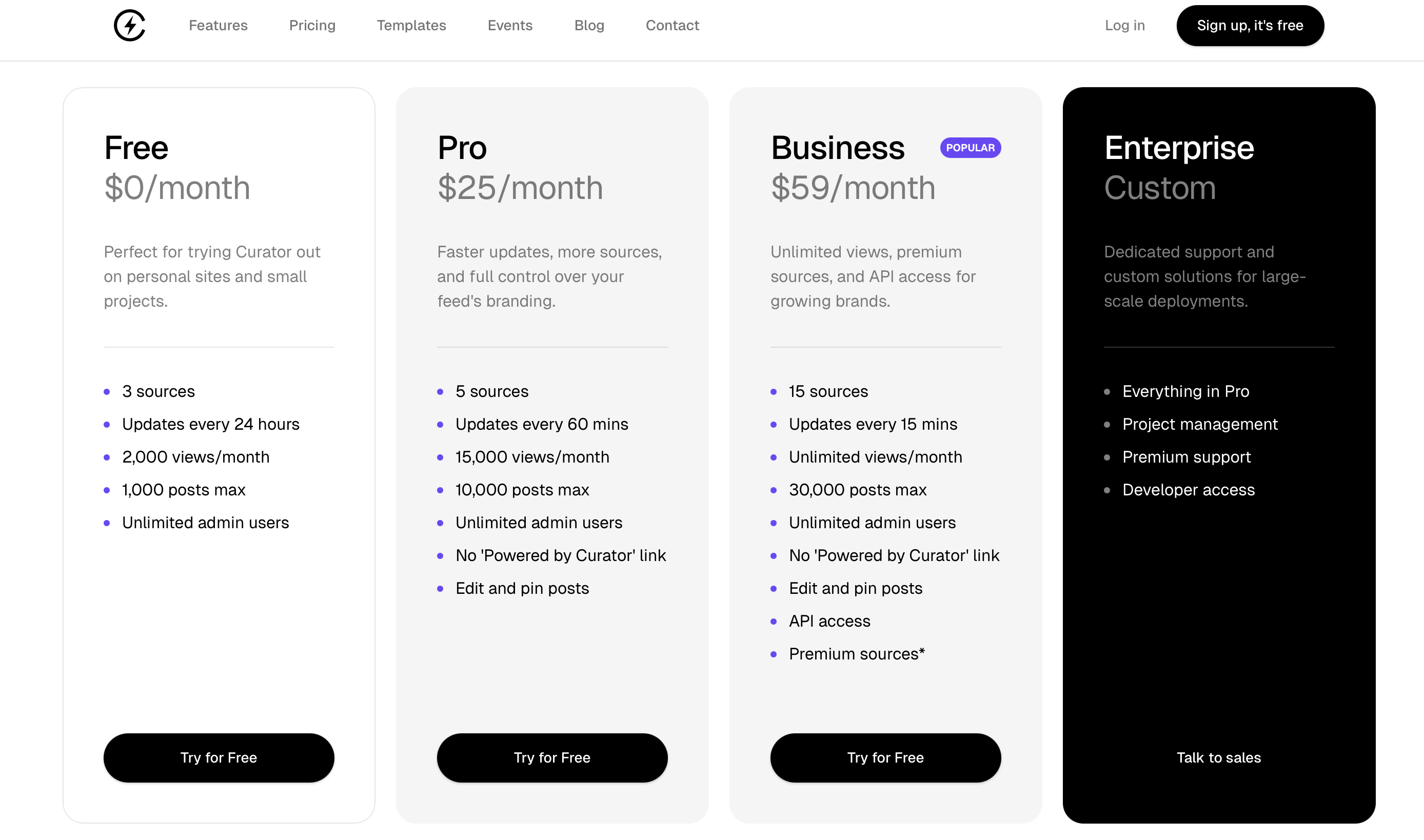
Pricing: Free (3 sources, branded) · Professional $25/mo (5 sources) · Business $59/mo (15 sources) · Enterprise custom pricing
3. Taggbox/Tagembed: Best for UGC-Heavy Campaigns
Best for: Brands running large-scale user-generated content campaigns with shoppable feeds and rights management needs.
Taggbox is Tagembed's sister product under the same parent company. The 2026 merger pulled both brands closer, with Taggbox carrying the heavier UGC toolset of the two. Taggbox positions itself as a full UGC platform rather than a simple feed aggregator. It supports over 20 social media platforms and offers features that go well beyond basic embedding: shoppable galleries, UGC rights management, hashtag campaign tracking, and AI-powered content moderation. If your campaign turns on tagging products inside customer photos and reporting on the hashtag afterwards, that pairing is where Taggbox goes deeper than Juicer or the cheaper tools on this list, CollectSocials included.
Where Taggbox works well. The shoppable feed feature is the standout for e-commerce brands. You can tag products directly in user-generated Instagram posts, turning social content into a conversion tool rather than just a display element. The analytics are more comprehensive than Juicer's, tracking impressions, clicks, and engagement metrics across your feeds. The platform also supports display across websites, digital signage, email campaigns, and event screens, making it versatile for multi-channel brands. The AI moderation saves significant time for businesses processing high volumes of UGC.
Where it falls short. Taggbox limits the number of feeds per plan, which creates the same artificial ceiling that frustrates Juicer users. The entry-level paid plan includes only two feeds, and even the advanced plan caps your feed count. Pricing starts at $19 per month for the Starter tier, but the feature set at that level is fairly basic: you need the Growth plan at $39 per month or higher to access meaningful functionality. For businesses that primarily need a clean, well-designed social feed on their website without the UGC campaign machinery, Taggbox's feature depth can feel like unnecessary complexity and cost. The learning curve is steeper than simpler tools like CollectSocials or Juicer.
Pricing: Free (limited, 500 views) · Starter $19/mo · Growth $39/mo · Advance $99/mo · Display and UGC Suite priced separately
4. EmbedSocial: Best for Review-Focused Social Proof
Best for: Businesses that want to combine Google Reviews, Facebook Reviews, and social media feeds in a single widget.
EmbedSocial has carved out a strong niche by focusing on the intersection of social media aggregation and review management. While it functions as a general social media aggregator through its EmbedFeed product, its real differentiation is in pulling customer reviews from Google, Facebook, Yelp, and other review platforms into polished website widgets. It holds approved API integrations with Google, Instagram, and TikTok, which means the data connections are official and reliable.
Where EmbedSocial works well. If reviews are the backbone of your social proof strategy, particularly Google Reviews for local businesses, EmbedSocial handles this use case better than Juicer and most other pure aggregators. The review widgets are customizable, and the platform includes AI-generated reply suggestions that can speed up review response workflows. Reviewers single out integration reliability and support quality. For restaurants, service businesses, healthcare providers, and retailers where star ratings drive purchasing decisions, having reviews prominently displayed on your website alongside social content is a meaningful conversion driver. (Learn more about what metrics actually matter for your feed.)
Where it falls short. EmbedSocial separates its social feed product from its review product, which means you may need to subscribe to multiple products to get full aggregation and review functionality in one place. An all-products bundle is available at $64 per month, but that is significantly more expensive than tools that include both capabilities natively. The standalone social aggregator starts at $29 per month for three sources and 5,000 page views, the same monthly price as CollectSocials' Pro plan, which carries five sources and 30,000 page views. For businesses that primarily need social feed aggregation without deep review management, the pricing-to-value ratio is less competitive.
Pricing: Pro $29/mo (3 sources, 5K views) · Pro Plus $49/mo (6 sources, 20K views) · Premium $99/mo (15 sources, 100K views) · All Products $64/mo
5. Walls.io: Best for Live Events and Digital Signage
Best for: Large-scale on-site productions that need branded photo-booth frames, emoji reactions, or a named signage integration alongside the live wall.
Walls.io is built for a fundamentally different use case than Juicer. While it can embed social feeds on websites, its core strength is live event displays, conference screens, trade show signage, festival walls, and interactive audience participation features. It supports over 14 social networks plus direct content uploads, and includes features like QR-code-based audience contributions, live polls, and photo booth functionality.
Where Walls.io works well. If you are running a conference, product launch, or large-scale event and need live social content displayed on big screens, Walls.io is purpose-built for this and publishes a customer list of household-name brands. It markets accessibility conformance and GDPR/CCPA compliance as first-class features, which is worth verifying directly with them if you are procuring in Europe. Where it is genuinely ahead of the cheaper tools on this list, CollectSocials included: branded photo-booth frames composited onto an attendee's own photo, emoji reactions, and named integrations with event and signage platforms.
Where it falls short. Walls.io is expensive. Plans start at $270 per month, or $215 per month if you pay a year up front, which is more than nine times the cost of CollectSocials' Pro plan. For a small or mid-size business that just needs a clean social feed on their website, this pricing is extremely difficult to justify. And the event capabilities carrying the premium are not exclusive to the premium end of this market: live multiple-choice polls, attendee posts from a phone with no account, and QR pairing to a venue screen all ship on CollectSocials' $59 Business plan, on the same account as the website feed. If your primary need is displaying Instagram posts and Google Reviews on your homepage, Walls.io is the wrong tool for the job.
Pricing: Plans start at $270/mo (or $215/mo billed annually) · Event passes from $270 one-time
6. Flockler: Best for Multi-Layout Enterprise Needs
Best for: Organizations managing multiple websites, language versions, or brand properties that need unlimited layouts from the same content sources.
Flockler's structural advantage is similar to CollectSocials' approach: you pay for sources, not layouts. Once you connect your social accounts, you can create unlimited display layouts (grids, carousels, slideshows, walls) without consuming additional source slots. This makes it dramatically more cost-effective than Juicer for businesses that need to display the same content in different formats across multiple pages or websites.
Where Flockler works well. Multi-brand organizations, universities, and companies with multiple website properties benefit the most from Flockler's architecture. The tag-filtering feature is particularly powerful: you can connect one Instagram source and then display filtered subsets of that content on different pages based on hashtags. Content is retained even when you change or disconnect sources, which directly addresses one of Juicer's most frustrating limitations. The platform supports display across websites, email newsletters, digital screens, and intranets, all from a single subscription. AI content moderation and UGC rights management are included in higher tiers. Customer support is available via email, live chat, and phone, a meaningful upgrade over Juicer's email-only approach.
Where it falls short. Flockler is expensive. Pricing starts at $129 per month for the Basic plan, $229 for Business, and $379 for Pro. There is no free plan, only a 14-day trial, after which you must subscribe to continue using the service. For small businesses or solopreneurs who need a simple social wall, this pricing is nearly impossible to justify. The interface also has a steeper learning curve than simpler tools, which can overwhelm new users. If you need unlimited layouts but do not need enterprise-scale features, CollectSocials offers multiple layouts per source at a fraction of the cost.
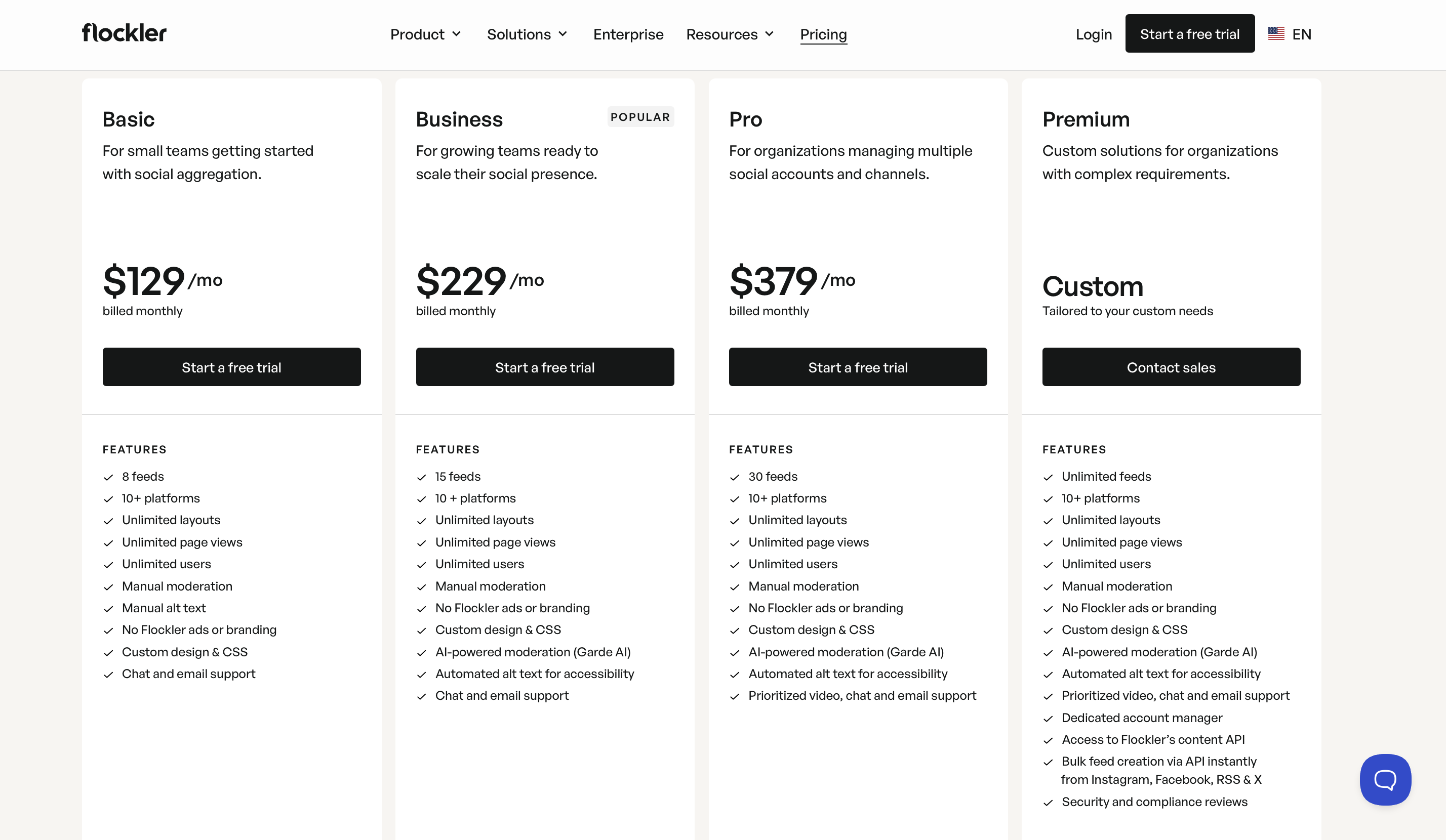
Pricing: No free plan · 14-day trial · Basic $129/mo · Business $229/mo · Pro $379/mo
7. Tagembed: Best Budget CMS Integration (Now Merged with Taggbox)
Best for: Small businesses and solopreneurs who want basic social feed embedding with the widest possible CMS compatibility.
Tagembed merged with Taggbox in 2026, pulling both brands under the same parent company. While Taggbox focuses on UGC campaigns and shoppable feeds (covered in section 3 above), Tagembed continues as a no-code social media aggregator that focuses on accessibility and broad CMS integration. It supports over 20 social media platforms and integrates with more than 120 CMS platforms, including WordPress, Shopify, Wix, Squarespace, Magento, and WooCommerce. If your website runs on a less common platform and you are worried about embed compatibility, Tagembed is likely to support it.
Where Tagembed works well. The CMS integration breadth is Tagembed's genuine differentiator. No matter what platform your website is built on, Tagembed has probably built a native integration or plugin for it. The tool also supports a variety of widget types beyond standard social feeds (review widgets, story widgets and album widgets), giving you flexibility in how you display different types of content. Paid plans start at $19 per month for the Starter tier, with Growth at $39 per month and Advance at $99 per month.
Where it falls short. Customization options are limited on lower-tier plans, and the default templates are basic compared to what CollectSocials, Taggbox, or even Curator.io offer. Users have reported that achieving advanced customization requires a learning curve that contradicts the platform's no-code positioning. Feed layouts are not as polished as the best on this list. The free plan includes a very restrictive 500-view monthly limit, which is insufficient for any site with meaningful traffic, even a small business website will likely exceed this within the first week. Some features feel locked behind progressively expensive tiers, making the upgrade path feel less transparent than competitors with clearer feature-per-tier breakdowns.
Pricing: Free (limited, 500 views) · Starter $19/mo · Growth $39/mo · Advance $99/mo
8. Elfsight: Best Single-Widget Solution at the Lowest Cost
Best for: Website owners who need exactly one social feed widget and want the cheapest possible paid option with a genuinely code-free visual builder.
Elfsight is a marketplace of 80+ website widgets where the Social Feed widget is one of the most popular. It supports Instagram, Facebook, YouTube, TikTok, X/Twitter, Pinterest, LinkedIn, and RSS. The widget is configured entirely through an online visual builder, with no code and no plugins, and embeds on any site via a single HTML snippet.
Where Elfsight works well. Per-widget pricing makes Elfsight the cheapest option for single-use needs. A Social Feed widget starts at $6 per month on the Basic plan (three widgets, 5,000 views). Compare that to Juicer's Lite plan at $15 per month. If all you need is an Instagram carousel on your homepage, Elfsight delivers it at less than half the price. The visual configurator is intuitive, and five social feed layouts (Grid, Masonry, List, Slider, Carousel) with dark and light modes look clean without customization.
Where it falls short. Elfsight is a widget tool, not a platform. There is no unified dashboard for managing multiple feeds, no content moderation system, no analytics beyond basic view tracking. The free plan caps at 200 views per month, and exceeding your view limit deactivates the widget entirely. If you need multiple social feeds or advanced features, Elfsight quickly becomes impractical. A dedicated aggregator like CollectSocials or Curator.io fits better.
Pricing: Free (1 widget, 200 views) · Basic $6/mo (3 widgets, 5K views) · Pro $12/mo (9 widgets) · Premium $24/mo (21 widgets)
Quick Comparison Table
| Tool | Free Plan | Starting Price | CSS Isolation | Best For |
|---|---|---|---|---|
| CollectSocials | 1 source, 7 layouts, all 16 themes (7-day full trial, 3 sources) | $29/mo | Shadow DOM ✓ | Design variety, flexible pricing, event walls on Business |
| Curator.io | 3 sources, minimal branding | $25/mo | None ✗ | Source variety, developer-friendly |
| Taggbox/Tagembed | 500 views/mo | $19/mo | Iframe (optional) | Budget CMS integration (merged 2026) |
| EmbedSocial | Free (1 source, 500 views) | $29/mo | Iframe ✓ (JS embed: partial) | Review integration, iframe isolation |
| Walls.io | 14-day trial only | $270/mo ($215 annual) | Iframe ✓ | Branded photo frames, signage integrations |
| Flockler | No free plan (14-day trial) | $129/mo | Iframe (optional) | Multi-brand, unlimited layouts |
| Elfsight | 1 widget, 200 views | $6/mo | None ✗ | Single-widget, lowest cost |
How to Choose the Right Juicer.io Alternative
The right tool depends on what matters most to your business. Here is a decision framework based on the most common scenarios. (If you're completely new to social aggregation, our complete aggregation guide for small businesses covers the fundamentals.)
If you want strong value for money with modern design, consider CollectSocials. It offers more sources on the free plan than Juicer (three versus one), unlimited feeds on every tier, forty professional layouts and sixteen themes out of the box, and a step at fifteen sources where Juicer jumps from five straight to thirty. For most small to mid-size businesses, this is a strong overall package: modern design, more flexibility, and a tier that fits the size you actually are. The multiple-layouts-per-source feature alone can save you from needing to upgrade to a more expensive plan.
If reviews are your primary social proof asset, choose EmbedSocial. Google Reviews is a first-class source on CollectSocials too, on every plan including the free one, so displaying star ratings is not the deciding factor. What EmbedSocial adds is the management layer around them: Facebook and Yelp reviews in the same widget, and reply workflows with AI-drafted responses. CollectSocials displays your Google Reviews and does nothing to help you gather or answer them. If responding to reviews is as much of the job as showing them, that gap is worth the premium. Just be prepared to pay more if you need both reviews and full social aggregation.
If you run large-scale UGC campaigns, choose Taggbox. Shoppable galleries that tag products inside customer photos, plus per-campaign hashtag analytics, are the two pieces the general aggregators here do not have. CollectSocials tracks UGC rights and consent, but it will not turn a customer photo into a product listing. If your marketing strategy revolves around monetizing customer-generated content, Taggbox's feature set justifies the investment.
If you need a live event social wall, both tools will run one, and the deciding factor is what the room is allowed to do with it. CollectSocials puts the event wall on the $59 Business plan, the same plan running your website feed the rest of the year. Anyone in the room can scan the code on the screen and send a photo, a message or a question from their phone, with no login, no app and no social account. The phone opens a camera booth with a three-second countdown and a front-or-back flip, attendees vote in live multiple-choice polls whose results render as animated bars on the big screen, and the venue machine pairs by QR without anyone signing into an account on it. A name and a consent tick are both required and both enforced on the server, and a human moderation queue sits in front of the screen by default. Walls.io stays ahead on the pieces CollectSocials genuinely does not have: branded frames and stickers composited onto an attendee's own photo, emoji reactions, and named integrations with event and signage platforms. If those decide your event, its pricing is the cost of them. For a website embed they buy you nothing.
If you manage multiple websites or brand properties at enterprise scale, choose Flockler. The unlimited layouts and tag-filtering features justify the premium pricing for organizations with complex, multi-property needs. For everyone else, CollectSocials offers similar multi-layout capabilities at a fraction of the cost.
If you are on the tightest possible budget and just need something that works, consider starting with CollectSocials' free plan. One connected source, unlimited feeds, 2,000 page views, seven layouts and all sixteen themes, plus a 7-day trial that opens three sources and the full design studio. It gives you the most room to grow without hitting a pricing cliff or being forced into an expensive plan just to get basic functionality.
The Bottom Line
Juicer.io was built for a simpler era of social media aggregation, when having any social feed on your website was impressive enough, regardless of how it looked. Our testing confirms that the product still works, but the architecture tells a clear story: a feed injected with no reserved space so the page visibly reflows, full-resolution JPEGs instead of thumbnails, and zero CSS isolation on the default embed. At $5 per source on the entry and mid-tier plans, with no step between five sources and thirty, the pricing structure creates ceilings that competitors have removed.
Whether you choose CollectSocials or another option from this list, you have no shortage of strong alternatives that deliver better design, smarter pricing, and more flexibility than what Juicer offers today. The key is choosing the tool that matches your specific use case, and not paying for features you will never use. For a detailed breakdown of every Juicer plan tier, see our complete Juicer.io pricing analysis. For the full testing methodology and performance data across all widgets, see our Instagram feed widget comparison.
If you are ready to see how a modern social media aggregator compares to what you have been using, CollectSocials offers a free plan with no credit card required. Set up your first feed in under five minutes and see the difference for yourself.
If Flockler is also on your shortlist, we have broken down the best Flockler alternatives with the same criteria.
Start Using CollectSocials Today
One curated feed from 10+ platforms: on your website in a single line of code, or up on the big screen at your event.