
npx serve, and embedded each widget one at a time. For every widget I recorded: how it renders (script embed or cross-origin iframe) and how many files it loads (DevTools Network tab, cache disabled), and its CSS isolation method (Elements panel inspection plus an aggressive leak test with Comic Sans, yellow backgrounds, red image borders, and magenta strikethrough links). Every claim in this article comes from that process, and each one is something you can reproduce on your own page in a couple of minutes. If you have not put an Instagram feed on a site before, start with how to embed an Instagram feed on your website, which walks through every method Instagram natively offers and shows where each one stops. This article picks up after that, at the point where you have decided you need a widget and have to pick one. For platform-specific setup guides once you have, see our tutorials for WordPress and Wix.This article is also available in 한국어 and 日本語.
This comparison covers the eight tools that come up most consistently when people are shopping for an Instagram feed widget: CollectSocials, Elfsight, Curator.io, Taggbox (Tagembed), EmbedSocial, Flockler, Juicer.io, and Walls.io. We tested all eight hands-on, installing each widget on the same blank HTML test page, recording how each one renders and how many files it loads, and stress-testing CSS isolation. We've kept the scope to tools that are genuinely designed for website embedding, not social media management platforms that happen to have a widget feature bolted on.
What to Look For in an Instagram Feed Widget
Before getting into the tools, it's worth establishing the criteria that actually matter, because a lot of comparison articles treat all features as equal, and they aren't.
Multi-platform support. Instagram alone is limiting. Most websites that benefit from a social feed also benefit from showing Google Reviews, Facebook posts, or YouTube videos. A tool that combines all of this into one unified widget is meaningfully more useful than one that forces you to manage and embed separate widgets for each platform.
Layout variety. A single grid option is not design flexibility. The way your feed looks should fit your website: a Masonry layout for a lifestyle brand, a Carousel for a compact product page placement, a Marquee for a dynamic homepage section. Narrow layout options mean compromise, and you will feel it on the first page where the feed has to sit next to something.
Content curation. Auto-syncing everything you've ever posted is not curation. You need to be able to select exactly which posts appear, edit captions, and remove content that doesn't represent your brand well on a website. Without manual curation, an Instagram feed widget is just a firehose.
Embedding quality (CSS isolation). This is a technical detail that most buyers never check until it causes problems. We tested every widget in this article by injecting aggressive CSS into the host page (Comic Sans fonts, yellow backgrounds, red image borders) to see which widgets break and which survive. The results were stark: most widgets have zero style isolation. Their CSS bleeds into your site and your site's CSS breaks their widget. Shadow DOM is the engineering standard for well-behaved embeds. Iframes work too, but with tradeoffs like fixed height, scrollbar issues, and cross-origin limitations. Only one tool in our test used Shadow DOM. The rest either used iframes or, more commonly, injected everything directly into your page's global DOM.
Pricing transparency. Some tools in this space have notoriously confusing pricing: separate plans for different platforms, page view limits hidden in fine print, UGC rights management locked behind premium tiers. Count the number of subscriptions you would need to show Instagram and Google Reviews on the same page, because for several tools here the answer is two.
Page speed impact. The honest version of this is narrower than most comparisons admit. How much a feed costs you depends on what is in it (a wall of Reels is not a wall of photos) and on where you put it, because a feed image that becomes the largest element on the first screen is scored very differently from the same feed placed below a heading. What does not depend on either is how many files a widget loads before it can render anything: that ranges from one to twenty-two across the eight tools here, and twenty-one extra round trips is a real cost on a real connection.
#shadow-root (Shadow DOM), <iframe> (iframe isolation), or plain <div> elements in your page DOM (no isolation). For deeper performance analysis, see our page speed optimization guide.The Comparison at a Glance
Here's the full feature and pricing breakdown across all eight tools. We verified competitor pricing in May 2026. Pricing models in this space change often, so always confirm on each vendor's site before purchasing.
| Feature | CollectSocials | Elfsight | Curator.io | Taggbox | EmbedSocial | Flockler |
|---|---|---|---|---|---|---|
| How it renders | Script + Shadow DOM | Script | Script | Script (iframe optional) | Cross-origin iframe | Script (iframe optional) |
| Free plan | ✓ (1 source, 2,000 views) | ✓ (1 widget, 200 views) | ✓ (1 feed) | ✓ (limited) | ✓ (1 feed) | ✗ |
| Paid entry price/mo | $29 | $5 (yearly) / $6 (monthly) | $25 | $19 | $29 | $129 |
| ✓ | ✓ | ✓ | ✓ | ✓ | ✓ | |
| Facebook posts | ✓ | ✓ | ✓ | ✓ | ✓ | ✓ |
| Google Reviews | ✓ | Separate widget | ✗ | ✓ | ✓ | ✗ |
| YouTube | ✓ | ✓ | ✓ | ✓ | ✓ | ✓ |
| Multi-platform in one widget | ✓ | ✗ (per platform) | ✓ | ✓ | ✓ | ✓ |
| Layout count | 40 | 5 | 3 | ~6 | ~5 | ~4 |
| Theme count | 16 | 12 color schemes | Custom CSS | Custom CSS | Templates | Limited |
| Manual post curation | ✓ | ✓ | ✓ | ✓ | ✓ | ✓ |
| Edit post captions | ✓ | ✗ | ✗ | ✗ | ✗ | ✗ |
| CSS isolation | Shadow DOM ✓ | None ✗ | None ✗ | None ✗ (iframe optional) | Iframe ✓ (JS embed: partial) | None ✗ (iframe optional) |
| Custom posts / ads in feed | ✓ (Business+) | ✗ | ✗ | ✓ (paid) | ✗ | ✗ |
| No credit card for trial | ✓ | ✓ | ✓ | ✗ | ✓ | N/A |
| Async / non-blocking load | ✓ | ✓ | ✓ | Varies | Varies | ✓ |
Start with the first row. It is the one most comparison articles never mention, and it decides more about how a widget behaves on your site than any feature in the list. A cross-origin iframe(EmbedSocial, and Walls.io below) is a sealed box: nothing you write can style it, its contents are invisible to your page, and it cannot inherit your fonts. A script embed renders into your page directly, which is why CSS isolation then matters so much: without it, your stylesheet and the widget's fight each other, which is exactly what our leak test provokes further down.
Then read the free plan row carefully, because "has a free plan" hides a wide range. Elfsight's free tier stops at 200 views a month, which most sites burn through in a week. Curator.io and EmbedSocial give you one feed. Ours runs 2,000 views a month on one source, with every theme unlocked, and it does not expire. Whichever way you go, check the number rather than the checkmark.
This also explains a real trap in comparing these tools on page-speed scores, and it is why we stopped publishing ours. An iframe's contents are largely invisible to a Lighthouse run on the parent page, so an iframe embed can score better than a script embed while doing strictly more work. Ranking the two against each other on that number is a category error. You can check any vendor's choice yourself in ten seconds: right-click the feed and pick Inspect. If you land inside an <iframe>, that is the sealed box.
Juicer.io and Walls.io are reviewed in their own sections below. We kept the main comparison table to the six most commonly compared tools to keep it readable on mobile.
How Each Widget Renders
This section used to print Lighthouse scores, transferred megabytes and network request counts for all eight widgets. We have taken those numbers down. It is worth saying plainly why, because the reason turns out to be more useful than the numbers were.
Two of the eight widgets render inside a cross-origin iframe; the other six inject a script into your page. Those architectures do not compete on the same axis. An iframe moves its work off your page's main thread, so it scores well on a page-speed audit almost by construction. In our own earlier table, EmbedSocial came out on top for exactly that reason, and we said so in the same paragraph that ranked it first. Ranking a script embed against an iframe embed on a single score tells you which one is an iframe. It does not tell you which one is better for your site.
The second problem is reproducibility. When we re-tested our own widget across five layouts and two page positions, the same unchanged page scored anywhere from 79 to 100, driven entirely by whether one of the feed's images happened to be the largest element on the first screen. Put a heading above the feed and the score jumps; put the feed at the very top of a bare page and it drops. Any single score we printed would be unreproducible on your page, and you would be right to distrust us for printing it.
So this section now reports what does not move: how each widget renders, how many files it loads, and whether its styles are isolated from your page. You can check every one of these yourself in DevTools in about a minute, which is rather the point.
Render Method and File Count
| Widget | Render method | Files loaded | Style isolation |
|---|---|---|---|
| CollectSocials | Script embed | 1 | Shadow DOM |
| Elfsight | Script embed | 2 | None |
| Flockler | Script embed | 2 | None (iframe optional) |
| Juicer.io | Script embed | 2 | None (iframe optional) |
| Curator.io | Script embed | 4 | None |
| Taggbox (Tagembed) | Script embed | 22 | None (iframe optional) |
| EmbedSocial | Cross-origin iframe | 10 | Iframe (full) |
| Walls.io | Cross-origin iframe | 11 | Iframe (full) |
File count is an architecture decision, not a measurement that drifts with whatever happens to be in your feed, which is why it survives on this list when transferred bytes did not. Twenty-two files versus one is twenty-one extra round trips before anything renders, and that gap does not close on a faster connection. Observed May 2026, re-checked for this update.
<script> tag that loads one file and injects nothing further, so open the Network panel and filter by JS. The feed is mounted in a Shadow DOM, so your page's CSS cannot reach into it and its CSS cannot leak out; inspect the container and you will see a #shadow-root. And it sets no cookies and writes nothing to localStorage or sessionStorage, which you can confirm in the Application panel before and after load. None of those three claims depend on which feed you connected or where you put the widget, which is why we are willing to put them in writing.We do still measure page weight, request counts and Lighthouse internally on every release, because that is how we catch our own regressions. What we will not do is publish those figures as a league table against products that render differently, on feeds we did not control. A number you cannot reproduce on your own page is not evidence, and we would rather hand you the three checks above than a leaderboard you have to take on faith.
CSS Isolation Test Results
We injected this CSS into the host page to test whether each widget's styles are isolated from the parent page:
* { font-family: "Comic Sans MS", cursive !important; }
img { border: 5px solid red !important; border-radius: 0 !important; }
a { color: magenta !important; text-decoration: line-through !important; }
div { background-color: yellow !important; }
If the widget renders normally despite this CSS, it has proper isolation. If it turns into a yellow, Comic Sans mess, it doesn't.
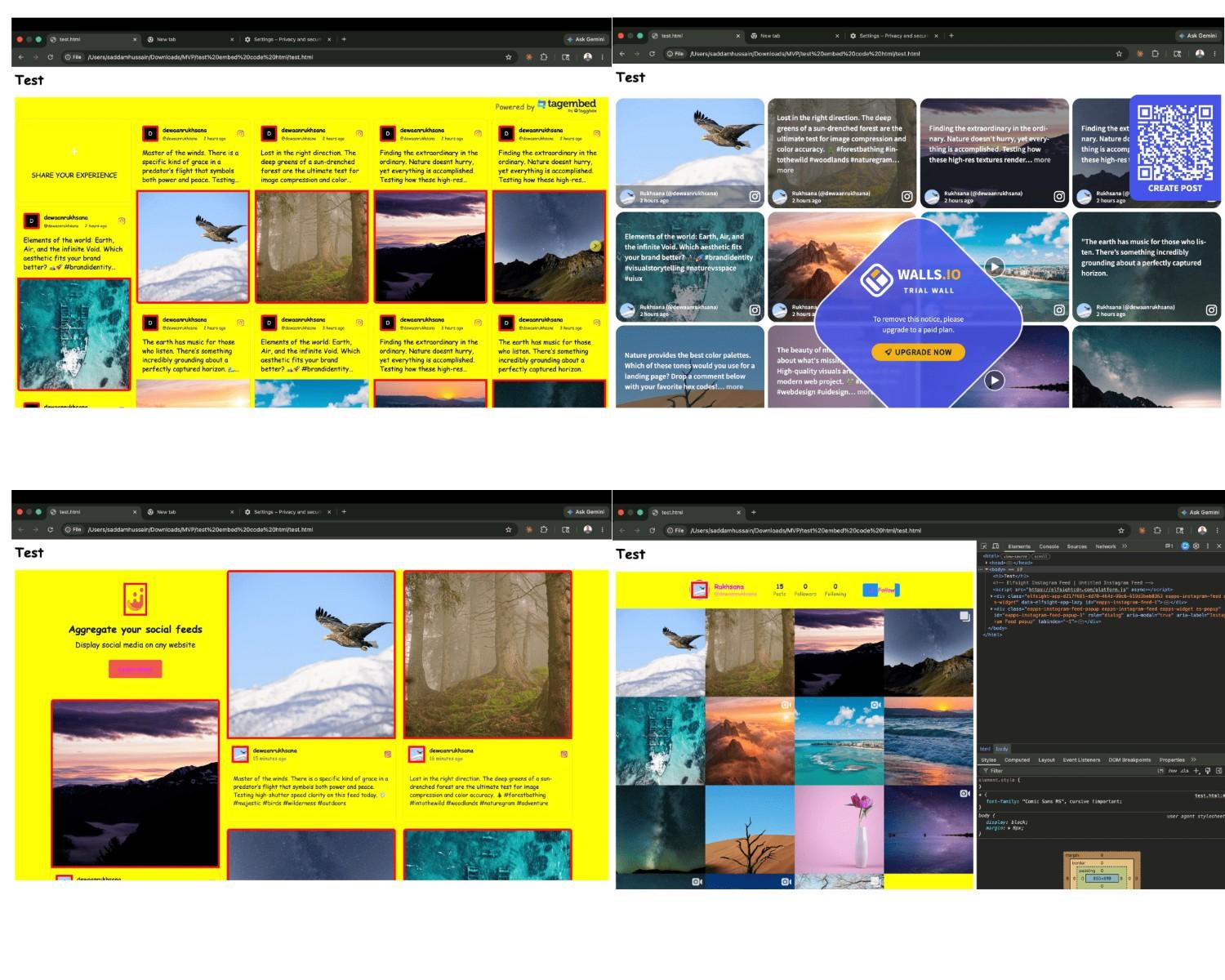
| Widget | Isolation Method | Page CSS Breaks Widget? | Widget CSS Leaks Out? |
|---|---|---|---|
| CollectSocials | Shadow DOM (open) | No ✓ | No ✓ |
| Walls.io | Iframe | No ✓ | No ✓ |
| Flockler (iframe embed) | Iframe (optional) | No ✓ | No ✓ |
| Taggbox (iframe embed) | Iframe (optional) | No ✓ | No ✓ |
| EmbedSocial (direct iframe) | Iframe | No ✓ | No ✓ |
| EmbedSocial (JS embed) | Iframe (JS-injected) | During load only ✗ | Minor ✗ (wrapper div) |
| Flockler (default script) | None (global CSS) | Yes ✗ | Yes ✗ |
| Taggbox (default script) | None (global CSS) | Yes ✗ | Yes ✗ |
| Elfsight | None (global CSS) | Yes ✗ | Yes ✗ |
| Curator.io | None (global CSS) | Yes ✗ | Yes ✗ |
| Juicer.io (default script) | None (global CSS) | Yes ✗ | Yes ✗ |
| Juicer.io (iframe embed) | Iframe | No ✓ | No ✓ |
A correction from our earlier version of this article: I previously listed Elfsight as using an iframe for CSS isolation. After actually testing it, that's wrong. Elfsight renders directly into the page DOM with class names like eapps-instagram-feed-container, with no shadow root and no iframe. Our test CSS turned the entire Elfsight widget yellow with Comic Sans text. This matters because Elfsight is one of the most popular widgets in this category, and the iframe claim appears across multiple review sites that clearly didn't test it.
The key finding: Flockler, Taggbox, Juicer.io, and EmbedSocial all offer two embed methods, a JavaScript embed and a direct iframe option. The direct iframe provides full isolation on all four. EmbedSocial's JavaScript embed is better than Flockler, Taggbox, and Juicer.io's defaults, because it still renders widget content inside an iframe, but the wrapper div in your page DOM is briefly exposed during loading. The other three have zero protection on their default script embeds. If you use any of these tools, use the iframe embed option.
CollectSocials
Best for: Businesses that want a design-forward, multi-platform feed with proper CSS isolation and the lightest JavaScript footprint.
CollectSocials is the tool I built, so I'll keep this section to the facts and let the test data speak. We designed it specifically for the use case this article is about: embedding curated social content on a business website in a way that's technically clean and doesn't break your site. Every claim in this section is one you can check in DevTools on our own demo in under a minute, which is the standard I have tried to hold the other seven tools to as well.
The two areas where CollectSocials leads the field are embedding quality and layout variety. It's the only widget in our test that uses Shadow DOM, the browser's native CSS isolation boundary, plus an aggressive internal CSS reset that explicitly sets every inherited property to initial inside the shadow root. In our CSS leak test, the widget rendered perfectly while the rest of the page turned yellow. No other widget in this comparison achieved that without an iframe, and the iframe route buys isolation by giving up the thing most buyers actually want, which is a feed that inherits your fonts and resizes with your layout.
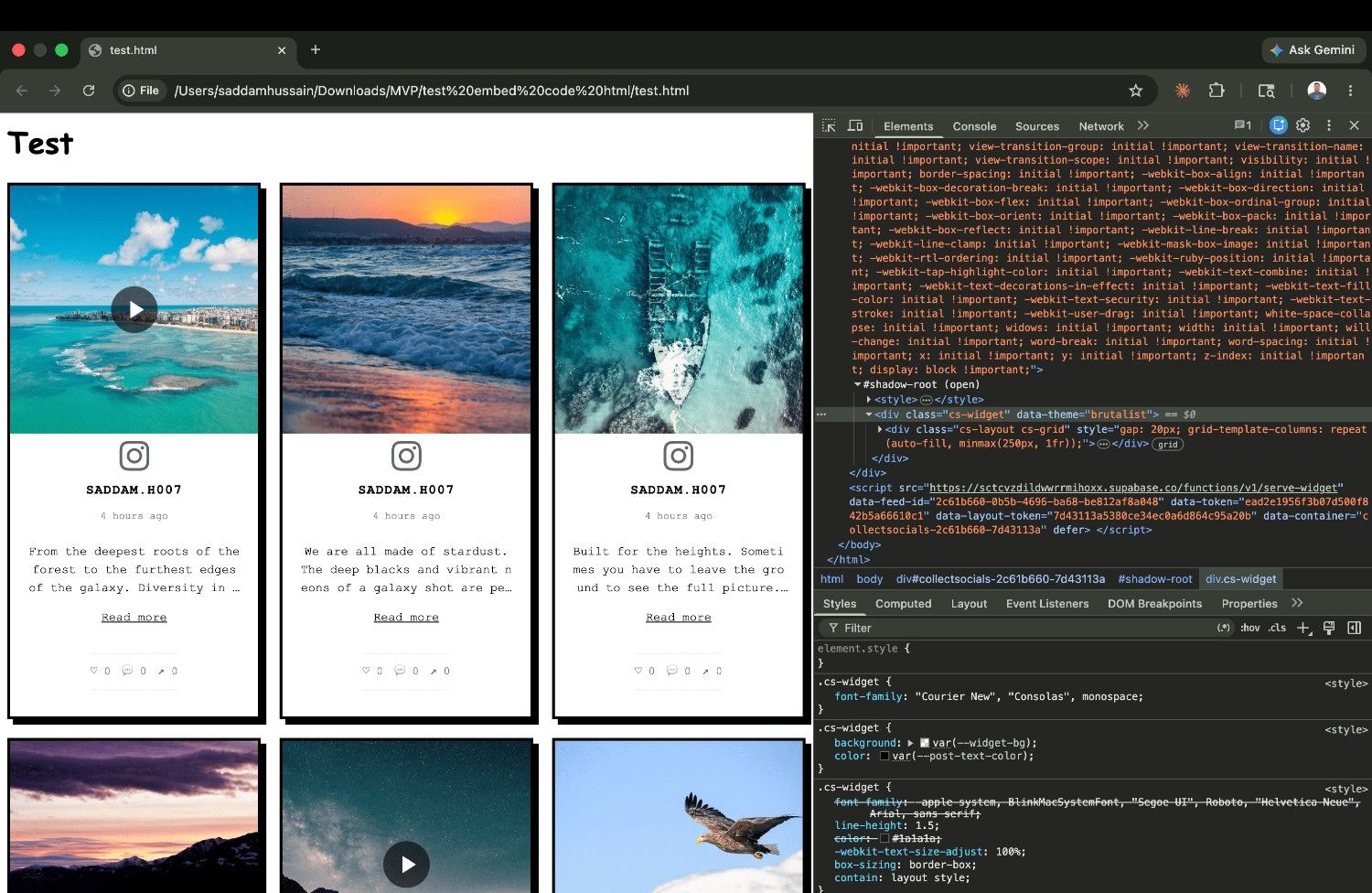
On the rendering side, CollectSocials loads a single JavaScript file and injects nothing further, the only widget here that does, against two to twenty-two files for everything else. It also sets no cookies and writes nothing to localStorage or sessionStorage, which you can confirm in the Application panel before and after the feed loads. That last one matters more than it used to: a widget that writes cookies drags your consent banner into scope, and most of the tools here do.
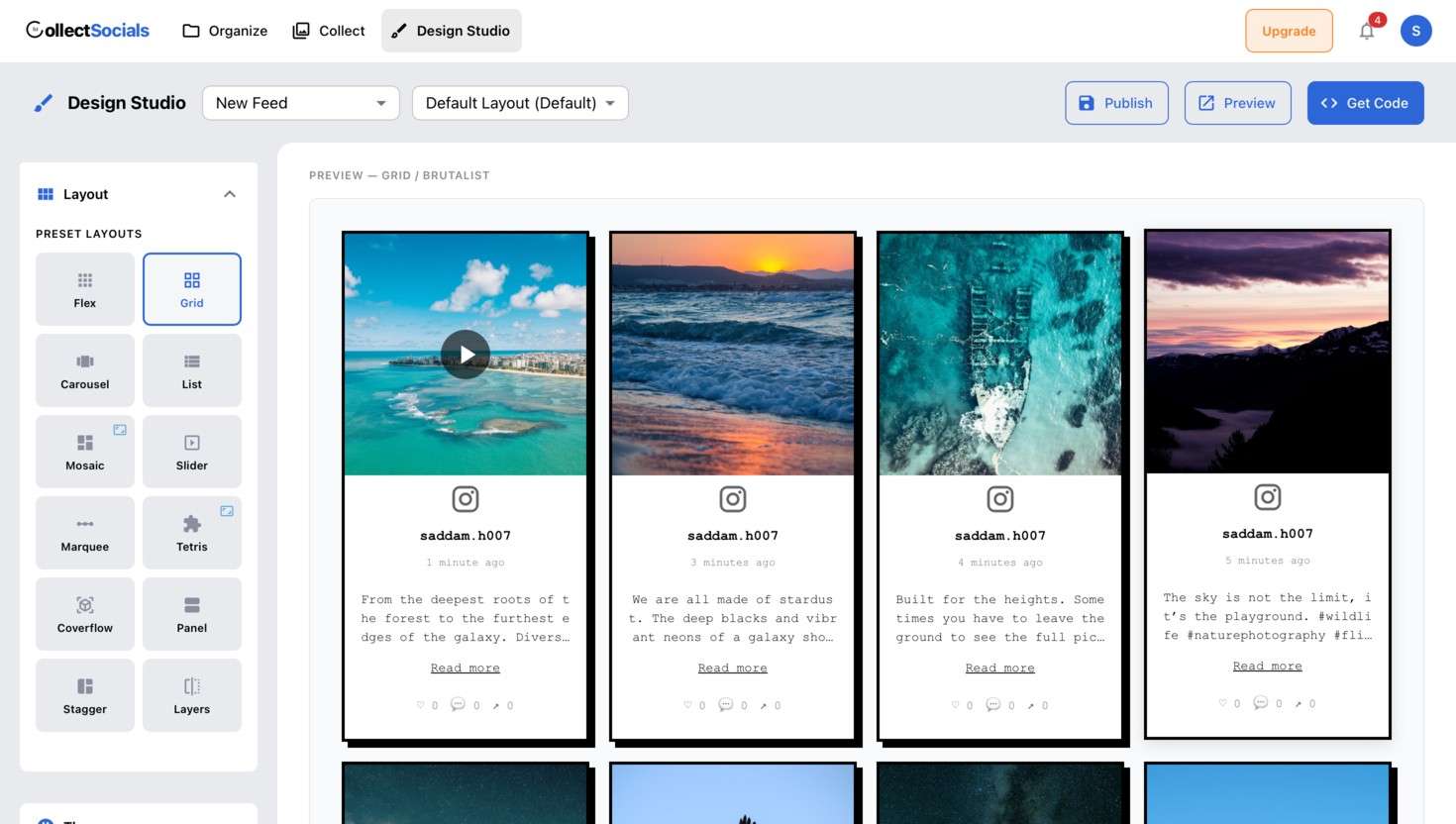
With 40 layouts and 16 themes, including options like Marquee, Stagger, Layers, Tetris and Coverflow that don't exist in most competing tools, the Design Studio gives you significantly more creative range. The nearest competitor in this test offers five layouts. The multi-source feed model, where Instagram, Facebook, Google Reviews and YouTube all merge into one widget, is a genuine differentiator for businesses that want a unified social proof section rather than four separate embeds stacked down a page.
One feature worth calling out specifically: CollectSocials is the only tool in this comparison that lets you edit post captions inline. In practice, this means you can strip out the 15 hashtags you added for Instagram reach, remove temporary promo text, or rewrite a caption entirely for a website audience, without touching your live Instagram post. Every other tool displays captions exactly as they appear on Instagram, hashtag clutter and all.
One more worth naming, because it is priced very differently across this comparison: UGC rights and consent tracking, the part that lets you ask a customer for permission to reuse their photo and keep a record of the answer. Taggbox puts it behind its Advanced plan and EmbedSocial behind Premium. On CollectSocials it runs on every plan, including the free one, at five requests a month on Free and Pro and uncapped from Business, with recorded consent never gated at all. If you reuse customer photos at all, price that row before the headline price.
On WordPress specifically, CollectSocials is one of the few tools here that you install rather than paste. The plugin is in the official WordPress plugin directory, so it arrives through the normal Add New Plugin search and gives you a feed block in the editor plus a [collectsocials] shortcode for themes and page builders. Most of the other tools in this comparison expect you to drop their embed code into a Custom HTML block instead.
The plugin also changes the economics, which is the part worth reading twice. It copies your posts and your published design into your own WordPress database and serves them from your own domain, so once a feed has synced your visitors never make a request to us. Those page views are not metered on any plan, including the free one, however busy the site gets. Weigh that against the view caps everywhere else in this comparison, our own hosted plans included: Elfsight deactivates the widget once you pass your cap, and EmbedSocial's $29 tier includes 5,000 page views. The honest edge of the claim is the word synced. A feed that hasn't synced yet, or one the site cannot cache, is loaded from us on each visit and does count until its sync succeeds.
Where I'm honest about the limits: Pro connects 5 sources and Business connects 15, so if you are running more accounts than that, the plan you need is not the $29 one. There is no SSO or SAML and no data processing agreement to sign, which rules us out of some enterprise procurement reviews outright. Live platforms are Instagram, X/Twitter, TikTok, YouTube, Google Reviews, Pinterest, Vimeo, Tumblr, RSS and Facebook; LinkedIn is not live yet. And one file is not the same as weightless: a video-heavy feed costs more to render than a photo feed, on any of the eight tools here.
Pricing starts at $29/month for the Pro plan (5 sources, 30,000 page views per month). The Business plan at $59/month adds unlimited page views and 15 sources. Paying yearly is two months free, so Pro is $290 a year and Business is $590. Underneath both sits a free plan that is permanent rather than a countdown: 1 source, 2,000 page views a month, 7 of the 40 layouts and all 16 themes, with our link shown under the feed. The 7-day trial opens 3 sources and the full design studio with no credit card, and when it ends you still have a working feed rather than a dead embed.
Elfsight
Best for: Users who need the lowest possible entry price and a very fast initial setup, if they can live with no CSS isolation.
Elfsight is a widget marketplace, offering hundreds of different website widgets, with Instagram feed being one of them. This broad scope is both its strength and its main limitation in this context.
On the positive side: Elfsight's entry pricing is genuinely low. The Single App plan starts at $5 per month (billed yearly) or $6 month-to-month for the Basic tier, covering 3 widgets, 5,000 monthly views and unlimited websites. Pro is $10 per month yearly ($12 monthly) for 9 widgets and 50,000 views. Premium hits $20 per month yearly ($24 monthly) for 21 widgets and 150,000 views. There's also a free plan, but it caps you at 1 widget with just 200 monthly views and displays Elfsight branding, which makes it a demo rather than a plan. Setup is fast: connect Instagram, pick a layout, copy the embed. Five layouts (Grid, Masonry, List, Slider, Carousel) and 12 color schemes cover basic design needs.
If you need multiple Elfsight apps (say, an Instagram feed plus a Google Reviews widget), the 96 Apps Pack bundles everything: Basic at $15 per month yearly ($18 monthly) with 5,000 views per app, Pro at $30 per month yearly ($36 monthly) with 50,000 views per app, and Premium at $60 per month yearly ($72 monthly) with 150,000 views per app. Each platform is still a separate widget with its own embed code, and they don't merge into a unified feed. (For a deeper analysis of Elfsight's limitations and what to use instead, see our Elfsight alternatives guide.)
Here's what our testing revealed that contradicts common assumptions: Elfsight does not use an iframe. When we inspected the DOM, the widget renders directly into the page as plain <div> elements with classes like eapps-instagram-feed-container. No shadow root, no iframe boundary. Our CSS leak test turned the entire widget yellow with Comic Sans text and red-bordered images. If your site has any custom CSS, which every site does, you're risking visual conflicts that are difficult to debug.
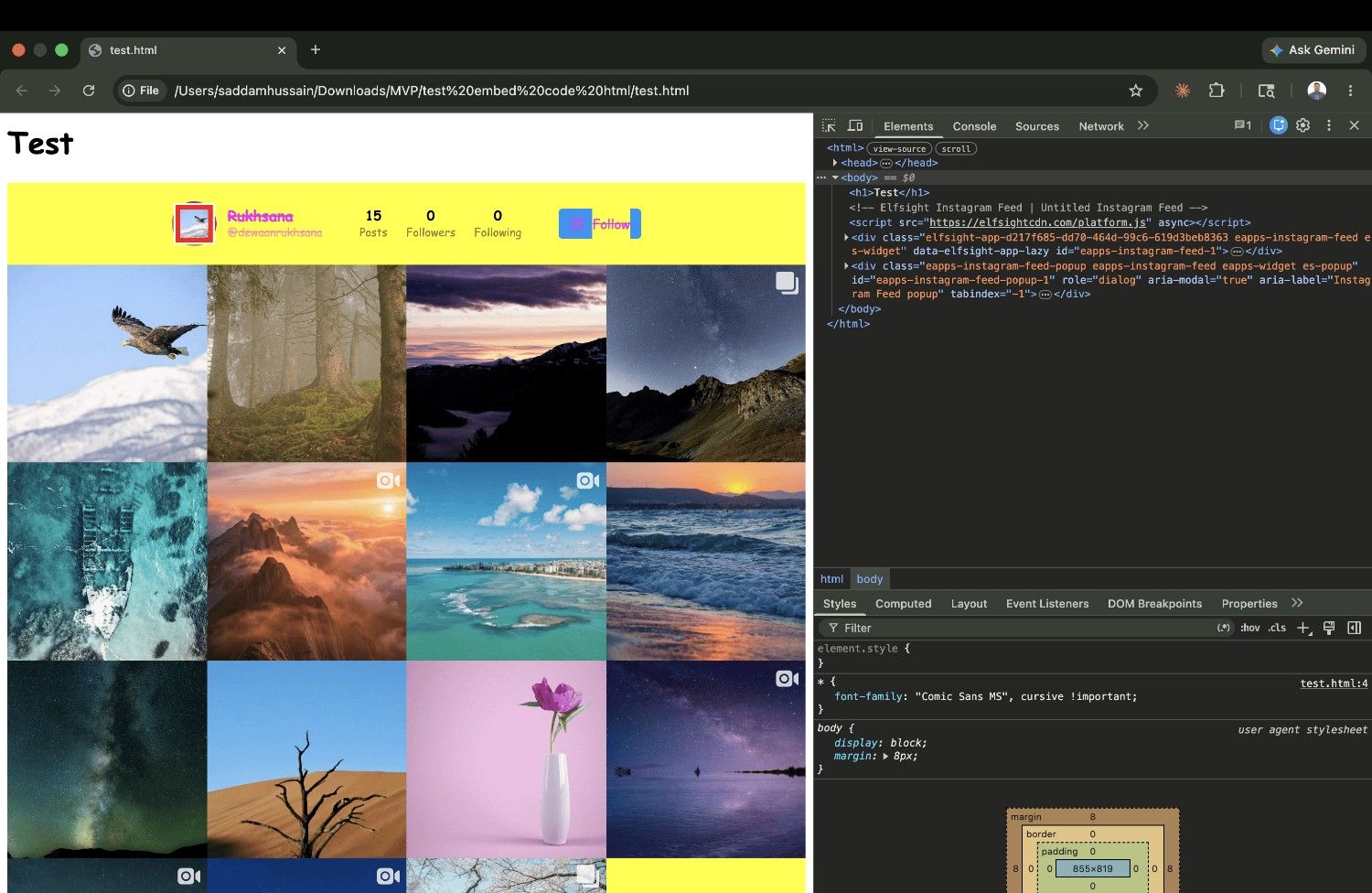
Structurally, Elfsight is a script embed loading 2 files, and it is the lack of isolation rather than the file count that bites: because the widget renders straight into your page, any aggressive CSS on your site lands in the feed, exactly as the screenshot above shows.
Because Elfsight is a widget marketplace rather than a social aggregator, combining Instagram with Google Reviews requires purchasing and embedding a separate widget, and they don't merge into a single feed. This means multiple embed codes, inconsistent design, and costs that stack per platform. Customer support is a recurring complaint in public reviews.
If your only requirement is a basic Instagram feed on one site and budget is the primary constraint, Elfsight works at its entry price. Just know that your site's CSS can break the widget, and the widget's CSS can leak into your page. The view cap is also worth watching, because the free plan's 200-view limit means even modest traffic will deactivate your widget, and exceeding caps on paid plans has the same effect with no graceful fallback. For a detailed breakdown of alternatives that address these limitations, see our Elfsight alternatives guide.
Curator.io
Best for: Developers and technical users who want a lightweight, developer-friendly tool with custom CSS control and can handle the isolation gap themselves.
Curator.io has been in this space for a long time and has built a reputation for reliability and clean code. It supports 15+ platforms, has a generous free tier (one feed with two sources), and is genuinely developer-friendly, with custom CSS, API access and a clean embedding architecture.
Curator.io is a script embed loading 4 files, and its image pipeline is the most serious of the script embeds here: WebP with aggressive compression, which does real work on image-heavy accounts. It has no style isolation, so the same CSS-leak caveat applies, and you will be scoping that CSS yourself.
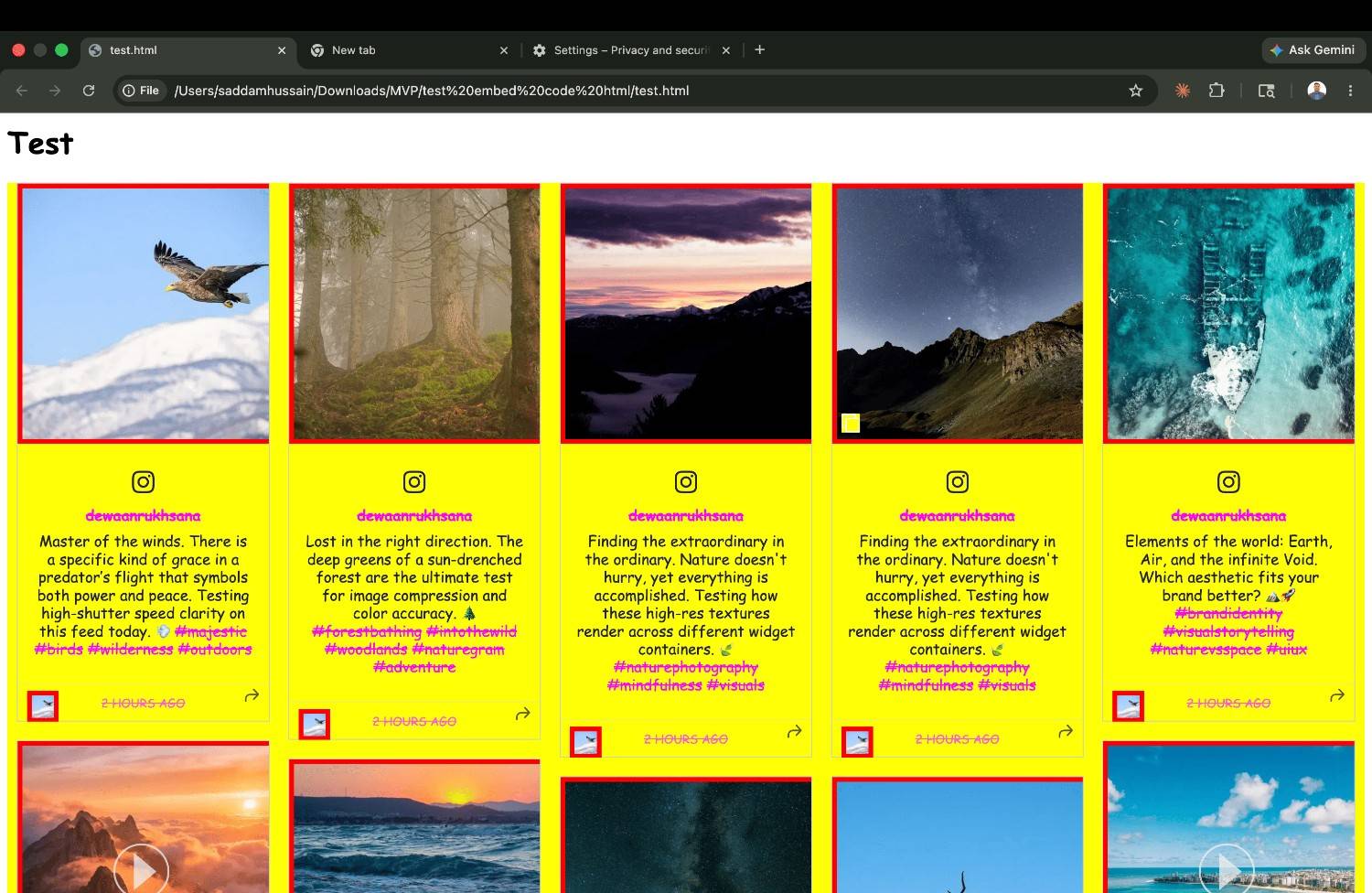
However, our CSS isolation test exposed a problem: Curator.io renders entirely in the global DOM with plain div/span elements and no Shadow DOM or iframe. Our test CSS broke the widget completely: yellow backgrounds, Comic Sans text, red image borders. Worse, Curator.io injects its own CSS variables on :root via curator.embed.css, which means the style leakage is bidirectional. Their styles can affect your page too.
Where Curator.io shows its age: the interface is functional but dated, layout options are limited, and there is no theme customization.
Curator.io is a strong choice if you're a developer who wants to build something custom on top of a reliable aggregation engine and can manage CSS scoping yourself. It's a weaker choice if you want CSS isolation out of the box.
Taggbox (Tagembed)
Best for: Enterprise marketers who need UGC rights management and social commerce features, and who can accept a 22-file embed that reflows the page as it loads.
Taggbox is the most feature-rich tool in this comparison, and the most complex. It supports 20+ platforms, includes AI-assisted moderation, UGC rights management, shoppable "Shop the Look" product tagging, and built-in analytics. Taggbox and Tagembed are the same company, and the embed widget is powered by Tagembed under the hood.
Taggbox is the outlier on architecture: it loads 22 separate JavaScript files, against two to four for every other script embed here and one for CollectSocials. That is twenty-one extra round trips before the feed can finish rendering, and unlike page weight it does not depend on what you put in the feed: it is the same twenty-two files whether you show four posts or forty.
Twenty-two files also means twenty-two things arriving at different moments, and Taggbox reserves no space for them, so the page visibly reflows as the feed assembles itself. It is the same failure as Juicer's, arriving by a different route.
On CSS isolation: Taggbox provides two embed options. The default script embed has zero isolation, and our test CSS broke the widget completely. The iframe embed option provides full isolation and rendered perfectly. If you use Taggbox, use the iframe embed code. The default option is unprotected.
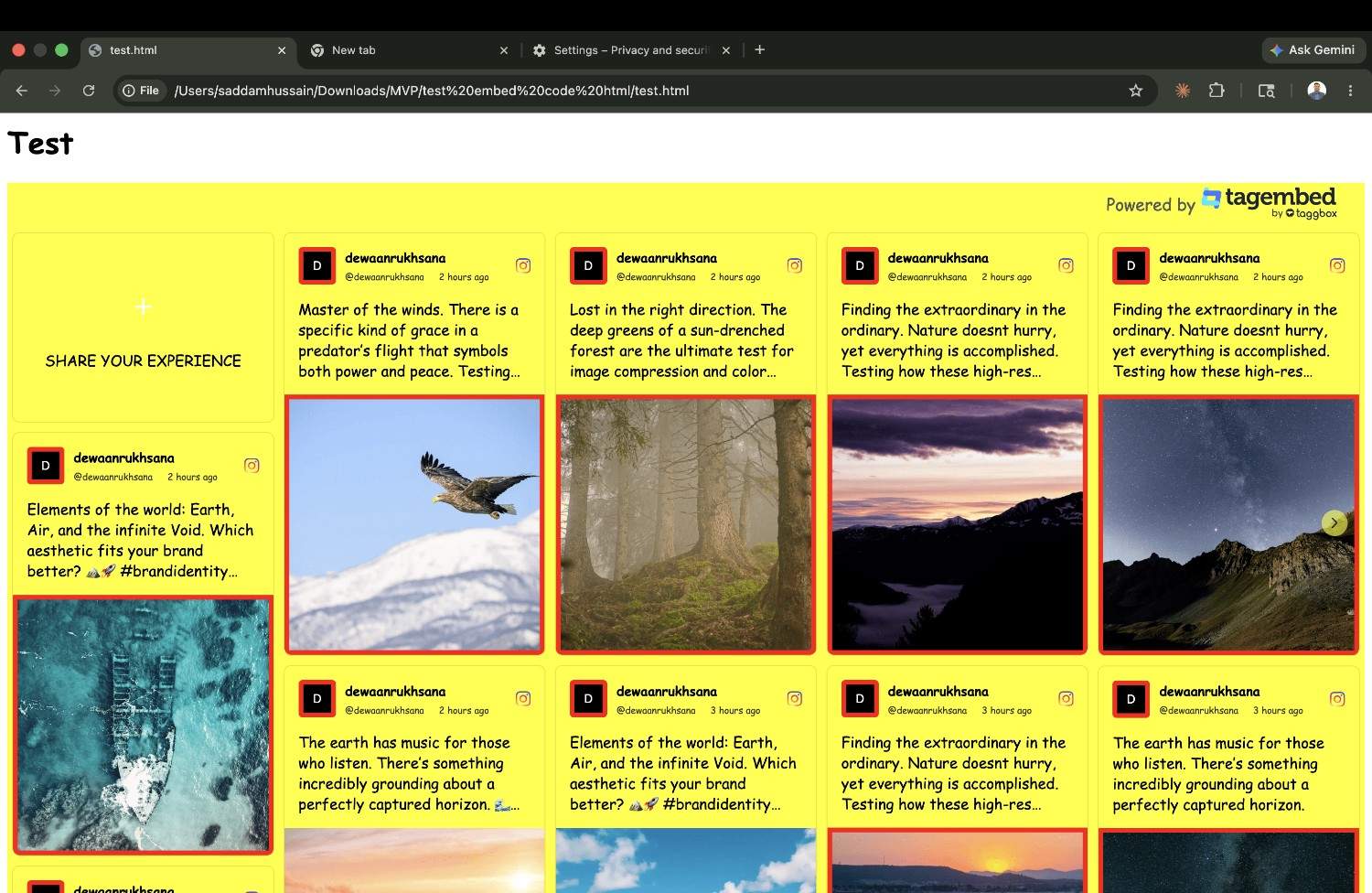
The pricing structure is confusing: separate plans for digital marketers and event marketers, with UGC rights management locked behind the Advanced plan at $79/month. For a small business, Taggbox is overkill in features and overly complex in pricing. For a mid-size or enterprise brand with a dedicated UGC marketing strategy, it has capabilities that other tools don't match, as long as you switch to the iframe embed and accept the file count that comes with it.
EmbedSocial
Best for: Businesses that need review aggregation and social feeds together, and want full iframe isolation plus AI-assisted widget design.
EmbedSocial started as a reviews aggregation platform and expanded into social feeds, which means its strongest feature set is around reviews: Google Reviews, Facebook Reviews, and social proof from multiple sources. It supports major social platforms, offers 100+ pre-made templates, and includes AI-powered review management with features like AI-generated review replies. It also has an AI widget designer that can generate creative layouts from a text prompt, which none of the other tools in this comparison offer.
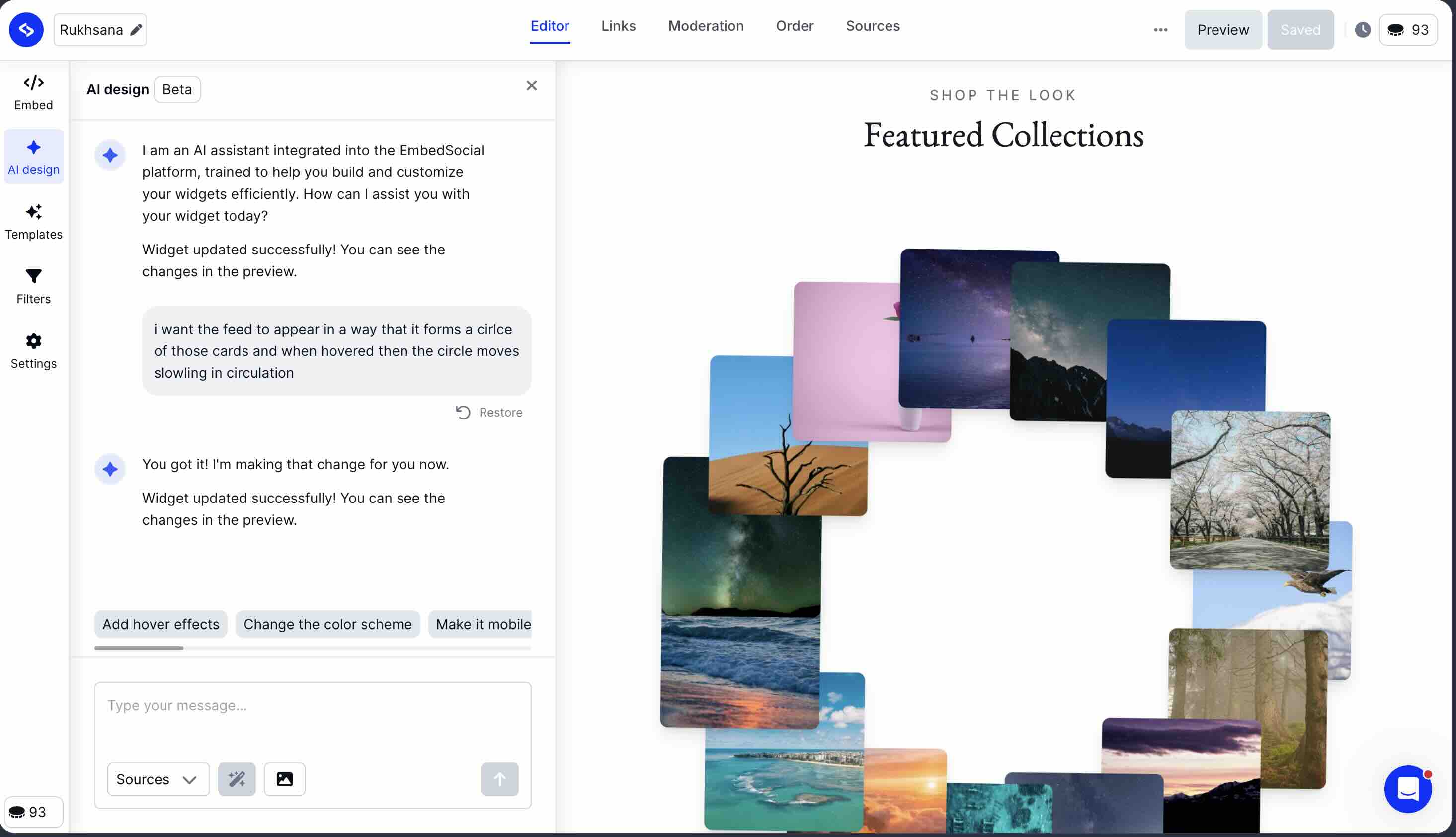
EmbedSocial is one of the two widgets here that renders inside a cross-origin iframe, and that single decision drives most of what follows. The browser handles the iframe's rendering separately from your page's main thread, so whatever the widget does inside it is largely insulated from your site, which is also why page-speed audits flatter iframe embeds and why we no longer rank these eight tools on one. Their image pipeline delivers optimized WebP thumbnails, which genuinely helps. The tradeoff is the one every iframe makes: the feed cannot inherit your typography, and its height is managed by script rather than by your layout.
It loads 10 files, including a full Tailwind CSS bundle and the Swiper library, the second-largest file count here after Taggbox. But because that JavaScript executes inside the iframe rather than on your page, the cost lands somewhere your own main thread does not feel it. This is the clearest example of why file count and page-speed scores tell you different things, and why comparing an iframe embed to a script embed on a single number is not a like-for-like test.
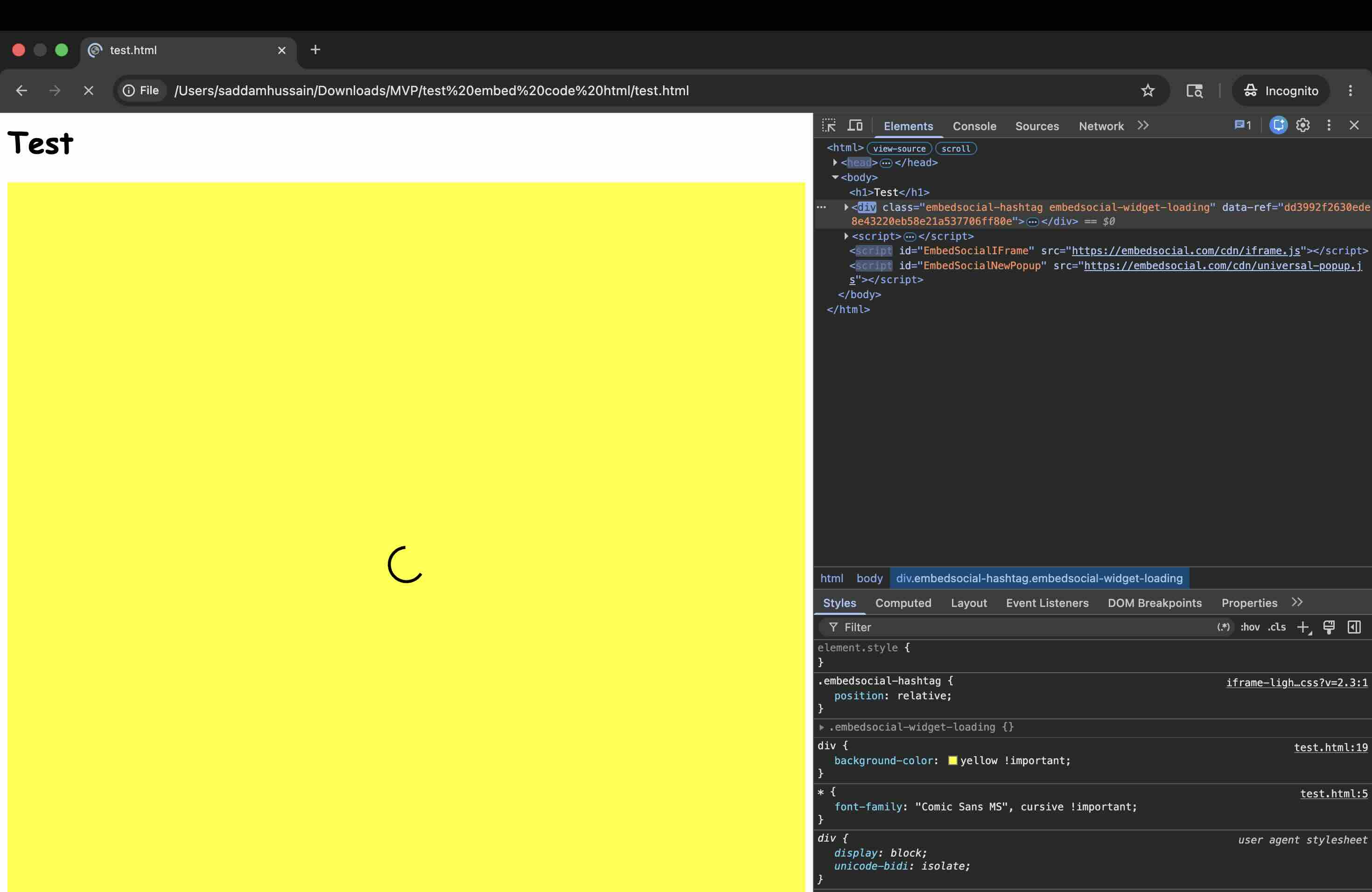
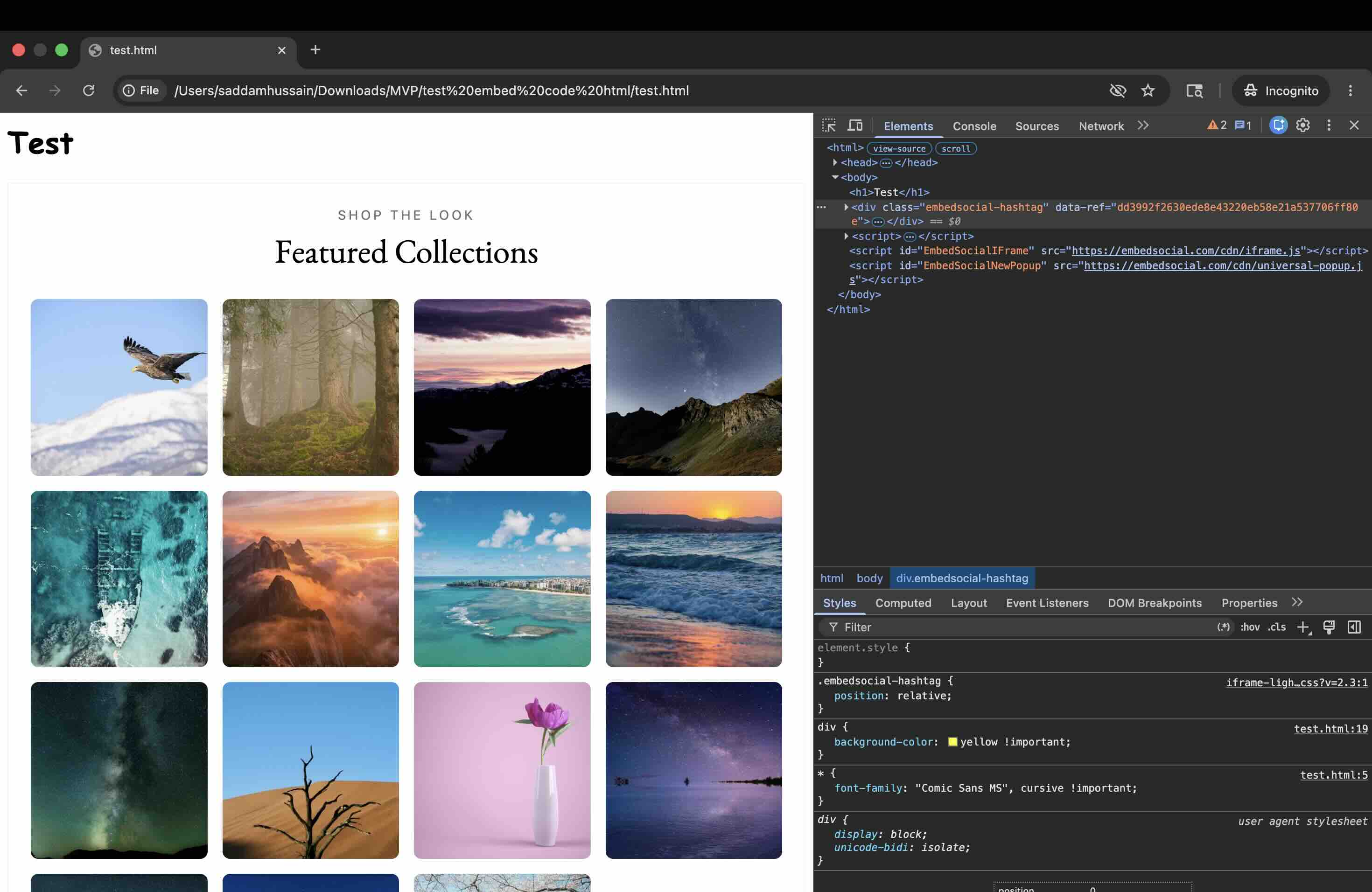
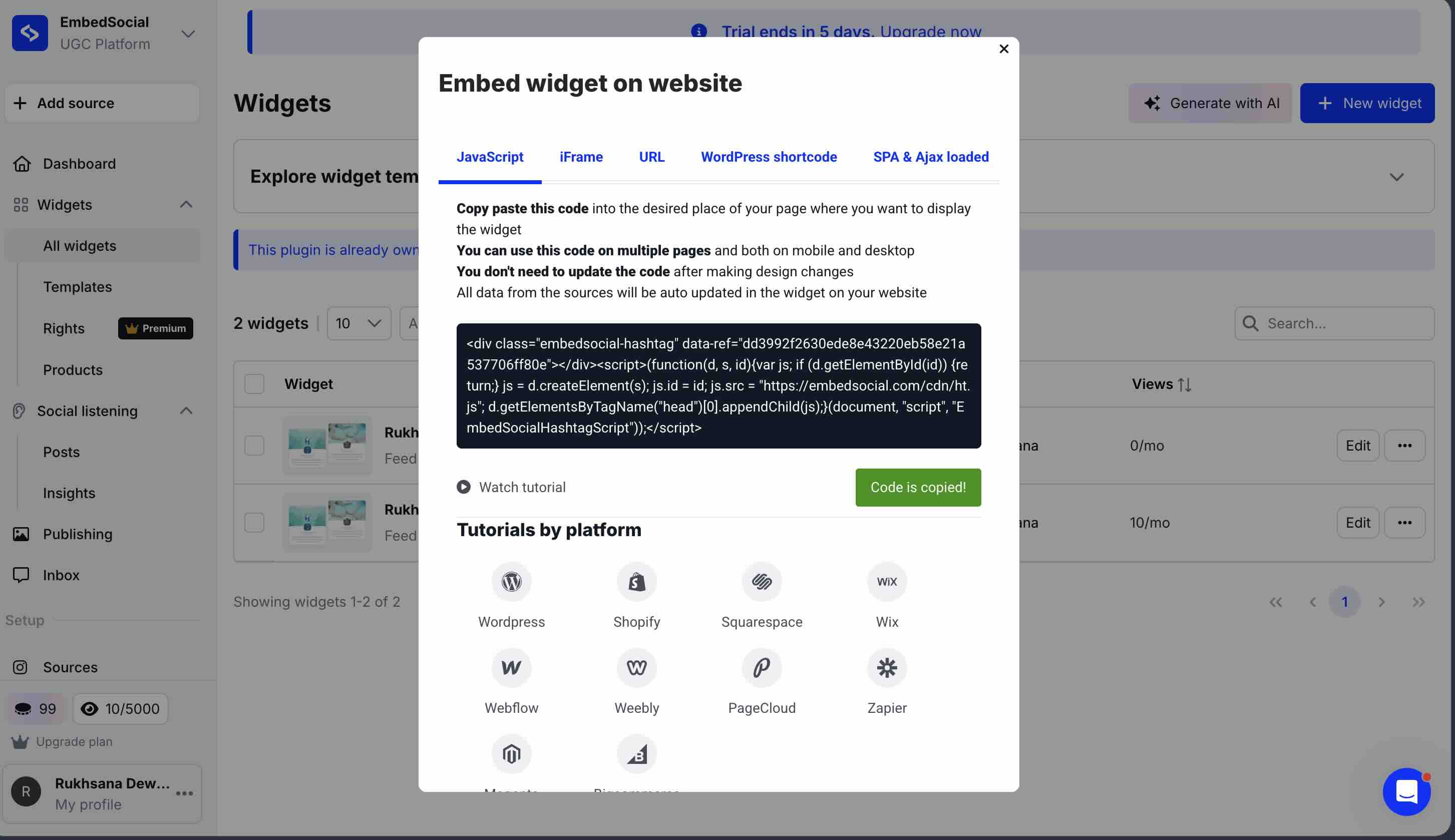
On CSS isolation, EmbedSocial offers two embed methods. The direct iframe embed provides complete isolation in both directions, and our aggressive test CSS had zero effect on the widget. The JavaScript embed also uses an iframe internally, but with a catch: the wrapper <div class="embedsocial-hashtag"> sits in your page DOM while the script loads. During that loading window, your page CSS affects the wrapper area. Once the iframe injects, the widget content itself is fully protected, but EmbedSocial's own stylesheet also sets position: relative on the wrapper div, which is a minor outward CSS leak. For clean isolation from the first frame, use the direct iframe embed.
Where EmbedSocial falls short for many buyers is its product architecture. Social feeds and reviews are split into separate products, EmbedFeed and EmbedReviews, each with its own pricing. If you want both an Instagram feed and Google Reviews on your site, you're paying for two subscriptions or upgrading to an all-products bundle. Paid plans start at $29/month for EmbedFeed Pro (3 sources, 5,000 page views). UGC rights management requires the Premium plan at $99/month.
EmbedSocial's iframe keeps its weight off your main thread and it has genuinely strong review management features. If reviews are central to your business and you can work within the split-product pricing, the isolation and the review depth make a strong case. If you want social feeds and Google Reviews merged into one widget on one plan, that is exactly the gap CollectSocials was built to close.
Flockler
Best for: Agencies and large brands that need a single subscription covering websites, events, email embeds and digital signage, and who use the iframe embed option.
Flockler is positioned at the premium end of this market, and priced accordingly. At $129/month for the entry plan and $299/month for automated moderation, it's not in the same conversation as the other tools here for most small or mid-size businesses. There is no free plan.
Our testing revealed a split personality. Structurally Flockler is one of the tidier script embeds here, at 2 files with an optional iframe mode if you want isolation. The engineering is not the problem.
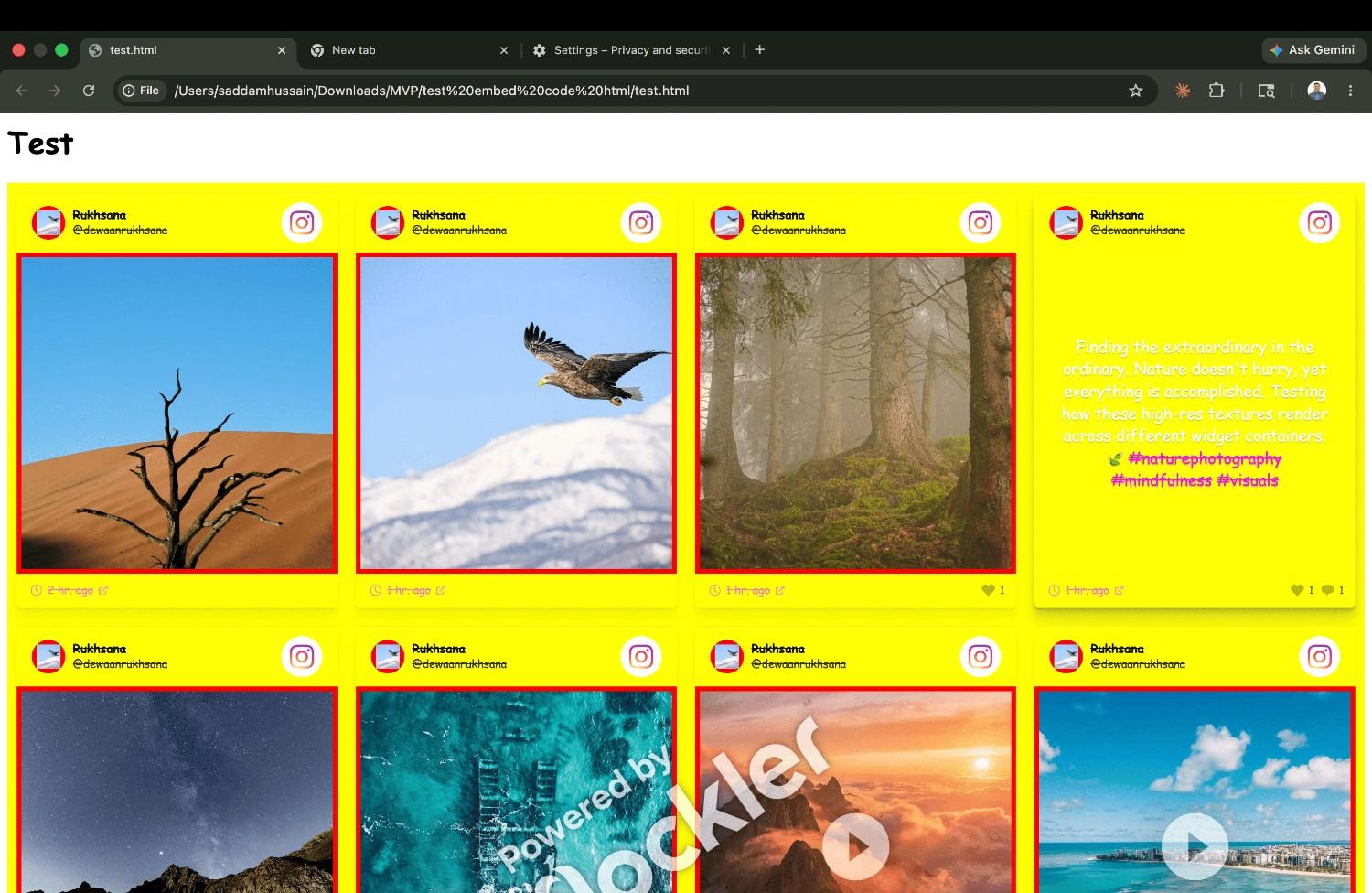
But the CSS isolation picture is more complicated. Flockler offers two embed options: a default script embed and a separate iframe option. The default script embed has zero CSS isolation, and our test CSS broke it completely with yellow backgrounds, Comic Sans, and red borders on every image. The iframe embed option provides full isolation. This is the same pattern I found with Taggbox: two embed methods, completely different isolation outcomes.
What justifies the price for the right customer: Flockler offers a single subscription that works across websites, event screens, email embeds, and digital signage. For an agency managing UGC across multiple channels for multiple clients, this breadth of coverage under one plan has genuine value. For a business that just needs an Instagram feed on a website, which is most businesses, Flockler is a significant overpay.
Juicer.io
Best for: Budget-conscious users who need a basic multi-platform aggregator and can accept a feed that shifts the page as it loads.
Juicer.io has been around since 2014 and supports 15+ social platforms including Instagram, Facebook, TikTok, YouTube, LinkedIn, and Slack. Its free plan includes 2 social feeds, making it one of the more accessible entry points. Paid plans start at $19/month (Small plan) and go up to $199/month (Enterprise).
Our testing flagged one concrete, reproducible problem: layout shift. Juicer uses HTMX with hx-swap="innerHTML" to inject the feed, and the injected content has no reserved space, so the page visibly jumps as the widget arrives and content your visitors are already reading physically moves. This is a mechanism rather than a measurement: it happens on any feed, on any page, until they reserve the space. You can watch it on their own demo.
Juicer also serves full-resolution JPEGs rather than optimized thumbnails. That is an architectural choice, not a quirk of our test feed, and it is the opposite of what Curator.io does, which is why the two behave so differently on image-heavy accounts regardless of how you measure them.
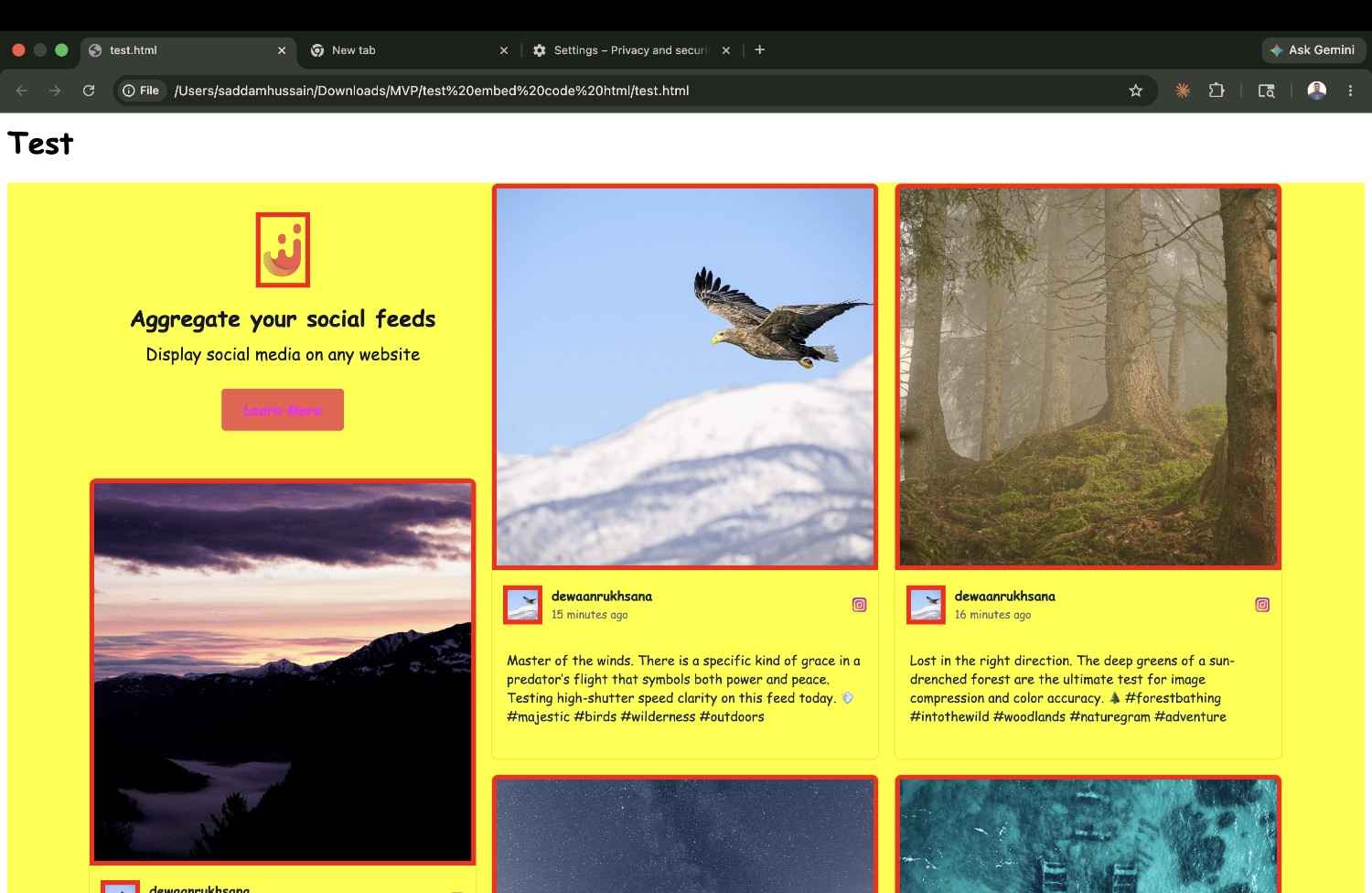
On CSS isolation: Juicer offers two embed methods, a default script embed and an iframe embed option. The default script embed renders everything in the global DOM with no Shadow DOM or iframe boundary. Our test CSS broke the widget completely, with yellow backgrounds, Comic Sans text and red borders throughout. Additionally, Juicer injects its own Tailwind CSS with --tw-* variables on the global * selector, which means the style leakage is bidirectional: your styles break theirs, and their Tailwind variables can interfere with yours. However, Juicer's iframe embed option provided full CSS isolation, and our test styles had zero effect on the widget when using the iframe code. This is the same pattern I found with Flockler and Taggbox: if you use Juicer, make sure you use the iframe embed code, not the default script embed.
Juicer makes sense as a budget multi-platform aggregator if performance isn't critical: internal dashboards, community pages where SEO doesn't matter. For any customer-facing page where Core Web Vitals affect your rankings, the unreserved-space layout shift alone is a dealbreaker.
Walls.io
Best for: Enterprise event organizers who need live social walls with real-time moderation and are comfortable with premium pricing.
Walls.io is built for live events and digital signage first, website embedding second. It supports 15+ platforms and stands out for its real-time capabilities, using WebSocket connections (Socket.io) to push new posts to the display without page reloads. For conferences, trade shows, and retail activations with live social walls, this is a genuine technical advantage.
In our testing, Walls.io's CSS isolation was excellent, because it uses a native browser iframe, giving it full style protection. Our aggressive test CSS had zero effect on the widget. The embed is clean: one iframe element injected into the page with auto-height JavaScript handling.
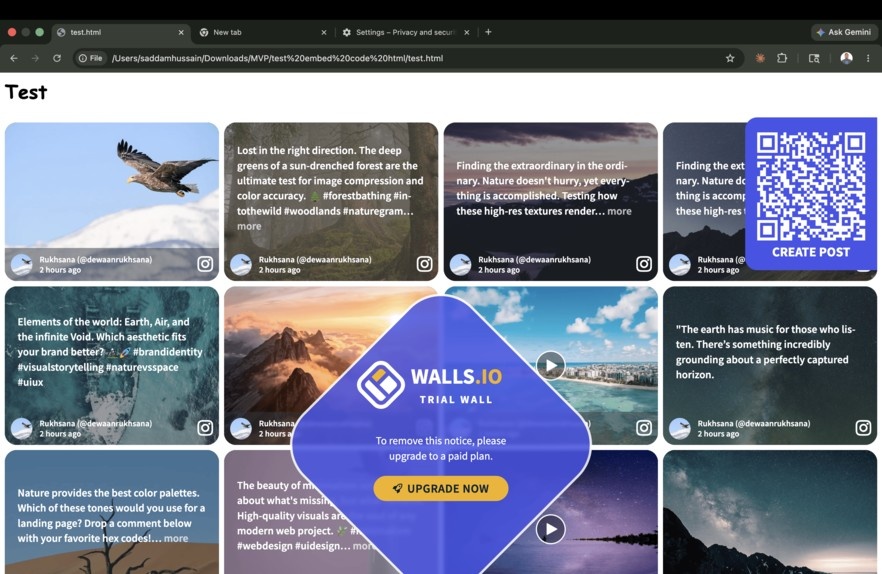
Walls.io is the other cross-origin iframe embed here, and it loads 11 files: Socket.io for live updates, a main app bundle, and several utility scripts. The Socket.io connection is the tell. This is built for a live event wall that updates in real time, which is a different job from a feed on a marketing page, and it carries the machinery for it whether or not you need it. It also auto-plays video, so an account posting Reels will cost meaningfully more than one posting photos.
The pricing is where most users will stop: Walls.io starts at approximately $270/month for the website plan. There's no free tier, just a 14-day trial. This puts it in a completely different bracket from every other tool in this comparison. For a simple Instagram feed on a business website, Walls.io is extreme overkill. For a corporate event with a live moderated social wall running across multiple screens, it's purpose-built. Worth knowing before you commit at that price: CollectSocials ships 11 live wall modes with moderation on the $59 Business plan, which covers a good share of what most single-event organisers actually need.
Do Instagram Feed Widgets Have Page View Limits?
Almost all of them do, ours included. A hosted widget is served from the vendor's infrastructure, so every visitor who loads your page costs the vendor a request, and every vendor prices that as a monthly page view allowance. Elfsight allows 200 views a month on the free plan and deactivates the widget once a paid plan passes its cap. EmbedSocial's $29 EmbedFeed Pro includes 5,000 page views. Our own hosted plans meter it too: 2,000 a month on free, 30,000 on the $29 Pro plan, uncapped on Business at $59. This is the cost buyers discover last, usually during the first month a page does well.
The exception is a feed your own site serves rather than the vendor. The CollectSocials WordPress plugin copies your posts and your published design into your own WordPress database and renders them from your own domain. Once a feed has synced, your visitors never make a request to CollectSocials, so those page views are not metered on any plan, including the free one, however much traffic the page takes. Of the eight tools I tested, that is the only setup where the page view number stops being something you have to budget for at all.
The word carrying the weight there is synced, and the edge of the claim is worth stating plainly rather than burying: a feed that hasn't finished its first sync, or one your site cannot cache, is loaded from CollectSocials on every visit and does count against your plan until the sync succeeds. If you are comparing vendors on this, the question to put to each of them is simply whether the widget renders from their servers or from yours. That one answer decides whether a traffic spike costs you money.
Who Should Use What: Plain-Language Guidance
All the comparison tables in the world are less useful than a direct answer. Here's how we'd actually steer different types of users based on what I found in testing.
You're a small business or solo operator who wants Instagram on your website and nothing complicated. Start on the CollectSocials free plan, which doesn't expire and doesn't ask for a card. If budget is the binding constraint and you only ever need one platform on one page, Elfsight is cheaper at the $5/month entry point, as long as you accept that it has no CSS isolation and may conflict with your site's styles. Curator.io's free plan is also viable if you can live with 24-hour sync delays and handle CSS scoping yourself. For setup instructions once you've chosen, see our guides for WordPress and Wix.
You're an e-commerce brand that wants Instagram plus Google Reviews in one cohesive widget. CollectSocials or Taggbox. CollectSocials if you want cleaner pricing, one script file instead of twenty-two, and proper CSS isolation; Taggbox if you specifically need shoppable UGC product tagging and can accept the twenty-two-file load. Don't use Elfsight for this, because the per-widget model means separate embeds for each platform.
You're a developer who wants to build something custom on top of a solid aggregation API. Curator.io. It has the strongest image pipeline of any tool here, WebP with real compression, and its developer tooling and custom CSS options are well-suited to custom implementations. You will be scoping the CSS yourself either way, so the missing isolation costs you less here than it would on a marketing site.
You're a WordPress-only user who wants a plugin rather than a script embed. CollectSocials. Our plugin is in the official WordPress plugin directory, so it installs from the Add New Plugin screen like any other plugin and gives you a feed block in the editor plus a [collectsocials] shortcode for themes and page builders. Of the eight tools here, most still expect you to paste an embed code into a Custom HTML block. The reason to prefer the plugin over our own hosted embed is the metering: a synced feed is served from your database rather than ours, so its page views don't count against any plan, free included. Smash Balloon is the other name that comes up for WordPress-only setups and is worth a look if you want everything to stay inside WordPress. Our WordPress plugin page covers installation, and the WordPress guide covers placement.
You're an enterprise brand or agency running social content across a website, events, and digital signage simultaneously. Flockler or Walls.io. Flockler if you want a lean two-file script embed at $129/month; Walls.io if you need real-time WebSocket updates for live event walls and can justify $270/month. Both require using their iframe embed options for CSS isolation. If the signage side is one or two events a year rather than a permanent channel, price the $59 CollectSocials Business plan against those two first, because it includes the live wall modes and moderation. Every team's first event also runs free on a one-time 24-hour go-live window, with no credit card, so a single event can be run end to end before you decide whether the plan is worth keeping. Nobody needs to buy a day pass to find out whether a social wall works for their room.
You need the cheapest multi-platform aggregator and performance isn't critical. Juicer.io has a free plan and starts at $19/month paid. It supports 15+ platforms. But between the unreserved-space layout shift and the absent CSS isolation, keep it off any page where SEO or user experience matters.
Reviews are your primary goal and Instagram is secondary. EmbedSocial. Its cross-origin iframe keeps its weight off your main thread and gives it full style isolation, and its reviews infrastructure, including AI-generated replies and multi-location management, is stronger than any other tool in this list. The split-product pricing (separate subscriptions for feeds and reviews) adds cost, but the isolation and review depth justify it if review management is central to your business. If you want reviews and Instagram in one widget on one plan rather than two subscriptions, that is the case for CollectSocials.
The Questions Worth Asking Any Vendor
Before signing up for any of these tools, ask the vendor, or check the documentation for, the following:
What happens if I exceed my page view limit? Some tools throttle or hide the widget. Others charge overage fees. Others simply block rendering until the billing cycle resets. This is a critical detail for any site with meaningful traffic.
How are Instagram API tokens managed? Meta OAuth tokens expire. When yours expires, your feed stops updating. Ask how the tool notifies you and how easy it is to reconnect. This is a maintenance detail that will affect you within months of signing up.
What CSS isolation method does the widget use? After our testing, I think this question matters more than most buyers realize. Ask specifically: Shadow DOM, iframe, or global CSS? If the answer is "global CSS" or the vendor doesn't know, your site's styles may conflict with the widget. We've documented the results for each tool above.
Can I preview before I pay? Any tool that doesn't offer a free trial or a meaningful free plan is asking you to buy blind. The tools in this list that require credit card details upfront or have no trial deserve extra scrutiny.
What happens to my data if I cancel? Do your curated selections, edited captions, and design configurations export or disappear? Knowing this upfront avoids painful surprises if you decide to switch tools later.
Final Verdict
After embedding all eight widgets on the same test page and recording how each one renders, how many files it loads, and how it behaves under hostile CSS, the picture is clearer than any feature checklist could make it.
On architecture: two of the eight, EmbedSocial and Walls.io, render in a cross-origin iframe, which keeps their weight off your main thread at the cost of the usual iframe tradeoffs. Of the six script embeds, CollectSocials loads one file and Taggbox loads twenty-two. Taggbox and Juicer.io both reflow the page as they load, because neither reserves space for the content it injects.
On CSS isolation: CollectSocials was the only widget using Shadow DOM. EmbedSocial and Walls.io both used iframe isolation effectively, though EmbedSocial's JavaScript embed exposes a wrapper div during loading. Flockler, Taggbox, and Juicer.io all offer optional iframe embeds that provide full isolation, but their default script embeds have zero protection. Elfsight and Curator.io render directly in the global DOM with no iframe option available, and our testing proved that their default embeds did not survive even basic CSS interference.
On value: CollectSocials is the only single-file embed and the only one with Shadow DOM isolation, has the most layout options, and is the only one with inline caption editing, starting at $29/month with a free plan underneath it that carries all 16 themes and UGC consent tracking at no cost. EmbedSocial has full iframe isolation and strong review management, but splits feeds and reviews into separate subscriptions starting at $29/month each. Curator.io has the best image pipeline of the group and a free tier, if you can handle CSS yourself. Flockler is a lean two-file embed but starts at $129/month. Walls.io is purpose-built for live events at $270/month. Taggbox has the deepest UGC features but by far the heaviest architecture of any tool I tested.
No comparison article substitutes for testing these tools yourself with your own content and your own website. What this one gives you is a shortcut: every finding above is something you can confirm in DevTools in about a minute, on any vendor's own demo page, before you hand anyone a card.
For the method-by-method version of this decision, our complete guide to embedding an Instagram feed on your website tests every native route Instagram offers, with screenshots of exactly where each one fails, and is the piece to read before you shortlist any of the tools above. If you want the full picture of what ours does, the Instagram feed widget overview covers the five Instagram source types, the design studio and the four-step setup. For getting the most from any widget once you've chosen one, where to place an Instagram feed and how to curate an Instagram feed cover placement strategy and curation in detail. If you need help troubleshooting common issues like feeds not showing or tokens expiring, our troubleshooting guide covers the most common problems and their solutions. For detailed guidance on keeping your page fast after embedding a widget, see our performance optimization guide.
Start Using CollectSocials Today
One curated feed from 10+ platforms: on your website in a single line of code, or up on the big screen at your event.