
But "first" does not always mean "best fit." As the aggregation market has matured, several limitations in Curator.io have become more apparent, and a new generation of tools has emerged to address them.
If you are here, you are probably already using Curator.io and hitting its walls, or you are comparing options before committing. Either way, this article gives you a straightforward comparison of eight Curator.io alternatives, including what each tool does well, where it falls short, and how the pricing stacks up. If you are just getting started with aggregation, check our complete guide to social media aggregation first.
We will start with the tool I believe offers a strong combination of design, pricing, and functionality for most use cases, then work through the rest of the field.
But I wanted to know if Curator.io's developer-friendly reputation holds up in 2026, so I installed Curator.io on a blank test page, recorded how it renders and how many files it loads, measured CSS isolation, and calculated the actual dollar-per-source cost across every tier. That original research is below. (Full testing methodology is documented in our Instagram feed widget comparison. If you are still deciding whether you need a widget at all, start with how to embed an Instagram feed on your website.)
Why People Look for Curator.io Alternatives
Before diving into the tools, it is worth understanding the common friction points that drive users away from Curator.io.
Layout limitations. Curator.io offers a reasonable selection of templates, but the design options have not kept pace with modern web aesthetics. If you care about how your social wall looks, and you should, because it sits on your website, you are choosing from a handful of layout families rather than the forty in this article's first entry.
Source management constraints. On Curator.io, each layout is tied to its content source. If you want to display the same content in different layouts across different pages, you need to add the source again, which consumes your source limit and drives up costs. For businesses running multiple campaigns or maintaining feeds across different website sections, this architecture gets expensive quickly.
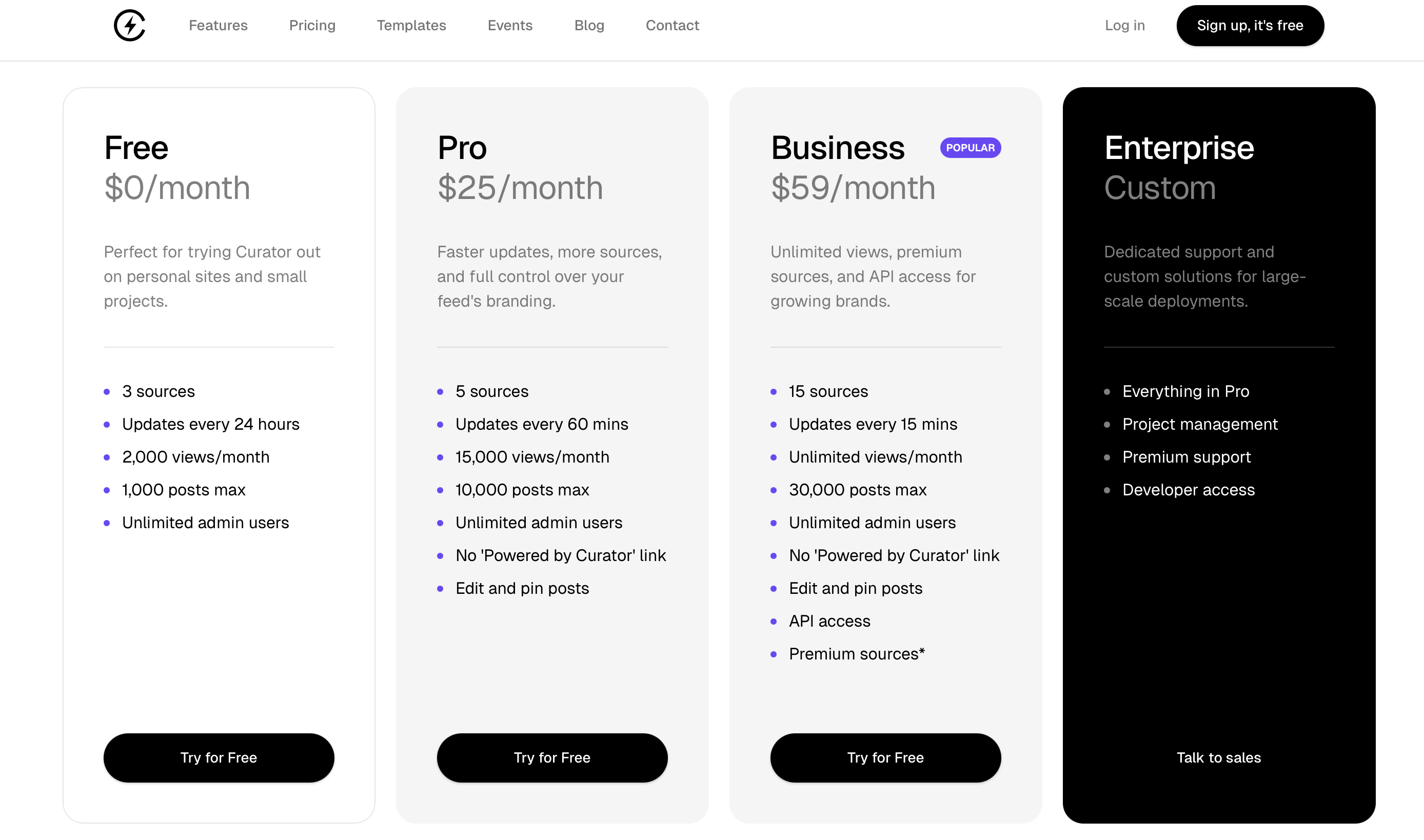
Pricing pressure at scale. Curator.io's free plan works for basic needs with three sources and 2,000 page views. The Professional plan at $25 per month covers five sources and 15,000 views. The Business plan jumps to $59 per month for 15 sources. For businesses that need moderate source counts and unlimited views, there is a significant gap between the Professional and Business tiers.
Content retention when changing sources. If you delete a source on Curator.io, say, an old campaign hashtag, you lose all the content associated with it. For businesses that run seasonal campaigns or events, this means choosing between paying for inactive sources or losing your content archive.
These are not dealbreaker issues for everyone, but they are the reasons the market for alternatives exists. Understanding these pain points helps you evaluate not just which tool to choose, but also how to implement and set up your social wall effectively.
Higher pricing
Limited sources
25% lower cost
Unlimited feeds
Why the market is shifting
Watch the scale tip toward modern aggregators. This animation shows a literal balance scale comparing "Basic Tools" (dated templates, limited sources, features held back for higher tiers) against "Modern Aggregator" (premium design, unlimited feeds, moderation and consent tracking on every plan). The modern side tips down as the feature labels float upward. It is a visual metaphor for market rebalancing.
When Curator.io launched, just getting social feeds to work reliably was the challenge. Today, that's table stakes. The scale tips because Curator.io's limitations (dated templates, source-tied layouts, gaps between tiers) opened space for tools built with current web standards and clearer packaging. For businesses evaluating options now, the alternatives often include at the same price what Curator.io holds back for a higher tier or an add-on. The tipping scale captures that shift.
We Tested Curator.io, Here Is What We Found
I installed Curator.io on a blank HTML test page, recorded how it renders and how many files it loads, and tested CSS isolation with intentionally aggressive stylesheets. (Full methodology documented in our Instagram feed widget comparison.)
Curator.io serves its images as WebP with real compression, which is more than several tools here manage. For developers who want a lightweight aggregation engine, this is compelling. But our CSS isolation test revealed a critical issue that affects every Curator.io user who does not write custom CSS scoping.
How Each Widget Renders
| Widget | Render method | Files loaded | Style isolation |
|---|---|---|---|
| Curator.io | Script embed | 4 | None |
| Flockler | Script embed | 2 | None (iframe optional) |
| CollectSocials | Script embed | 1 | Shadow DOM |
| Juicer.io | Script embed | 2 | None |
| Taggbox/Tagembed | Script embed | 22 | None (iframe optional) |
| EmbedSocial | Cross-origin iframe | 10 | Iframe (full) |
| Walls.io | Cross-origin iframe | 11 | Iframe (full) |
| Elfsight | Script embed | 2 | None |
CSS Isolation: The Critical Gap
I tested CSS isolation by injecting aggressive styles, Comic Sans fonts, yellow backgrounds, red image borders, to see which widgets survive. Curator.io renders entirely in the global DOM with no Shadow DOM boundary and no iframe option. Our test CSS broke the widget completely.
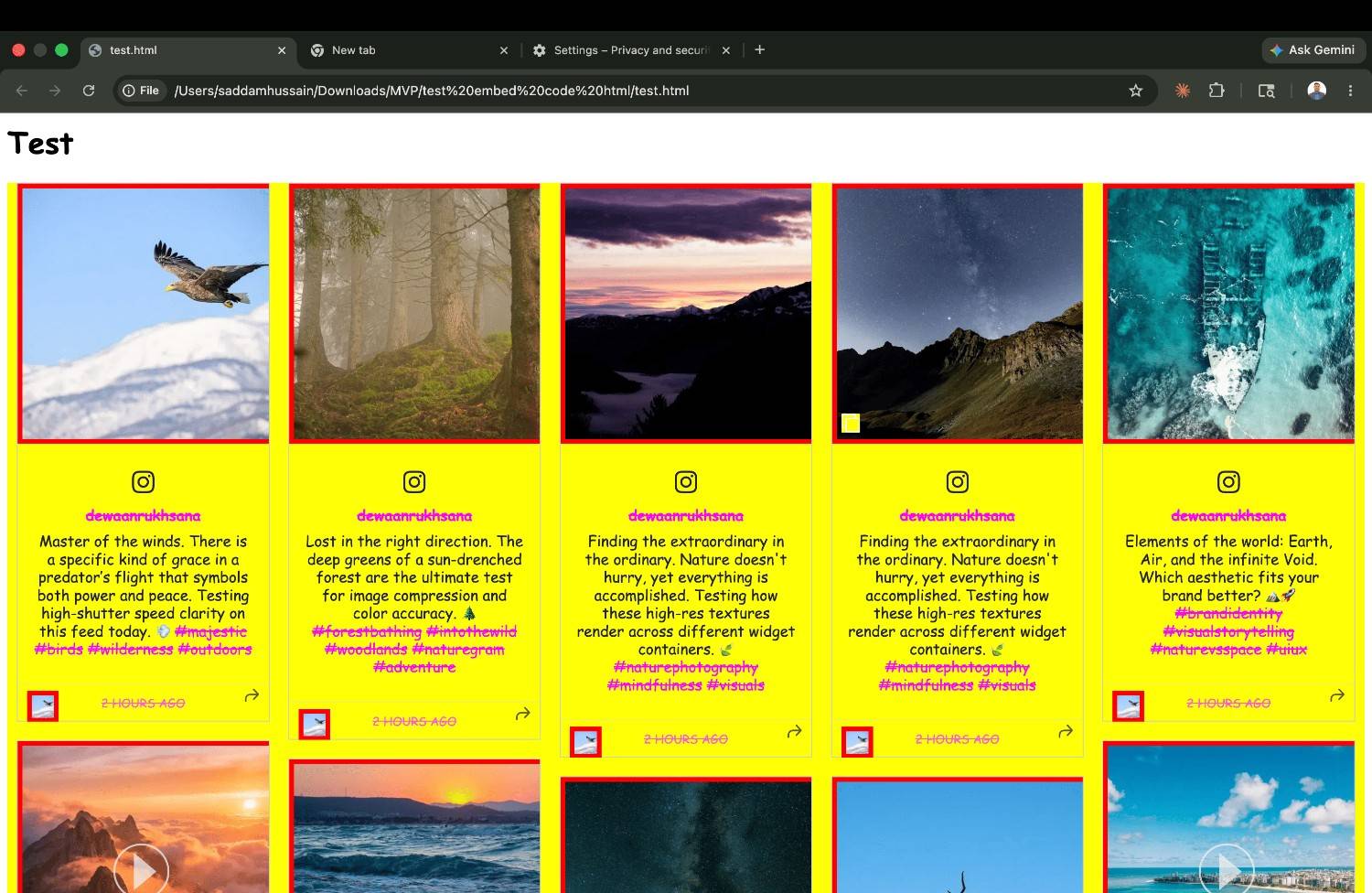
| Widget | Isolation Method | Page CSS Breaks Widget? | Widget CSS Leaks Out? |
|---|---|---|---|
| CollectSocials | Shadow DOM | No ✓ | No ✓ |
| Walls.io | Iframe | No ✓ | No ✓ |
| Flockler (iframe) | Iframe (optional) | No ✓ | No ✓ |
| Curator.io | None (global CSS) | Yes ✗ | Yes ✗ |
| Juicer.io (default) | None (global CSS) | Yes ✗ | Yes ✗ |
| Elfsight | None (global CSS) | Yes ✗ | Yes ✗ |
An X (Twitter) Hashtag Feed Requires Connecting an X Account
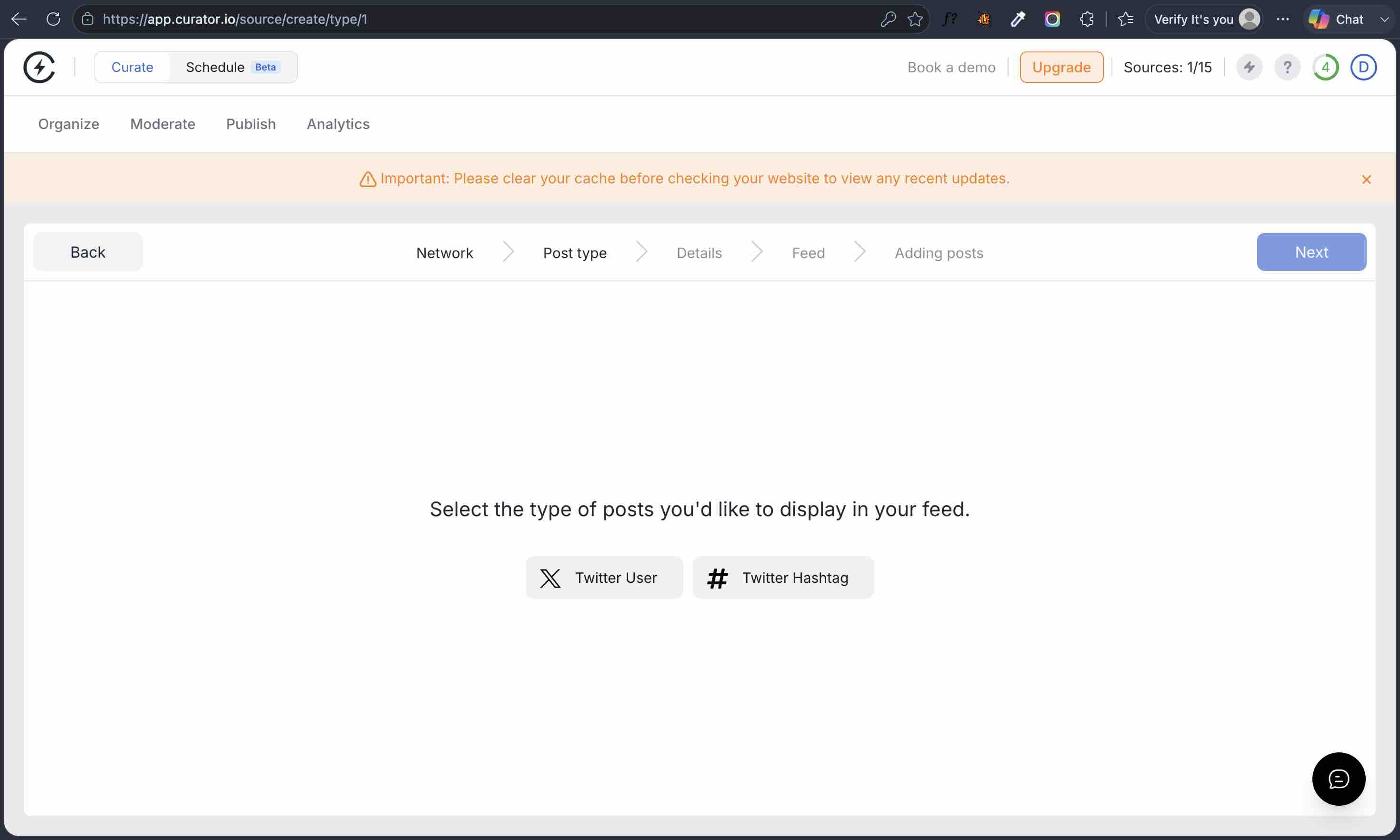
This one is easy to miss until you are halfway through setup, and it decides whether some projects are possible at all. In August 2026 I walked Curator.io's X source flow end to end. At the Post type step it offers exactly two choices, Twitter User and Twitter Hashtag.
Pick either one and the next step is the same wall: "Please connect an X / Twitter Profile", with the explanation "To access posts on X / Twitter you must first connect Curator to a X / Twitter account." I selected each post type in turn and got this identical screen both times. There is no path past it without authorising an X account.
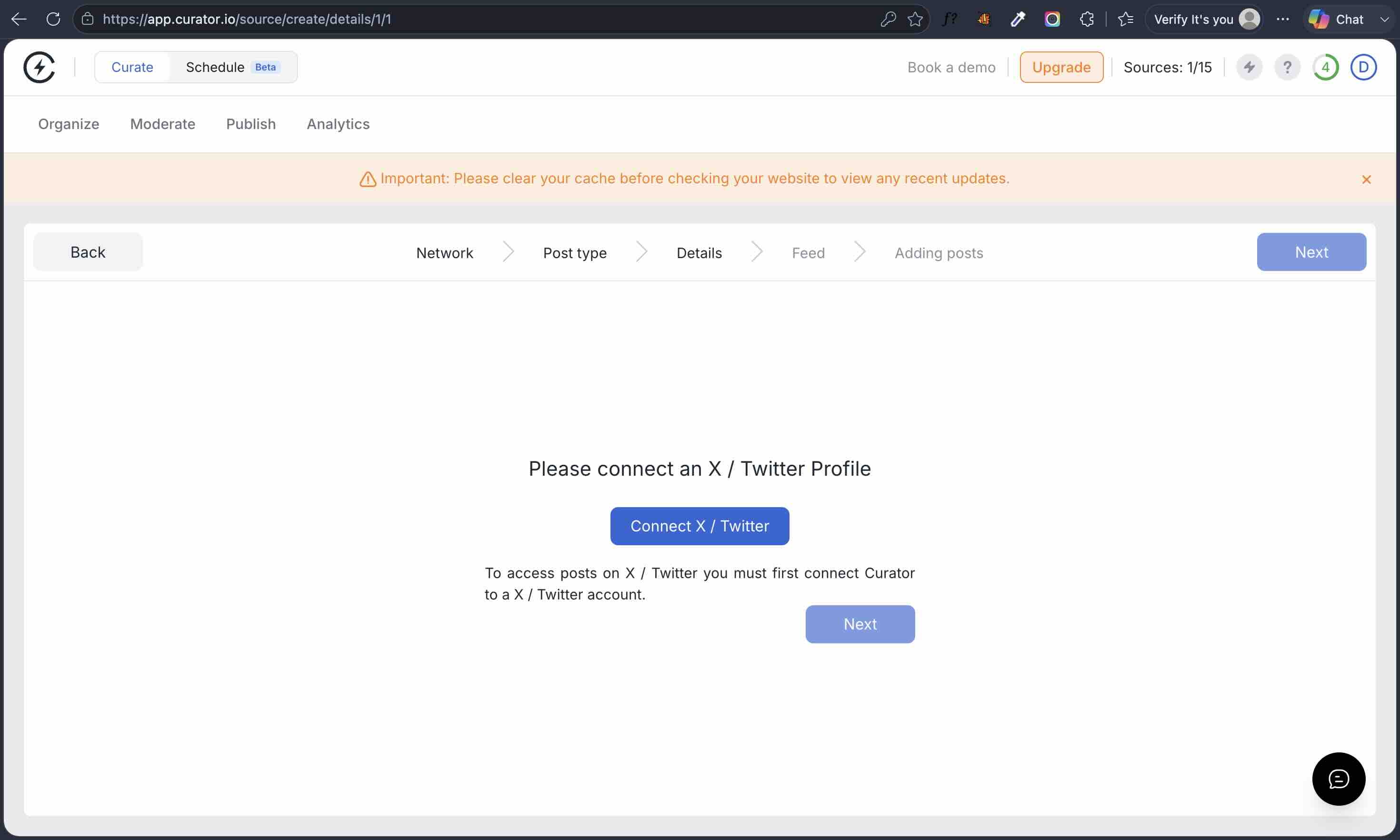
Why this matters beyond one extra click. A hashtag feed displays other people's public posts, so there is no technical reason it needs your account: X's recent-search endpoint answers to application-level credentials. Requiring a user connection means the reads are running against an account rather than against the vendor's own credentials, and that has consequences you inherit:
- A business with no X presence cannot display an X hashtag wall at all without creating an account purely to authorise the tool.
- An agency has to ask a client for X access, or sit through a screen-share, before it can build anything.
- The feed is tied to whoever authorised it. When that person leaves and their access is revoked, the connection goes with them.
Dollar-Per-Source Pricing
| Tool | Plan | Sources | Price | $/Source |
|---|---|---|---|---|
| Curator.io | Pro | 5 | $25/mo | $5.00 |
| Curator.io | Business | 15 | $59/mo | $3.93 |
| CollectSocials | Pro | 5 | $29/mo | $5.80 |
| CollectSocials | Business | 15 | $59/mo | $3.93 |
| Flockler | Basic | 8 | $129/mo | $16.13 |
| Juicer.io | Starter | 5 | $25/mo | $5.00 |
| Tagembed | Starter | 2 | $19/mo | $9.50 |
1. CollectSocials: Strong Value Across All Tiers
CollectSocials turns one curated feed of posts, reviews and video into both a widget on your website and a full-screen wall the whole room can post to, with consent recorded and provable on every post. Ten platforms are live: Instagram, TikTok, YouTube, Facebook, X, Google Reviews, Pinterest, Vimeo, Tumblr and RSS. LinkedIn is not live yet. Against Curator.io it differentiates on three dimensions: layout quality, pricing, and user experience.
Where CollectSocials wins
The layout and theme library is the most immediately noticeable difference. CollectSocials ships forty layouts and sixteen themes, and every combination looks polished without any customization. For businesses that do not have a designer on staff, the quality of default templates directly determines how professional their social wall looks. The full-screen event wall is a separate renderer with eleven display modes of its own, so nothing about the website embed has to be compromised to make it work on a TV.
Pricing lands in the same bracket as Curator.io, and the limits behind it are where the two separate. The free plan includes one connected source, unlimited feeds, 2,000 monthly page views, and keyword moderation, which is not tier-gated here. The 7-day trial opens three sources. Pro at $29 per month (against Curator.io's $25) gives you five sources, all 40 layouts and 30,000 page views, twice their allowance at the same source count. Business at $59 per month, the same monthly price as theirs, includes 15 sources, unlimited page views, premium platform access, AI-powered moderation and the live event wall. X sources run one, two and five across the three paid tiers, against a cap of one on theirs, and X refreshes every 12 hours on every paid plan because X bills per post returned. Annual billing is two months free: $290, $590 and $1,190 a year.
What you're seeing
Interactive design playground: 5 layouts × 5 themes. Click any layout button (Grid, Masonry, Carousel, Coverflow, Marquee) and any theme button (Minimal, Shadow, Neon, Brutalist, Sunset) to see your feed transform instantly. Sample posts from Google, Instagram, YouTube, and Facebook populate the live preview, showing exactly how each combination looks. The playground samples five of each; the tagline below gives the full catalogue.
Curator.io's templates have remained largely static since launch, achieving a modern look requires custom CSS knowledge. This interactive playground shows what happens when design is a core feature: professional results without code. For businesses without in-house designers, the difference between "looks acceptable" and "looks professional" comes down to the quality of default templates. CollectSocials delivers 640 combinations, Curator.io delivers dated defaults.
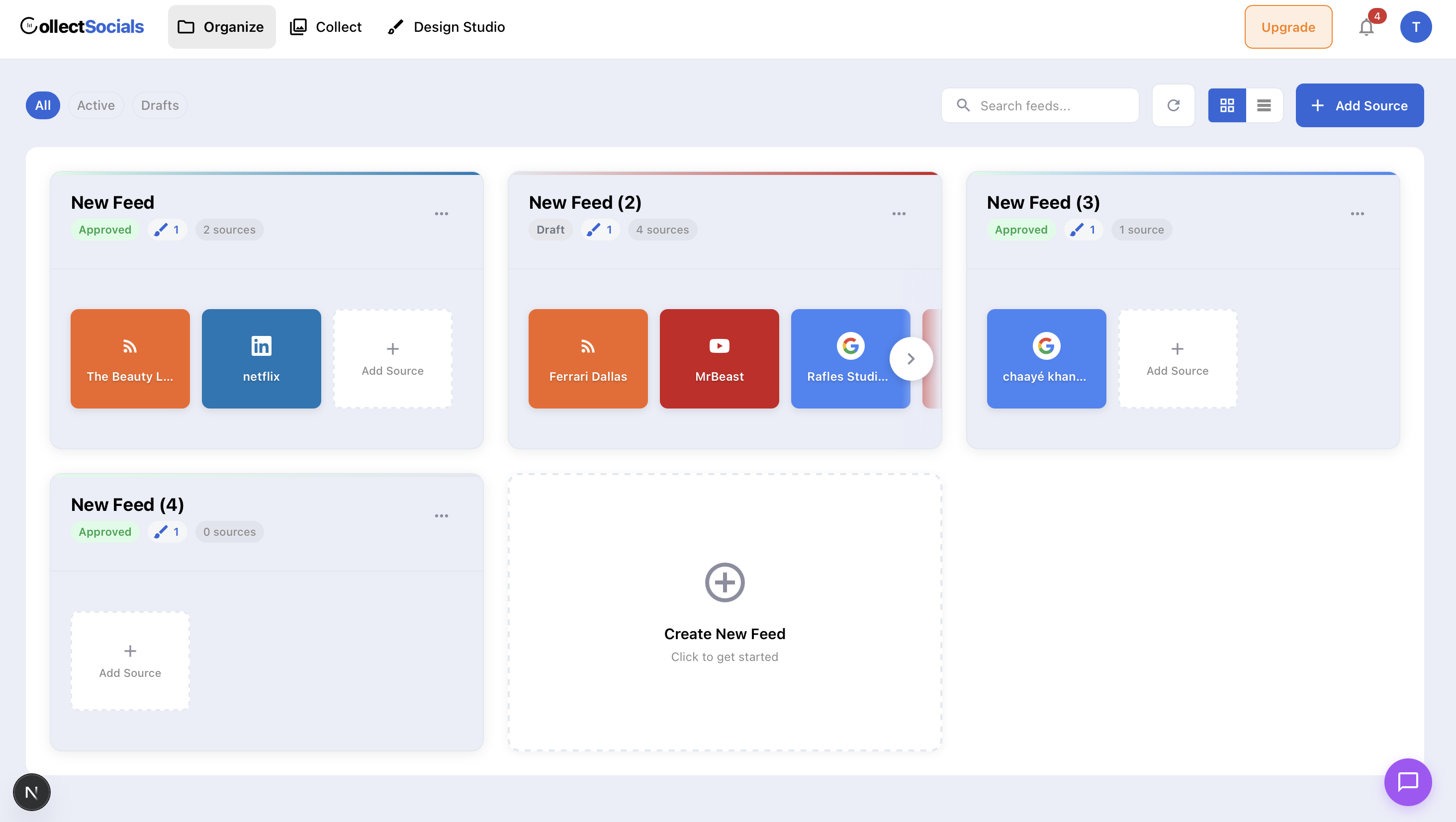
The interface is clean and modern, with a guided onboarding flow that walks new users through setup without requiring documentation. Feeds are unlimited on all plans, you only pay based on the number of sources, not the number of feeds or embeds you create. This is a significant structural advantage over tools that charge per feed or per embed.
Where to keep in mind
CollectSocials gates by connected source, so Pro carries five sources and Business fifteen, and LinkedIn is not live yet. There is no SSO and no data processing agreement to sign, which rules it out of some enterprise procurement. Those are the limits worth checking against your own list before you switch.
Pricing
- Free: 1 source, 7 layouts, all 16 themes, 2,000 page views, $0/mo (7-day trial opens 3 sources and the full design studio)
- Pro: 5 sources, 30,000 page views, $29/mo
- Business: 15 sources, unlimited page views, live event wall, $59/mo
2. Juicer: Simplest Setup for a Single Feed
Juicer is one of the oldest social media aggregators on the market and has built a reputation for simplicity. It supports over 15 platforms and offers a clean, no-fuss approach to embedding social feeds. The free plan includes one source account (with Juicer branding on your feed), and paid plans start at $15 per month for three sources, which is what the CollectSocials 7-day trial opens before free settles at one. For five sources, Juicer charges $25 per month.
Where Juicer works well: The setup process is genuinely straightforward, and the tool is reliable for basic use cases. If you need a single Instagram and Twitter feed on your blog and do not want to think about it again, Juicer handles that well.
Where it falls short: Customization is limited to nine built-in styles, and meaningful changes mean writing CSS on a paid plan. The design templates feel dated, and the analytics capabilities are basic. A notable limitation is that Juicer does not retain content when you change your sources, switch from one hashtag to another, and the old content disappears. For businesses running rotating campaigns, this is a meaningful drawback. Customer support on lower-tier plans is also limited.
Pricing: Free (1 source, with branding) · $15/mo (3 sources) · $25/mo (5 sources) · higher tiers available
3. Walls.io: Best for Live Events
Walls.io sells into the event and enterprise market. It supports over 14 social networks and direct content uploads, and its event wall carries QR-code audience contributions, live polls and a photo booth. Major brands like Adobe and BMW use Walls.io for large-scale events. Those three capabilities are not the dividing line buyers assume, though. CollectSocials runs QR pair-to-TV, attendee posting with no account and live multiple-choice polls on its $59 Business plan.
Where Walls.io works well: the reasons to pay its premium are specific rather than general. Branded frames and stickers applied to an attendee's own photo, emoji reactions, and named integrations with event platforms and signage vendors are all things it offers that the cheaper tools on this list, CollectSocials included, do not. It also publishes accessibility-optimized layouts against WCAG 2.1 and a documented GDPR and CCPA posture, which matters when a procurement review is part of how you buy. If any of those sit on your requirement list, it is the tool on this page that answers them.
Where it falls short: Walls.io is expensive for small businesses that just need a website embed. The cheapest plan starts at $270 per month, which is significantly higher than Curator.io, let alone more affordable alternatives like CollectSocials. Most of its advanced features are tier-locked behind premium plans. The website embed use case works, but the tool's design and feature priorities clearly favor the events market.
Pricing: Plans start at $270/mo. Event passes available for one-time occasions.
Comparing at a glance
Seven alternatives, one decision framework. This comparison visualizes how each tool positions against Curator.io across the dimensions that matter most: starting price, free plan availability, primary use case, and key limitation.
The pattern that emerges is clear: Curator.io sits in an awkward middle ground. Tools like CollectSocials match it on price while delivering better design and carrying a full-screen event wall on the same feed. Walls.io and Flockler price at a premium for narrower buyers: branded photo overlays and named event-platform integrations on one side, multi-site layout sprawl on the other. Tools like Juicer and Tagembed compete on entry-level simplicity. Curator.io no longer holds a distinctive advantage in any specific category, which is why the alternatives market has grown so quickly.
4. EmbedSocial: Best for Review Integration
EmbedSocial differentiates itself through its review aggregation capabilities. While it functions as a social media aggregator (under its "EmbedFeed" product), its real strength is pulling in Google Reviews, Facebook Reviews, and other review platform content alongside social media posts. It holds approved API integrations with Google, Instagram, and TikTok.
Where EmbedSocial works well: If reviews are a core part of your social proof strategy, particularly Google Reviews, EmbedSocial handles this better than most competitors. The widgets are customizable, and the platform supports AI-generated replies to reviews.
Where it falls short: The social media aggregation features are separated from the review features, meaning you may need to pay for two different products to get full functionality. Paid plans start at $29 per month for Pro (3 sources, 5,000 views), $49 per month for Pro Plus (6 sources, 20,000 views), and $99 per month for Premium (15 sources, 100,000 views). For businesses that primarily need social media aggregation without the review component, the pricing-to-value ratio is less competitive.
Pricing: Pro $29/mo (3 sources) · Pro Plus $49/mo (6 sources) · Premium $99/mo (15 sources)
5. Flockler: Best for Multi-Layout Needs
Flockler's standout structural advantage is that you pay for sources, not layouts. Once you connect your social accounts, you can create unlimited display layouts, grids, carousels, slideshows, walls, without consuming additional source slots. This makes it significantly more cost-effective than Curator.io for businesses that need to display the same content in different formats across multiple pages or websites.
Where Flockler works well: Multi-brand organizations, universities, and companies with multiple website properties benefit the most. The tag-filtering feature is particularly powerful, you can create one Instagram source and then display filtered subsets of that content on different pages based on hashtags. Content is retained even when you change sources, which is a major advantage over both Curator.io and Juicer.
Where it falls short: Flockler is expensive. Pricing starts at $129 per month for the Basic plan, $229 for Business, and $379 for Pro. There is no free plan, only a 14-day trial, after which you must subscribe to continue using the service. For small businesses that need a simple social wall, this pricing is difficult to justify. The interface also has a learning curve that can overwhelm new users.
Pricing: No free plan · 14-day trial · Basic $129/mo · Business $229/mo · Pro $379/mo
6. Taggbox/Tagembed: Best Budget Option for Beginners
Taggbox is Tagembed's sister product under the same parent company. The 2026 merger pulled both brands closer, and they now split by job: Taggbox carries the UGC platform side, shoppable galleries and campaign analytics, while Tagembed stays the no-code embed with the wide CMS list. Tagembed is a no-code aggregator that focuses on accessibility and affordability. It supports over 20 platforms and integrates with more than 120 CMS platforms, including WordPress, Shopify, Wix, and Magento. The interface prioritizes simplicity, and the free plan includes one feed with 500 monthly views.
Where Tagembed works well: If you are on a very tight budget and need basic social feed embedding without advanced features, Tagembed is a viable entry point. The CMS integration breadth is a genuine strength, no matter what platform your website is built on, Tagembed probably supports it. Paid plans start at $19 per month (Starter), with Growth at $39 per month and Advance at $99 per month. Its UGC rights and consent workflow is not on the free plan; CollectSocials runs rights requests on every plan, five a month on Free and Pro and uncapped from Business, with a timestamped consent trail on each one.
Where it falls short: Customization options are limited on lower-tier plans, and the default templates are basic. Users frequently report that advanced customization requires a learning curve that contradicts the tool's "no-code" positioning. Feed layouts are not as polished as the best on this list, and some features feel locked behind progressively expensive tiers. The free plan's 500-view limit is extremely restrictive for any site with meaningful traffic.
Pricing: Free (limited) · Starter $19/mo · Growth $39/mo · Advance $99/mo
7. Elfsight: Lowest Entry Price Point
Elfsight is a widget marketplace, it offers hundreds of different website widgets, with Instagram feed being one of them. This broad scope is both its strength and its main limitation in this context.
On the positive side: Elfsight's entry pricing is genuinely low. The Single App plan starts at $5 per month (billed yearly) or $6 month-to-month for the Basic tier, 3 widgets, 5,000 monthly views, and unlimited websites. Pro is $10 per month yearly ($12 monthly) for 9 widgets and 50,000 views. Premium hits $20 per month yearly ($24 monthly) for 21 widgets and 150,000 views. There's also a free plan, but it caps you at 1 widget with just 200 monthly views and displays Elfsight branding, effectively a demo. Setup is fast, connect Instagram, pick a layout, copy the embed. Five layouts (Grid, Masonry, List, Slider, Carousel) and 12 color schemes cover basic design needs.
If you need multiple Elfsight apps (say, an Instagram feed plus a Google Reviews widget), the 96 Apps Pack bundles everything: Basic at $15 per month yearly ($18 monthly) with 5,000 views per app, Pro at $30 per month yearly ($36 monthly) with 50,000 views per app, and Premium at $60 per month yearly ($72 monthly) with 150,000 views per app. Each platform is still a separate widget with its own embed code, they don't merge into a unified feed. (For a deeper analysis of Elfsight's limitations and what to use instead, see our Elfsight alternatives guide.)
Here's what our testing revealed that contradicts common assumptions: Elfsight does not use an iframe. When we inspected the DOM, the widget renders directly into the page as plain <div> elements with classes like eapps-instagram-feed-container. No shadow root, no iframe boundary. Our CSS leak test turned the entire widget yellow with Comic Sans text and red-bordered images. If your site has any custom CSS, which every site does, you're risking visual conflicts that are difficult to debug.
Elfsight is a script embed with no style isolation, so host CSS reaches straight into the feed. It loads 2 files, against one for CollectSocials.
Because Elfsight is a widget marketplace rather than a social aggregator, combining Instagram with Google Reviews requires purchasing and embedding a separate widget, they don't merge into a single feed. This means multiple embed codes, inconsistent design, and costs that stack per platform. Customer support is a recurring complaint in public reviews.
If your only requirement is a basic Instagram feed on one site and budget is the primary constraint, Elfsight works at its entry price. Just know that your site's CSS can break the widget, and the widget's CSS can leak into your page. The view cap is also worth watching, the free plan's 200-view limit means even modest traffic will deactivate your widget, and exceeding caps on paid plans has the same effect with no graceful fallback. For a detailed breakdown of alternatives that address these limitations, see our Elfsight alternatives guide.
8. Onstipe: Best Budget Option for Basic Needs
Onstipe positions itself as the affordable alternative in the social wall category. It supports aggregation from major platforms including Instagram, X/Twitter, Facebook, LinkedIn, YouTube, Tumblr, and Flickr using hashtags, handles, or page URLs. The platform offers both website embedding and event display capabilities, with layout templates designed for digital screens, projectors, and TV displays alongside standard website widgets.
Where Onstipe works well
The pricing is genuinely budget-friendly. Plans start at just $8 per month for the Nano tier, with the Starter plan at $15 per month offering four sources and 100,000 page views. For businesses that need basic social aggregation without paying premium prices, Onstipe delivers functional results at a price point that is over 90 percent cheaper than enterprise alternatives. The platform also supports event-specific features like hashtag walls for conferences and temporary event plans that you can purchase separately. That per-event buying shape is the one thing CollectSocials does not match: its event wall sits inside the $59 Business subscription rather than a day pass, which is the better deal only if the wall runs alongside a website feed you keep all year. Worth knowing before you compare on price alone, though: every CollectSocials team's first event runs free on a one-time 24-hour go-live window, on a free account with no credit card, so a single event can be run without buying either a pass or a subscription.
Where it falls short
The design quality reflects the price point. Templates are functional but basic compared to what CollectSocials, Curator.io, or premium tools offer. Customization options are limited, and while custom CSS is available on some plans, the default themes are not likely to impress visitors on a polished brand website. API access sits on the Business tier and higher event plans, which limits its usefulness for businesses with custom integration needs on the cheaper plans. The free plan is restrictive and includes Onstipe branding. User reviews on Capterra note that the backend can feel slow, and theme customization is generic.
Pricing
Pricing: Free (limited, branded) · Nano $8/mo · Starter $15/mo · Plus $25/mo · Economy $39/mo · Business $69/mo · Event plans available separately
Quick Comparison Table
| Tool | Free Plan | Starting Price | CSS Isolation | Best For |
|---|---|---|---|---|
| Curator.io | 3 sources, minimal branding | $25/mo | None ✗ | Platform variety, lightweight |
| CollectSocials | 1 source, 7 layouts, all 16 themes (7-day full trial, 3 sources) | $29/mo | Shadow DOM ✓ | One feed driving both a website widget and a live event wall |
| Juicer | 1 source, branded | $15/mo | Iframe (optional) | Broad platform support |
| Walls.io | 14-day trial only | $270/mo | Iframe ✓ | Live events, digital signage |
| EmbedSocial | Free (1 source, 500 views) | $29/mo | Iframe ✓ (JS embed: partial) | Review integration |
| Flockler | No free plan (14-day trial) | $129/mo | Iframe (optional) | Multi-brand, unlimited layouts |
| Taggbox/Tagembed | 500 views/mo | $19/mo | Iframe (optional) | Budget CMS integration |
| Elfsight | 1 widget, 200 views (branded) | $5/mo (yearly) | None ✗ | Widget marketplace, low entry price |
| Onstipe | Free (branded, limited) | $8/mo | Not tested | Budget option |
How to Choose the Right Alternative
The right tool depends on your specific situation.
If you want strong value for money with modern design: CollectSocials. It offers approximately 20% savings over Curator.io, better layouts, unlimited feeds on all plans, and a genuinely functional free tier. For most small to mid-size businesses, this is a strong overall package.
If you primarily run live events: the answer depends on which capability you need on the day. If it is branded photo-booth frames or stickers applied to an attendee's own photo, emoji reactions, or a named integration with your event platform or signage vendor, that is where Walls.io is ahead of the cheaper tools on this list, CollectSocials included, and plans start at $270 per month. If what you need is the wall itself, CollectSocials Business at $59 per month runs eleven full-screen modes rendered by the screen page itself, QR pair-to-TV with fifteen-minute codes and no login on the venue machine, attendee posts with no account at all (a photo, a message or a question, through an in-browser camera booth with a three-second countdown), live multiple-choice polls with animated result bars on the screen, and a human moderation queue that is on by default. The same curated feed drives the website widget on the same account.
If reviews are your main social proof asset: EmbedSocial. Its ability to pull Google and Facebook reviews into website widgets alongside social feeds is its key differentiator. Just be prepared for the costs of combining multiple products.
If you manage multiple websites or language versions: Flockler. The unlimited layouts and tag-filtering features justify the premium pricing for organizations with complex, multi-property needs.
If you are on the tightest possible budget: Start with CollectSocials' free plan (one connected source, 2,000 views, our link under the feed, three sources through the 7-day trial) and upgrade as your traffic grows. It provides the most room to grow without hitting a pricing cliff.
Curator.io's WebP image pipeline is a real strength. But zero CSS isolation (with no iframe alternative) and dated templates mean developers still need significant work to make it production-ready. Priced within a few dollars of each other, the question stops being which is cheaper and becomes what arrives with the plan: native Shadow DOM isolation, forty layouts, and consent recorded on every post from the free tier up. And if any part of your year involves a screen in a room, the same $59 Business plan carries the full-screen event wall on the same feed and the same account, so that use case does not turn into a second subscription. Whether you land on CollectSocials or another option from this list, you have no shortage of alternatives.
Weighing more than one incumbent? We have also broken down the best Flockler alternatives with the same criteria.
Start Using CollectSocials Today
One curated feed from 10+ platforms: on your website in a single line of code, or up on the big screen at your event.