
But affordable and sufficient are not the same thing. As your website matures and your social media presence grows, Onstipe's limitations become increasingly visible: basic design templates that look generic on professional sites, a backend that Capterra reviewers repeatedly describe as slow, no API access on most plans, and a free plan so restrictive it functions more as a demo than a usable product. If you chose Onstipe because the price was right but now find yourself wishing the output looked more polished, you are not alone.
This guide compares eight Onstipe alternatives that range from free tools with modern design to enterprise platforms with unlimited layouts. We break down what each does well, where it falls short, and how pricing compares, so you can find the right upgrade without overspending.
sync
How it works
Onstipe promises automation, but slow refresh rates and platform restrictions on lower tiers undermine that promise. The animation shows how social aggregation should work: posts flow from your accounts to your website continuously, with minimal delay and no manual intervention. This is the baseline expectation, not a premium feature.
At Onstipe's Nano tier, you wait four hours for updates. At Starter, one hour. If your business actively posts during campaigns or product launches, that lag creates a disconnect between your social activity and what visitors see. The tools below deliver faster syncing and broader platform coverage without requiring constant manual management or restrictive refresh windows.
How Each Widget Renders
We installed each of the alternatives on a blank test page and recorded what it loads and how it isolates its styles. Onstipe itself was not part of that run. Here's how they compare:
| Widget | Render method | Files loaded | Style isolation |
|---|---|---|---|
| Curator.io | Script embed | 4 | None |
| Flockler | Script embed | 2 | None (iframe optional) |
| CollectSocials | Script embed | 1 | Shadow DOM |
| Juicer.io | Script embed | 2 | None |
| Taggbox/Tagembed | Script embed | 22 | None (iframe optional) |
| EmbedSocial | Cross-origin iframe | 10 | Iframe (full) |
| Walls.io | Cross-origin iframe | 11 | Iframe (full) |
| Elfsight | Script embed | 2 | None |
CSS Isolation: Protecting Your Website Design
We tested CSS isolation by injecting aggressive styles to see which widgets survive without breaking. Proper CSS isolation prevents your website's styles from breaking the widget and prevents the widget from affecting your page design.
| Widget | Isolation Method | Page CSS Breaks Widget? | Widget CSS Leaks Out? |
|---|---|---|---|
| CollectSocials | Shadow DOM (open) | No ✓ | No ✓ |
| Walls.io | Iframe | No ✓ | No ✓ |
| Flockler (iframe embed) | Iframe (optional) | No ✓ | No ✓ |
| Taggbox (iframe embed) | Iframe (optional) | No ✓ | No ✓ |
| EmbedSocial (direct iframe) | Iframe | No ✓ | No ✓ |
| EmbedSocial (JS embed) | Iframe (JS-injected) | During load only ✗ | Minor ✗ (wrapper div) |
| Flockler (default script) | None (global CSS) | Yes ✗ | Yes ✗ |
| Taggbox (default script) | None (global CSS) | Yes ✗ | Yes ✗ |
| Elfsight | None (global CSS) | Yes ✗ | Yes ✗ |
| Curator.io | None (global CSS) | Yes ✗ | Yes ✗ |
| Juicer.io (default script) | None (global CSS) | Yes ✗ | Yes ✗ |
| Juicer.io (iframe embed) | Iframe | No ✓ | No ✓ |
Why People Look for Onstipe Alternatives
Onstipe delivers on its promise of being cheap and functional. But “cheap and functional” comes with trade-offs that become more apparent as your needs grow. These are the specific friction points drawn from Capterra reviews, comparison sites, and hands-on evaluation.
Design quality is basic. Onstipe offers a set of layout templates for both web embedding and display screens, but they are generic. The themes are functional in the sense that they display social posts in recognizable formats, but they lack the visual polish that modern websites demand. Reviewers on Capterra note that the backend feels slow and theme customization options are “too generic,” providing limited control over how the final widget looks. If your website has a clean, professional design system, Onstipe's widgets can look noticeably out of place. Custom CSS is available on some plans, but the default templates do not provide a strong starting point.
The free plan is effectively a demo. Onstipe's Free Forever plan includes just two sources, only Facebook and Instagram, with a 24-hour refresh rate, 500 page views per month, Onstipe branding, and ads displayed within your feed. Five hundred page views is insufficient for any business website with even modest traffic most sites will exhaust that within the first few days. The ads and branding make it unusable for any professional context. This means the free plan serves as a testing sandbox, not a production-ready tool.
Slow refresh rates on lower tiers. The Nano plan refreshes content every four hours. The Starter and Plus plans bring this to one hour. Thirty-minute refresh rates require the Economy plan, and fifteen-minute updates require the Business plan. If you are actively posting on social media during a product launch or campaign and want your website to reflect that in near-real-time, you need to be on one of the higher-priced tiers.
X/Twitter is restricted to higher plans. Onstipe's Nano and Starter plans do not include X/Twitter support at all. To aggregate tweets, you need the Plus plan or above, and even then, tweets are capped: 500 per month on Plus, 1,000 on Economy, and 2,000 on Business. For businesses that rely on X/Twitter as a key social channel, this restriction is a meaningful limitation that other tools do not impose.
No API on most subscription plans. API access is only available on the Business subscription tier and higher event plans. For businesses that want to integrate social feed data into custom applications, dashboards, or workflows, this limitation forces an upgrade to the most expensive tier regardless of whether they need the other features it includes.
No Google Reviews support. Onstipe supports Facebook Reviews through its widget, but does not offer Google Reviews aggregation. For local businesses, restaurants, clinics, service providers, where Google star ratings are the primary source of social proof, this is a notable gap that competitors fill.
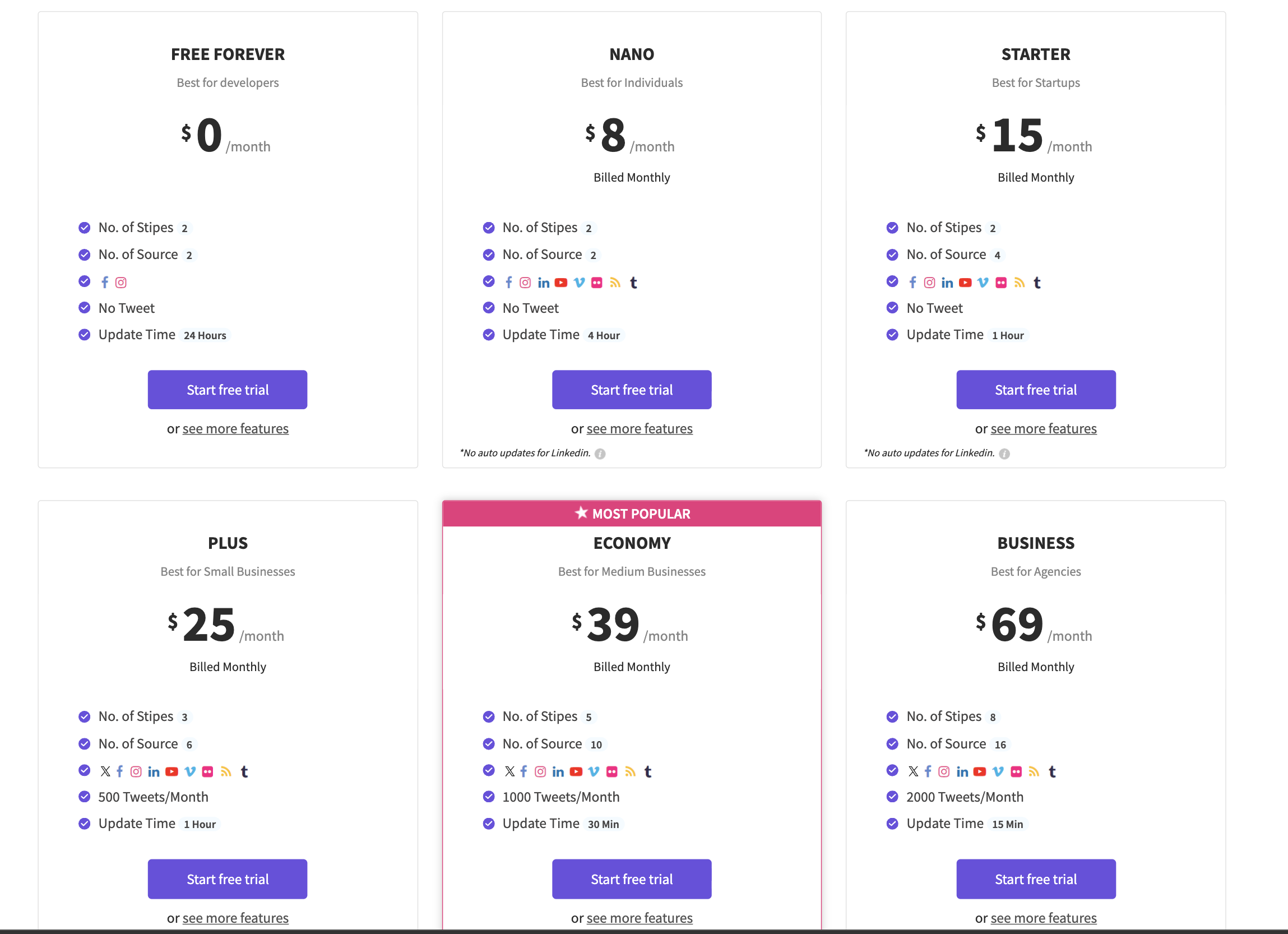
LinkedIn has no auto-updates. While Onstipe lists LinkedIn as a supported platform, the pricing page notes that there are “no auto updates for LinkedIn” across all plans. This means LinkedIn content must be managed manually, which undermines the core value proposition of an automated social aggregator.
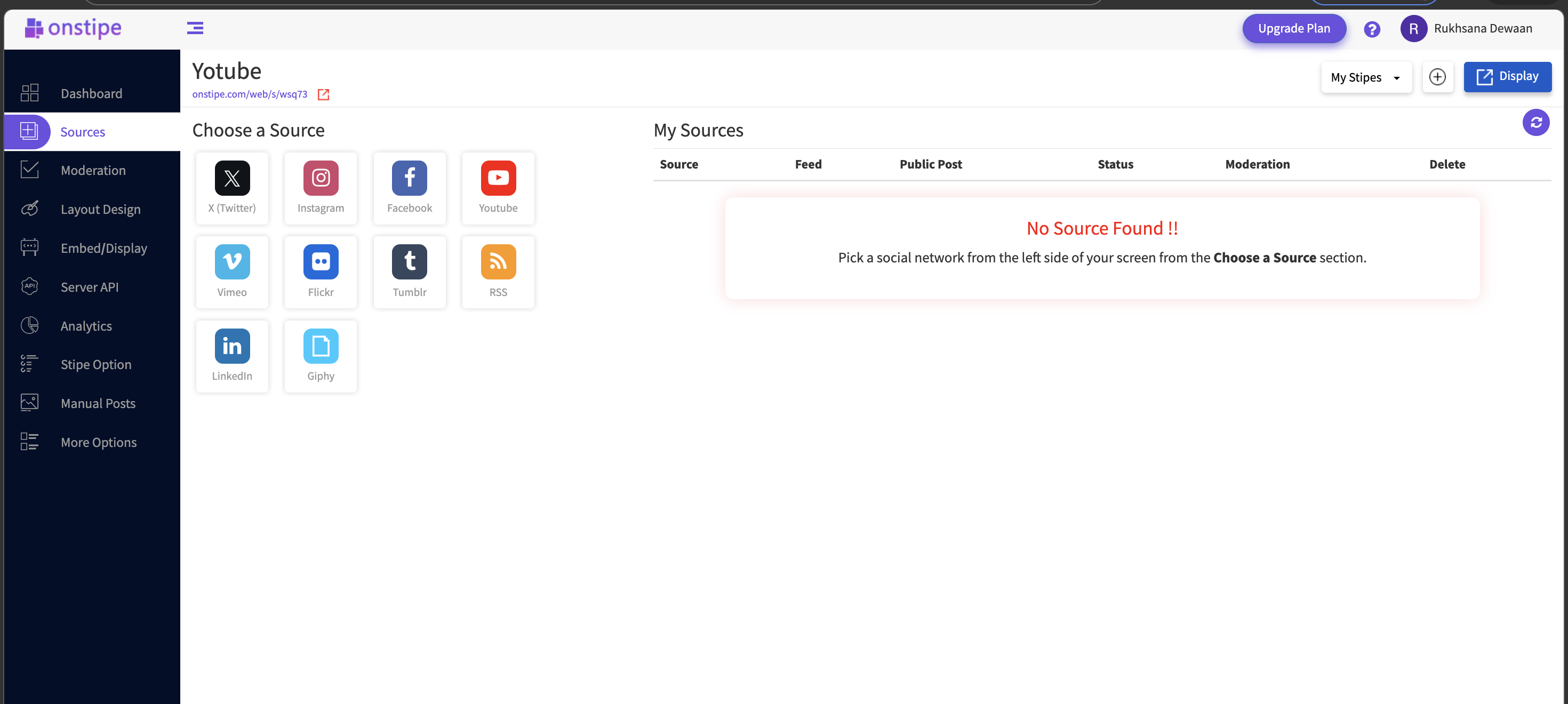
These limitations reflect Onstipe's positioning as a budget tool. They do not make it unusable, but they explain why users who want professional-quality output, broader platform support, or faster content syncing look for alternatives.
Manual embedding vs automation
Split-screen: 20 minutes vs 2 minutes. LEFT side shows manual embedding: find post on LinkedIn, copy embed code, open website editor, paste code, publish page. Five posts, ~20 minutes, exhaustion emoji worsening with each cycle. RIGHT side shows automation: connect account once (~2 minutes), posts flow automatically forever. Bottom: "CollectSocials saved ~18 minutes, and every future update is free."
Onstipe's budget pricing means basic automation on cheap plans, real functionality locked behind upgrades. You chose it for affordability, but slow performance and limited customization mean compensating for what the tool can't do. This split-screen makes the trade-off visceral: true automation means connecting once and forgetting feed management. Onstipe's tier structure forces you to choose between low cost and actual usability.
1. CollectSocials: Significant Design and Feature Upgrade
Best for: Businesses upgrading from Onstipe who want dramatically better design quality, unlimited feeds, and a free plan that is actually usable in production.
CollectSocials turns one curated feed of posts, reviews and video from ten platforms into both a widget on your website and a full-screen wall the whole room can post to, with consent recorded and provable on every post. The live sources are Google Reviews, YouTube, X/Twitter, TikTok, Instagram, Pinterest, RSS feeds, Vimeo, Tumblr, and Facebook. LinkedIn is not live yet. Where Onstipe gives you functional but generic templates, CollectSocials gives you professional results that match the quality of the rest of your website, and the feed that runs on the site is the same one that runs on the screen at your event. If Instagram is the source you care most about, how to embed an Instagram feed on your website walks through every native method first and shows where each one stops.
Where CollectSocials wins
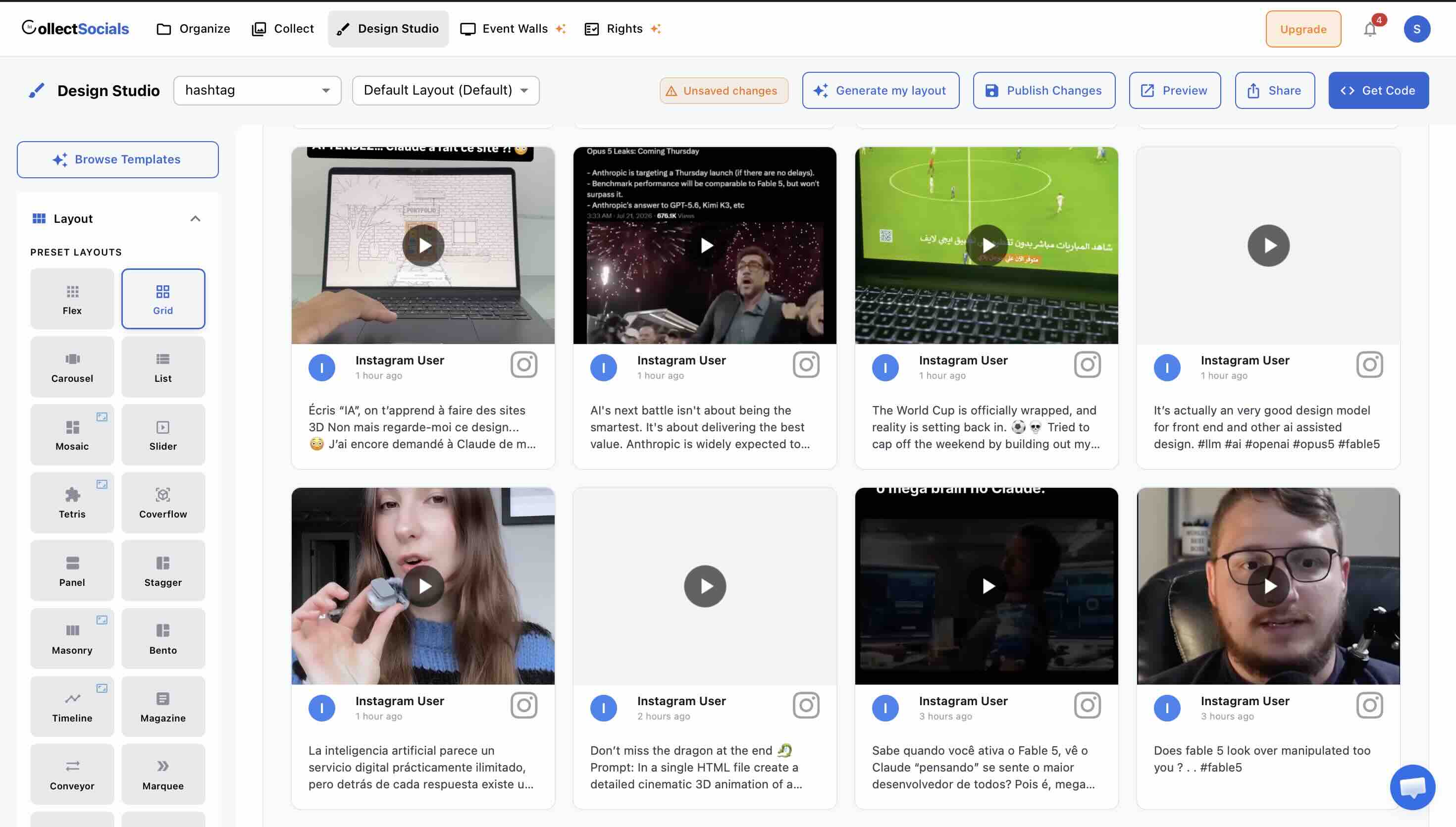
The design library is a significant upgrade. CollectSocials offers forty professionally designed layouts Grid, Masonry, Carousel, List, Mosaic, Slider, Marquee, Compact, Tetris, Stack, Coverflow, Panel, Stagger, and Layers, paired with sixteen themes including Minimal, Bold, Elegant, Glass, Neon, Brutalist, Midnight, and more. Each combination produces a polished, modern result without writing a single line of CSS. For Onstipe users who have been frustrated by generic templates, this is the single biggest reason to switch.
How it works
Onstipe's generic templates reflect its budget positioning. The animation demonstrates what modern design flexibility looks like: switching between professional layouts and themes instantly, finding combinations that match your brand without touching code. This is not a luxury feature. In 2026, website visitors expect embedded content to look intentional, not bolted on.
Reviewers consistently note that Onstipe's backend feels slow and theme customization is too generic. Custom CSS is available on some plans, but the default starting point is weak. If your website has a polished design system, Onstipe's widgets will stand out for the wrong reasons. The visual upgrade shown above is the primary reason businesses move away from budget aggregators toward tools that prioritize design quality.
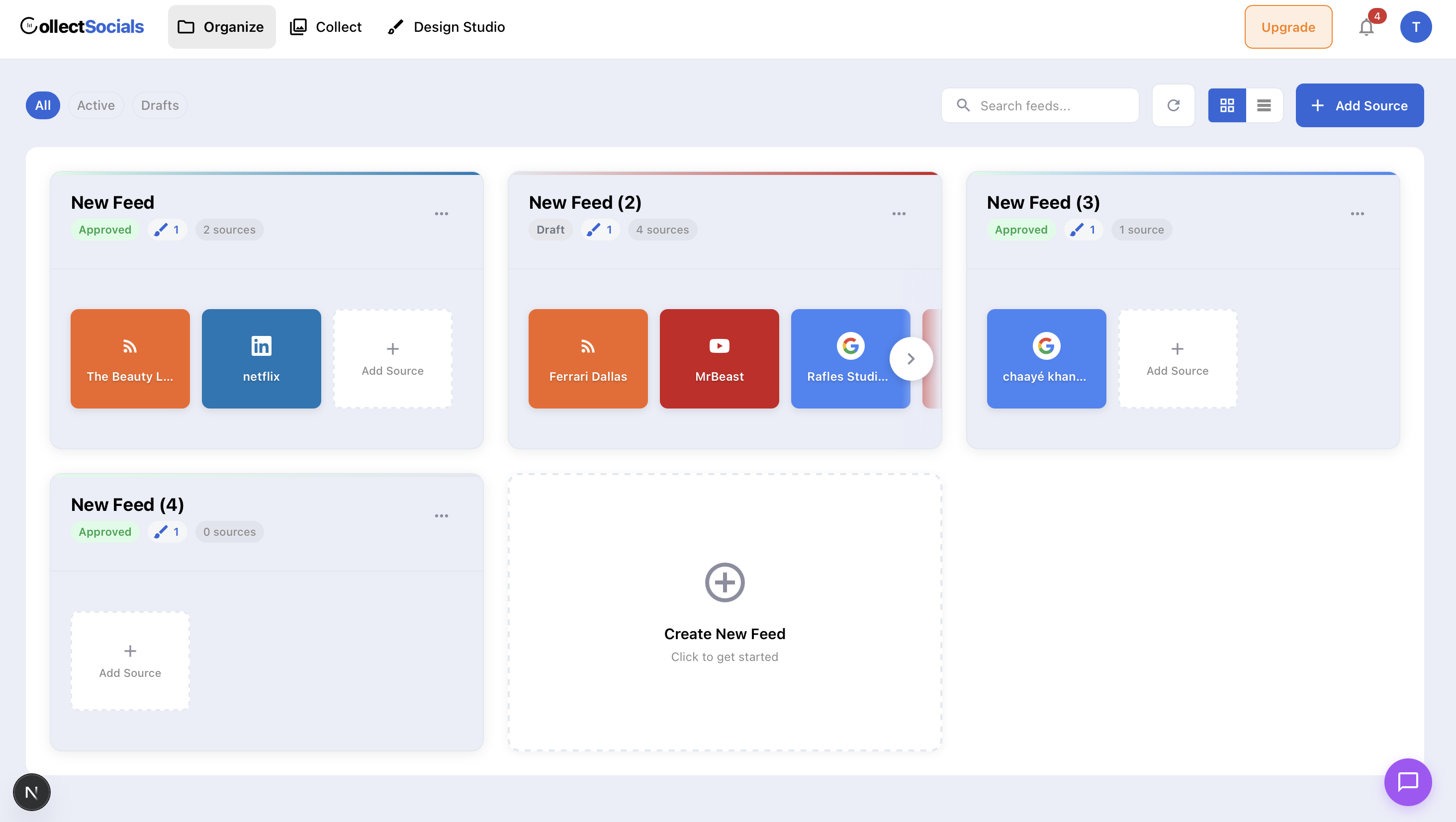
The free plan is genuinely production-ready. CollectSocials' free tier includes one connected source, unlimited feeds (versus Onstipe's two walls), 2,000 monthly page views, and seven layouts with all 16 themes. Every new account starts with a 7-day trial that opens three sources and the full design studio, all 40 layouts plus the custom card builder, so you can design the whole widget before deciding. This means a small business can use the free plan on a real website something Onstipe's ad-laden, heavily branded free plan cannot deliver.
Unlimited feeds on every plan. Onstipe limits the number of “Stipes” (walls) you can create based on your plan two on Nano and Starter, three on Plus, five on Economy. CollectSocials takes a different approach: create as many feeds as you want, and only pay based on the number of sources you connect. This means you can have separate feeds for your homepage, testimonials page, portfolio, and blog sidebar without being forced to upgrade. For a practical walkthrough, see our guide on embedding social feeds on any website.
Multiple layouts per source. On Onstipe, displaying the same content in different formats on different pages requires separate walls that consume your Stipe limit. CollectSocials lets you apply different layouts and themes to the same source feeds freely, show Google Reviews in a Carousel on your homepage and a Grid on your testimonials page without using an extra source slot.
Google Reviews support. This is a direct gap-fill for Onstipe users. CollectSocials supports Google Reviews as a first-class source on every plan, including the free one, letting you embed star ratings and customer testimonials directly on your website alongside social media content.
Shadow DOM isolation. The embed renders inside a Shadow DOM, keeping its CSS completely isolated from your site's styles. No broken layouts, no conflicts. It works on WordPress, Webflow, Squarespace, Wix, Shopify, or any custom-built site. On WordPress our official plugin goes further: it copies posts into your own database and renders from your own domain, so once a feed has synced its page views are not metered on any plan, free included.
How it works
Content curation separates professional social feeds from unfiltered dumps of posts. The animation shows the core workflow: approve what aligns with your brand, hide what does not, and see changes reflected immediately. Onstipe offers basic moderation through auto-rules on higher plans, but the interface limitations and slow backend make curation feel like work rather than control.
Budget tools often treat moderation as an afterthought. When your feed refresh is already delayed by hours and your design options are generic, adding manual curation on top creates compounding friction. The alternatives below treat curation as a first-class feature, with interfaces designed to make approvals quick and changes instant. If your social feed represents your brand, you need control that does not slow you down.
Where to keep in mind
CollectSocials does not sell a one-off day pass for a single conference. The event wall, its eleven full-screen display modes and QR pair-to-TV all sit inside the $59 Business plan rather than a per-event purchase, which is the wrong shape if you run one conference a year and need nothing the other fifty-one weeks. If that is you, Onstipe's event plans (starting at $29 per day) are priced closer to the way you actually buy.
Two things soften that gap, though. Every team's first event runs free: the wall previews in test mode for as long as you like, and a one-time 24-hour go-live window runs the event itself, on a free account with no credit card, so a one-day event can be rehearsed and run without buying a pass at all. And if the wall runs alongside a website feed you keep all year, the $59 Business plan covers both surfaces on one account, which a day pass does not.
Pricing
- Free: 1 source, 7 layouts, all 16 themes, 2,000 page views, $0/mo (7-day trial opens 3 sources and the full design studio)
- Pro: 5 sources, 30,000 page views, $29/mo
- Business: 15 sources, unlimited page views, live event wall, $59/mo
- Annual: two months free, $290 a year on Pro and $590 on Business
2. Curator.io: Widest Niche-Platform List on a Free Tier
Best for: Businesses that need a usable free tier with more platforms than Onstipe and nearly invisible branding.
Curator.io supports over a dozen content sources, Instagram, Facebook, YouTube, X/Twitter, TikTok, LinkedIn, Pinterest, Tumblr, RSS, and more, all available on the free plan with three sources and minimal watermark branding. Unlike Onstipe's free plan, which excludes most platforms and shows ads, Curator.io's free tier is genuinely usable for professional sites. For a deeper analysis, see our full Curator.io alternatives guide.
Where Curator.io works well
The platform breadth is the standout. If you need aggregation from niche sources like Tumblr, DeviantArt, or Pinterest alongside your main social accounts, Curator.io likely supports it, and it does not gate platforms behind plan tiers the way Onstipe gates X/Twitter. The free plan includes all platforms with minimal branding. Paid plans start at $25 per month for five sources and 15,000 page views.
Where it falls short
The design library is the weak point: a handful of layout families against the forty above, and the defaults look it. Like Onstipe, Curator.io ties layouts to sources, so displaying the same content in different formats requires duplicate sources. The Business plan at $59 per month for fifteen sources is priced level with CollectSocials' comparable tier, which adds unlimited page views, a live event wall on the same account, and UGC rights and consent tracking that Curator.io sells as a rights-management add-on.
Pricing
Free: 3 sources, minimal branding, $0/mo. Professional: 5 sources, 15,000 views, $25/mo. Business: 15 sources, $59/mo. Enterprise: custom pricing.
3. Taggbox/Tagembed: Best for UGC Campaigns and CMS Integration
Best for: E-commerce brands that need shoppable galleries and UGC rights management, or small businesses requiring broad CMS compatibility. For deeper comparisons, see our Taggbox alternatives guide and Tagembed alternatives guide.
Taggbox and Tagembed merged under the same parent company in 2026. While Taggbox focuses on full UGC platform capabilities, shoppable galleries, UGC rights management, AI-powered moderation, and campaign analytics, Tagembed continues as the no-code option with 120+ CMS integrations. Both support twenty-plus social platforms including Facebook, Instagram, X/Twitter, LinkedIn, YouTube, TikTok, Pinterest, and more.
Where Taggbox/Tagembed works well
For UGC campaigns (Taggbox): The shoppable feed feature lets you tag products directly in user-generated posts, turning social proof into a conversion tool. AI moderation saves significant time for high-volume UGC management, a feature Onstipe only offers as auto-moderation with basic rules on higher plans. Built-in rights management handles content permissions that Onstipe does not address, though it is not on their free plan; CollectSocials runs rights requests on every plan, five a month on Free and Pro and uncapped from Business, with a timestamped consent trail on each one. The platform supports websites, digital signage, email campaigns, and event screens.
For CMS integration (Tagembed): No matter what platform your website is built on, Tagembed has probably built an integration for it. WordPress, Shopify, Wix, Squarespace, Magento, WooCommerce, 120+ platforms covered. The platform supports more social sources than Onstipe (twenty-plus versus nine), with widget types beyond standard feeds including review widgets, story widgets, and album widgets.
Where it falls short
Like Onstipe, default templates are basic. Achieving a polished look requires custom CSS. Feed refresh rates on the Starter plan are two hours, slower than Onstipe's Starter at one hour. AI moderation is locked behind the most expensive tier. The free plan caps at just 500 views with branding, matching Onstipe's restrictive limit. Taggbox separates website widget and event social wall pricing, so businesses needing both pay twice. The learning curve is steeper than simpler tools for those who just need a clean social feed.
Pricing
Free trial: 14 days. Starter: $19/mo. Growth: $39/mo. Advance: $99/mo. Enterprise: custom. Event plans priced separately.
4. Elfsight: Best Single-Widget Solution at the Lowest Cost
Best for: Website owners who need exactly one social feed widget and want the cheapest possible paid option with a genuinely code-free setup.
Elfsight is a marketplace of eighty-plus website widgets, and its Social Feed widget is one of its most popular. It supports Instagram, Facebook, YouTube, TikTok, X/Twitter, Pinterest, Tumblr, LinkedIn, and RSS. The widget is managed through an online visual configurator, no plugin installation required, and embeds on any site via a single HTML snippet.
Where Elfsight works well
Per-app pricing makes Elfsight the cheapest paid option for single-widget needs. A Social Feed starts at $6 per month on Basic with 5,000 views and three widgets, or $12 per month on Pro with 50,000 views. If you only need an Instagram feed on your homepage, Elfsight can be cheaper than both Onstipe and Tagembed while offering a more intuitive configurator. Five layouts (Grid, Masonry, List, Slider, Carousel) with dark/light mode and popup viewing provide better out-of-the-box design than Onstipe's templates. G2 reviewers consistently praise its ease of use.
Where it falls short
Elfsight is a widget tool, not a dedicated aggregator. It lacks content curation, feed management dashboards, and the ability to reuse content across layouts without creating separate widgets. The free plan caps at just 200 views, even more restrictive than Onstipe's 500. Exceeding your monthly view limit deactivates your widget entirely. If your needs grow beyond a single simple feed, you will outgrow Elfsight quickly.
Pricing
Free: 1 widget, 200 views/mo. Basic: 3 widgets, 5,000 views, $6/mo. Pro: 9 widgets, 50,000 views, $12/mo. Premium: 21 widgets, 150,000 views, $24/mo.
5. EmbedSocial: Best for Google Reviews and Social Proof
Best for: Local businesses that want Google Reviews, Facebook Reviews, and social feeds in a unified, professional widget filling the Google Reviews gap that Onstipe leaves open. For a deeper comparison, see our complete EmbedSocial alternatives guide.
EmbedSocial sits at the intersection of social aggregation and review management. It holds approved API integrations with Google, Instagram, and TikTok. For businesses where customer reviews, particularly Google star ratings, are the primary driver of trust and conversions, EmbedSocial fills a gap that Onstipe simply does not address. For more on measuring feed performance, see our guide on social feed analytics that actually matter.
Where EmbedSocial works well
The review widget functionality is the standout. Pull Google, Facebook, and Yelp reviews into customizable widgets with features like five-star filtering, multi-account review galleries, and AI-generated reply suggestions. For restaurants, clinics, law firms, and service businesses, having star ratings prominently on your website is a direct conversion driver. The social feed product (EmbedFeed) supports aggregation from major platforms with official API connections.
Where it falls short
EmbedSocial separates its social feed and review products into different subscriptions. The all-products bundle at $64 per month is significantly more expensive than Onstipe or CollectSocials. The standalone social aggregator starts at $29 per month for three sources and 5,000 page views, the same monthly price as CollectSocials' Pro plan, which carries five sources and 30,000 views. If you do not need review management, the pricing is hard to justify compared to alternatives.
Pricing
Pro: 3 sources, 5K views, $29/mo. Pro Plus: 6 sources, 20K views, $49/mo. Premium: 15 sources, 100K views, $99/mo. All Products bundle: $64/mo.
6. Walls.io: Best for Live Events and Digital Signage
Best for: Event organizers who need branded frames on attendee photos, emoji reactions, or a named integration with their event platform or signage vendor, and have the budget for it. For a detailed comparison, see our Walls.io alternatives guide.
Walls.io is the enterprise-grade counterpart to Onstipe's budget event plans. It supports fourteen social platforms, direct content uploads, live polls, photo booth functionality, QR-code-based audience participation, and GDPR and CCPA compliance features. Major brands like Adobe and BMW use it for large-scale events. One thing to know before you price it: polls, a camera booth and QR audience posting are not exclusive to it. CollectSocials ships all three on its $59 Business plan, alongside eleven full-screen wall modes and a human moderation queue that is on by default.
Where Walls.io works well
Its interactive features go beyond what Onstipe's event plans offer, and against the rest of this list the capabilities it has to itself are specific: branded frames and stickers applied to an attendee's own photo, emoji reactions, and named integrations with event platforms and signage vendors. It also publishes accessibility-optimized layouts against WCAG 2.1 and a documented GDPR and CCPA posture, which matters when a procurement review is part of how you buy. If any of those are on your requirement list, that is where it is ahead of the cheaper tools here, CollectSocials included.
Where it falls short
Walls.io is expensive. Plans start at $270 per month, with a lower equivalent rate if you pay annually, which is significantly more than Onstipe's most expensive subscription plan. For small businesses or organizations that just need a social feed on their website, this pricing is impossible to justify, and most of the event-specific features are irrelevant to a standard website embed. If you need both a website feed and an event wall, compare it against CollectSocials Business at $59 per month, which carries both on one account and one curated feed.
Pricing
Plans start at $270/mo, with a lower equivalent monthly rate if billed annually. Event passes from $270 (one-time for 30 days). Enterprise pricing available.
7. Flockler: Best for Multi-Layout Enterprise Needs
Best for: Organizations managing multiple websites, language versions, or brand properties that need unlimited layouts from the same content sources.
Flockler's structural advantage is similar to CollectSocials' approach: you pay for sources, not layouts. Once you connect your social accounts, you can create unlimited display layouts, grids, carousels, slideshows, walls, without consuming additional source slots. This makes it dramatically more cost-effective than Onstipe for businesses that need to display the same content in different formats across multiple pages or websites.
Where Flockler works well
Multi-brand organizations, universities, and companies with multiple website properties benefit most from Flockler's architecture. The tag-filtering feature is particularly powerful, you can connect one Instagram source and then display filtered subsets of that content on different pages based on hashtags. Content is retained even when you change or disconnect sources, which directly addresses one of Onstipe's frustrating limitations. The platform supports display across websites, email newsletters, digital screens, and intranets, all from a single subscription. AI content moderation and UGC rights management are included in higher tiers. Customer support is available via email, live chat, and phone, a meaningful upgrade over Onstipe's limited support options.
Where it falls short
Flockler is expensive. Pricing starts at $129 per month for the Basic plan, $229 for Business, and $379 for Pro. There is no free plan, only a 14-day trial, after which you must subscribe to continue using the service. For small businesses or solopreneurs who need a simple social wall, this pricing is nearly impossible to justify. The interface also has a steeper learning curve than simpler tools, which can overwhelm new users. If you need unlimited layouts but do not need enterprise-scale features, CollectSocials offers multiple layouts per source at a fraction of the cost.
Pricing
No free plan. 14-day trial only. Basic: $129/mo. Business: $229/mo. Pro: $379/mo.
8. Juicer.io: Best Lightweight Option With Broad Platform Support
Best for: Users who want a simple, set-and-forget social feed aggregator with recognizable brand and support for 15+ platforms. For a deeper analysis, see our full Juicer.io alternatives guide.
Juicer offers a straightforward value proposition: connect your social accounts, generate a feed, and embed it on your site. It supports fifteen-plus platforms and has a free plan that includes one source and one feed with Juicer branding, refreshing once every 24 hours.
Where Juicer works well
Setup is quick and the embed code works reliably. The range of supported social platforms is broad, including some that competitors skip. If you need one feed on one page and nothing else, that is the job Juicer is priced and built for. The Pro plan at $99 per month unlocks thirty sources, custom CSS, and faster refresh rates.
Where it falls short
The nine built-in styles feel dated, and meaningful customization requires CSS on paid plans. The free plan is extremely restrictive: one source, one feed, 24-hour refresh, and prominent Juicer branding. The mid-tier pricing creates an awkward gap: the Starter plan at $25 per month for five sources is reasonable, but jumping to Pro at $99 for more sources is a steep increase with no intermediate option.
Pricing
Free: 1 source, 1 feed, branded, $0/mo. Lite: 3 sources, $15/mo. Starter: 5 sources, $25/mo. Pro: 30 sources, $99/mo.
Quick Comparison Table
| Tool | Free Plan | Starting Price | CSS Isolation | Best For |
|---|---|---|---|---|
| CollectSocials | 1 source, 7 layouts, all 16 themes (7-day full trial, 3 sources) | $29/mo | Shadow DOM ✓ | Modern design; one feed for both website widget and live event wall |
| Curator.io | 3 sources, minimal branding | $25/mo | None ✗ | Platform variety, lightweight |
| Taggbox/Tagembed (merged 2026) | 500 views/mo | $19/mo | Iframe (optional) | UGC campaigns, shoppable galleries |
| Elfsight | 1 widget, 200 views (branded) | $5/mo (yearly) | None ✗ | Widget marketplace, low entry price |
| EmbedSocial | Free (1 source, 500 views) | $29/mo | Iframe ✓ (JS embed: partial) | Review integration |
| Walls.io | 14-day trial only | $270/mo | Iframe ✓ | Live events, digital signage |
| Flockler | No free plan (14-day trial) | $129/mo | Iframe (optional) | Multi-brand, unlimited layouts |
| Juicer.io | 1 source, branded | $15/mo | Iframe (optional) | Broad platform support, simplicity |
| Onstipe | Free (branded, limited) | $8/mo | Not tested | Budget option |
How to Choose the Right Onstipe Alternative
The right tool depends on what specific Onstipe limitation is pushing you to switch. Here is a decision framework based on the most common scenarios. If you are new to social aggregation, our complete aggregation guide for small businesses covers the fundamentals.
If you want better design quality and a free plan you can ship, consider CollectSocials. Onstipe's free tier connects two sources against our one, so if raw source count at zero cost is the whole test, theirs is wider. On the other axes the free plan is the upgrade: unlimited feeds instead of two walls, seven layouts and all 16 themes, and a 7-day trial that opens three sources and the full design studio (all 40 layouts plus the custom card builder). The Pro plan at $29 per month is more expensive than Onstipe's Nano plan at $8, but the difference in visual quality and plan generosity is substantial. For most businesses, this is a natural upgrade path from Onstipe.
If you need the cheapest possible paid option for a single widget, choose Elfsight. At $6 per month for a Social Feed widget with 5,000 views, Elfsight undercuts even Onstipe's Nano plan while offering better design configurability. The trade-off is that it is a widget tool with limited feed management, but for a single homepage feed, that may be all you need.
If you need Google Reviews on your website, choose CollectSocials or EmbedSocial. Onstipe does not support Google Reviews. CollectSocials includes Google Reviews as a standard source on every plan. EmbedSocial offers deeper review management with features like AI reply suggestions and multi-account galleries, but at a higher price point starting at $29 per month.
If you need the broadest platform support on a free plan, choose Curator.io. Three sources across all supported platforms with minimal branding, no ads, and no platform restrictions. Unlike Onstipe, Curator.io does not gate X/Twitter or other networks behind paid tiers.
If you run large-scale UGC campaigns, look at Taggbox/Tagembed. Shoppable galleries that tag products inside user posts are the specific capability here, and neither Onstipe nor CollectSocials offers them. If what you need is the rights and consent side rather than the commerce side, CollectSocials records a timestamped consent trail on every direct submission and runs a UGC rights-request workflow on the same feed.
If your event needs branded photo frames or a named platform integration, look at Walls.io. Onstipe's event plans are budget-friendly but limited. Branded frames and stickers on an attendee's own photo, emoji reactions, and named integrations with event platforms and signage vendors are where Walls.io is ahead of the cheaper tools on this list, CollectSocials included, and they cost $270 per month. Polls, a camera booth and no-account attendee posting are not the dividing line: CollectSocials runs live multiple-choice polls with animated result bars, an in-browser camera booth with a three-second countdown, QR pair-to-TV with fifteen-minute codes and no login on the venue machine, and a human moderation queue, all on the $59 Business plan and on the same feed that drives the website widget.
If you manage multiple websites or brand properties at enterprise scale, choose Flockler. The unlimited layouts and tag-filtering features justify the premium pricing for organizations with complex, multi-property needs. For everyone else, CollectSocials offers similar multi-layout capabilities at a fraction of the cost.
If you need broad CMS compatibility on a budget, choose Taggbox/Tagembed. With 120-plus CMS integrations and pricing similar to Onstipe, Tagembed is a lateral move that gives you broader platform support. Design quality is comparable to Onstipe, functional but basic.
If you want a simple, recognizable aggregator with broad platform support, consider Juicer.io. Juicer supports 15+ platforms and the setup is straightforward. However, its nine built-in styles feel dated, its free plan refreshes only once every 24 hours, and at $5 per source on entry tiers it is less competitive than CollectSocials at $4.
The Bottom Line
Onstipe earned its users by being the cheapest option in the room and for organizations with truly minimal budgets, that value proposition still holds. If you need a basic social wall for a one-day event at $29 and design quality is not a priority, Onstipe's day pass is the cheapest way on this list to buy exactly one event.
But for website embedding, where the social feed is a permanent, visible part of your brand's online presence, cheap and generic is a liability, not an asset. Visitors form impressions of your business based on every element of your website, including your social feed. A widget that looks bolted on, refreshes slowly, and lacks the platforms your audience cares about undermines the credibility you are trying to build.
The alternatives on this list address Onstipe's specific shortcomings from different angles: design quality, platform breadth, review integration, UGC monetization, and event engagement. For most businesses upgrading from Onstipe, CollectSocials is the direct improvement: better design, a more generous free plan, Google Reviews on every plan, and one curated feed that runs both the website widget and a full-screen wall the room can post to on the days you do run an event. Try it free and see the difference for yourself.
Start Using CollectSocials Today
One curated feed from 10+ platforms: on your website in a single line of code, or up on the big screen at your event.