
This is different from displaying your own Instagram profile feed. That's covered in our main Instagram embedding guide. Hashtag feeds pull content from anyone using a specific hashtag — your customers, event attendees, campaign participants, brand advocates — regardless of whether they follow you or tag your account. Both kinds of feed are built on the same Instagram feed widget; the difference is the source you point it at, and the rights and moderation work that only the hashtag source creates.
How to Add an Instagram Hashtag Feed to Your Website
Once you have content flowing into your branded hashtag, here's how to aggregate and display it on your website.
Step 0: Two Meta requirements nobody mentions until you hit them
Before the setup steps, two constraints that come from Meta rather than from any particular tool. We ran this end to end in July 2026, and both will shape your campaign plan.
Hashtag search requires a Facebook Page. Meta routes Instagram hashtag search through a Facebook Page linked to your Instagram Business account. There is no way around it and no vendor can offer hashtag feeds without it — if a tool implies otherwise, it is still doing this behind the scenes.
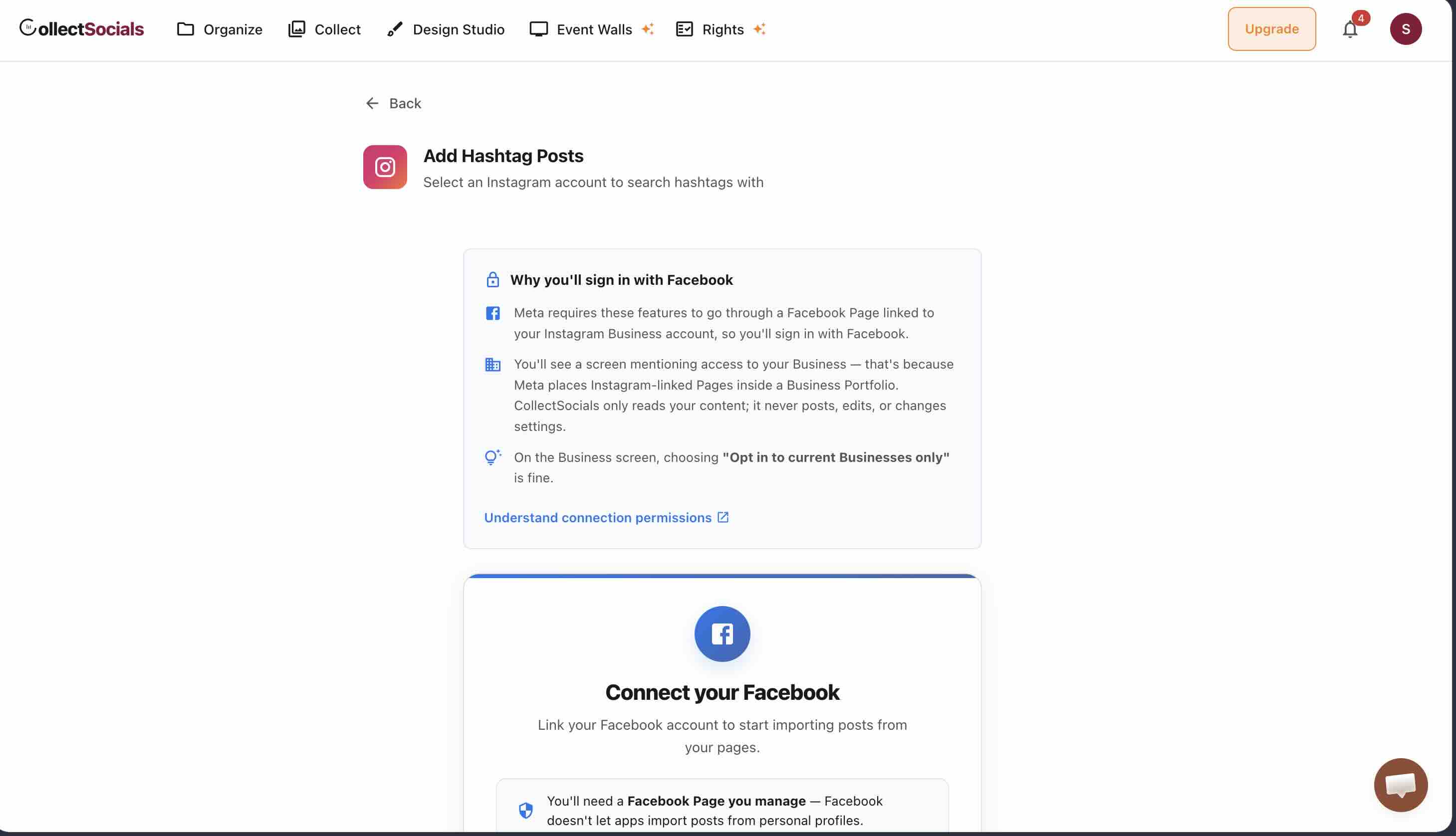
Meta caps you at 30 unique hashtags per rolling 7-day window. This is the one that breaks campaign plans. If you intended to track a dozen event tags plus regional variants plus misspellings, you will hit the ceiling — and because the window rolls, swapping a hashtag out does not immediately free a slot.
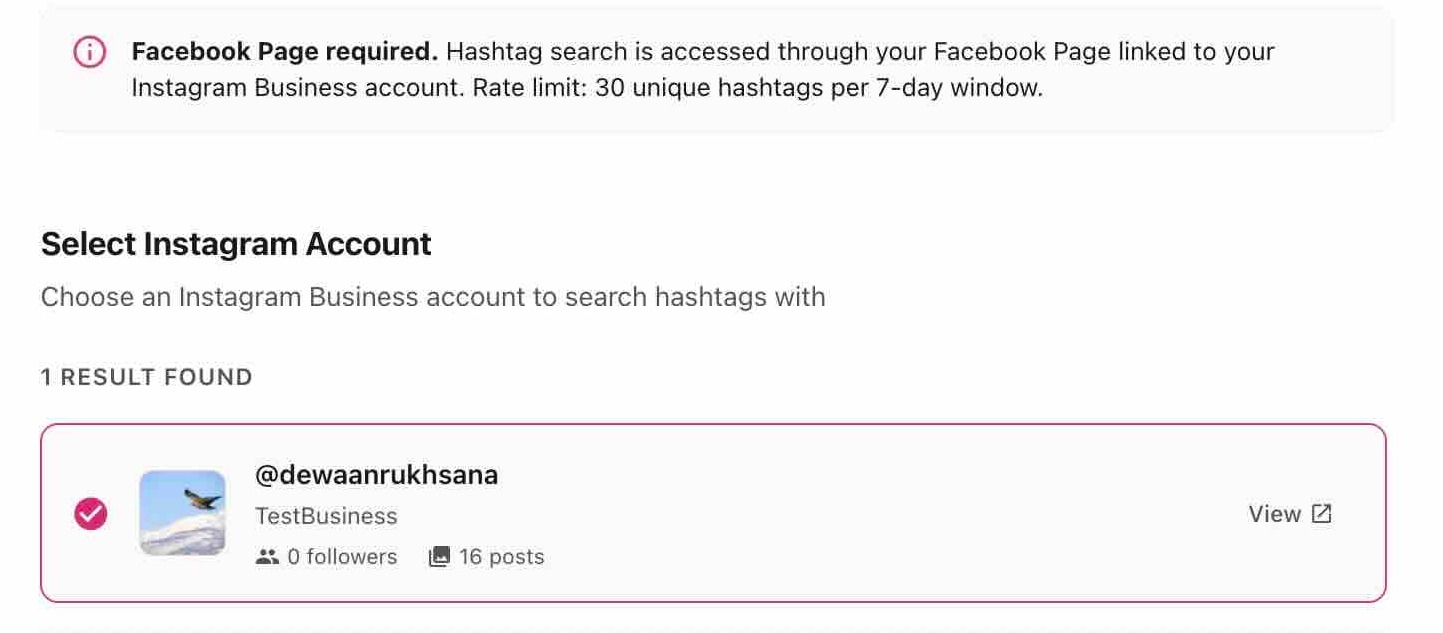
The practical consequence: pick few hashtags and commit to them. One strong branded tag beats fifteen speculative ones, and the cap makes that a technical necessity rather than just good advice.
Step 1: Connect Your Hashtag Source
In your CollectSocials dashboard, add Instagram Hashtag as a source. Enter your branded hashtag (without the # symbol), and the system will begin pulling posts that use that hashtag. How quickly new posts appear depends on your plan: every 24 hours on the free plan, hourly on Pro, and down to every 5 minutes on the highest tier.
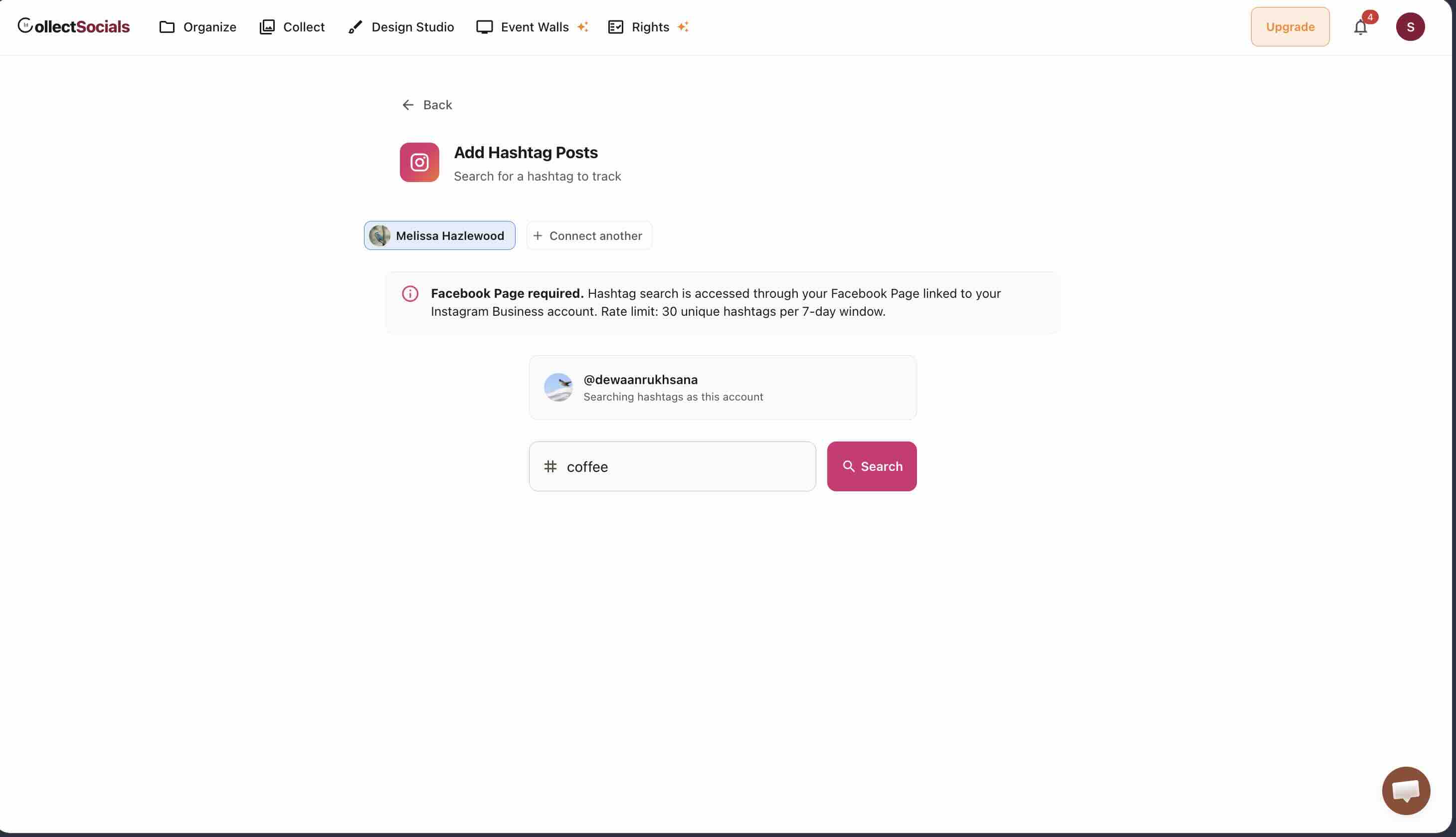
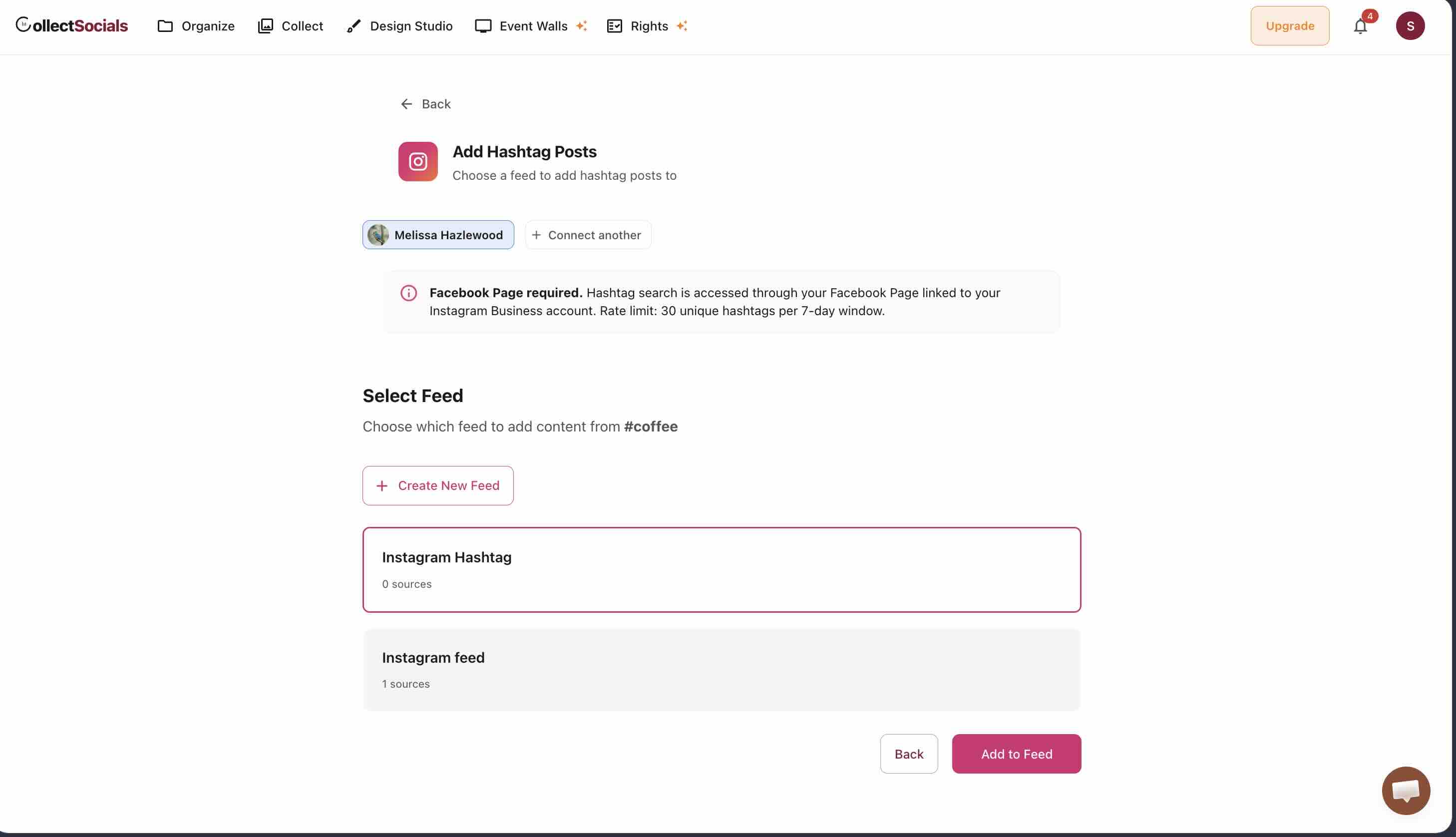
You can connect multiple hashtags if you're running multiple campaigns or want to aggregate related hashtags. For example, a fitness brand might track both #BrandName and #BrandNameTransformation to capture different types of customer content — bearing the 30-tag window above in mind.
Step 2: Implement Moderation Workflow
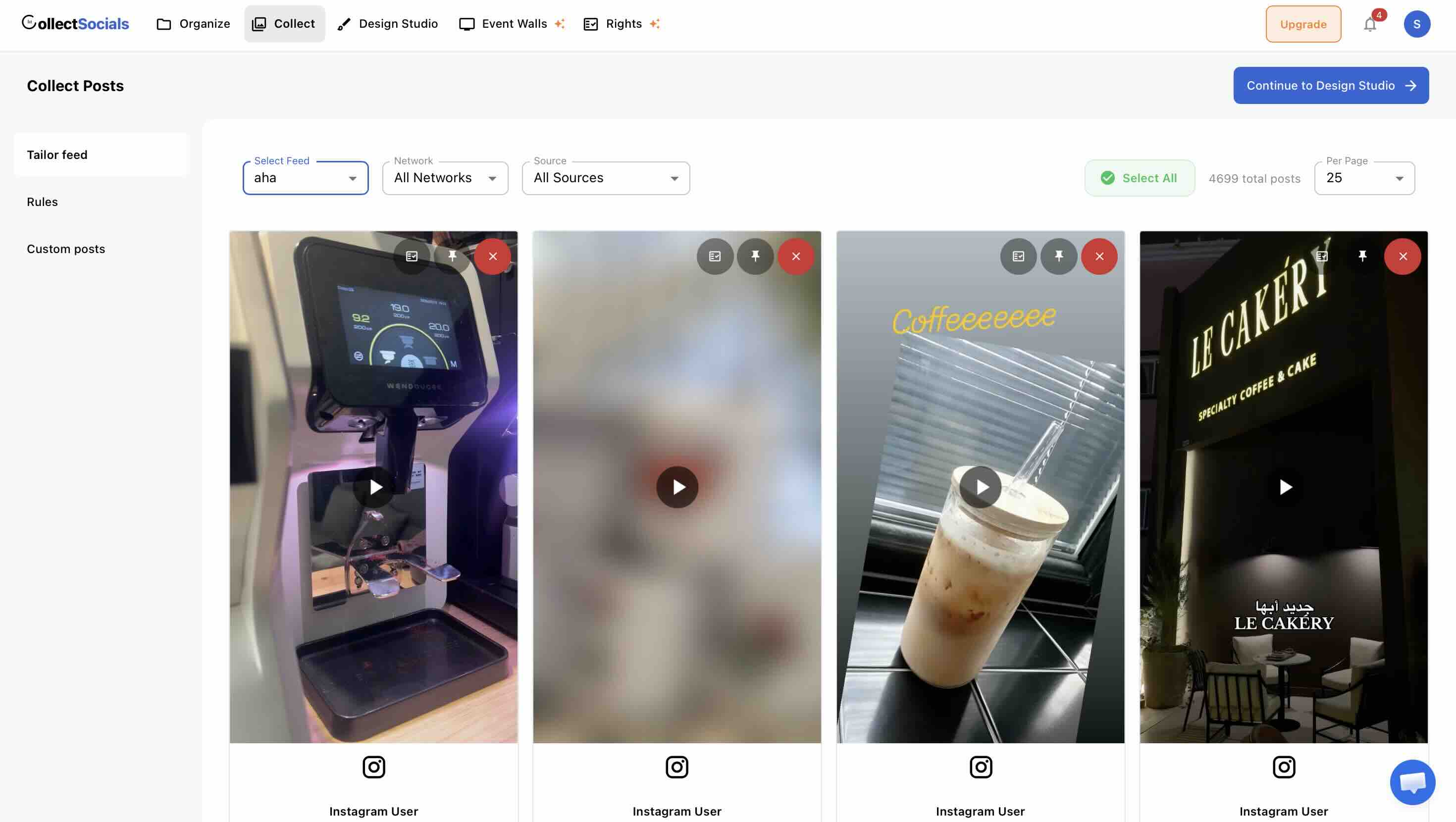
Unlike profile feeds where you control all content, hashtag feeds require active moderation. Your Collect page will show all posts using your hashtag. Review each post for:
Content appropriateness: Remove posts with profanity, inappropriate imagery, spam, or content that doesn't align with your brand values.
Relevance: People sometimes use popular hashtags hoping for visibility even when their content isn't related to your brand. Filter these out.
Quality: If you're featuring content on your website, quality matters. Blurry photos, poor lighting, or low-effort content might be authentic, but it doesn't help your brand. Curate for posts that genuinely showcase your product or brand positively.
Rights considerations: If you see content that includes recognizable people (especially minors), copyrighted material, or other potentially sensitive elements, be cautious about featuring it without explicit permission.
Step 3: Design Your Hashtag Feed Display
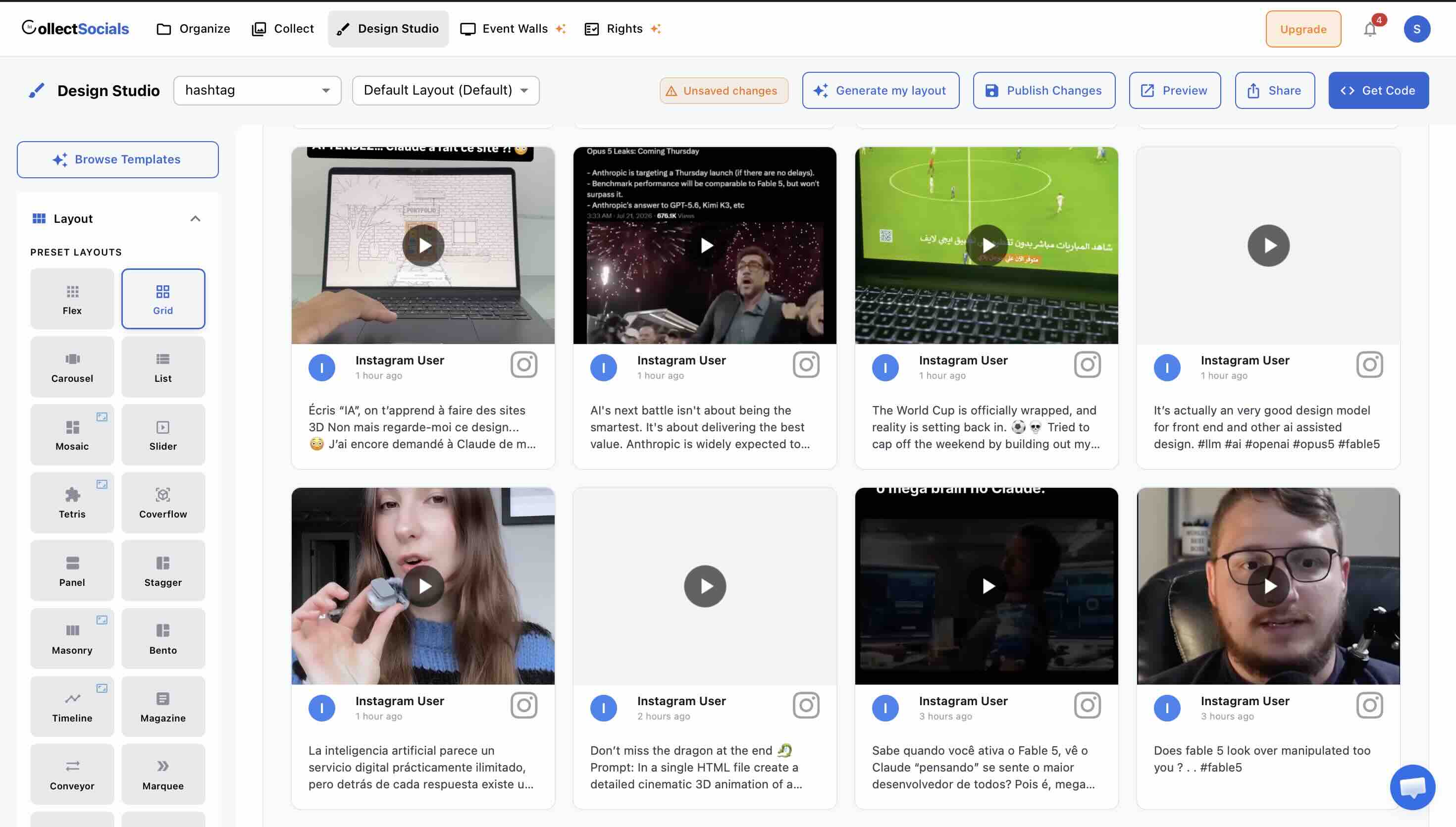
Hashtag feeds often work best with layouts that emphasize volume and variety. Since the content comes from multiple creators with different photography styles, layouts that embrace this diversity tend to perform better than rigid, uniform grids.
Designing for user-generated content
The animation cycles through layout options suited to hashtag feeds: masonry for embracing diverse photo styles, grid for imposing visual order on varied content, and marquee for creating energy on event or campaign pages. Unlike profile feeds, hashtag feeds benefit from layouts that celebrate variety rather than uniformity.
Masonry layout + Neon or Bold theme — emphasizes the organic, unpolished nature of UGC. Varied heights and energetic themes communicate authenticity. Works exceptionally well for fashion, beauty, lifestyle brands where diversity of content is a strength.
Grid layout + Minimal theme — brings order to diverse content sources. If your hashtag feed includes widely varying content quality or styles, a grid with neutral theme creates visual consistency.
Marquee layout + any theme — perfect for event pages or campaign landing pages where you want to show volume and movement. A continuous scroll of customer photos creates energy and FOMO (fear of missing out) that drives participation.
Display settings: Always show creator names and avatars for hashtag feeds. This reinforces that these are real people, not brand content. Consider showing captions as well, especially if customers write compelling testimonials alongside their photos.
Step 4: Strategic Placement on Your Website
Where you place your hashtag feed depends on your campaign goals:
Campaign landing pages: If you're running a specific promotion or contest, create a dedicated page that explains the campaign and displays the hashtag feed front and center. This is both the promotion and the proof of participation.
Product pages: For e-commerce, hashtag feeds showing real customers using your product work exceptionally well on product pages near the add-to-cart button. This provides the final push of social proof that drives conversions. See our e-commerce Instagram guide for detailed strategies.
Community or About pages: Hashtag feeds work beautifully on pages designed to showcase your brand community and customer relationships. This is less about immediate conversion and more about long-term brand building.
Event pages: If your hashtag is tied to an event (conference, festival, wedding, trade show), display the feed on the event website. For live events, real-time hashtag walls on physical displays create tremendous engagement. See our event social wall guide for event-specific strategies.
Hashtag Feeds vs Profile Feeds: Understanding the Difference
A profile feed displays posts from your own Instagram account. You control the content, you own the posts, and what appears on your website is entirely within your control. This works exceptionally well for showcasing your brand's visual identity, products, and professional content.
A hashtag feed displays posts from anyone who uses a specific hashtag. You don't control who posts, you don't own the content, and what appears requires curation and moderation. But what you gain in exchange is enormously valuable: authentic social proof from real customers, community-generated content that builds trust far more effectively than brand content, and volume — hundreds or thousands of posts showcasing your product or brand in real-world contexts.
When to Use Each Approach
Use a profile feed when: You want complete control over your website's visual content, you have consistent, high-quality brand photography, and the goal is showcasing your aesthetic, products, or services as you present them.
Use a hashtag feed when: You want to show how real customers use your product, you're running a campaign or event that generates user content, or you want to build community and demonstrate that real people engage with your brand. Hashtag feeds work especially well for fashion, beauty, hospitality, events, and consumer products where customer experience is a primary selling point.
Use both together when: You want the best of both worlds — your professionally curated brand content alongside authentic customer posts. Many businesses display both feeds on their website: profile feed on the homepage for brand control, hashtag feed on product or community pages for social proof. See our social media wall guide for multi-source strategies.
sync
How hashtag aggregation works
The animation shows how Instagram posts tagged with your branded hashtag — from any user, not just your account — get collected and displayed on your website automatically. Each customer photo becomes part of a curated UGC gallery that updates as new participants tag your campaign.
Creating a Branded Hashtag That Works
Before you can display a hashtag feed, you need a hashtag worth displaying. Here's what makes a branded hashtag effective in 2026.
Keep It Short and Memorable
Your hashtag should be easy to remember, easy to type, and easy to say out loud. Long, complex hashtags get misspelled, forgotten, or simply not used. Compare #ShareACoke (Coca-Cola's wildly successful campaign) with #MyBrandExperienceStory2026. The former works; the latter doesn't.
Aim for 2-3 words maximum, no special characters, and ideally something that makes sense even without brand context. Nike's #JustDoIt is recognizable as Nike, but it also works as a standalone motivational phrase, which increases its shareability.
Make It Unique and Searchable
Before committing to a hashtag, search Instagram to see what's already using it. If your intended hashtag is already associated with unrelated content, you'll have noise in your feed that requires constant moderation. A unique branded hashtag makes tracking and aggregation dramatically easier.
Consider Campaign vs Evergreen Hashtags
Some hashtags are campaign-specific: #StarbucksRedCupContest runs during the holidays for a specific promotion. These hashtags have a defined lifecycle — launch, growth, conclusion — and then retire. Other hashtags are evergreen: #GoProTravel is always active, continuously collecting user content as customers use GoPro cameras on trips.
Campaign hashtags work well for time-limited promotions, contests, or events. Evergreen hashtags work well for ongoing community building and continuous content generation. Many brands use both: a primary evergreen hashtag plus seasonal campaign hashtags.
Instagram's 30-Hashtag API Limit
According to Instagram API documentation, businesses can track a maximum of 30 unique hashtags per week. This means if you're running multiple campaigns simultaneously or tracking multiple branded hashtags, you need to be strategic about which hashtags you monitor. Prioritize your primary brand hashtag and active campaign hashtags; archive old campaign hashtags once they're no longer active.
Launching a Hashtag Campaign: Strategy Framework
Creating a hashtag is easy. Getting people to actually use it requires strategy, promotion, and incentivization. Here's the framework that consistently works.
Phase 1: Seeding (Pre-Launch)
Don't launch a hashtag to an empty feed. Before you publicly promote your hashtag, seed it with 20-50 high-quality posts. Use photos from employees, brand ambassadors, or loyal customers (with permission). This accomplishes two things: it shows potential participants what kind of content you're looking for, and it prevents your campaign from looking empty when people first discover it.
If you're a restaurant launching #TacoTuesdayAt[YourRestaurant], seed the hashtag with beautiful taco photos from your kitchen, your team enjoying tacos, and perhaps a few early customer posts. When a customer considers participating, they see a feed that's already active and visually appealing.
Phase 2: Launch and Promotion
Promote your hashtag everywhere: in-store signage, receipts, packaging, email campaigns, your Instagram bio, Instagram Stories, and of course your website itself. Make the call-to-action clear and compelling. Don't just say "use #OurHashtag" — tell people why.
Examples that work: "Share your photos with #OurHashtag and you'll be featured on our website" (recognition incentive), "Use #OurHashtag for a chance to win $500" (monetary incentive), "Show us your style with #OurHashtag" (community participation). The clearer and more valuable the incentive, the higher the participation rate.
Phase 3: Engagement and Momentum
Once posts start coming in, engagement is everything. Respond to tagged posts, like and comment on content using your hashtag, share standout posts to your Instagram Stories, and feature selected posts on your website's hashtag feed. This creates a virtuous cycle: people see that you're actively engaged with the community, which increases their motivation to participate.
For campaigns with significant volume, successful brands often feature a "Post of the Week" or similar recognition program. This provides ongoing incentive without requiring you to give away prizes constantly — social recognition can be as motivating as monetary rewards for many participants.
Phase 4: Maintenance and Evolution
If your hashtag is evergreen, you need sustainable maintenance practices. Set a weekly or biweekly schedule to review new posts, curate the best content for your website display, and engage with participants. For campaign hashtags that are winding down, archive the best content and prepare your next campaign launch.
Content Rights and Legal Permissions
This section is critical. Just because someone uses your branded hashtag doesn't automatically give you the right to use their content in your marketing. Here's how to handle this correctly.
Instagram's Terms of Service
Displaying an Instagram post in a feed widget on your website falls under Instagram's embedding permissions — this is generally allowed as long as you're using Instagram's API and not downloading images. However, using that content in ads, promotional materials, product packaging, or other commercial contexts requires explicit permission from the content creator.
Requesting Permission: The Right Way
When you find UGC you want to feature prominently (beyond just displaying it in a feed), reach out via Instagram DM with a clear, professional request. Here's a template that works:
Many creators will say yes, especially if you're offering credit and exposure. Some may request compensation, particularly if they're professional creators or influencers. Respect their decision either way. For high-value usage (print ads, billboards, TV commercials), formal licensing agreements and compensation are standard practice.
Campaign Terms and Conditions
If you're running a contest or giveaway, your official rules should include a clause that states participants grant you permission to use their content for specified purposes (website display, social media sharing, etc.). This doesn't eliminate the need for courtesy permission requests, but it provides legal coverage.
Work with legal counsel to draft terms appropriate for your specific campaign. This is especially important if you're running campaigns in multiple jurisdictions with different consumer protection laws.
Event Hashtag Walls: Live Display Strategies
Hashtag feeds take on a different dimension when displayed at live events. Instead of a static website element, they become a dynamic, real-time engagement tool that encourages participation and amplifies your event's social reach.
Physical Display Setup
For conferences, trade shows, galas, weddings, or other events, display your hashtag feed on large screens positioned strategically throughout the venue. High-traffic areas work best: registration desks, main stages, dining areas, or near photo opportunities.
Technical requirements: You'll need a screen (LED display, TV, or projector), internet connectivity (for real-time updates), and a device (laptop, tablet, or dedicated display hardware) running your hashtag feed in full-screen mode. Many social wall platforms offer dedicated display modes optimized for large screens with auto-refresh.
Real-Time Moderation
For live events, you need someone moderating the feed in real-time. Inappropriate content that might take hours to notice on a website feed becomes immediately visible on a 10-foot screen in a ballroom. Assign a team member to monitor and approve posts as they come in, especially during high-volume events.
Encouraging Participation
Place signage near your hashtag wall that explains how to participate: "Post your photos with #EventHashtag to see them on the screen!" This creates a game-like dynamic — people post, then watch to see if their content appears, which encourages more posting.
Consider offering small incentives: "Best photo of the day wins a prize" or "Featured posts get exclusive swag." The combination of public recognition and tangible rewards can generate hundreds of posts even at modestly sized events.
Measuring Hashtag Campaign Success
How do you know if your hashtag campaign is working? Track these metrics:
Volume Metrics
Total posts using your hashtag: The most basic measure of campaign reach. Track this over time to see campaign growth and momentum.
Unique participants: How many different accounts are using your hashtag? This measures community breadth rather than just volume. A hundred posts from ten accounts is less valuable than a hundred posts from a hundred accounts.
Reach and impressions: How many people saw content with your hashtag? This extends beyond your immediate participants to their followers. Instagram Insights provides reach data for branded content; hashtag tracking tools can estimate total campaign reach.
Engagement Metrics
Average engagement per post: Likes, comments, and shares on posts using your hashtag. High engagement indicates that your campaign resonates beyond just participation.
Website feed engagement: How many people view, click, or interact with your hashtag feed on your website? If you're displaying UGC but nobody engages with it, placement or design needs adjustment.
Conversion Metrics
Campaign-attributed conversions: Can you tie hashtag campaign participation to sales or other business outcomes? For e-commerce, use campaign tracking codes. For lead generation, ask how people heard about you and track "Instagram hashtag campaign" as a source.
Customer acquisition cost: If you're running paid promotions to drive hashtag participation, calculate the cost per new participant and the downstream conversion rate to determine campaign ROI.
Real Campaign Examples That Worked
Learning from successful campaigns helps clarify what actually drives results. Here are proven examples across industries:
Coca-Cola: #ShareACoke
Coca-Cola personalized bottles with popular names and encouraged people to share photos with #ShareACoke. The campaign generated 500,000+ photos shared on social media. Why it worked: Personal connection (finding your name), clear call-to-action, simple hashtag, and massive promotional support across all channels.
Starbucks: #RedCupContest
Every holiday season, Starbucks asks customers to share photos of their red holiday cups with #RedCupContest for a chance to win prizes. The campaign generates tens of thousands of posts annually. Why it works: Seasonal timing (holiday excitement), beautiful product (the cups are photogenic), clear incentive (contest prizes), and established tradition (customers expect and look forward to it).
Disney: #ShareYourEars
Disney encouraged people to post photos wearing Mickey Mouse ears using #ShareYourEars, pledging to donate $5 per post to Make-A-Wish, raising over $2 million. Why it worked: Charitable cause (feel-good participation), simple ask (take a photo with ears), and Disney's massive brand love creating built-in motivation to participate.
GoPro: #GoProTravel
GoPro's evergreen hashtag #GoProTravel continuously collects user-generated travel content showcasing their cameras in action. This isn't a time-limited campaign; it's ongoing community building. Why it works: The product is the camera, so users are already creating content while using the product. GoPro simply needed to create a hashtag to aggregate what was already happening.
Common Mistakes to Avoid
Launching without seeding content. An empty hashtag feed doesn't inspire participation. Seed with 20-50 posts before promoting publicly.
Weak or unclear incentives. "Use our hashtag!" isn't motivating. Tell people why they should participate: recognition, prizes, community, cause support.
Ignoring content rights. Just because someone uses your hashtag doesn't mean you can use their content in all contexts. Displaying in a feed is generally acceptable; using in ads requires permission.
Insufficient moderation. Hashtag feeds require active curation. Inappropriate, irrelevant, or low-quality content undermines your brand if displayed publicly on your website.
No ongoing engagement. If people participate but you never acknowledge, like, or respond to their posts, participation drops off. Active engagement keeps campaigns alive.
Choosing overly complex hashtags. Keep it short, memorable, and easy to spell. #MyBrandSummer2026Contest is too long; #BrandSummer works better.
Integrating Hashtag Feeds with Other Social Content
Hashtag feeds work powerfully on their own, but combining them with other social sources creates even more comprehensive social proof strategies:
Hashtag feed + profile feed: Show both your curated brand content and customer-generated content side by side. Profile feed establishes brand aesthetic; hashtag feed proves customer love. This works especially well for fashion and lifestyle brands.
Hashtag feed + Google Reviews: Visual social proof from Instagram combined with text-based trust signals from Google Reviews covers both emotional and rational decision factors. See our Google Reviews guide for implementation strategies.
Multi-platform hashtag aggregation: Track the same hashtag across Instagram, TikTok, and Twitter simultaneously for events or major campaigns. This captures content regardless of where participants post. See our social media wall guide for multi-platform setup.
2026 Hashtag Strategy Updates
Instagram's algorithm and best practices have evolved significantly. Here's what matters in 2026:
Quality Over Quantity
Instagram now recommends 3-5 highly relevant hashtags per post instead of the old 30-tag approach. For branded hashtag campaigns, this means participants should use your branded hashtag plus 2-4 contextually relevant tags, not spam posts with maximum hashtags.
Caption Keywords Matter Now
Instagram's search now indexes actual words in captions, not just hashtags. This means someone searching "sustainable fashion" can find posts even without #SustainableFashion. For campaign instructions, encourage participants to write meaningful captions that describe their experience, not just stack hashtags.
Video Content Prioritization
Instagram heavily prioritizes video content (Reels, Stories) in 2026. Encourage video submissions in your hashtag campaigns, not just static photos. Video generates higher engagement and reaches more users through Instagram's algorithm.
Is an Instagram Hashtag Feed Worth Running?
Hashtag feeds transform scattered customer content into organized, displayable social proof that builds trust more effectively than any amount of brand-created marketing. When someone considering a purchase sees dozens of real customers sharing their experiences with your product — unprompted, unscripted, genuinely enthusiastic — that's persuasion money can't buy.
The technical implementation is straightforward: create a hashtag, promote it, aggregate the content, moderate for quality, and display it where it matters most. The strategic work — choosing the right hashtag, creating compelling incentives, maintaining engagement, managing rights — determines whether your campaign generates ten posts or ten thousand.
Start with a clear goal: What do you want participants to show? What experience or product feature should they highlight? Then build your campaign, promotion, and display strategy around that goal. Hashtag campaigns that work have clarity of purpose and consistency of execution.
For related strategies, see our guides on UGC campaign strategy, Instagram feed curation, and social walls for events.
Start Using CollectSocials Today
One curated feed from 10+ platforms: on your website in a single line of code, or up on the big screen at your event.