
Whether you run a fine dining restaurant, a casual neighborhood spot, a food truck, a bakery, or a cafe, the principles here apply. Visual social proof is one of the highest- leverage tools a food business has — and most restaurants are still leaving it on the table.
Why Restaurants Have a Unique Advantage on Instagram
Food is one of Instagram's most naturally native content categories. People photograph meals. They post food. They tag restaurants. They share their dining experiences with their followers. This means that virtually every active restaurant with a decent social presence has a library of high-quality visual content sitting in their Instagram account — content that their website visitors never see.
The typical restaurant website experience is static: a few gallery images chosen 18 months ago, a PDF menu, an About section, a contact page. It looks fine. But it doesn't feel alive. It doesn't show the restaurant as it exists right now — the seasonal menu item you posted last Tuesday, the full dining room on Saturday night, the cocktail your bartender just perfected.
An embedded Instagram feed changes this. Suddenly your website becomes a window into your restaurant's real, current life — updated automatically every time you post, requiring no website maintenance to keep current. And because that content comes from Instagram (a trusted, third-party platform), it carries more credibility than anything you place in a static gallery yourself.
sync
Food photography that stops disappearing
The animation moves a dish photo from an Instagram post to a permanent gallery on a restaurant site. For a restaurant the timing argument is sharper than for most businesses: the post peaks the evening you publish it, while the same photo keeps working on your site every time someone checks the menu before booking.
What Instagram Content Works Best on a Restaurant Website
Not every post you've published deserves a spot on your website feed. Curation is everything. Here's what tends to convert the most effectively for restaurants:
Hero dishes and signature items. Your best-performing food photography — the dishes that make people stop mid-scroll on Instagram — belong on your website. These are the images that should greet a potential guest who's deciding whether to book. Close crops that make the food look as good as it tastes. Well-lit, appetizing, real.
Ambience and atmosphere shots. Photos of your space — the dining room at a full Saturday night, the bar lit warmly, the patio on a summer evening — do something food photography alone can't: they let potential guests picture themselves there. For restaurants where atmosphere is part of the experience (which is most restaurants), these images are as important as the food.
Behind-the-scenes content. Kitchen shots, prep work, the team in action. This content humanizes your restaurant and builds the kind of connection that turns first-time visitors into regulars. A guest who feels like they know who's cooking their food and how much care goes into it is a guest who comes back.
Seasonal and limited-time content. Specials, seasonal menus, holiday offerings, new cocktails. This content is time-sensitive on Instagram — it has a short lifespan. On your website, it serves a different function: it signals that your restaurant is actively evolving, that there's always something new, that coming back is worth it.
Customer content (UGC). Posts from guests who tagged your restaurant or used a branded hashtag. This is your most powerful category. Guest-taken food photos, group shots at the table, someone's birthday dinner — all of it tells potential guests that real people come here, enjoy themselves, and feel moved enough to share it publicly. Read more about collecting and displaying UGC from Instagram in our dedicated guide.
Where to Place Your Instagram Feed on a Restaurant Website
Restaurant websites typically follow a relatively predictable structure: a hero section, a brief about or concept description, a menu link, possibly a gallery, a reservations section, and contact details. Here's where an Instagram feed fits — and performs best — within that structure.
Homepage: The Visual Story Section
The homepage is the first impression. Most potential guests will land here from Google search, from a referral link, or from your Instagram bio. They've already seen your name — now they want to feel what your restaurant is like before they commit to a reservation.
Place your Instagram feed as a full-width section in the mid-to-lower portion of your homepage, after your hero section and core concept text. Frame it as "From Our Kitchen" or "Life at [Restaurant Name]" rather than the generic "Follow Us on Instagram." The framing signals curation and intention — this isn't just a social media block, it's a curated visual narrative about what your restaurant offers.
For layout, Masonry works beautifully for food content — the varied heights create visual rhythm that feels like browsing a food magazine. Grid creates a cleaner, more ordered look that works well for upscale or fine dining contexts where visual consistency is part of the brand identity. Marquee and Carousel both work in contexts where the feed needs to be compact — a scrolling banner of food images above the footer, for instance.
Menu Page: From Description to Visual
A text menu is informative but not inspiring. Adding an Instagram feed to your menu page — or embedding specific post images that correspond to menu sections — brings the dishes to life. This is especially effective for seasonal specials and dishes that are hard to describe in words but impossible to resist when you see them.
Keep the placement non-intrusive on a menu page: a compact Carousel or horizontal strip below or alongside the menu text is more appropriate than a full-page Masonry gallery that competes with the menu itself.
Reservations Page: Closing the Decision
The reservations page is where intent converts into action. A guest who's landed here is 90% of the way to booking — but they can still be lost to hesitation. A curated feed of your best atmosphere and food photography near the booking widget is the visual reinforcement they need to click "Reserve."
A tight Carousel or a short Grid of your very best shots — three to six images maximum — sits perfectly alongside a reservation form without overwhelming the page.
A Dedicated Gallery or Social Feed Page
Some restaurants benefit from a standalone page dedicated to visual content — especially those with strong Instagram followings or active guest photography communities. A "Gallery" or "Moments" page that combines your best Instagram posts with Google Reviews can become a destination page in itself, and one that ranks well in local search for terms like "[Restaurant Name] photos."
How to Set Up an Instagram Feed for Your Restaurant
The technical setup is the same regardless of which website platform you're on. Here's the full process using CollectSocials.
Step 1: Make Sure Your Instagram Account Is Set to Business or Creator
This is a prerequisite for any third-party Instagram feed tool. Personal accounts don't support API access. Switch to a Business account in your Instagram app (Settings → Account → Switch to Professional Account), and connect it to your restaurant's Facebook Page. This takes about two minutes and doesn't affect your existing content or followers.
Step 2: Create Your CollectSocials Account and Feed
Sign up at CollectSocials — the 7-day free trial includes the full design studio, no credit card needed. Create a new feed and name it something useful: "[Restaurant Name] Homepage Feed" or "Website Gallery."
Step 3: Connect Instagram as a Source
Add Instagram as a source inside your feed. CollectSocials uses Meta's official OAuth — you'll log in with Facebook, grant permissions, and select your Instagram Business account. Your posts, reels, and carousels will import immediately.
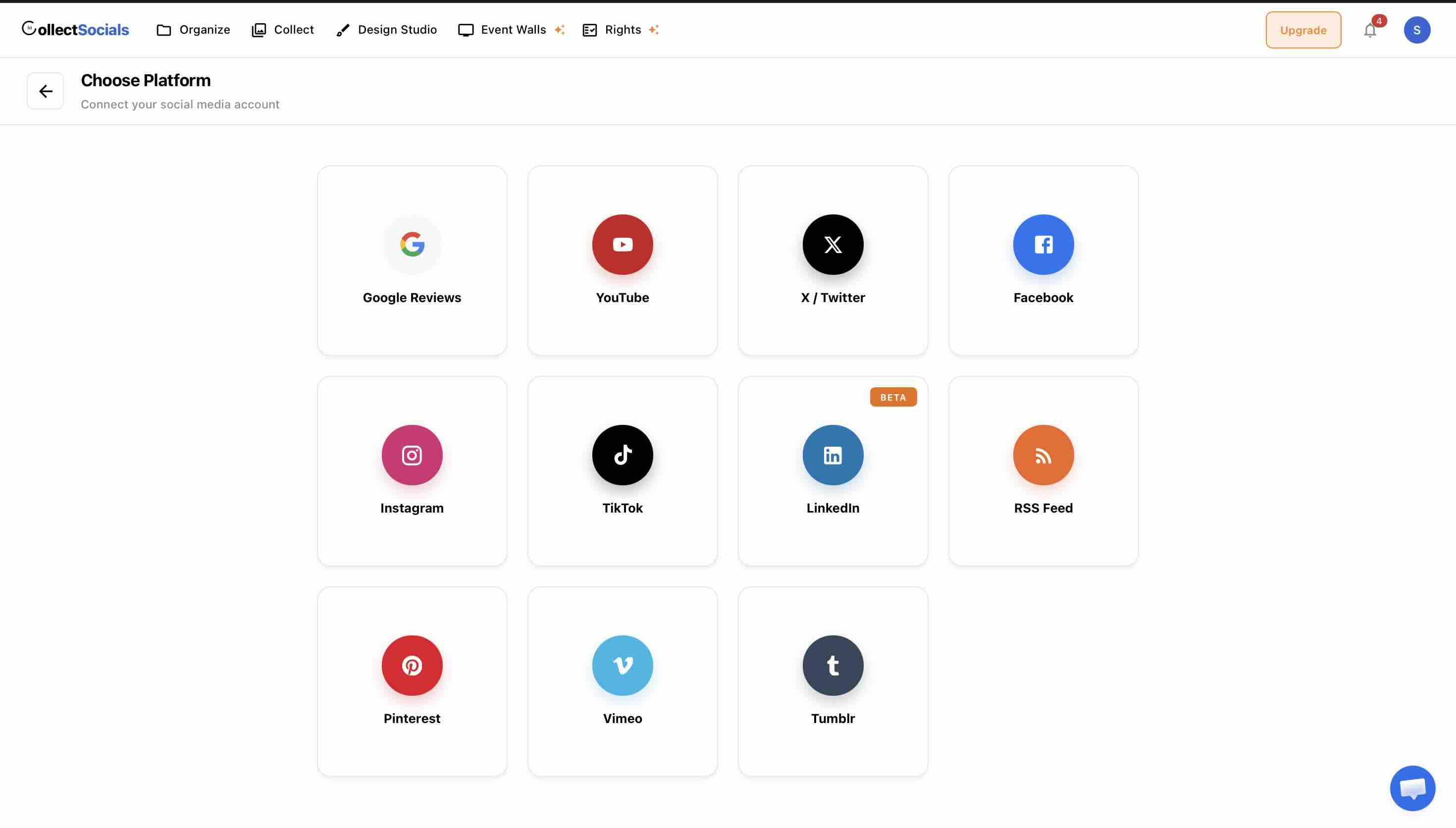
Consider also adding Google Reviews as a second source. For restaurants, the combination of Instagram visuals and Google Reviews is especially powerful — it covers both the emotional decision (this place looks amazing) and the rational one (this place is consistently well- reviewed). Both appear in a single unified widget.
Step 4: Curate for Your Website
On the Collect page, go through every imported post. For a restaurant website, the curation criteria are clear: Does this make the food look good? Does this make the restaurant feel like somewhere people want to be? Is the quality (photography, framing, lighting) high enough for the website context?
Exclude posts that were text-heavy or context-dependent — a post announcing a staffing change, a repost of a news article, a promotional post with heavy overlay text. These worked on Instagram in the moment; they don't translate well to an ongoing website gallery.
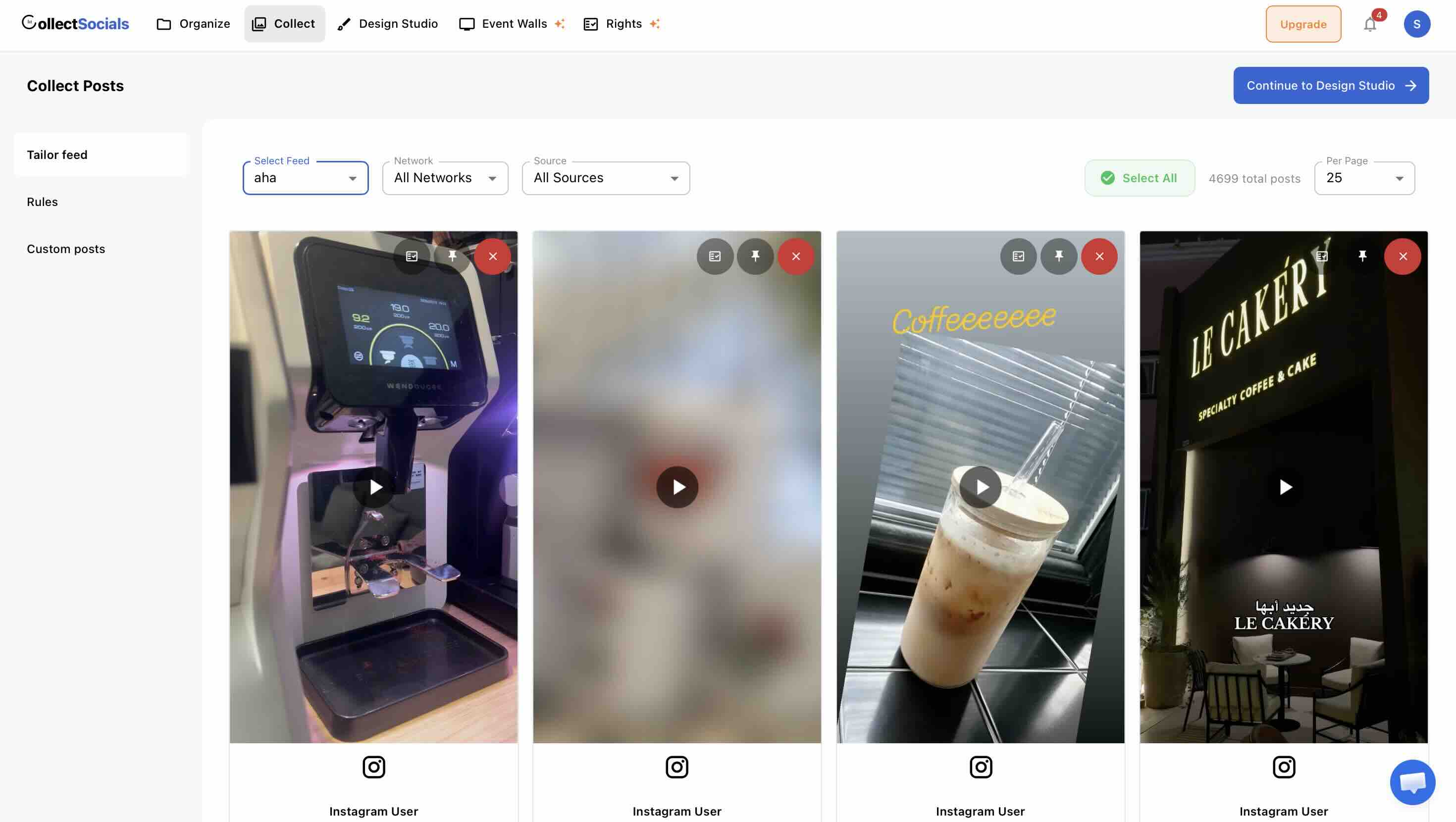
Edit captions where helpful. A long Instagram caption full of hashtags and line breaks can be trimmed to its essential sentiment for a web display context.
Step 5: Design Your Widget
For restaurant websites specifically, some layout and theme combinations perform especially well:
Layouts that suit food
The animation runs a restaurant feed through the layout and theme options. Food photography rewards size — a grid of large images does more for appetite than a dense wall of thumbnails, which is the opposite of the trade-off you would make for a text-heavy feed.
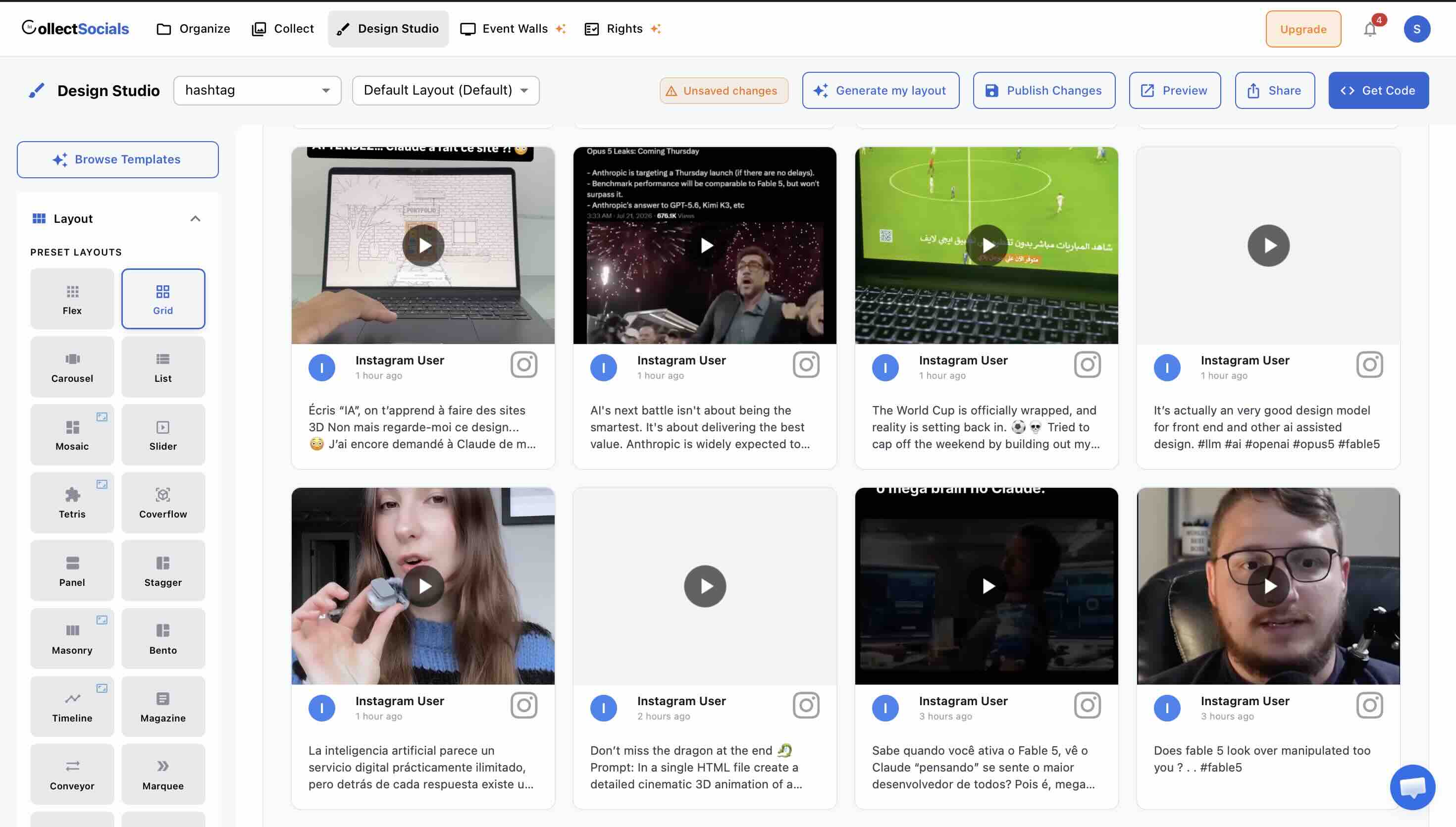
Masonry + Elegant or Minimal — the combination used by most fine dining and upscale casual restaurants. Masonry's varied heights give the feed a curated, editorial feel. Elegant and Minimal themes keep the focus on the food photography itself without distracting chrome.
Grid + Bold or Neon — works well for casual, energetic restaurant brands. Street food, craft beer, brunch spots. The grid creates order while the bold theme brings energy.
Marquee + any theme — excellent for footer or mid-page placements where you want the feed to be eye-catching and dynamic without taking up too much vertical space. A horizontal scroll of food images is one of those design moments that visitors reliably pause on.
Toggle on avatars if your feed includes significant UGC — showing that real guests posted this content strengthens the social proof signal. For brand-only feeds, avatars are less important. Keep platform badges on to reinforce that these are real Instagram posts.
Step 6: Embed on Your Website
Set the feed to Public and copy the generated <script> tag. Paste it into your website's HTML editor in whatever platform you're using. For restaurant website builders like Squarespace, see our Squarespace Instagram guide. For WordPress-based restaurant sites, see our WordPress Instagram guide.
The widget is fully responsive and isolated in a Shadow DOM — no CSS conflicts with your existing website theme, and it adapts cleanly to mobile screens, which is where a large proportion of restaurant website traffic comes from.
Showing Your Guests' Photos, Not Only Your Own
Here is the move most restaurant sites miss. Your own account is a marketing channel and reads like one. The photos your guests take on a Friday night do not — and for a restaurant those exist in volume, because people photograph food unprompted and geotag the room they are sitting in. Pulling that content onto your site is usually a bigger conversion lever than another round of your own plating shots.
A hashtag source is how you collect it: your venue hashtag, your neighbourhood, a dish people name. Two things about it are set by Meta rather than by any tool, and both are better known before you plan a campaign around them.
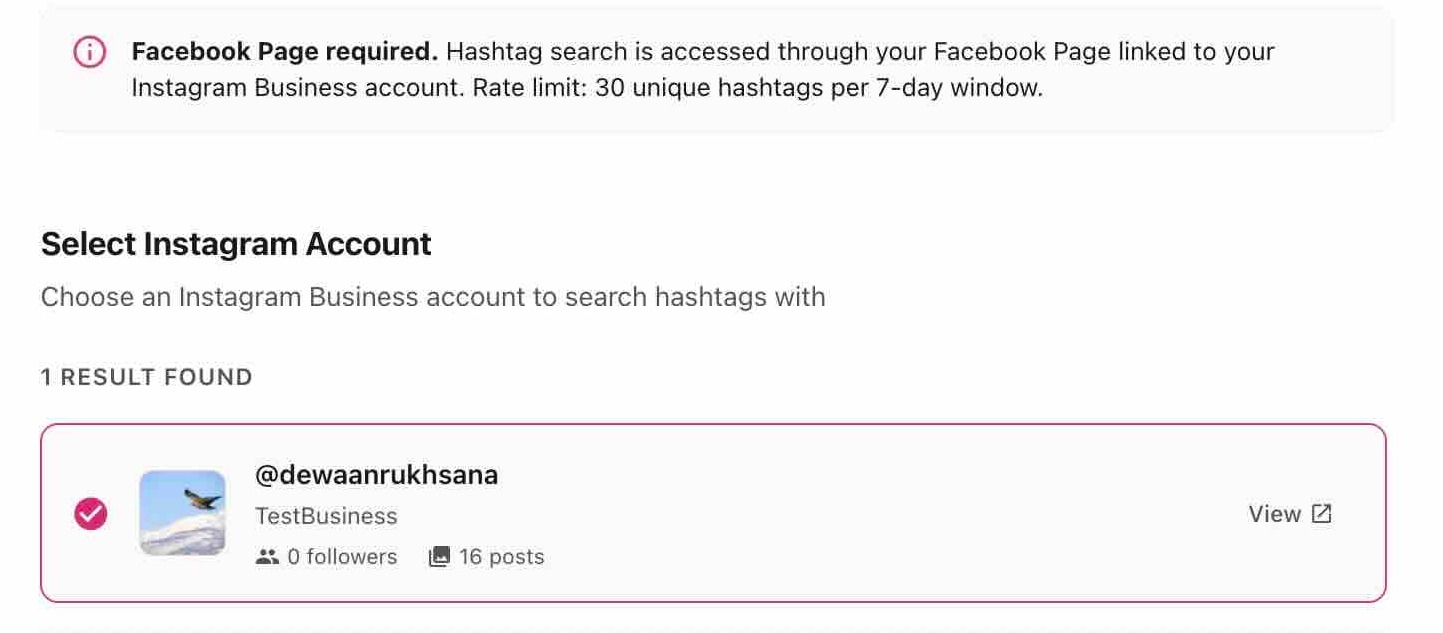
First, hashtag search runs through a Facebook Page linked to your Instagram Business account. If the Page is not connected, the source cannot be created at all.
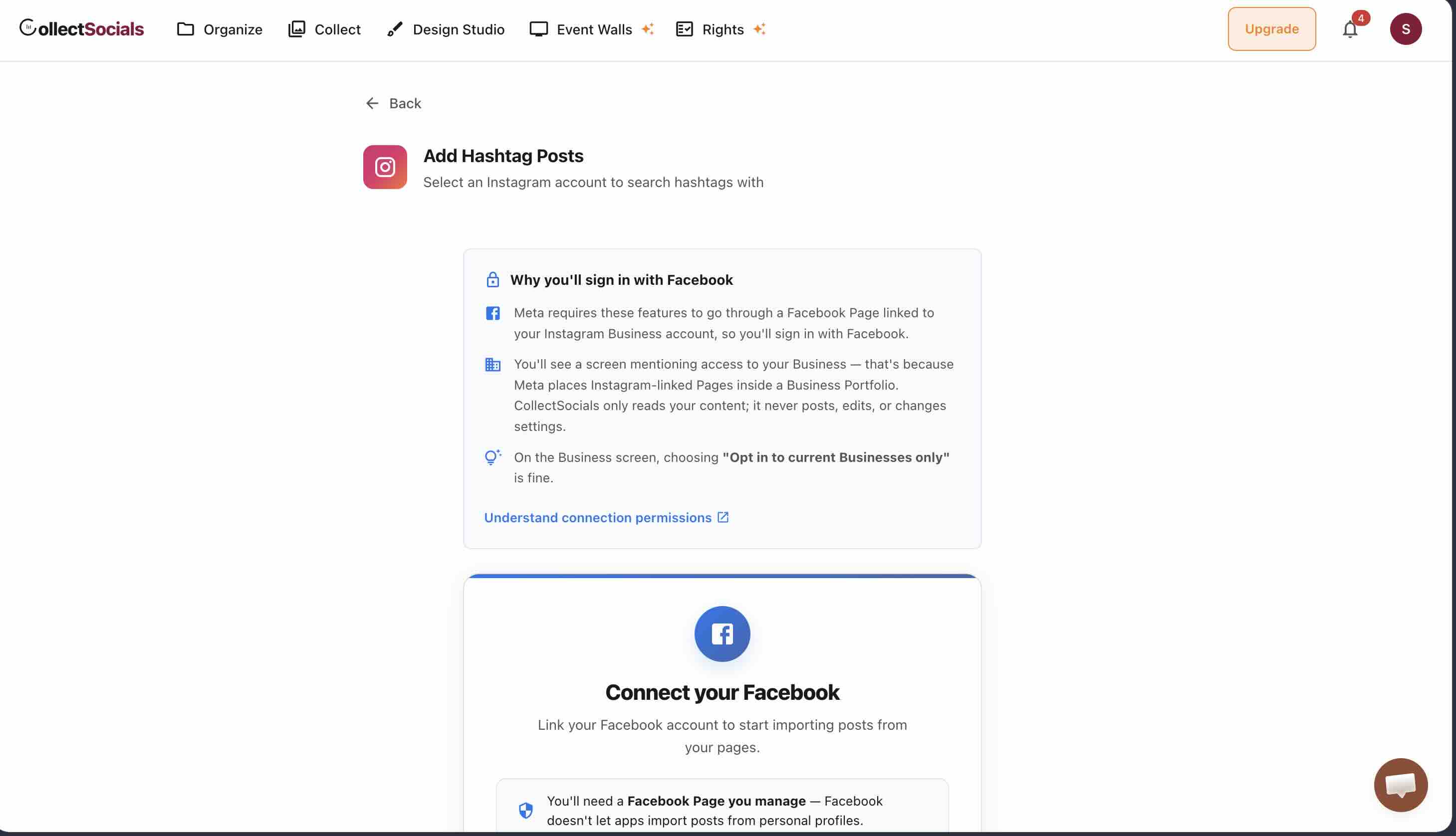
Second — and this is the one that shapes campaign planning — Meta rate-limits hashtag search to 30 unique hashtags in any rolling seven-day window, per account.
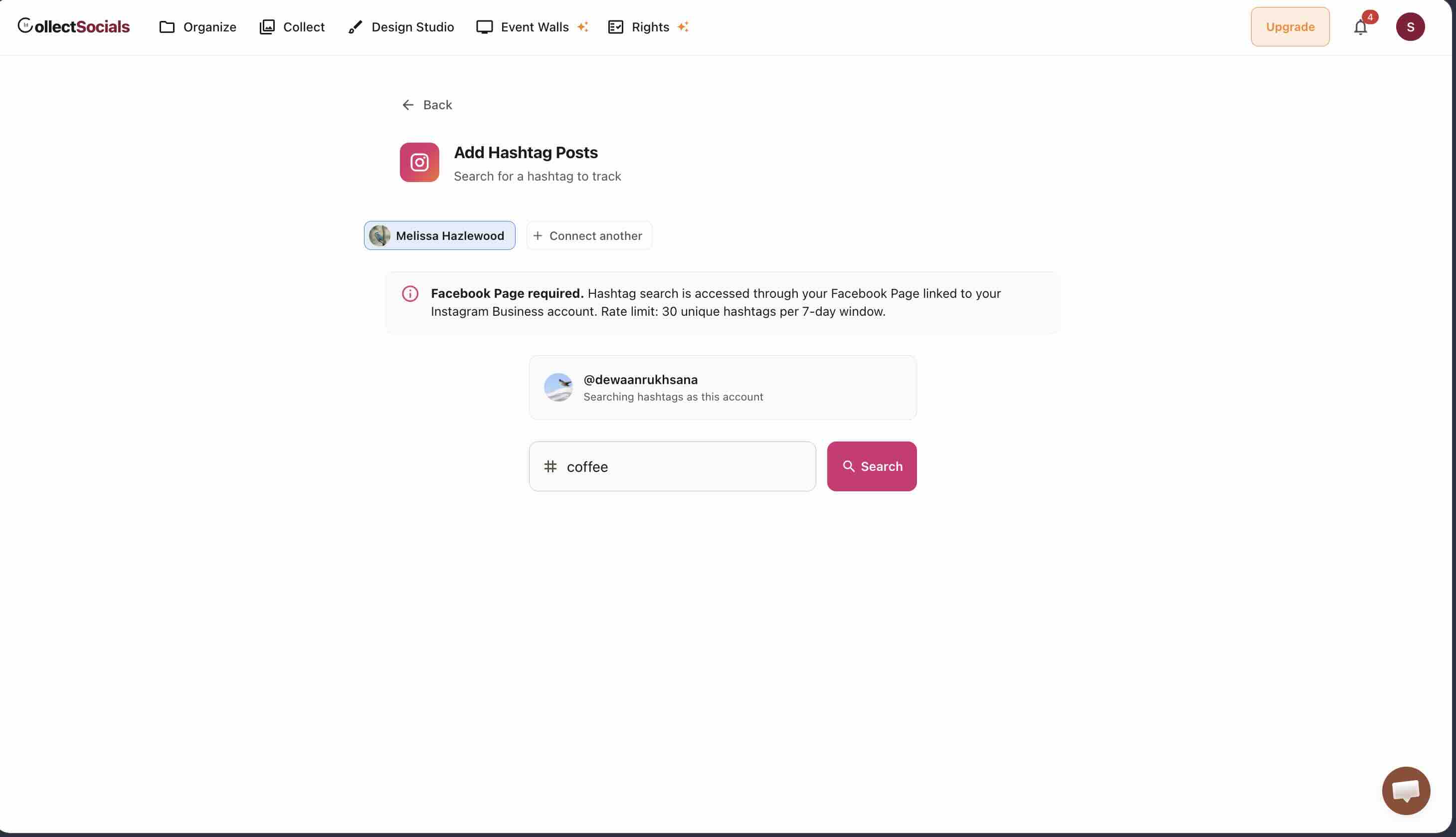
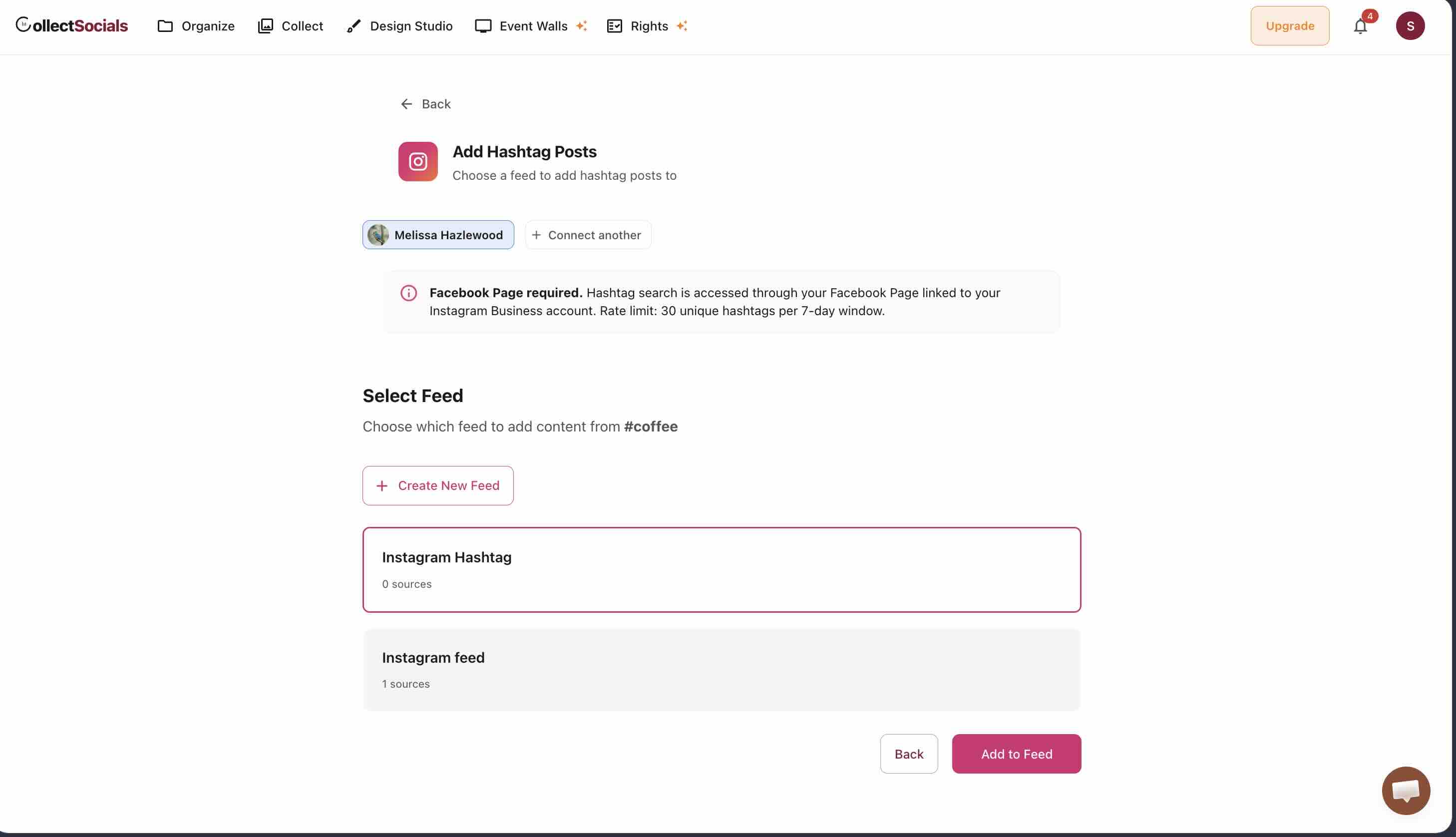
From there it is a search and an assignment: enter the tag, pick the feed the results should land in.
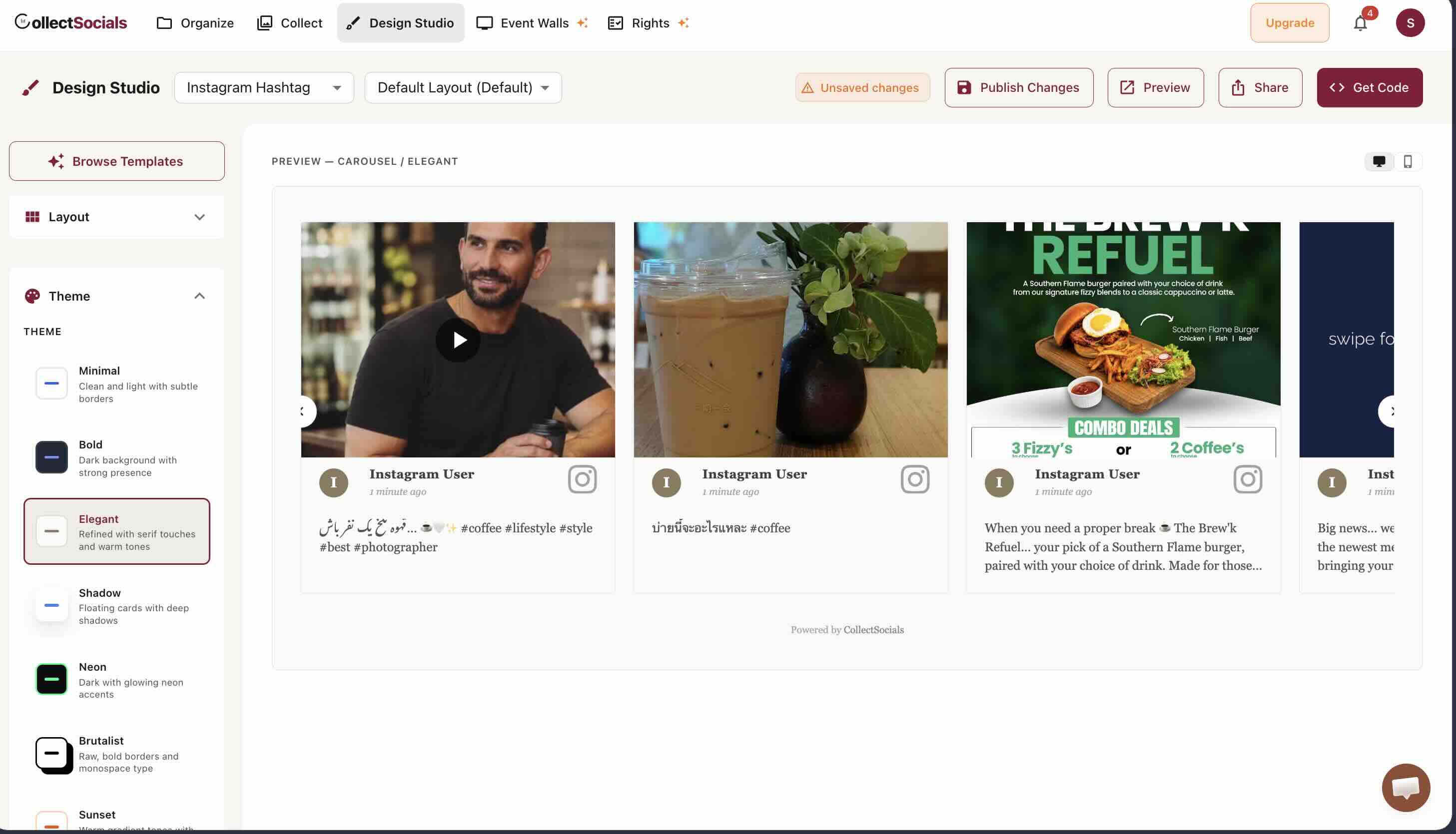
Presented well, guest photography carries the room in a way a menu page cannot.
Combining Google Reviews With Your Instagram Feed
The most effective social proof setup for a restaurant website combines visual Instagram content with Google Reviews in a single feed. Here's why this combination is so particularly powerful for restaurants.
When someone is deciding where to eat, they make two kinds of assessments. The first is emotional: does this place look like somewhere I'd enjoy? Does the food look good? Does the atmosphere match what I'm looking for? Instagram content answers these questions. The second is rational: has this place delivered consistently for other people? What do reviews say about service, value, noise levels, the things that matter to me specifically? Google Reviews answer these questions.
Putting both in one section of your website — your Instagram posts interspersed with five-star Google Review cards — covers both assessments in one integrated experience. A potential guest who sees a beautiful photo of your signature dish next to a Google Review that says "best Italian in the neighborhood, we come back every month" is an extremely warm lead.
In CollectSocials, adding Google Reviews alongside Instagram is as simple as connecting your Google Business Profile as a second source. Search for your business by name, select it from the results, and your reviews begin importing alongside your Instagram posts.
Keeping Your Restaurant Feed Current
One of the greatest advantages of a live Instagram feed for a restaurant is automatic freshness. Every time you post on Instagram, your website updates automatically at your sync interval — no manual uploads, no updating gallery pages, no calling your web developer.
The one task that does require attention is curation. New posts appear in your Collect page and won't go live on the website until you've reviewed and selected them. Build a weekly habit: check your CollectSocials Collect page, review the new posts from the week, select the ones that meet your quality criteria. This takes ten minutes and keeps your website fresh with intentional, curated content.
Seasonally, do a deeper audit. Remove posts that reference menu items you've retired, seasonal content that's no longer current, or anything that no longer accurately represents where your restaurant is now. Your Instagram feed on your website should always feel like it's showing the restaurant as it exists today — not as it existed a year ago.
A Note on Food Photography Quality
An Instagram feed widget is only as good as the content going into it. The single highest- return investment most restaurants can make — before worrying about widget layouts and themes — is improving the quality of their Instagram food photography.
This doesn't mean hiring a professional photographer for every post. Natural light, a clean surface or background, a reasonably recent smartphone camera, and a few minutes of attention to composition will produce photos that hold up on your website. The key is to make it a habit: before a new dish goes on the menu, photograph it properly. Before a seasonal special launches, get the shot.
Because those photos will end up on your website — automatically, without any extra steps — every piece of high-quality food content you create for Instagram becomes a website asset. That's a leverage ratio that makes the effort of better photography very easy to justify.
Is an Instagram Feed Worth It for a Restaurant Website?
The restaurant business is visual, local, and relationship-driven. A well-managed Instagram feed on your website serves all three dimensions: it shows the food and atmosphere visually, it builds the trust that turns a search result into a reservation locally, and it humanizes the business in ways that static marketing content never quite manages.
The setup is straightforward. The ongoing maintenance is minimal. The impact — on first impressions, on trust, on the conversion from website visitor to dining guest — is real and measurable. For any restaurant with an active Instagram presence, embedding that feed on your website is one of the simplest and most effective website improvements available. For e-commerce applications of the same principles, see our e-commerce Instagram guide. For curation strategies that apply to any business, check our curation guide. And for understanding where Instagram feeds work best on websites, our placement guide covers strategic positioning in depth.
Start Using CollectSocials Today
One curated feed from 10+ platforms: on your website in a single line of code, or up on the big screen at your event.