
But here is the friction point that decides most of these searches: Flockler's Basic plan costs $129 per month, billed monthly, with no free tier, only a 14-day trial. To get AI-powered moderation, you need the Business plan at $229 per month. API access and bulk feed creation are locked behind the Premium plan at custom enterprise pricing. That is the highest entry point of any major social media aggregator in the market today, and for the vast majority of businesses searching for "Flockler alternative," the problem is not the product, it is that Flockler is priced and built for a customer profile they are not.
This guide compares eight Flockler alternatives across the three scenarios where Flockler users most commonly churn: teams that need basic social feeds on their website, e-commerce brands running UGC campaigns, and event organizers who need social walls for conferences or trade shows. We break down exact pricing, where each tool genuinely wins, where it falls short, and how to pick based on what you are actually trying to accomplish.
But I wanted to know if Flockler's premium performance reputation holds up in 2026, so I installed Flockler on a blank test page, recorded how it renders and how many files it loads, measured CSS isolation, and calculated the actual dollar-per-source cost across every tier. That original research sits alongside the eight alternatives below. (Full testing methodology is documented in our Instagram feed widget comparison. If you are still deciding whether you need a widget at all, start with how to embed an Instagram feed on your website.)
sync
How it works
This is the core workflow that Flockler charges $129 per month to access, and one that CollectSocials delivers at $29 per month on the Pro plan, or free for a single source. The animation shows exactly what happens when you connect a social media account: posts flow automatically from platform silos (Instagram, Facebook, YouTube, TikTok) directly to embeddable widgets on your website. No manual copying, no screenshot uploads, no scheduled exports. When you publish a new post on Instagram, it appears in your website feed within minutes.
For Flockler users evaluating alternatives, this automatic sync is table stakes, but the pricing structure matters enormously. Flockler's Basic plan gives you 8 sources at $129/month with no free tier. If you're a small marketing team that just needs Instagram, LinkedIn, and Google Reviews flowing to your homepage, you're paying over $1,500 annually for a single use case. CollectSocials' architecture delivers the same unlimited-layouts-per-source model that makes Flockler appealing to enterprises, but at a price point that makes sense for businesses still proving ROI on social proof.
The real friction point for most Flockler alternatives searches isn't the product quality, it's that Flockler is priced for Harvard and the UN, not for the five-person B2B SaaS team that just wants their LinkedIn feed embedded. This automatic sync capability should be accessible at every business size, not just enterprise budgets.
Why People Look for Flockler Alternatives
Reviewers on G2 are consistent about what Flockler gets right: responsive support, AI moderation that does its job, and a pay-per-source, unlimited-layouts pricing shape that does not charge you for building more walls. But that same architecture creates predictable friction for specific customer segments. These are not complaints from people who misunderstood the product, they come up consistently across G2, Capterra, and Software Advice reviews.
The starting price excludes most small and mid-size businesses. Flockler's Basic plan is $129 per month billed monthly, or $110 per month if you commit to annual billing. There is no free plan. For a five-person marketing team that just wants to embed their Instagram and LinkedIn feeds on their company homepage, that is over $1,500 per year for a single use case, before they have proven the feature even drives conversions. A permanent free plan covers a website-only use case here, and the paid tiers that remove our link start at $29 a month.
The source limits get tight fast for multi-platform brands. The Basic plan includes 8 feeds. A feed is defined as one automated content source, a single Instagram account, one Facebook page, one Twitter hashtag, or one LinkedIn company feed each counts as one feed. A typical B2B brand with an Instagram account, a LinkedIn company page, a YouTube channel, two monitored hashtags (#brandname and #productlaunch), a Google Reviews integration, and a Facebook page has already consumed seven of their eight allowed feeds. Adding TikTok or a second campaign hashtag forces an upgrade to the Business plan at $229 per month, where you get 15 feeds. This "forced upgrade" pattern is one of the most common frustrations cited in G2 reviews.
AI moderation is locked out of the entry tier. Garde AI Flockler's automated content moderation that filters off-brand posts, profanity, and spam, is only available on the Business plan and above. If you are aggregating user-generated content from public hashtags (which is exactly when you need automated moderation the most), the Basic plan requires you to manually review every incoming post. For a live hashtag campaign at an event, manual moderation is not a workflow; it is a full-time job.
API access requires enterprise pricing. Flockler's Content API and bulk feed creation API are only available on the Premium plan, which is custom-priced and typically negotiated at the enterprise level. For developers and agencies building custom integrations, this is a hard limit, and it is the common shape at this end of the market: Juicer.io reserves API access for its Enterprise tier as well, at a $199 per month minimum.
Analytics feel shallow for the price point. Multiple G2 reviewers note that Flockler's analytics dashboard is adequate but not deep. You get impression counts, click tracking, and engagement metrics, but the cohort analysis, conversion attribution, and funnel reporting that a CMO paying $229 per month might reasonably expect are not there. Reviewers have also flagged that the layout library lacks grouping, after a year of creating walls for different campaigns, the dashboard becomes an "endless list" of every layout ever made.
Thumbnail cropping on mixed content is a known issue. If you are aggregating content from platforms with different native aspect ratios, Instagram portrait, YouTube landscape, LinkedIn 1:1, Flockler's auto-cropping can produce awkward previews where key parts of an image get cut off. There is no per-post thumbnail override. For brands obsessive about visual consistency, this is a real limitation.
Separate pricing logic for agencies adds friction for resellers. Flockler offers dedicated agency pricing, but it is gated behind a "contact sales" flow and requires commitment to the Premium tier. Agencies managing five or more client social walls often find simpler per-seat or white-label pricing at competitors easier to resell.
These issues do not make Flockler a bad product. They make it the wrong fit for a specific (and large) part of the market: SMBs, startups, solo marketers, agencies billing monthly, and event organizers who need a social wall for one weekend per year rather than an always-on enterprise deployment.
How it works
LEFT side: Manual embedding takes ~20 minutes. Find each post on Instagram, copy the embed code, open your website editor, paste the code block, publish the page. Repeat five times for five posts. The exhaustion emoji gets worse with each manual cycle, this tedious workflow is what businesses resort to when Flockler's $129/month starting price is out of reach. RIGHT side: CollectSocials' automated approach takes ~2 minutes. Connect your account once, then posts flow automatically. Bottom banner: "CollectSocials saved ~18 minutes, and every future update is free."
The value proposition of automation is identical between Flockler and CollectSocials: connect once, content syncs forever. But Flockler's pricing assumes you're Harvard running dozens of social walls across 30 subdomains. CollectSocials assumes you're a normal business that needs 3-5 accounts on your homepage. The manual workflow isn't sustainable, but Flockler's $1,500+ annual cost forces smaller teams into exactly that position, they know automation would save hours per week, but the cost-benefit math doesn't close at enterprise pricing tiers.
This is why "Flockler alternative" searches are driven by SMBs and mid-market teams who need the automation without the enterprise cost structure. The split-screen makes it visceral: automation should be accessible, not luxury-priced.
We Tested Flockler, Here Is What We Found
The figures below come from an install, not from a marketing page: I put Flockler on a blank HTML test page, recorded how it renders and how many files it loads, and tested CSS isolation with intentionally aggressive stylesheets. (Full methodology documented in our Instagram feed widget comparison.)
Flockler is a lean two-file script embed with an optional iframe mode, one of the tidiest architectures in the test. So the question at a $129/mo entry price (4.4x CollectSocials at $29/mo) is not whether that embed is well built. It is what else the premium is buying.
How Each Widget Renders
I installed each widget on the same blank test page in incognito mode and recorded what it loads and how it isolates its styles. Here is how Flockler compared to alternatives I tested:
| Widget | Render method | Files loaded | Style isolation |
|---|---|---|---|
| Flockler | Script embed | 2 | None (iframe optional) |
| Curator.io | Script embed | 4 | None |
| CollectSocials | Script embed | 1 | Shadow DOM |
| Juicer.io | Script embed | 2 | None |
| Taggbox | Script embed | 22 | None (iframe optional) |
CSS Isolation: Two Embed Methods, Very Different Results
I tested CSS isolation by injecting aggressive styles into the host page Comic Sans fonts, yellow backgrounds, red image borders, magenta strikethrough links, to see which widgets survive and which break. Flockler offers two embed methods with very different results:
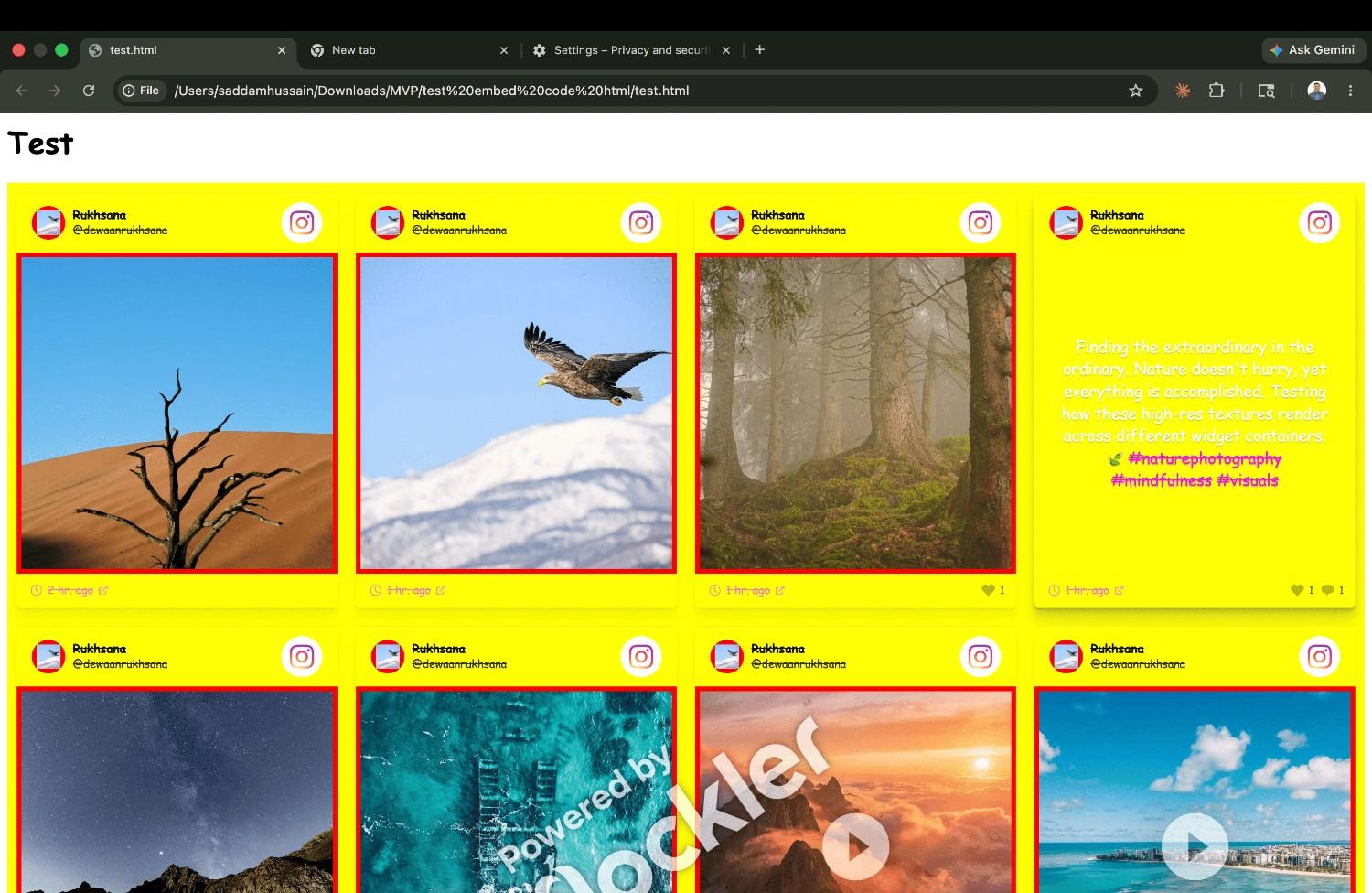
| Widget | Isolation Method | Page CSS Breaks Widget? | Widget CSS Leaks Out? |
|---|---|---|---|
| EmbedSocial (direct iframe) | Iframe | No ✓ | No ✓ |
| EmbedSocial (JS embed) | Iframe (JS-injected) | During load only ✗ | Minor ✗ (wrapper div) |
| CollectSocials | Shadow DOM | No ✓ | No ✓ |
| Walls.io | Iframe | No ✓ | No ✓ |
| Flockler (iframe) | Iframe (optional) | No ✓ | No ✓ |
| Flockler (default script) | None (global CSS) | Yes ✗ | Yes ✗ |
| Curator.io | None (global CSS) | Yes ✗ | Yes ✗ |
| Juicer.io (default) | None (global CSS) | Yes ✗ | Yes ✗ |
| Elfsight | None (global CSS) | Yes ✗ | Yes ✗ |
The takeaway for Flockler users: If you use Flockler's default script embed, your site's CSS will break the widget and Flockler's styles can leak into your page. Make sure you use the iframe embed option for full isolation. CollectSocials solves this differently, Shadow DOM provides native isolation without needing a separate embed method.
The Real Cost: Dollar-Per-Source Pricing Comparison
Unlimited layouts per source is a real advantage, and it is the thing Flockler customers cite most. But when you calculate the cost per source, the premium becomes stark:
| Tool | Plan | Sources | Price | $/Source | Notes |
|---|---|---|---|---|---|
| Flockler | Basic | 8 | $129/mo | $16.13 | Unlimited feeds, layouts & page views; strong value at scale |
| Flockler | Business | 15 | $229/mo | $15.27 | Adds AI moderation (Garde AI) & automated alt text |
| Flockler | Pro | 30 | $379/mo | $12.63 | Prioritized support; best $/source in Flockler's lineup |
| CollectSocials | Pro | 5 | $29/mo | $5.80 | Unlimited feeds, 30K views/mo; Google Reviews included |
| CollectSocials | Business | 15 | $59/mo | $3.93 | Unlimited views, AI moderation; best value at scale |
| Curator.io | Pro | 5 | $25/mo | $5.00 | 15K views/mo; sources tied to feeds |
| Curator.io | Business | 15 | $59/mo | $3.93 | Unlimited views; 15-min update frequency |
| EmbedSocial | Pro | 3 | $29/mo | $9.67 | 5K views/mo; no LinkedIn or X |
| Juicer.io | Starter | 5 | $25/mo | $5.00 | Hourly refresh; 1 feed; LinkedIn/X restricted |
1. CollectSocials: Affordable Alternative for Website Embedding
One clarification before the comparison, because the heading above names only half of it. CollectSocials turns one curated feed of posts, reviews and video from ten platforms into both a widget on your website and a full-screen wall the whole room can post to, with consent recorded and provable on every post. Website embedding is one of the two surfaces that feed drives, not the ceiling of the product. Event walls are on the $59 Business plan and are covered further down this section.
Best for: Small and mid-size businesses, agencies, and teams that want unlimited layouts per source at a fraction of Flockler's price, with modern out-of-the-box design quality.
CollectSocials prices on sources, not layouts. Once you connect an Instagram account, a Facebook Page, or a YouTube channel, you can create as many feeds and display layouts as you want across every page of your website, homepage, product pages, testimonials section, about page, without consuming additional source slots. The difference is the pricing: where Flockler's Basic plan starts at $129 per month for 8 sources, CollectSocials' Pro plan is $29 per month for 5 sources, and the Business plan at $59 per month gives you 15 sources, matching Flockler's Business tier feed count at roughly a quarter of the cost.
Where CollectSocials wins
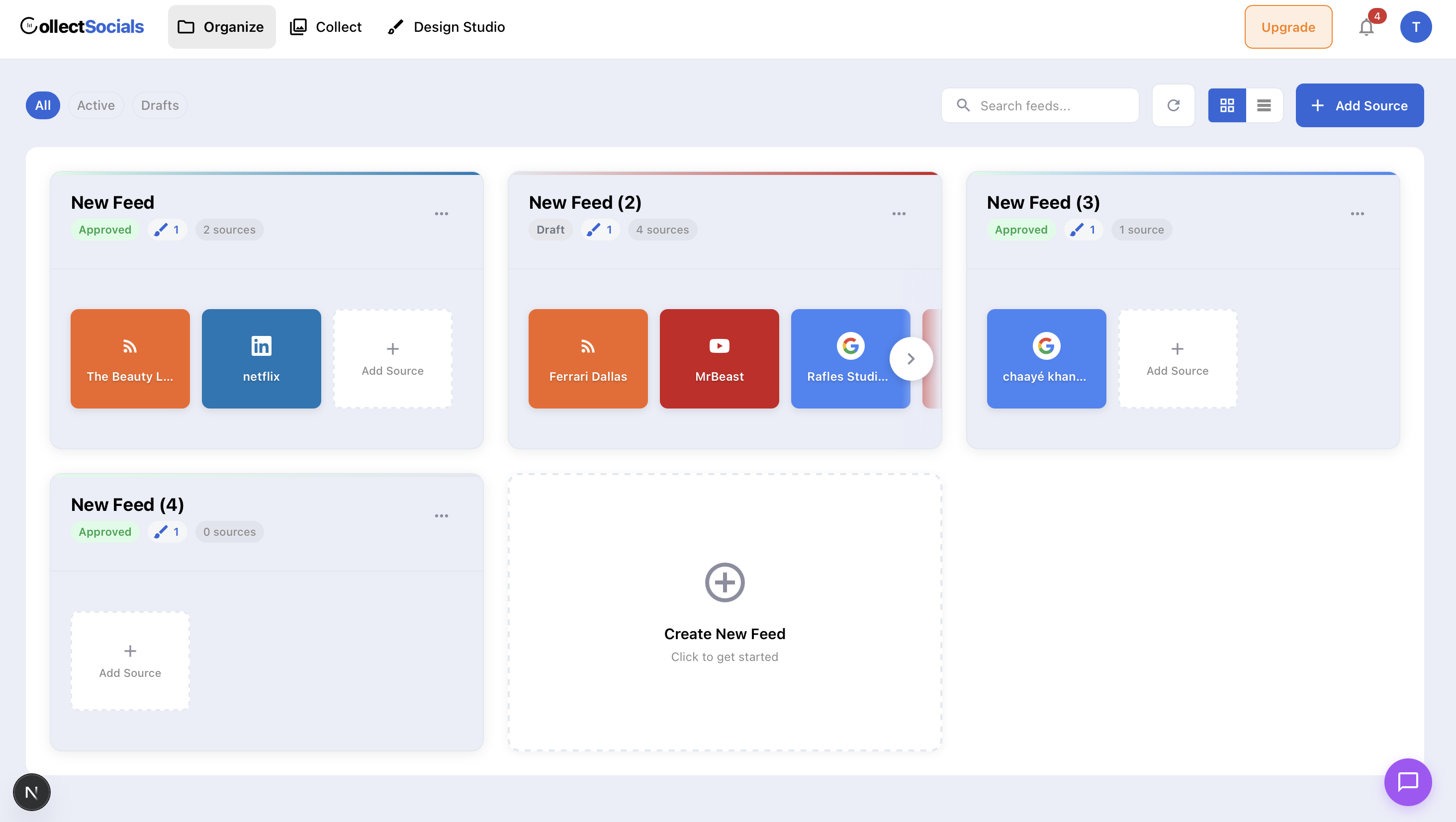
The design library eliminates the custom-CSS requirement. CollectSocials ships with forty professionally designed layouts Grid, Masonry, Carousel, List, Mosaic, Slider, Marquee, Compact, Tetris, Stack, Coverflow, Panel, Stagger, and Layers, paired with sixteen themes including Minimal, Bold, Elegant, Glass, Neon, Brutalist, Midnight, and more. Every combination renders a polished result out of the box. Flockler's base layouts are clean but generic, achieving a distinctive visual identity typically means writing custom CSS or bringing in a developer. For teams without a dedicated front-end resource, this is a meaningful time saving.
How it works
This animation demonstrates one of the most significant hidden costs in Flockler's pricing model: achieving distinctive design typically requires custom CSS or developer resources. Flockler's base layouts are clean and functional, but they're generic by design, built for enterprise flexibility rather than out-of-the-box visual impact. For agencies and brands obsessive about design consistency, this means budgeting developer time on top of the $129/month subscription, or settling for layouts that look identical to every other Flockler customer.
CollectSocials' Design Studio was built specifically to solve this problem for teams without dedicated front-end developers. The animation shows the same content transforming through 40 layout structures (Grid, Masonry, Carousel, Tetris, Coverflow, etc.) and 16 themes (Minimal, Glass, Neon, Brutalist, Midnight, etc.). Every combination renders a polished, production-ready result instantly, no CSS required. This isn't a superficial feature for Flockler alternatives searchers; it's a fundamental workflow difference that determines whether a five-person marketing team can achieve brand-quality output without hiring a developer.
Flockler's unlimited-layouts architecture is genuinely smart, pay for sources, not layouts, but that advantage evaporates if every layout requires custom coding to match your brand. CollectSocials preserves the architectural benefit (unlimited layouts per source) while eliminating the design bottleneck. For the vast majority of businesses comparing alternatives, this combination of affordability and design accessibility is what makes the switch viable.
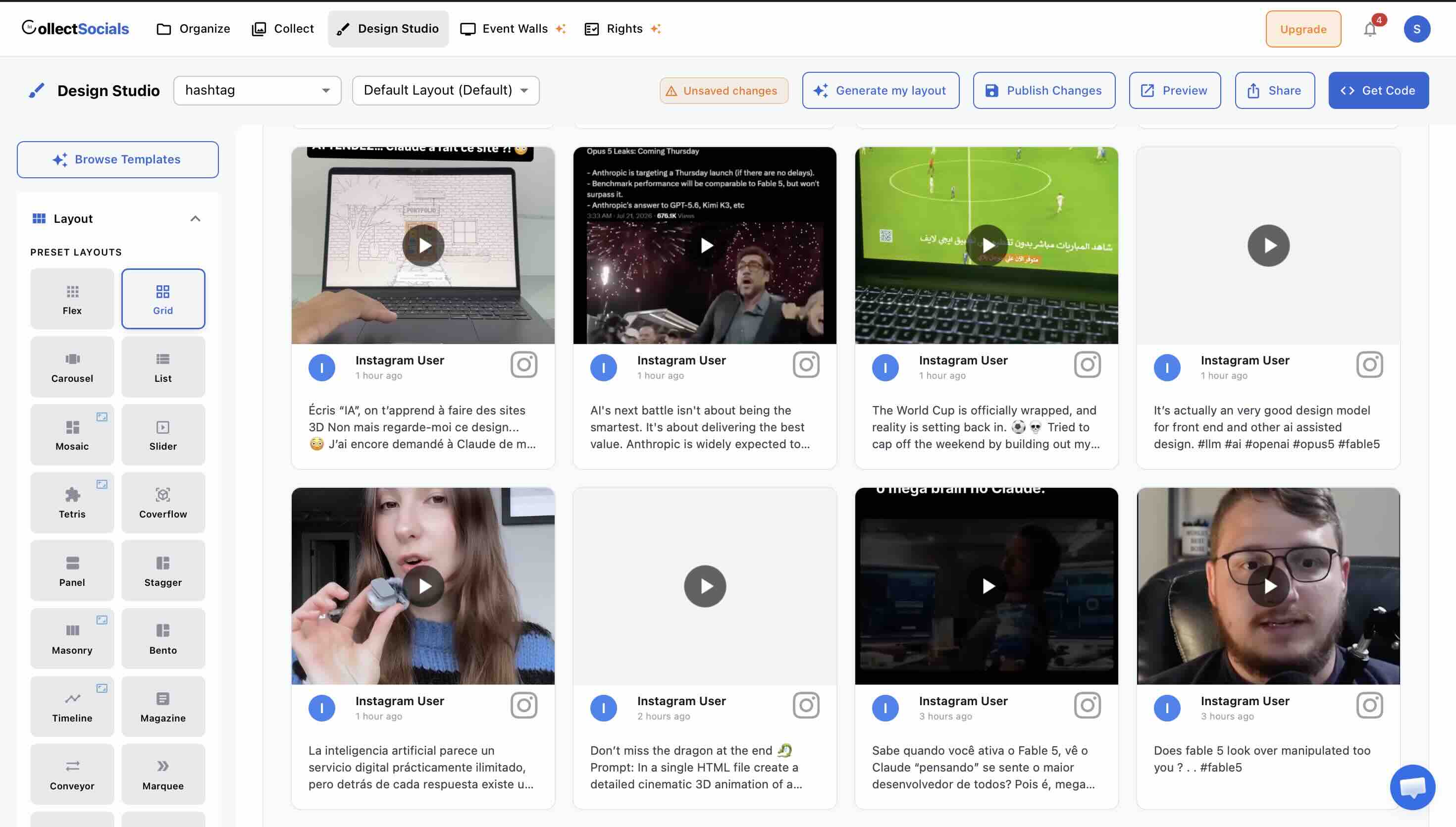
Feeds are truly unlimited on every plan, including free. The free tier includes one connected source, unlimited feeds, and 2,000 monthly page views, with three sources through the 7-day trial. Our link shows under a free feed, and paid plans can remove it. For a business that wants to test social aggregation before committing, there is no trial expiration pressure, you can run a feed indefinitely on the free tier and upgrade only when you outgrow the page view limit.
Multiple layouts per source solve the "same content, different pages" problem. This is where CollectSocials matches Flockler's core value proposition directly. Display your Google Reviews in a Carousel on the homepage and in a Grid on your testimonials page without consuming an extra source slot. Flockler does the same thing, but charges $129 per month minimum for the privilege.
Shadow DOM isolation means zero CSS conflicts. On WordPress, Webflow, Shopify and hand-built sites the embed is a single script tag that renders inside a Shadow DOM, keeping the widget's styles completely sandboxed from your site's theme. Wix and Squarespace get a self-resizing iframe instead, because both sandbox or strip custom scripts, and a frame is a harder boundary again. No broken layouts either way. For platform-specific embedding instructions, see the guide to embedding a social wall on any website.
WordPress, Shopify, Wix and Webflow have their own apps. The WordPress plugin is in the official directory, and it copies posts into your own database so a synced feed renders from your own domain: once it has synced, its page views are not metered on any plan, free included. Everywhere else the embed is a snippet, with dedicated guides for Instagram on Wix, Instagram on WordPress and Instagram on Squarespace. Setup is typically under five minutes per platform.
How it works
This curation workflow highlights one of Flockler's most frustrating pricing gaps: AI-powered moderation (Garde AI) is locked out of the Basic plan entirely. If you're on Flockler's $129/month entry tier and aggregating user-generated content from public hashtags, exactly when automated filtering matters most, you're forced to manually review every incoming post. The animation shows the streamlined alternative: approve or hide content with one click, and changes sync instantly to your live website without touching code or refreshing embed scripts.
For brands running hashtag campaigns at conferences, product launches, or social activations, manual moderation isn't just inconvenient, it's operationally impossible. A live event hashtag can generate hundreds of posts in hours. Flockler requires upgrading to the Business plan at $229/month to unlock automated content filtering. That's a forced upsell of $100/month for a feature that should be table stakes on any plan handling public UGC. CollectSocials includes manual curation controls on every plan, including free, with no feature gating based on tier. Its UGC rights management with a real consent-and-deletion audit trail runs on every plan too, at five rights requests a month on Free and Pro and uncapped from Business up, the kind of compliance engineering the pricier incumbents charge more for.
The broader pattern here is what drives most Flockler alternatives searches: essential features locked behind aggressive tier upgrades. Need more than 8 sources? Upgrade to Business at $229/month. Need AI moderation? Same upgrade. Need API access? Contact enterprise sales. For SMBs and agencies, this pricing ladder feels designed to extract maximum revenue rather than serve actual customer workflows. Alternatives like CollectSocials keep core moderation, layout flexibility, and design tools accessible at every price point, which is why they're increasingly competitive for website embedding use cases.
Where to keep in mind
The procurement gap is the concrete one, and it is worth naming as a list of missing artefacts rather than a vibe: CollectSocials has no SSO, no SAML, no customer-account 2FA and no data processing agreement to sign, and no bulk feed creation via API. A security review that requires any of those stops at us and does not stop at Flockler's Premium tier, which also brings dedicated account management and contractual SLAs.
Live event features are a different story, and the common assumption runs the wrong way. CollectSocials ships an event wall on the $59 Business plan: eleven wall modes rendered by the screen page itself, QR pair-to-TV with codes that expire after fifteen minutes and no login on the venue machine, attendee posting with no account at all (photo, message or question), an in-browser camera booth with a three-second countdown and a front-or-back flip, server-enforced name and consent, live multiple-choice polls with animated result bars, a human moderation queue, and a rotating sponsor strip. It runs off the same feed as your website widget, so there is no second product to buy. What it does not have is a branded frame or sticker composited onto an attendee's own photo, emoji reactions, named signage or event-platform integrations, or a per-event pass.
Pricing
Free: 1 source, unlimited feeds, 7 layouts, all 16 themes, 2,000 page views, $0/mo (7-day trial opens 3 sources and the full design studio). Pro: 5 sources, unlimited feeds, 30,000 page views, $29/mo. Business: 15 sources, unlimited feeds, unlimited page views, the event wall, $59/mo. Scale: 30 sources, $119/mo. Annual billing is two months free: $290, $590 and $1,190 a year. Enterprise: 50+ sources, contact sales.
Verdict: For website embedding, and for event walls too, CollectSocials covers the ground most Flockler customers actually use at under a quarter of the price. Where it stops is enterprise procurement: no SSO, no SAML, no DPA, no API for bulk feed creation.
2. Curator.io: Best for Broad Platform Coverage
Best for: Businesses that need niche platform support (Tumblr, DeviantArt, RSS feeds, SoundCloud) alongside mainstream social networks, and want a free plan with minimal branding.
Curator.io has been in the social aggregation space for years and connects a longer list of content sources than most tools here. It integrates with fifteen-plus platforms including Instagram, Facebook, YouTube, X/Twitter, TikTok, LinkedIn, Pinterest, Tumblr, Flickr, RSS, Vimeo, and more. For context on what to expect when comparing aggregators head-to-head, see the Curator.io alternatives guide.
Where Curator.io works well
The platform breadth is the reason to pick it. If your brand has a meaningful presence on a less common platform, a DeviantArt portfolio for a design agency, a SoundCloud channel for a music label, a Tumblr blog for a fashion brand, Curator.io likely supports it natively. The free plan includes three sources with a discreet watermark (a small logo rather than a prominent banner), making it one of the more professional free tiers in the category. Paid plans start at $25 per month for the Professional tier with 15,000 page views, well below Flockler's $129 entry point.
Where it falls short
The design templates feel dated. Curator.io ships a handful of layout families against the forty in this article's first entry, and achieving a modern, distinctive look typically requires custom CSS. The architecture also ties each layout to a specific content source, to display the same Instagram feed in a Grid on one page and a Carousel on another, you must add the source twice, consuming two of your allowed source slots. This is the opposite of Flockler's and CollectSocials' "pay per source, unlimited layouts" approach and can force premature upgrades. The Business plan at $59 per month for fifteen sources is priced level with CollectSocials' equivalent Business tier, which adds unlimited page views and a live event wall on the same account.
Pricing
Free: 3 sources, minimal branding, $0/mo. Professional: 5 sources, 15K views, $25/mo. Business: 15 sources, $59/mo. Enterprise: custom.
Verdict: The right choice when platform variety is the deciding factor, and the condition is narrower than it first looks. CollectSocials connects Tumblr and RSS natively, so neither of those is a reason to go elsewhere. Flickr is the real gap: if a Flickr photostream, a SoundCloud channel or a DeviantArt portfolio has to be in the feed, Curator.io connects sources CollectSocials does not.
3. Taggbox/Tagembed: Best for UGC Campaigns and Shoppable Commerce
Best for: E-commerce brands and marketing teams running hashtag-based UGC campaigns where content rights management, shoppable product tagging, and deeper analytics are non-negotiable. For a deeper breakdown, see the Taggbox alternatives guide.
Taggbox is Tagembed's sister product under the same parent company. The 2026 merger pulled both brands closer. Taggbox is built around campaign work rather than a single embed: shoppable product tagging, rights-request workflows and campaign analytics sit alongside the feed itself. Taggbox supports over twenty social media platforms and goes significantly deeper than basic aggregation: shoppable galleries that let you tag products directly inside user-generated Instagram or TikTok posts, UGC rights management workflows that automate permission-request DMs to content creators, hashtag campaign tracking, AI-powered content moderation, and detailed analytics with sentiment analysis. The platform integrates with over 120 CMS platforms including WordPress, Shopify, Wix, Squarespace, and many others.
Where Taggbox/Tagembed works well
The shoppable feed is the standout feature for e-commerce. Tag products directly inside user-generated content, and a click takes the visitor straight to the product page, turning social proof into a conversion surface rather than just a display element. The UGC rights management module is particularly useful for brands that need documented creator permissions for legal or compliance reasons. Analytics include impression tracking, click-through rates, engagement data, and sentiment analysis across aggregated content. For display, Taggbox covers websites, digital signage, email campaigns, and event screens. Tagembed's CMS integration list is the longest on this page at over 120 platforms, so whatever your site is built on, there is likely a native integration or plugin for it.
Where it falls short
Taggbox splits its offering across two separately priced products: Taggbox Widget (for websites) and Taggbox Social Walls (for events). A brand that needs both, say, an e-commerce company that runs quarterly trade show activations, ends up paying for two subscriptions. This is structurally similar to how Walls.io prices Events, Websites, and Digital Signage separately, and it adds real cost and administrative overhead. Widget pricing starts at approximately $19 per month for the Starter plan, but AI moderation and meaningful customization unlock only at the Growth tier ($39) or higher. Users on G2 note that the learning curve is steeper than simpler aggregators, and widget customization on lower-tier plans is constrained. Customization options are limited on lower-tier plans, and the default templates are basic compared to what CollectSocials or Flockler offer.
Pricing
Free: 1 feed, 500 views, 4-day refresh, $0/mo. Starter: 2 feeds, 10K views, $19/mo. Growth: 4 feeds, 50K views, auto-mod, $39/mo. Advance: 10 feeds, 1M views, AI mod, $99/mo. Event social wall pricing is separate.
Verdict: If your marketing strategy revolves around UGC campaigns with shoppable content and documented creator permissions, Taggbox's feature depth justifies the premium. For teams that just need to display social feeds on their website, the split-product pricing makes it harder to justify over simpler, cheaper tools.
4. EmbedSocial: Best for Google Reviews and Social Proof
Best for: Local businesses, service providers, restaurants, clinics, and SaaS companies where Google Reviews and other review platform content are the primary social proof asset. For a deeper comparison, see the EmbedSocial alternatives guide.
EmbedSocial has carved out a strong niche at the intersection of social media aggregation and review management. The product is split into two primary modules, EmbedFeed for social aggregation and EmbedReviews for review display, along with a bundled All Products plan. Where Flockler treats review platforms as one of many sources, EmbedSocial treats reviews as a first-class product with specialized widgets, AI-generated reply suggestions, and review collection workflows. The platform holds official API integrations with Google, Instagram, and TikTok, giving it a reliability edge for those networks.
Where EmbedSocial works well
If Google Reviews are the most persuasive social proof on your website, as they are for most local services businesses, healthcare practices, law firms and restaurants, EmbedSocial is one of the few tools here that treats reviews as a product rather than a source type: dedicated review widgets, AI reply suggestions, and collection workflows (QR codes for in-store review requests, email automation, SMS collection) that no pure aggregator on this list attempts. In our own render test its widget loaded inside a cross-origin iframe with full style isolation. For e-commerce brands that combine product reviews with social content, the hybrid displays do a job a plain feed widget cannot.
Where it falls short
The split-product pricing adds up quickly. The standalone EmbedFeed social aggregator starts at $29 per month for three sources and 5,000 page views, the same monthly price as CollectSocials' Pro plan, which offers five sources and 30,000 page views. Getting both social feeds and review management requires either two separate subscriptions or the All Products bundle at $64 per month. If reviews are secondary to your social strategy, the pricing-to-value ratio works against EmbedSocial.
Pricing
Pro: 3 sources, 5K views, $29/mo. Pro Plus: 6 sources, 20K views, $49/mo. Premium: 15 sources, 100K views, $99/mo. All Products bundle: $64/mo.
Verdict: The right choice when reviews are your primary social proof asset. If reviews are just one element of a broader social strategy, the specialized features do not justify the premium over a general-purpose aggregator.
5. Elfsight: Best Single-Widget Solution at the Lowest Price
Best for: Website owners who need exactly one social feed or one review widget and want the cheapest path to a polished result.
Elfsight is a marketplace of eighty-plus website widgets. Its Social Feed and Google Reviews widgets are among the most popular. Each widget is configured through an online visual builder and embeds via a single HTML snippet, no plugins, no accounts to manage within multiple products.
Where Elfsight works well
Per-widget pricing makes Elfsight the cheapest option for single-use needs. A Google Reviews widget or Social Feed widget starts at $6 per month on the Basic plan (three widgets, 5,000 views). Compare that to Flockler at $129 per month. If all you need is a Google Reviews carousel on your homepage, Elfsight delivers it at a fraction of the price. The visual configurator is intuitive, and G2 reviewers consistently highlight ease of use. Five social feed layouts (Grid, Masonry, List, Slider, Carousel) with dark and light modes look clean without customization.
Where it falls short
Elfsight is a widget tool, not a platform. There is no unified dashboard for managing social feeds and reviews together, no content moderation system, no analytics beyond basic view tracking, and no way to combine social posts and reviews in a single feed. If you need a social feed widget and a review widget, you are purchasing and managing them separately within Elfsight's marketplace, a different kind of product fragmentation. The free plan caps at 200 views per month, and exceeding your view limit deactivates the widget entirely.
Pricing
Free: 1 widget, 200 views/mo. Basic: 3 widgets, 5K views, $6/mo. Pro: 9 widgets, 50K views, $12/mo. Premium: 21 widgets, 150K views, $24/mo.
Verdict: The right choice for single-widget needs at the lowest possible price. If you need multiple feeds, layouts, or unified management, the per-widget model becomes limiting.
6. Juicer.io: Best for Affordable Multi-Source Aggregation
Best for: Small businesses, bloggers, and agencies that want to aggregate content from ten-plus social platforms without paying enterprise prices.
Juicer.io has positioned itself as the value-priced alternative in the general aggregation space. It supports fifteen-plus platforms, offers a free plan capped at one source, and charges roughly $5 per social account on its entry plans. For brands that do not need Flockler's enterprise features but do need broad platform coverage and a clean interface, Juicer.io hits a reasonable price-to-features ratio. For a more detailed comparison, see the Juicer.io alternatives guide.
Where Juicer.io works well
The per-source pricing is refreshingly transparent. Unlike Flockler's tier-based feed limits, Juicer.io lets you add sources à la carte on lower plans, which works well for businesses that do not fit neatly into any pre-defined feed bucket. The free plan is capped at one source, one feed and a 24-hour refresh, with Juicer branding inside the feed. The Lite plan at $15 per month covers three sources, hourly refresh, and removes the branding. Starter at $25 covers five sources, and Pro at $99 covers thirty.
Where it falls short
The 24-hour refresh rate on the free plan is too slow for any brand that posts daily. Even the Lite plan's hourly refresh feels dated compared to Flockler's 5-to-15-minute refresh cycle. Design templates are basic, customization requires CSS, and the out-of-the-box themes have not kept pace with modern design trends. Some historical user reviews flag browser compatibility issues, particularly with script blocking by ad filters. Analytics are thin compared to Taggbox or Flockler.
Pricing
Free: 1 source, 1 feed, 24h refresh, branded, $0/mo. Lite: 3 sources, $15/mo. Starter: 5 sources, $25/mo. Pro: 30 sources, $99/mo.
Verdict: The practical choice when you need broad source coverage on a strict budget and can tolerate slower refresh rates and plain design. For premium design and faster refresh, CollectSocials delivers more for similar or less money.
7. Walls.io: Best for Live Event Social Walls
Best for: Conference organizers, trade show marketers, and event production teams that need large-format social walls with live audience engagement features. For a deeper breakdown, see the Walls.io alternatives guide.
If Flockler is the enterprise choice for always-on website deployments, Walls.io is the premium choice for time-boxed live events. It is used by Adobe, BMW, Ferrari, and major conference organizers for product launches and large-audience activations. The feature set leans hard into event engagement: live polls, photo booths, QR-code audience submissions, hashtag aggregation, and digital signage optimization designed for jumbotrons and projection screens.
Where Walls.io works well
The live event features are the reason to buy it. Audience members submit photos via QR code, the photos flow into a moderated queue and onto the big screen, and live polls, leaderboards and hashtag walls run alongside them, with digital signage output sized for jumbotrons. One thing to check before assuming that set is exclusive: CollectSocials runs QR audience submissions, an in-browser camera booth, live polls, a leaderboard mode and a moderation queue on its $59 Business plan, off the same feed that drives the website widget. What Walls.io has and we do not is branded photo frames, emoji reactions, and named signage and event-platform integrations. It also sells a per-event pass, which we do not, though the practical answer to that is cheaper: every CollectSocials team's first event runs free on a one-time 24-hour go-live window, no credit card. Schedule the window and screen pairing unlocks for the week before it, so you can run a wall, pair a screen and take real attendee posts before you have paid anything at all.
Where it falls short
The pricing is the steepest in the category. Paid plans start at $270 per month (or $215/mo billed annually) for Websites and Digital Signage, with Event passes from $270 one-time, and no affordable entry tier. There is no free plan at all, only a 14-day trial. For businesses that need both website embedding and occasional event activations, the separate-product pricing doubles the cost. And if you are shopping for a social wall tool for website use, you are paying for enormous event-specific functionality you will never use.
Pricing
14-day free trial (no credit card required). Paid plans: from $270/mo (or $215/mo billed annually with 20% savings) for Websites and Digital Signage. Event passes from $270 (one-time for 30 days).
Verdict: The right tool when the event is the product: thousands of attendees, a main-stage screen, and named integrations with the signage and event platforms already in the run of show. For a website embed, or for a wall you want running off the same feed as your site, the entry price is hard to justify.
8. Onstipe: Best Budget Option for Basic Aggregation
Best for: Solopreneurs, nonprofits, and small event organizers on the tightest possible budget who need functional social walls without design polish. For a deeper comparison, see the Onstipe alternatives guide.
Onstipe is the budget end of the social aggregation market. Pricing starts at $8 per month for the Nano plan, with the Starter plan at $15 per month including four sources and 100,000 page views. It supports the main platforms (Instagram, Facebook, X/Twitter, LinkedIn, YouTube, Tumblr, Flickr) and offers both website embedding and event-specific display modes.
Where Onstipe works well
The pricing is genuinely budget-friendly, roughly 94 percent cheaper than Flockler for functionally similar basic aggregation. Onstipe also offers one-time event plans you can buy for a specific date range, which is useful for one-off conference social walls without committing to a recurring subscription. For the specific use case of "I need a hashtag wall for this weekend's event and I do not want to pay $270," Onstipe is hard to beat on cost.
Where it falls short
The design quality reflects the price. Templates are functional but basic, customization is limited on lower plans, and the default themes will not impress on a polished brand website. Backend performance has been flagged as slow by Capterra reviewers, and API access sits on the Business tier and higher event plans, which rules out custom integration work on the cheaper plans. The free plan carries branding and ads.
Pricing
Free: limited, branded. Nano: $8/mo. Starter: $15/mo. Plus: $25/mo. Economy: $39/mo. Business: $69/mo. Event plans priced separately.
Verdict: The right tool when price is the only deciding factor. For most professional use cases, CollectSocials' free tier delivers more polished results at zero cost.
Quick Comparison Table
| Tool | Free Plan | Starting Price | CSS Isolation | Best For |
|---|---|---|---|---|
| Flockler | No free plan (14-day trial) | $129/mo | Iframe (optional) | Multi-brand, unlimited layouts |
| CollectSocials | 1 source, 7 layouts, all 16 themes (7-day full trial, 3 sources) | $29/mo | Shadow DOM ✓ | One feed driving both a website widget and a live event wall |
| Curator.io | 3 sources, minimal branding | $25/mo | None ✗ | Platform variety, lightweight |
| Taggbox/Tagembed | 1 feed, 500 views | $19/mo | Iframe (optional) | UGC campaigns, CMS integration (merged 2026) |
| EmbedSocial | Free (1 source, 500 views) | $29/mo | Iframe ✓ (JS embed: partial) | Review integration |
| Elfsight | 1 widget, 200 views/mo | $6/mo | None ✗ | Single-widget, lowest cost |
| Juicer.io | 1 source, branded | $15/mo | Iframe (optional) | Broad platform support |
| Walls.io | No free plan (14-day trial) | $270/mo | Iframe ✓ | Live events, digital signage |
| Onstipe | Free (branded, limited) | $8/mo | Not tested | Budget option |
The Math: Cost Per Source Across All Plans
One of the clearest ways to cut through marketing copy is to calculate the cost per source on each platform's entry paid tier. Sources are the meaningful unit of value in social aggregation, they represent actual connected social accounts, not abstract "feeds" or "views."
| Tool | Entry Plan | Price/mo | Sources | Cost per Source |
|---|---|---|---|---|
| Onstipe Starter | Starter | $15 | 4 | $3.75 |
| CollectSocials Pro | Pro | $29 | 5 | $5.80 |
| Juicer.io Lite | Lite | $15 | 3 | $5.00 |
| Taggbox/Tagembed Starter | Starter | $19 | 2 feeds | $9.50 |
| Curator.io Professional | Professional | $25 | 5 | $5.00 |
| Elfsight Basic | Basic | $6 | 3 widgets | $2.00/widget |
| EmbedSocial Pro | Pro | $29 | 3 | $9.67 |
| Flockler Basic | Basic | $129 | 8 | $16.13 |
Flockler is the most expensive per source on this page, from 1.7 times the nearest tool up to more than four times the cheapest. That premium is paying for three things: AI moderation on higher tiers, enterprise support infrastructure, and the unlimited-layouts architecture. For organizations that genuinely use all three, like Harvard running dozens of campus-wide hashtag walls across thirty subdomains, this is justified. For a SMB or agency that needs a social feed on a client's homepage, it is not.
How to Choose the Right Flockler Alternative
The right choice depends on which of Flockler's capabilities you actually use. Here is the decision framework.
If your primary use is website embedding and design quality matters, consider CollectSocials. You get Flockler's core architectural advantage (unlimited layouts per source) at under a quarter of the price, plus a design library that does not require custom CSS to look modern. For most businesses leaving Flockler due to pricing, this is a strong replacement option.
If platform variety is your deciding factor, choose Curator.io. Flickr, SoundCloud and DeviantArt are the ones that decide it, since CollectSocials already connects Tumblr and RSS natively. Accept the source-tied-layout tradeoff.
If you run hashtag UGC campaigns with shoppable content, choose Taggbox. Shoppable galleries that tag products inside a creator's post are the genuinely differentiated part. Rights and consent tracking is not: Taggbox keeps it off its free plan, while CollectSocials runs it on every plan, five rights requests a month on Free and Pro and uncapped from Business, with a timestamped consent trail on each one. Budget for both Widget and Social Walls pricing if you need events too.
If Google Reviews and review collection are your highest-impact social proof, choose EmbedSocial. The review collection workflows have no equivalent in a general aggregator, ours included: we display reviews, we do not collect them. If reviews are secondary, the specialization does not justify the cost.
If you need broad source coverage on a strict budget, choose Juicer.io. The per-source pricing is transparent, and the $15 Lite plan hits a practical value sweet spot. Accept slower refresh rates and plain design.
If you are running a live event at scale, look hard at Walls.io. Branded photo frames, named event-platform integrations and a per-event pass are things it has and CollectSocials does not, and at main-stage scale they matter. If what you actually need is QR audience submissions, a camera booth, live polls and a moderation queue, our $59 Business plan runs those off the same feed as your website widget, so price the event against the whole year rather than the weekend.
If price is the only factor and "functional" is enough, choose Onstipe. At $8 to $15 per month, it is the cheapest option that works. Do not expect polished design.
If you genuinely need Flockler's enterprise feature set, dedicated account management, SSO, API access, compliance reviews, bulk feed creation, multi-brand agency dashboards, stay with Flockler. The Premium tier's enterprise features are real, and none of them is a copy edit away here: we have no SSO, no SAML, no data processing agreement to sign and no bulk feed creation API. For that specific customer, Flockler is priced fairly.
The Bottom Line
Flockler is priced for large organizations with complex multi-brand, multi-property, multi-language deployments where dedicated account management and API access are non-negotiable, and its architecture is a lean two-file script embed, which our own test confirmed.
But the numbers also tell a different story about value. Curator.io is a four-file script embed at $25/mo. CollectSocials loads a single file and isolates the feed in a Shadow DOM at $29/mo. At $16.13 per source on the Basic plan against $3.93 on our Business plan, Flockler's premium is paying for enterprise infrastructure, not for a leaner embed: it loads two files to our one.
For every other customer, the SMB that just wants an Instagram feed on their homepage, the agency managing three client websites, the nonprofit hosting one conference a year, Flockler's pricing is genuinely hard to justify when tools like CollectSocials deliver the same core architectural advantage (unlimited layouts per source) at under a quarter of the price, with a design library that does not require custom CSS to look modern.
If you want to see how CollectSocials compares to what you are using now, the free plan gives you one connected source, unlimited feeds, and 2,000 monthly page views with no credit card required, and the 7-day trial opens three sources. Setup takes under five minutes. If it does not deliver meaningfully better design at meaningfully lower cost than what you have, nothing is lost.
Start Using CollectSocials Today
One curated feed from 10+ platforms: on your website in a single line of code, or up on the big screen at your event.