
But feature-rich and right-for-you are not the same thing. Taggbox is built for mid-market and enterprise UGC campaigns, and it shows: the pricing structure is split across multiple products (Widget vs. Display vs. UGC Suite), the free plan is severely limited at 500 views, and the backend, while powerful, requires a learning curve that many small business owners and marketers find excessive for what should be a straightforward task: displaying social media content on a website.
If you signed up for Taggbox expecting a simple social feed widget and instead found yourself navigating a UGC campaign platform, you are not alone. This guide compares eight alternatives that range from dead-simple website embeds to specialized tools for reviews, events, and budget-conscious teams, so you can find the tool that matches what you actually need. If you are earlier than that and still weighing whether you need a paid tool at all, how to embed an Instagram feed on your website tests every native method first and shows exactly where each one stops.
How Each Widget Renders
We installed Taggbox (merged platform) on a blank test page and recorded how each widget renders, how many files it loads and whether it isolates its styles. Here's how they compare:
| Widget | Render method | Files loaded | Style isolation |
|---|---|---|---|
| Curator.io | Script embed | 4 | None |
| Flockler | Script embed | 2 | None (iframe optional) |
| CollectSocials | Script embed | 1 | Shadow DOM |
| Juicer.io | Script embed | 2 | None |
| Taggbox/Tagembed | Script embed | 22 | None (iframe optional) |
| EmbedSocial | Cross-origin iframe | 10 | Iframe (full) |
| Walls.io | Cross-origin iframe | 11 | Iframe (full) |
| Elfsight | Script embed | 2 | None |
CSS Isolation: Protecting Your Website Design
We tested CSS isolation by injecting aggressive styles to see which widgets survive without breaking. Proper CSS isolation prevents your website's styles from breaking the widget and prevents the widget from affecting your page design.
| Widget | Isolation Method | Page CSS Breaks Widget? | Widget CSS Leaks Out? |
|---|---|---|---|
| CollectSocials | Shadow DOM (open) | No ✓ | No ✓ |
| Walls.io | Iframe | No ✓ | No ✓ |
| Flockler (iframe embed) | Iframe (optional) | No ✓ | No ✓ |
| Taggbox (iframe embed) | Iframe (optional) | No ✓ | No ✓ |
| EmbedSocial (direct iframe) | Iframe | No ✓ | No ✓ |
| EmbedSocial (JS embed) | Iframe (JS-injected) | During load only ✗ | Minor ✗ (wrapper div) |
| Flockler (default script) | None (global CSS) | Yes ✗ | Yes ✗ |
| Taggbox (default script) | None (global CSS) | Yes ✗ | Yes ✗ |
| Elfsight | None (global CSS) | Yes ✗ | Yes ✗ |
| Curator.io | None (global CSS) | Yes ✗ | Yes ✗ |
| Juicer.io (default script) | None (global CSS) | Yes ✗ | Yes ✗ |
| Juicer.io (iframe embed) | Iframe | No ✓ | No ✓ |
sync
How it works
Watch posts escape their platform silos. This animation shows posts flying from a locked platform container (Instagram, Facebook, etc.) across an "auto sync" bridge with pulsing dots, then landing in empty widget slots on your website. Status messages update: "Posts locked in [Platform]..." → "Syncing post 1 of 4..." → "Post 1 live on your website ✓" → "✓ Feed live, auto-updates with every new post."
Taggbox's multi-product split (Widget vs. Display vs. UGC Suite) means you navigate complexity just to get basic social content on your homepage. This animation shows the opposite: connect once, posts flow automatically. For businesses that came to Taggbox wanting a simple feed and found an enterprise UGC platform instead, this streamlined visual is exactly what they were looking for from the start.
Why People Look for Taggbox Alternatives
Taggbox reviews well overall, and its support team gets consistently high marks. But a good average masks specific friction points that drive users to look elsewhere. These are the recurring themes from G2, Capterra, Trustpilot, and competitive comparison sites.
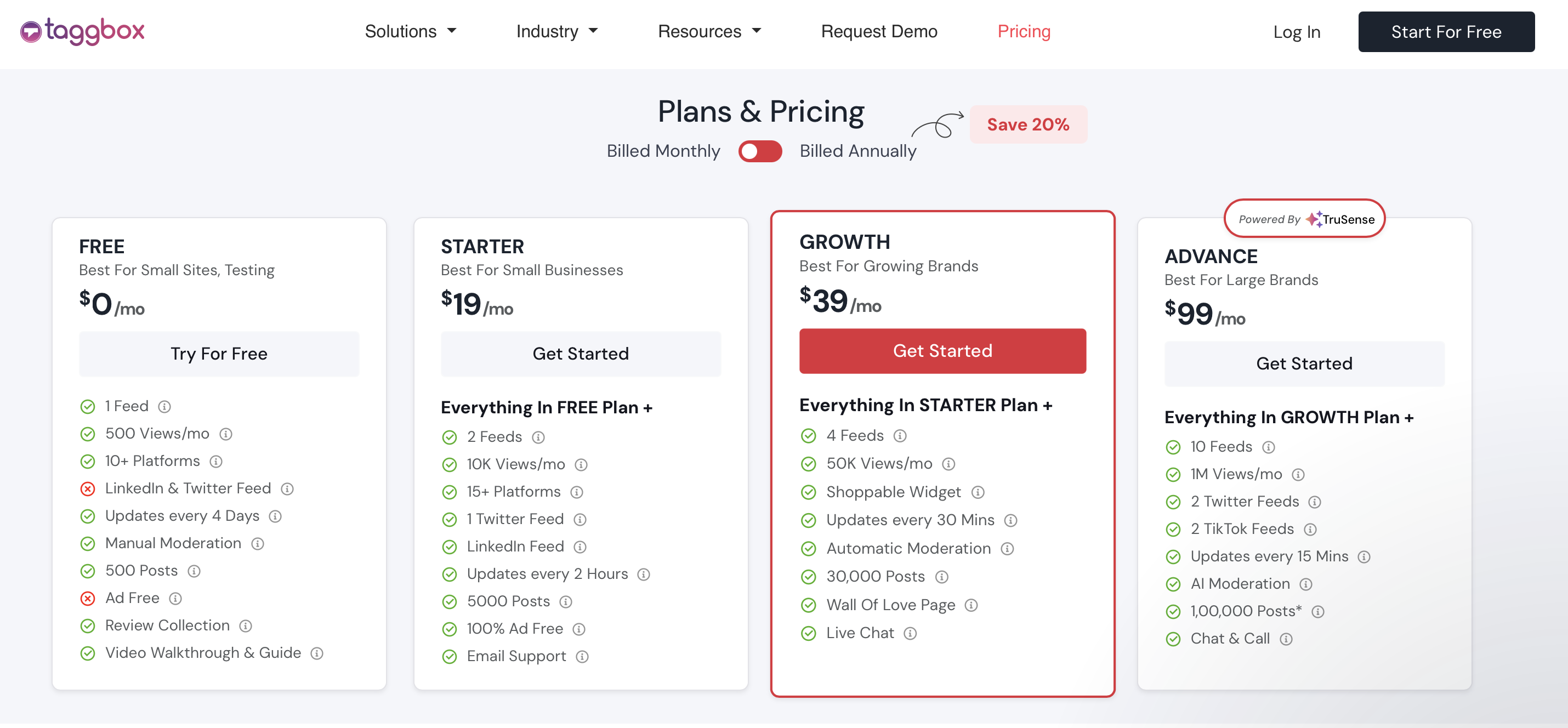
The product is split across multiple subscriptions. Taggbox's pricing is divided into at least three separate products: Widget (for website embedding), Display (for events and digital signage), and UGC Suite (for end-to-end campaign management). If you need both a website embed and a social wall for your annual conference, you are paying for two products. This split pricing means the total cost for multi-channel use can climb quickly, and comparing Taggbox's price against competitors that bundle everything into one subscription is not straightforward.
The free plan is a demo, not a product. Taggbox's free Widget tier gives you one feed, 500 views per month, content updates every four days, and only three social platforms (Instagram, Facebook, Vimeo). Five hundred views is exhausted within days on any website with meaningful traffic, and four-day refresh rates mean your feed will be visibly stale. The free plan is useful for testing the interface, but it is not something you can deploy on a production website.
Moderation features are gated behind higher tiers. Manual moderation is available on all plans, but automated moderation (rule-based filtering) requires the Growth plan at $39 per month, and AI-powered moderation requires the Advance plan at $99 per month. For teams managing high-volume UGC campaigns, manual moderation on the Starter plan creates a significant operational bottleneck. Multiple review sources confirm this pushes smaller teams toward time-consuming manual workflows.
The backend can feel complex for simple use cases. Taggbox is designed for UGC campaigns, shoppable commerce, rights management, and multi-channel distribution. If your goal is simply to embed an Instagram feed and some Google Reviews on your homepage, the dashboard presents far more options, menus, and configuration steps than you need. Several reviewers note that certain settings require multiple clicks to find, and switching between plans or products within the platform can be slow.
Twitter and TikTok feeds are limited or gated. The free plan includes no Twitter or TikTok support. The Starter plan allows one Twitter feed, but due to API limitations, updates can take four to six hours. TikTok feeds require the Advance plan at $99 per month. For brands that are active on X/Twitter or TikTok, these restrictions are a meaningful limitation, especially when competitors include all platforms at lower price points.
Refresh rates are slow on lower plans. The Starter plan updates content every two hours. Growth brings this to thirty minutes, and Advance to fifteen minutes. If you are running a product launch or campaign and want your website feed to reflect new posts quickly, you need to be on a higher-priced tier to get reasonable update speeds.
No refund on monthly plans. Taggbox's refund policy explicitly states that monthly plan subscriptions are non-refundable. Annual plans may be eligible under exceptional circumstances. This means if you sign up, discover the product is not what you expected, and want to cancel, you are out that month's payment regardless.
None of these issues make Taggbox a bad product. It is genuinely powerful for teams running sophisticated UGC strategies. But they explain why businesses with simpler needs, tighter budgets, or a preference for streamlined tools look for alternatives.
20 minutes vs 2 minutes
LEFT side shows manual embedding: Find each post on LinkedIn, copy the embed code, open your website editor, paste the code block, publish the page. Repeat five times for five posts. The exhaustion emoji gets progressively worse with each cycle. Total time: ~20 minutes. RIGHT side shows CollectSocials: connect your account once (~2 minutes), then posts flow in automatically. Bottom banner confirms: "CollectSocials saved ~18 minutes, and every future update is free."
Taggbox's interface is designed for enterprise UGC campaigns with shoppable galleries and rights management. If your goal is simply displaying social feeds on your website, you're navigating complexity you don't need. This split-screen comparison shows what simplicity looks like: one connection, then content flows automatically. No manual embedding. No repetitive workflow. For businesses frustrated by Taggbox's learning curve, this is the value proposition.
1. CollectSocials: Streamlined Website Embedding at a Lower Price
Best for: Businesses that want professional-quality social feeds on their website without the complexity or cost of a full UGC campaign platform, with a live event wall on the same account for the weeks they need one.
CollectSocials turns one curated feed of posts, reviews and video from ten live platforms into both a widget on your website and a full-screen wall the whole room can post to, with consent recorded and provable on every post. It supports Instagram, Facebook, YouTube, Google Reviews, TikTok, and X/Twitter (X/Twitter on paid plans), plus Pinterest, Vimeo, Tumblr, and RSS. LinkedIn is not live yet. The website half is the use case that brings most people to Taggbox in the first place, and the venue half is the one Taggbox sells as a second product.
Where CollectSocials wins
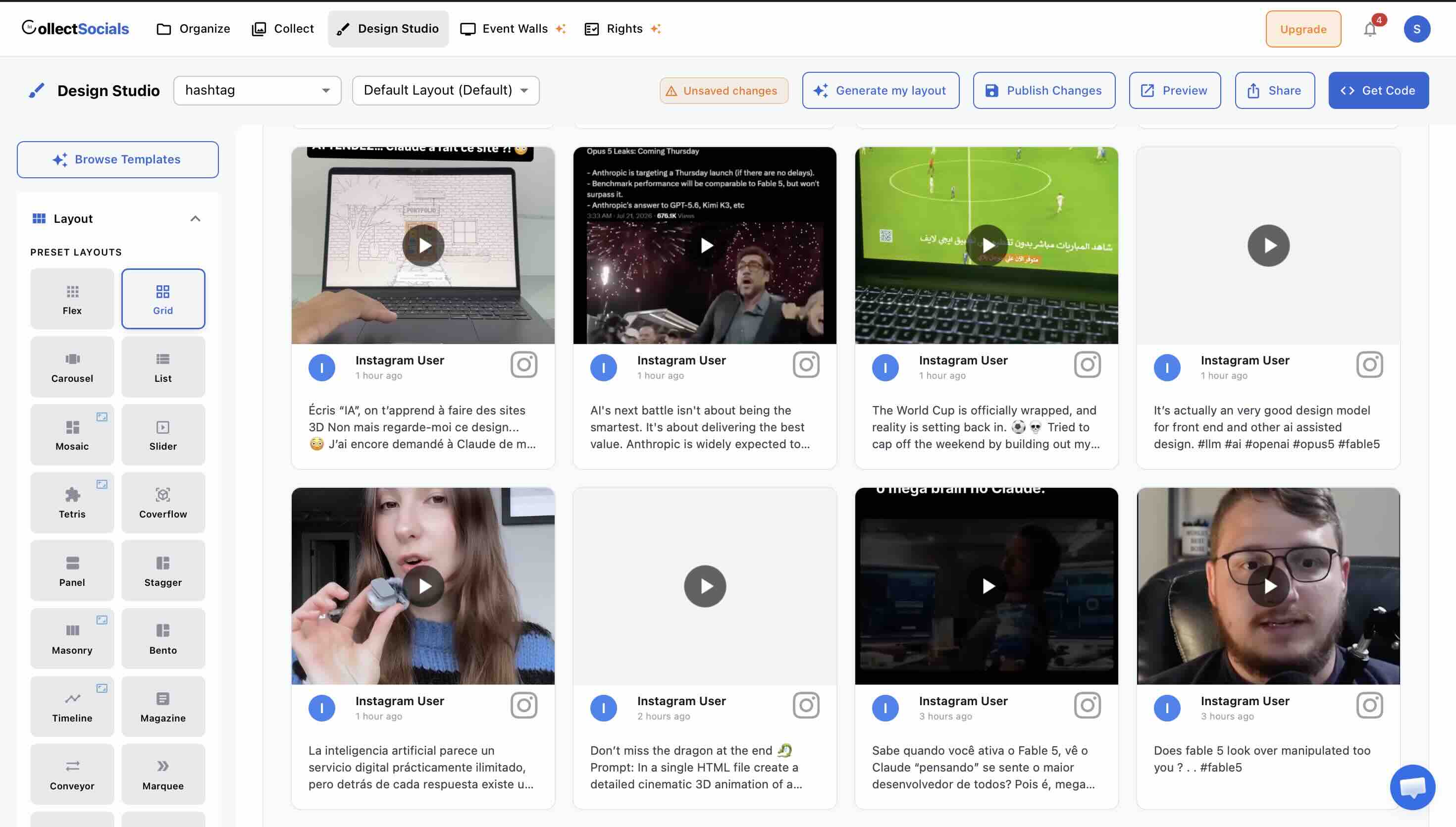
Design quality is the single biggest differentiator. CollectSocials ships with forty professionally designed layouts (Grid, Masonry, Carousel, List, Mosaic, Slider, Marquee, Compact, Tetris, Stack, Coverflow, Panel, Stagger and Layers among them) paired with sixteen themes including Minimal, Bold, Elegant, Glass, Neon, Brutalist and Midnight. Taggbox offers twenty-plus themes, but reviews consistently note the need for custom CSS to achieve polished results. CollectSocials produces professional output from the default options without touching a line of code.
Design Studio interface
The actual CollectSocials Design Studio UI. This animation mirrors the real interface: left sidebar with layout icons (Grid, Masonry, Carousel, List, Mosaic, Marquee) arranged in a 2-column grid, theme swatches below (Minimal, Bold, Glass, Elegant, Neon), and display toggles (Rating, Date, Avatar, Badge). The preview area on the right morphs through different combinations automatically, demonstrating how the feed transforms with each selection. Header shows "Save Changes" and "Get Code" buttons. Footer tagline: "40 layouts · 16 themes · any website."
Taggbox offers twenty-plus themes, but reviewers note CSS work is needed for polished results. This interface shows the opposite: click layout, pick theme, see instant professional output. No learning curve. No CSS. For teams frustrated by Taggbox's complexity, this is what "design-first" means in practice: beautiful feeds without power-user status.
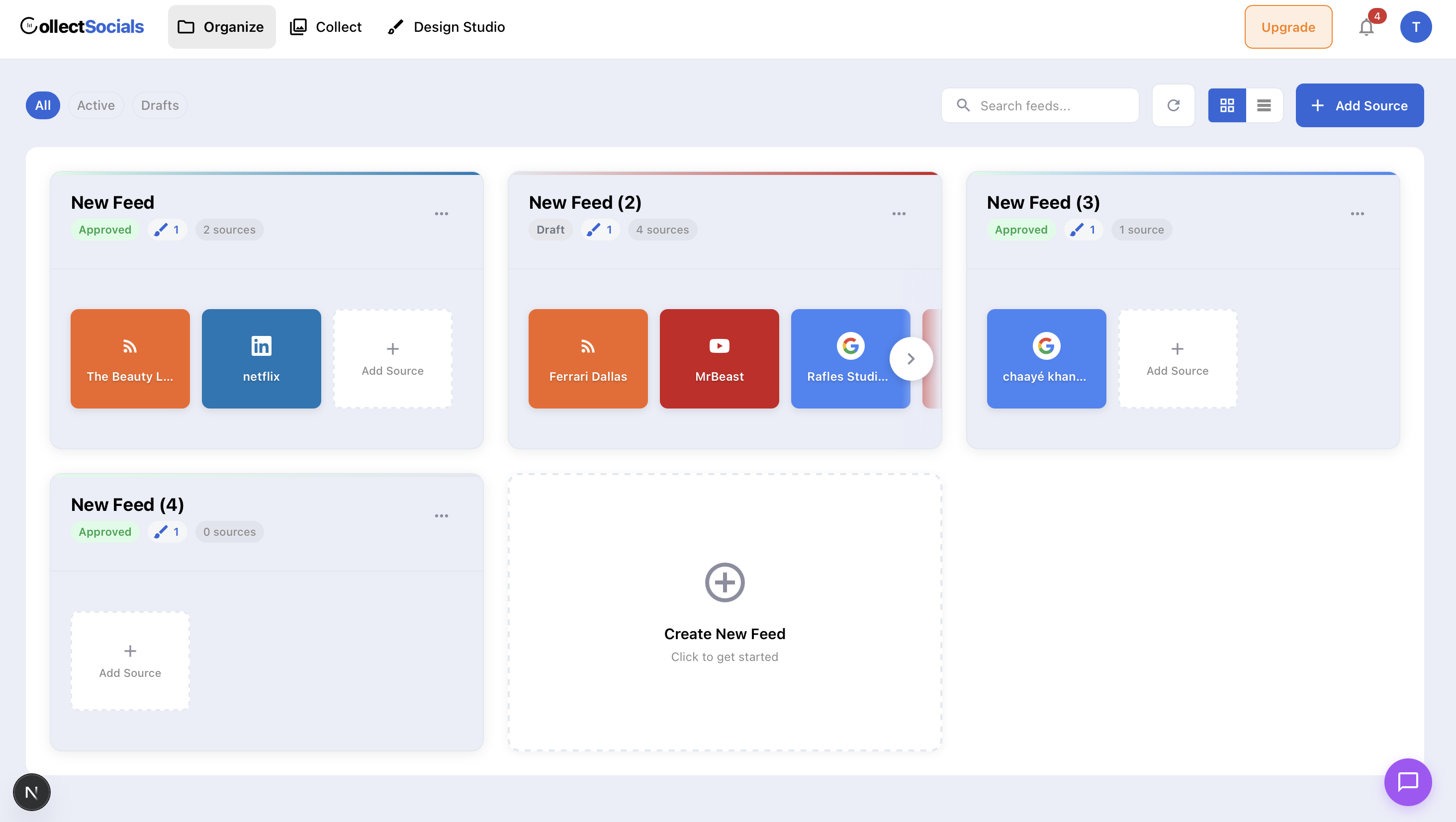
The free plan is actually usable. CollectSocials' free tier includes one connected source, unlimited feeds, 2,000 monthly page views, and no ads. There is a small CollectSocials link under the feed on free, which paid plans can turn off. Compare that to Taggbox's free plan: one feed, 500 views, four-day refresh, and only three platforms. CollectSocials gives you four times the views and unlimited feeds, and no platform is walled off from the free plan except X (Twitter), though free connects one source at a time. For small businesses testing social proof on their website, this difference is the gap between a demo and a real product.
Unlimited feeds on every plan. Taggbox caps the number of feeds you can create: one on Free, two on Starter, four on Growth, ten on Advance. CollectSocials imposes no feed limit on any plan: create as many as you need and only pay based on the number of connected sources. Show your Instagram on the homepage, Google Reviews on the testimonials page, and YouTube on the blog sidebar without worrying about feed caps. For a practical walkthrough, see our guide on embedding social feeds on any website.
Multiple layouts per source. On Taggbox, displaying the same content in a different layout on a different page means creating another feed that counts toward your plan limit. CollectSocials lets you apply different layouts and themes to the same source data freely: show your reviews as a Carousel on the homepage and a Grid on the testimonials page without consuming an extra feed slot.
Simpler pricing, and the limits move with it. CollectSocials Pro costs $29 per month for five sources, unlimited feeds, and 30,000 page views. Taggbox's Starter costs $19 per month for two feeds, 10,000 views, and two-hour refresh rates. What the difference buys is unlimited feeds instead of two, three times the page views (30K vs. 10K), five connected sources instead of two, and an hourly refresh rather than a two-hourly one. The Business tier at $59 per month includes fifteen sources and unlimited views, compared to Taggbox's Growth plan at $39 that gives you four feeds and 50,000 views.
Shadow DOM isolation. The embed renders inside a Shadow DOM container, completely isolating its CSS from your website's styles. No conflicts, no broken layouts. This matters especially on platforms like WordPress, Webflow, Squarespace, and Shopify where global CSS can interfere with third-party widgets. On WordPress you can skip the embed entirely and use the plugin in the official directory, which syncs posts into your own database and renders them from your own domain.
How moderation works
LEFT queue, RIGHT website, approve or reject in real time. This animation shows CollectSocials' curation interface. LEFT side: imported posts flow into a queue labeled "Imported posts (6)." Each post appears with platform emoji and label. CENTER: you decide. Green checkmark to approve (post slides right into "Live on Site"), red X to reject (post fades away). RIGHT side: only approved posts appear in the website preview. Header tracks decisions: "✓ 3 approved" and "✕ 2 hidden." Updates sync instantly.
Taggbox gates automated moderation behind Growth plan ($39/mo) and AI behind Advance ($99/mo). On Starter, manual moderation creates bottlenecks. CollectSocials includes manual curation on all plans, AI at Business ($59/mo). This split-screen workflow shows control without tier-gated pricing: automation plus oversight, without premium pricing for basic moderation.
Where to keep in mind
The one genuine gap is shoppable galleries (tagging products inside UGC to turn posts into directly purchasable content), which is core to Taggbox's e-commerce proposition and something CollectSocials does not do. On the two features people usually assume a lower-priced tool skips, though, CollectSocials actually ships them: UGC rights management (request, track, and prove consent with an append-only evidence ledger and a real deletion callback, see our consent-and-deletion audit) and event social walls (eleven full-screen display modes, QR pair-to-TV, attendee posting with an in-browser camera booth, and live polls). Taggbox's UGC Suite still goes deeper on high-volume campaign tooling and shoppable commerce, and LinkedIn is not live on CollectSocials yet. But the “cheaper tool, so it must be a shallow widget” assumption does not hold here: the rights-compliance and moderation engineering is exactly what the pricier incumbents charge more for.
Pricing
- Free ($0/mo): 1 source, 7 layouts, all 16 themes, 2,000 page views, plus a 7-day trial that opens 3 sources and the full design studio
- Pro ($29/mo): 5 sources, 30,000 page views
- Business ($59/mo): 15 sources, unlimited page views
2. Curator.io: Best Free Plan With the Broadest Platform Support
Best for: Teams that need to aggregate from many different social platforms (including niche ones) without paying for Taggbox's higher tiers. For a deeper analysis, see our full Curator.io alternatives guide.
Curator.io supports twelve-plus content sources (Instagram, Facebook, YouTube, X/Twitter, TikTok, LinkedIn, Pinterest, Tumblr, RSS, Yelp and more), all available on the free plan without platform gating. Where Taggbox restricts Twitter to Starter and above, TikTok to Advance, and limits the free plan to three platforms, Curator.io provides all platforms from day one.
Where Curator.io works well
Platform breadth on the free plan is the standout. Three sources across all supported networks with minimal watermark branding (a small “Powered by Curator” link) makes it the most permissive free tier for platform coverage. Paid plans start at $25 per month for five sources and 15,000 views. Custom CSS is available on all paid plans for design control, and the niche-network coverage reaches further than anything else here.
Where it falls short
Templates have not evolved at the same pace as the rest of the category. The default layouts are functional but visually dated, and achieving a modern, polished look requires CSS work. Like Taggbox, Curator.io ties layouts to feeds, so displaying the same content in different formats requires duplicate sources. The Business plan at $59 per month for fifteen sources is priced level with CollectSocials' comparable tier, which includes unlimited views, a live event wall on the same account, and UGC rights and consent tracking that Curator.io sells as a rights-management add-on.
Pricing
Free: 3 sources, minimal branding, $0/mo. Professional: 5 sources, 15K views, $25/mo. Business: 15 sources, $59/mo. Enterprise: custom pricing.
3. EmbedSocial: Best for Google Reviews and Social Proof
Best for: Local businesses and service providers that prioritize Google Reviews and multi-platform review management alongside social feeds. For a deeper comparison, see our complete EmbedSocial alternatives guide.
EmbedSocial occupies a similar market position to Taggbox but with a stronger lean toward reviews and social proof. It holds approved API integrations with Google, Instagram, and TikTok, and offers both social feed aggregation (EmbedFeed) and review management (EmbedReviews) as core products. For businesses where five-star Google ratings drive foot traffic and conversions, EmbedSocial fills that need directly. For more context on which metrics matter, see our guide on social feed analytics that actually matter.
Where EmbedSocial works well
Google Reviews, Facebook Reviews, and Yelp Reviews are pulled into customizable widgets with features like star-rating filtering, multi-location review galleries, and AI-generated reply suggestions. The review collection feature lets you proactively solicit reviews via email or QR code. Taggbox also supports review platforms (Google, Facebook, Yelp, Airbnb, Amazon, Tripadvisor, and more), but EmbedSocial's review product is more mature with deeper management features. Official API connections with Google and TikTok ensure reliable content fetching.
Where it falls short
Like Taggbox, EmbedSocial splits its products: EmbedFeed for social aggregation and EmbedReviews for reviews are separate subscriptions. The all-products bundle costs $64 per month. The standalone social feed starts at $29 per month for three sources and 5,000 page views, the same monthly price as CollectSocials Pro ($29/mo, 5 sources, 30K views) and $10 above Taggbox Starter ($19/mo, 2 feeds, 10K views). Design templates are functional but do not match the out-of-the-box polish of CollectSocials or the customization flexibility of Taggbox's twenty-plus themes.
Pricing
Pro: 3 sources, 5K views, $29/mo. Pro Plus: 6 sources, 20K views, $49/mo. Premium: 15 sources, 100K views, $99/mo. All Products bundle: $64/mo.
4. Elfsight: Best Single-Widget Solution at the Lowest Cost
Best for: Website owners who need exactly one social feed widget and want the cheapest possible paid option with a genuinely code-free visual builder.
Elfsight is a marketplace of eighty-plus website widgets where the Social Feed is one of the most popular. It supports Instagram, Facebook, YouTube, TikTok, X/Twitter, Pinterest, LinkedIn, and RSS. The widget is configured entirely through an online visual builder, with no code and no plugins, and embeds on any site via a single HTML snippet.
Where Elfsight works well
Per-app pricing makes Elfsight the cheapest paid option for simple, single-widget needs. A Social Feed widget starts at $6 per month on Basic with three widgets and 5,000 views, or $12 per month on Pro with nine widgets and 50,000 views. For context, Taggbox's Starter at $19 gives you two feeds and 10,000 views. If all you need is a single Instagram feed on your homepage, Elfsight delivers that at one-third the cost. The visual configurator is genuinely intuitive: five layouts (Grid, Masonry, List, Slider, Carousel) with dark and light modes, popup post viewing, and follow-button integration. G2 reviewers consistently praise ease of use.
Where it falls short
Elfsight is a widget tool, not a social media aggregator. There is no content curation dashboard, no moderation system, no analytics, and no way to reuse source content across multiple layout configurations without creating separate widgets. The free plan caps at 200 views per month, lower than both Taggbox (500) and CollectSocials (2,000). Exceeding your monthly view limit deactivates your widget entirely rather than degrading gracefully. If your needs grow beyond a single simple feed, you will outgrow Elfsight quickly.
Pricing
Free: 1 widget, 200 views/mo. Basic: 3 widgets, 5K views, $6/mo. Pro: 9 widgets, 50K views, $12/mo. Premium: 21 widgets, 150K views, $24/mo.
5. Flockler: Best for Multi-Channel Publishing (Web, Email, Signage)
Best for: Enterprise brands and agencies managing multiple brands that need to publish the same social content across websites, email campaigns, and digital signage from a single subscription.
Flockler is an enterprise-focused social media aggregator that supports Instagram, Facebook, YouTube, X/Twitter, TikTok, LinkedIn, Pinterest, Tumblr, and RSS. Its defining feature is multi-channel output: a single content source can be displayed on your website, embedded in email newsletters, shown on event screens, and pushed to digital signage, all from one dashboard with one subscription. Where Taggbox splits these into separate products, Flockler bundles everything.
Where Flockler works well
The unlimited layouts per source approach is powerful. Connect your Instagram account once and create as many layouts as you want without consuming additional source slots: Grid for the homepage, Carousel for email, Slideshow for the lobby screen. Every plan includes unlimited users, making it ideal for agencies or marketing teams where multiple people need dashboard access. Tag-based content filtering lets you organize and route content to specific destinations. Flockler also offers automatic responsive layouts that adapt cleanly across devices without manual configuration.
Where it falls short
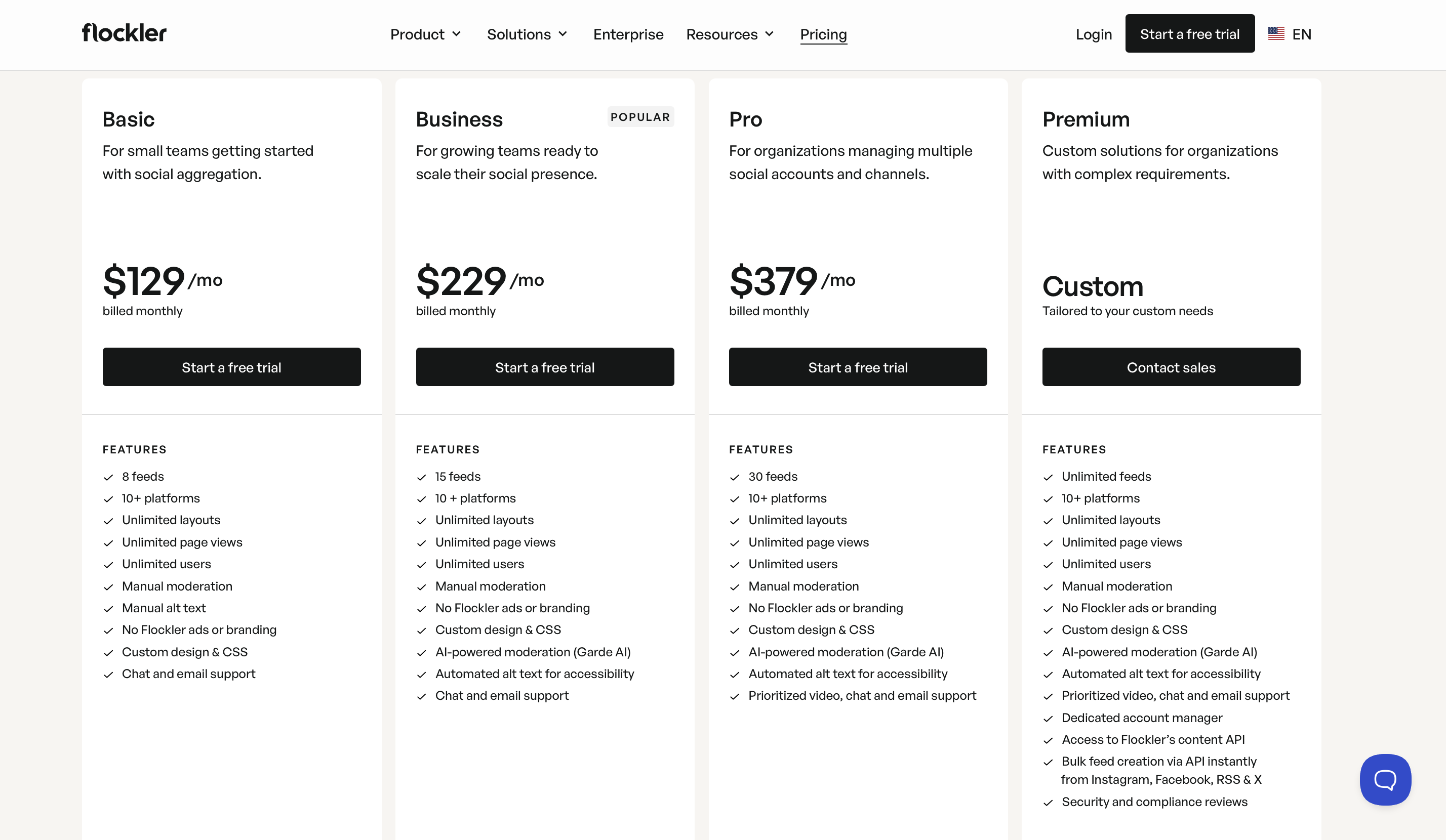
Pricing is the barrier. Plans start at $129 per month for the Basic plan with eight feeds, scaling to $229 for Business (fifteen feeds) and $379 for Pro (thirty feeds). This puts Flockler at three to ten times the cost of most other tools on this list. The platform only offers a fourteen-day trial with no ongoing free plan, and design templates, while clean, are not as visually diverse as CollectSocials' forty layouts and sixteen themes. For businesses that only need website embedding, Flockler's multi-channel capabilities represent cost you are paying for but not using.
Pricing
Basic: $129/mo (8 feeds). Business: $229/mo (15 feeds). Pro: $379/mo (30 feeds). Premium: custom pricing. All plans include unlimited layouts and users.
6. Walls.io: Best for Live Events and Interactive Social Walls
Best for: Event marketers who need premium live social walls with interactive features that go far beyond what Taggbox Display offers. For a detailed comparison, see our Walls.io alternatives guide.
Walls.io is built around the live event social wall rather than around the website embed. It supports fourteen social platforms, direct content uploads, live polls, photo booth functionality and QR-code audience participation. Taggbox's Display product competes in this space with shallower event-specific tooling.
Where Walls.io works well
If your primary use case is a live social wall on a big screen at a conference, festival, or product launch, Walls.io is purpose-built for this. Live polls that display results in real time, a photo booth that lets attendees upload directly and QR codes for audience participation are all core product rather than add-ons, moderation tools handle high-volume real-time content reliably, and accessibility compliance meets WCAG 2.1 guidelines. Those first three are not exclusive to it: CollectSocials runs live multiple-choice polls, an in-browser camera booth with a three-second countdown, and QR pair-to-TV attendee posting with no login on the venue machine, on its $59 Business plan. If you need branded photo-booth frames or stickers composited onto an attendee's own photo, emoji reactions, or a named integration with your event or signage platform, that is where Walls.io is ahead of the cheaper tools on this list, CollectSocials included.
Where it falls short
Walls.io lists $270 per month, with $215 per month the rate if you pay annually, significantly more than Taggbox's Display product. The platform is optimized for event screens and display environments rather than for embedding polished social feeds on business websites, so a website-first buyer pays event pricing for the half of the tool they use least. If you need both halves, CollectSocials drives the website widget and the full-screen venue wall off one feed on the $59 Business plan, which is one subscription rather than two.
Pricing
Plans start at $270/mo, or $215/mo if you pay annually. Event passes from $270 (one-time for 30 days). Enterprise pricing available.
7. Onstipe: Best Budget Option for Basic Social Walls
Best for: Organizations with the tightest budgets that need functional social aggregation with event day passes at the lowest cost on the market. For a deeper comparison, see our complete Onstipe alternatives guide.
Onstipe is the price leader in the social media aggregator space. Subscription plans start as low as $8 per month (Nano), and event day passes begin at $29 per day, pricing that undercuts every other tool on this list. It supports nine platforms including Facebook, Instagram, X/Twitter, LinkedIn, YouTube, Vimeo, Flickr, Tumblr, and RSS, with both website embedding and display screen output.
Where Onstipe works well
If budget is your absolute primary constraint, Onstipe delivers functional social aggregation at one of the lowest entry prices here. The event day pass model is useful for one-off events where you do not want an ongoing subscription, though it is worth comparing against a free option before you buy one: every CollectSocials team's first event runs free on a one-time 24-hour go-live window, on a free account with no credit card. The platform covers both website embedding and event displays in a single subscription (via combo plans), unlike Taggbox which separates Widget and Display pricing. PayPal-only payment processing makes it accessible in regions where credit card penetration is lower.
Where it falls short
Design quality is basic, templates are functional but generic, and the backend is noticeably slower than competitors. The free plan includes ads in your feed, 500 page views, Onstipe branding, and only Facebook and Instagram, even more restrictive than Taggbox's free tier. X/Twitter is restricted to the Plus plan ($25/mo) and above with monthly tweet caps. LinkedIn has no auto-updates on any plan. No Google Reviews support. Refresh rates range from 24 hours on the free plan to 15 minutes on Business. Custom CSS and API access are only available on higher tiers.
Pricing
Free: 2 sources (FB/IG only), 500 views, ads, $0/mo. Nano: 2 sources, 10K views, ~$8/mo. Starter: 4 sources, ~$15/mo. Plus: 6 sources, Twitter access, ~$25/mo. Economy: 10 sources, ~$39/mo. Event day passes from $29/day.
8. Juicer.io: Simplest Setup With the Broadest Platform List
Best for: Teams that want a feed running in minutes from a long list of networks and do not need campaign tooling, rights management or a wall. For a deeper analysis, see our full Juicer.io alternatives guide.
Juicer sits at the opposite end of the spectrum from Taggbox. Where Taggbox sells a UGC campaign platform split across three products, Juicer sells one thing: connect accounts, take an embed code, done. It supports fifteen-plus platforms and includes unlimited website embeds on every paid plan, so the feed-count ceiling that frustrates Taggbox Starter users is not the constraint here. Source count is.
Where Juicer works well
Setup is quick and the embed works. For a marketing team that wants a social feed on the site this afternoon and has no interest in shoppable galleries or campaign reporting, that is the whole requirement. The platform list is wider than Taggbox's on the niche end, and unlimited embeds mean one source can appear on as many pages as you like.
Where it falls short
Nine built-in styles is the ceiling on how the feed can look, and meaningful customization means writing CSS on a paid plan. The free plan is one source, one feed, a 24-hour refresh and Juicer branding inside the feed. Pricing steps awkwardly: $15 for three sources, $25 for five, then $99 for thirty with nothing in between, so a business that needs eight or ten sources pays for thirty. Content is lost when a source is disconnected, and the default script embed has no style isolation, though an iframe embed is available and does isolate.
Pricing
Free: 1 source, 1 feed, branded, $0/mo. Lite: 3 sources, $15/mo. Starter: 5 sources, $25/mo. Pro: 30 sources, $99/mo. Unlimited website embeds on paid plans.
9. Taggbox/Tagembed Merger Update: Now One Unified Platform
Best for: Understanding that Taggbox and Tagembed are now the same platform. If you're researching both, you're comparing a single tool to itself. For a deeper comparison, see our Tagembed alternatives guide.
Taggbox is Tagembed's sister product under the same parent company. The 2026 merger pulled both brands closer, so the question is no longer which of the two you pick but whether you need the UGC-campaign half at all, and whether you are willing to buy Widget, Display and UGC Suite separately to get it. Tagembed historically focused on straightforward social media aggregation for websites (20+ platforms, 120+ CMS integrations), while Taggbox emphasized UGC campaigns, shoppable galleries, and rights management. The combined platform now offers both feature sets under shared pricing and backend infrastructure.
What this merger means
If you're evaluating "Taggbox vs. Tagembed," that comparison no longer exists: they're the same product. Existing Tagembed users now have access to Taggbox's advanced UGC features (shoppable galleries, AI moderation, campaign analytics). Existing Taggbox users now benefit from Tagembed's broader CMS integration library and simplified embedding workflows. The pricing structure remains split across Widget, Display, and UGC Suite products, with plans starting at $19/mo for the Widget product.
Why this still matters for your decision
The merger doesn't change the core issue: Taggbox/Tagembed is built for mid-market and enterprise UGC campaigns, not simple website embedding. The alternatives listed above (CollectSocials, Curator.io, Elfsight, Flockler, Walls.io, EmbedSocial, Onstipe) remain distinct platforms with different strengths. If you came looking for simpler pricing, better out-of-the-box design, or lower cost per source, the merger hasn't solved those limitations.
Pricing
Same as Taggbox. Widget Starter: 2 feeds, 10K views, $19/mo. Widget Growth: 4 feeds, 50K views, $39/mo. Widget Advance: 10 feeds, 1M views, AI moderation, $99/mo. Display and UGC Suite priced separately.
Quick Comparison Table
| Tool | Free Plan | Starting Price | CSS Isolation | Best For |
|---|---|---|---|---|
| Taggbox/Tagembed (merged 2026) | 500 views/mo | $19/mo | Iframe (optional) | UGC campaigns, shoppable galleries |
| CollectSocials | 1 source, 7 layouts, all 16 themes (7-day full trial, 3 sources) | $29/mo | Shadow DOM ✓ | Website feed and a live event wall on one plan |
| Curator.io | 3 sources, minimal branding | $25/mo | None ✗ | Platform variety, lightweight |
| EmbedSocial | Free (1 source, 500 views) | $29/mo | Iframe ✓ (JS embed: partial) | Review integration |
| Elfsight | 1 widget, 200 views (branded) | $6/mo | None ✗ | Widget marketplace, low entry price |
| Flockler | No free plan (14-day trial) | $129/mo | Iframe (optional) | Multi-brand, unlimited layouts |
| Walls.io | 14-day trial only | $270/mo ($215 annual) | Iframe ✓ | Live events, digital signage |
| Onstipe | Free (branded, limited) | $8/mo | Not tested | Budget option |
| Juicer.io | 1 source, 1 feed, branded | $15/mo | None ✗ (iframe available) | Fastest setup, widest platform list |
How to Choose the Right Taggbox Alternative
The right alternative depends on which Taggbox limitation matters most to you. Here is a decision framework based on the most common scenarios. If you are new to social media aggregation, our complete aggregation guide for small businesses covers the fundamentals.
If you want better design with simpler pricing, consider CollectSocials. This is a direct upgrade path for users who came to Taggbox wanting a beautiful website embed but found a complex UGC platform. CollectSocials' Pro plan at $29 per month gives you more sources, three times the page views, and unlimited feeds compared to Taggbox's Starter at $19. The design library offers more out-of-the-box layout and theme combinations than other tools on this list, and the free plan is genuinely production-ready rather than a 500-view demo.
If you need shoppable galleries, stay with Taggbox. Tagging products inside UGC so a post becomes directly purchasable is the one capability on this page that no alternative here replicates, and the same goes for pushing a single UGC campaign across web, email, social ads and print from one workflow. The Advance plan at $99 per month is the entry point for that, which is a real reason to pay it. Rights management on its own is not: CollectSocials requests, tracks and proves consent on every plan, five requests a month on Free and Pro and uncapped from Business, with an append-only evidence ledger and a deletion callback that actually deletes.
If Google Reviews are your top priority, consider CollectSocials or EmbedSocial. Both support Google Reviews as a first-class source. CollectSocials includes them on every plan and delivers them in professional layouts. EmbedSocial goes deeper with multi-location review galleries, AI reply suggestions, and proactive review collection tools, at a higher price point.
If you need the cheapest possible paid option, choose Elfsight. At $6 per month for 5,000 views and three widgets, Elfsight is the lowest-cost path to a polished single-widget social feed. The trade-off is that it is a widget tool with no content management, but for a homepage Instagram feed, that may be all you need.
If you need to publish across web, email, and signage from one tool, choose Flockler. Flockler's single-subscription model covers every distribution channel that Taggbox splits across separate products. At $129-plus per month it is expensive, but for enterprise brands already paying for Taggbox Widget plus Display plus UGC Suite, the total may actually be comparable.
If you run live events, compare CollectSocials and Walls.io feature by feature rather than assuming the cheaper tool skips the event half. Live polls, a photo booth, attendee posting with no account and QR-code participation are on both. CollectSocials puts them on the $59 Business plan next to the same feed that runs your website widget, with eleven full-screen wall modes, a fifteen-minute pairing code so nobody signs into an account on the venue machine, and a human review queue in front of the screen. Walls.io sells the wall as its core product from $270 per month, and it is ahead where you need branded photo-booth frames on an attendee's own photo, emoji reactions, or a named integration with your event or signage platform. For a large conference with those on the checklist, the premium buys them.
If budget is your absolute constraint, choose Onstipe. Subscription plans from $8 per month and event day passes from $29 per day make Onstipe the cheapest option in the category. You sacrifice design quality and speed, but for organizations with genuinely minimal budgets, it works.
The Bottom Line
Taggbox is a genuinely powerful platform, and if your work is sophisticated UGC campaigns with shoppable galleries and multi-channel distribution, that depth is exactly what you are paying for. The teams running those campaigns are the ones who rate it highly.
But depth and complexity are two sides of the same coin. A significant number of Taggbox users signed up because they wanted a social media feed on their website, not a full-stack UGC campaign platform. If that describes you, you are paying for features you do not use, navigating a dashboard designed for a different use case, and working within a pricing model that charges separately for capabilities most competitors bundle together.
The alternatives in this guide address different aspects of that disconnect. For most businesses that came to Taggbox wanting a clean, professional social feed on their website, CollectSocials delivers that outcome with better design, simpler pricing, and a free plan that actually works in production. The same curated feed opens full screen for a venue on the $59 Business plan, with attendee posting, live polls and QR pair-to-TV, so the conference wall is not a second subscription on a separate product. Try it free and see the difference for yourself.
Start Using CollectSocials Today
One curated feed from 10+ platforms: on your website in a single line of code, or up on the big screen at your event.