
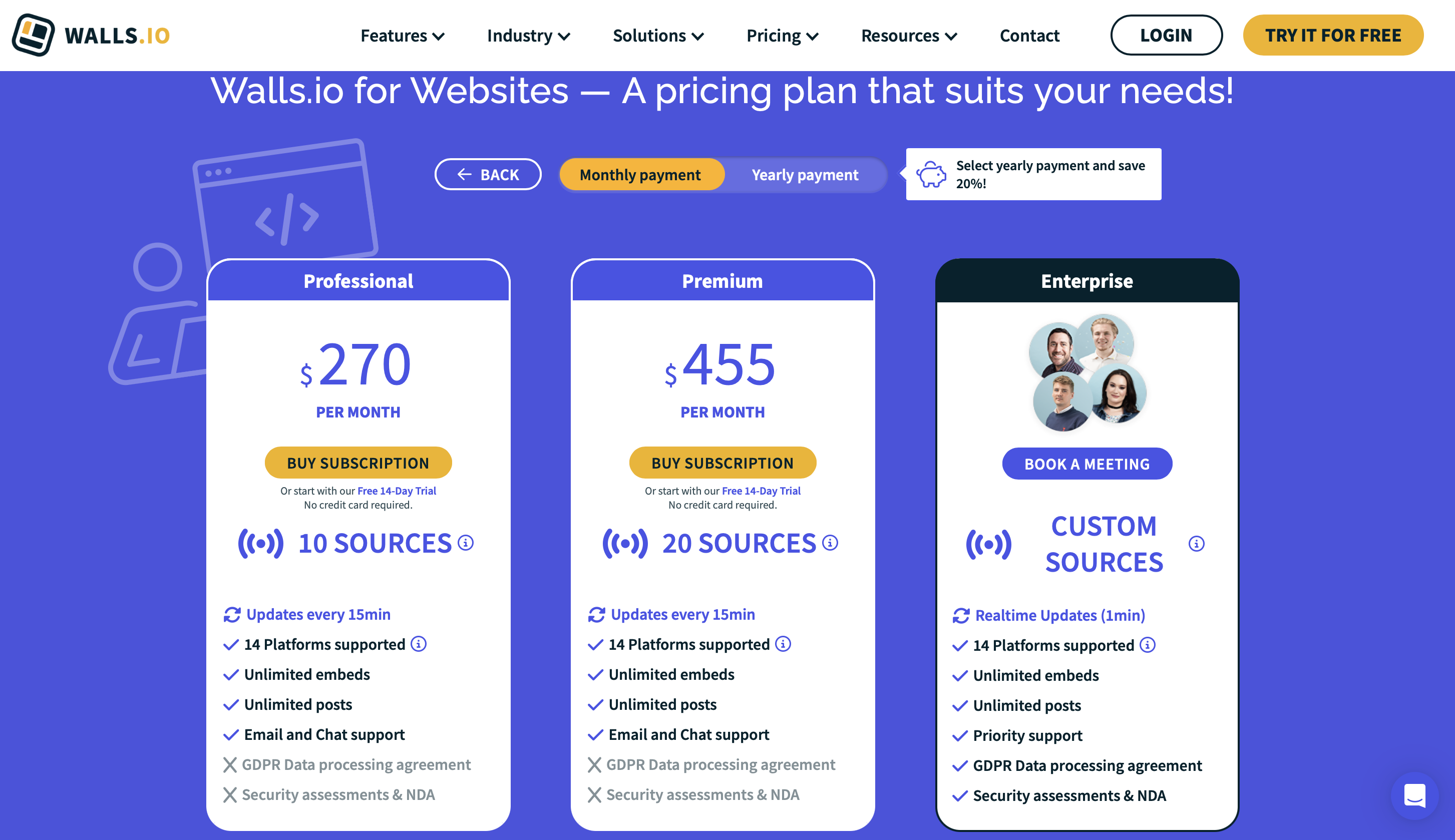
But here is the problem: Walls.io's paid plans start at $270 per month for monthly billing (or $215/mo if billed annually). That is more than ten times the average cost of social media management software, and it is a price point that puts it out of reach for most small and mid-size businesses. If your primary need is displaying a polished social media feed on your company website, not running a live event wall at a trade show, you are paying for an enormous amount of functionality you will never touch.
This guide compares eight Walls.io alternatives that cover the full range of use cases, from affordable website embedding to enterprise UGC campaigns. We break down what each tool does well, where it falls short, and how pricing compares, so you can find the right fit without overspending for features you do not need.
sync
How it works
The animation above shows the workflow most businesses are actually buying: connect your accounts once, and posts flow to your site automatically without anyone touching an embed code again. Walls.io bundles that website feed into event-tier pricing at $270 per month for monthly billing (or $215/mo annually), so you carry the cost of a live event platform whether or not you ever run an event. The alternatives below unbundle it.
Why People Look for Walls.io Alternatives
Nothing below argues that Walls.io is a bad product. Its pricing, feature scope and target audience simply create friction points that push a specific kind of buyer toward alternatives. These are not edge cases; they come up consistently in reviews across G2, Capterra, and Software Advice.
The pricing is prohibitive for most businesses. Walls.io's paid plans start at $270 per month for monthly billing (or $215/mo billed annually) for Websites and Digital Signage, with Event passes from $270 one-time. There is only a 14-day free trial (no credit card required), but no ongoing free plan. The trial-to-$270 per month jump is one of the steepest in the entire social media aggregation category. Multiple reviewers on Capterra and G2 specifically cite this gap as a barrier, particularly for small businesses, nonprofits, and educational institutions. Compare this to competitors that offer branding-free paid plans starting at $15 to $25 per month, and the disparity is stark.
It is built for events first, websites second. Walls.io's core product identity is centered on live event engagement: social walls displayed on big screens, photo booths, live polls, QR-code-based audience contributions, and real-time hashtag aggregation. These are powerful features for conference organizers and event marketers. But if you are a marketing manager who simply needs to embed your company's Instagram posts and Google Reviews on your homepage, most of that functionality is irrelevant, and you are still paying $270 per month for it (or $215/mo if billed annually). Several alternatives on this list are built specifically for the website embedding use case and deliver it at a fraction of the cost.
Design customization requires technical knowledge for deeper changes. Walls.io offers a style editor with color, font, and layout adjustments. For basic customization, this works fine. But users who want to go beyond the defaults need custom CSS or custom JavaScript, which requires development resources. Tools built around a layout and theme library instead of a style editor produce that variety without any code: CollectSocials ships forty layouts and sixteen themes, all sixteen of them on the free plan.
Separate pricing for separate use cases. Walls.io structures its pricing around three distinct product categories: Events, Websites, and Digital Signage. If your business needs social feeds both on your website and at occasional events, you are potentially looking at two separate subscriptions. Several competitors offer unified pricing where one plan covers all display contexts.
No retroactive post imports. Multiple reviewers note that Walls.io cannot pull in posts from the past: it only aggregates content going forward from the point of connection. If you have months of Instagram content you want to showcase on your website from day one, this is a meaningful limitation.
These issues do not make Walls.io a bad product. They make it the wrong product for a significant portion of the market that needs social media aggregation. Understanding these pain points will help you evaluate the alternatives below more effectively.
$270/month vs 20 minutes of manual work
Split-screen comparison: manual embedding vs automation. LEFT side shows the exhausting manual workflow: find each post on LinkedIn, copy embed code, open website editor, paste code block, publish page. Five posts, ~20 minutes, progressively worse exhaustion emoji. RIGHT side shows automation: connect once (~2 minutes), posts flow automatically forever. Bottom banner: "CollectSocials saved ~18 minutes, and every future update is free."
Walls.io charges $270 per month for this automation on monthly billing, or $215 per month if you pay a year up front. The animation makes the trade-off concrete: automation is genuinely worth paying for, but a business that only wants its Instagram posts and Google Reviews on a homepage is paying event-tier pricing for basic website embedding.
We Tested Walls.io: Here Is What We Found
Most "Walls.io alternatives" articles list features from marketing pages. We did something different: I installed Walls.io on a blank HTML test page, recorded how it renders and how many files it loads, and tested CSS isolation with intentionally aggressive stylesheets. The data below is from our actual testing. (Full methodology and results for all tools are documented in our Instagram feed widget comparison. If you are still deciding whether you need a widget at all, start with how to embed an Instagram feed on your website.)
Then on 17 July 2026 we ran a Walls.io trial end to end. We added sources and built a wall, posted to that wall from a phone as an ordinary attendee would, timed how long a hidden post took to leave an open screen, read every plan line by line against the screenshots on this page, asked their support assistant what happens to a wall after the event finishes, and put their own published demo videos through frame-by-frame scene detection. Everything in this section is first-hand, and most of it has not been published anywhere. Where a number comes from a screenshot, the screenshot is on this page.
The refresh inversion: their most expensive subscription is the slow one
For anything sold as a live wall, the spec that matters most is how often it goes looking for new posts. It is also the spec almost no comparison publishes. Read it off the pricing screenshots above and the pattern runs backwards from what the prices suggest.
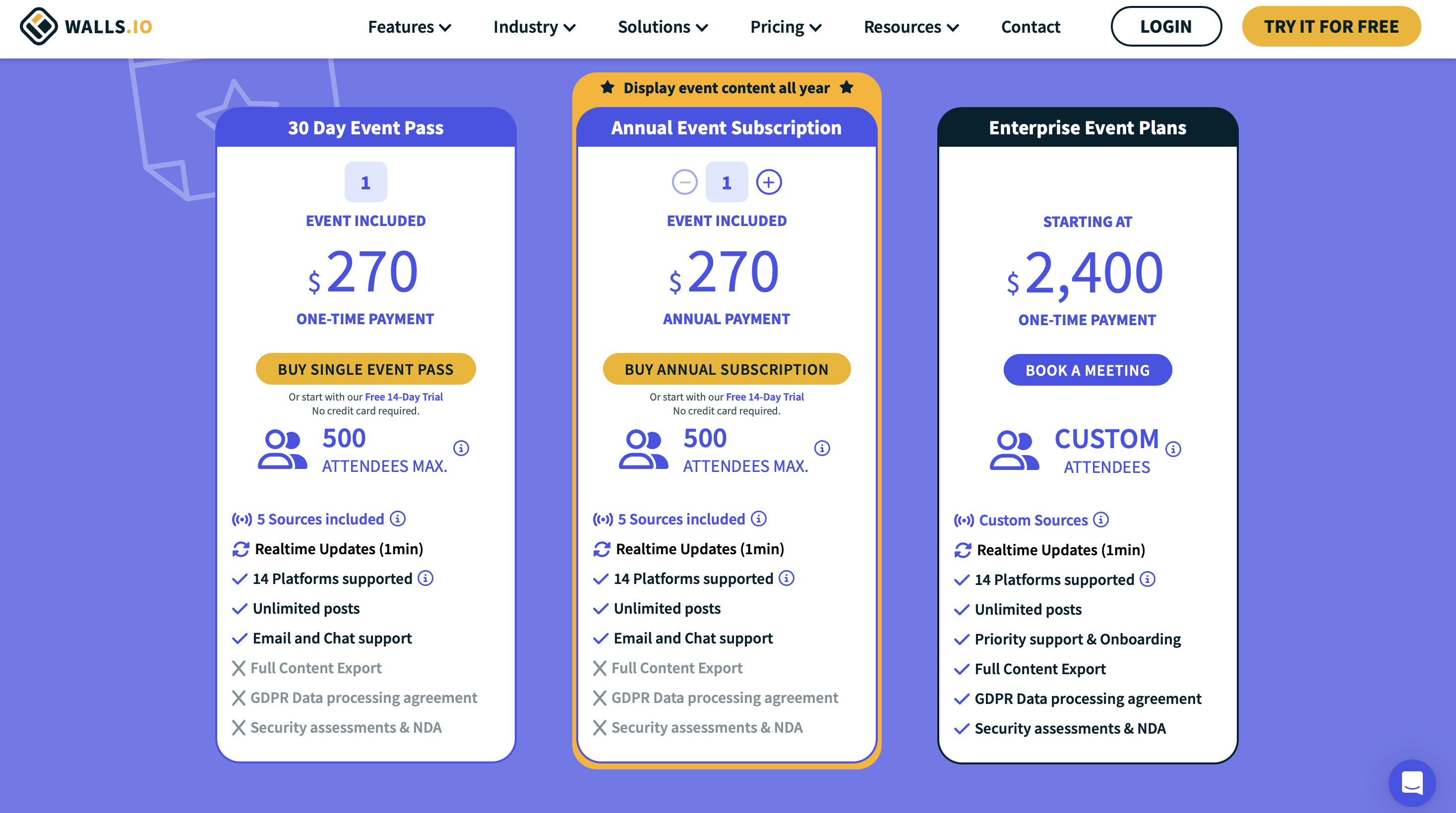
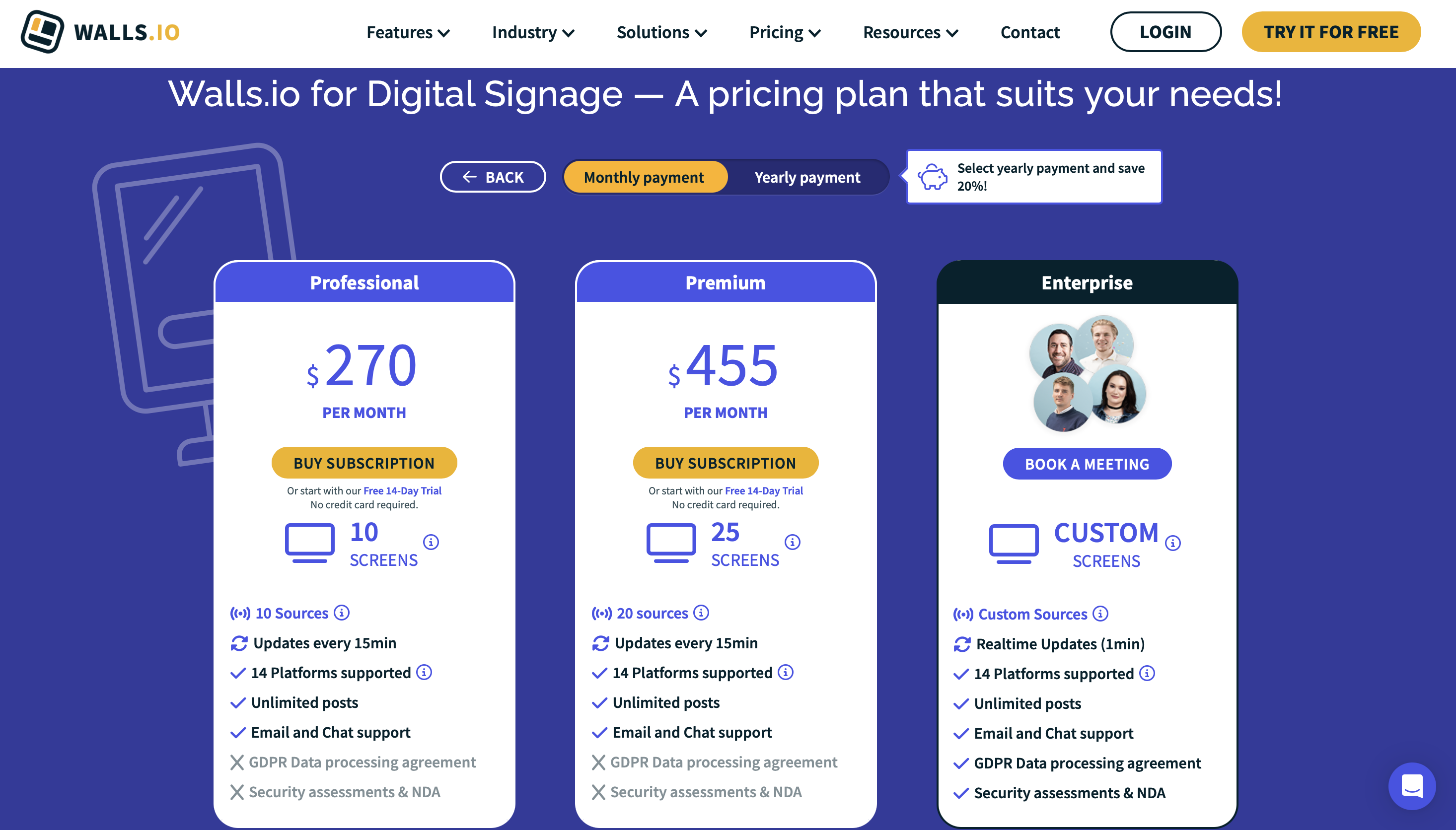
On Walls.io for Websites, both paid plans are labelled Updates every 15min: Professional at $270 per month and Premium at $455 per month. Realtime Updates (1min) appears only on Enterprise. Digital Signage is identical, fifteen minutes on the $270 and $455 plans, realtime on Enterprise only. Now look at the events screenshot: the $270 one-time 30 Day Event Pass, the annual event subscription and the enterprise event plans all carry Realtime Updates (1min).
So the $270 per month subscription is the slower product and the $270 one-time pass is the faster one. Speed here is not a tier, it is a use case: minute-level updating belongs to events and to Enterprise, and a website or a signage screen on a recurring plan waits a quarter of an hour. We captured that in March 2026 and it was still the gating when we ran a trial account on 17 July 2026.
It is worth sitting with the signage line specifically. A digital signage plan is by definition a screen on a wall that people walk past, and on the $455 per month tier it looks for new content four times an hour. For comparison, on our side collection runs from every 24 hours on the free plan down to every five minutes on higher tiers, and arming event mode on a Business plan feed refreshes that feed's sources on every collection pass, about every five minutes, then switches itself off after 48 hours. Whichever tool you are looking at, ask for the refresh interval in writing, per plan, and check whether the plan you are actually buying is the one the realtime badge belongs to.
How Each Widget Renders
We installed each widget on the same blank test page in incognito mode and recorded what it loads and how it isolates its styles. File count and render method are architecture rather than a benchmark, which is why they are the figures published here: they do not move with what you put in the feed.
| Widget | Render method | Files loaded | Style isolation |
|---|---|---|---|
| EmbedSocial | Cross-origin iframe | 10 | Iframe (full) |
| CollectSocials | Script embed | 1 | Shadow DOM |
| Flockler | Script embed | 2 | None (iframe optional) |
| Curator.io | Script embed | 4 | None |
| Juicer.io | Script embed | 2 | None |
| Taggbox | Script embed | 22 | None (iframe optional) |
| Walls.io | Cross-origin iframe | 11 | Iframe (full) |
CSS Isolation: Walls.io Gets This Right
We tested CSS isolation by injecting aggressive styles into the host page, Comic Sans fonts, yellow backgrounds, red image borders, magenta strikethrough links, to see which widgets survive and which break. Walls.io uses a native browser iframe, which provides complete CSS isolation. Our test styles had zero effect on the widget.
This is one area where Walls.io genuinely excels. The iframe embed is clean: one iframe element injected into the page with auto-height JavaScript handling. Your site's CSS cannot break the widget, and the widget's CSS cannot leak into your page. Among the tools I tested, only CollectSocials (Shadow DOM) and EmbedSocial (iframe) matched this level of isolation on their default embeds.
| Widget | Isolation Method | Page CSS Breaks Widget? | Widget CSS Leaks Out? |
|---|---|---|---|
| CollectSocials | Shadow DOM | No ✓ | No ✓ |
| Walls.io | Iframe | No ✓ | No ✓ |
| EmbedSocial (direct iframe) | Iframe | No ✓ | No ✓ |
| Flockler (iframe embed) | Iframe (optional) | No ✓ | No ✓ |
| Taggbox (iframe embed) | Iframe (optional) | No ✓ | No ✓ |
| Juicer.io (iframe embed) | Iframe (optional) | No ✓ | No ✓ |
| Flockler (default script) | None (global CSS) | Yes ✗ | Yes ✗ |
| Taggbox (default script) | None (global CSS) | Yes ✗ | Yes ✗ |
| Juicer.io (default script) | None (global CSS) | Yes ✗ | Yes ✗ |
| Curator.io | None (global CSS) | Yes ✗ | Yes ✗ |
We posted to a Walls.io wall as an attendee
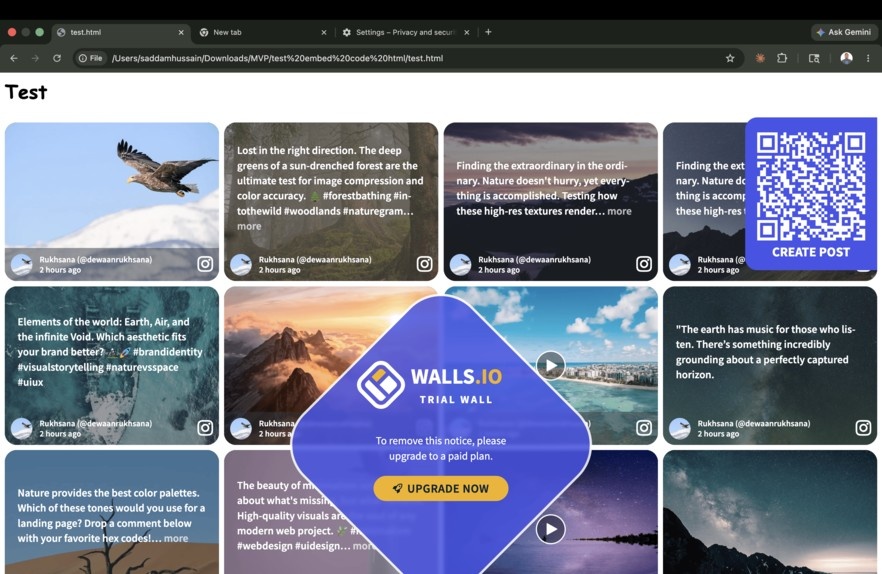
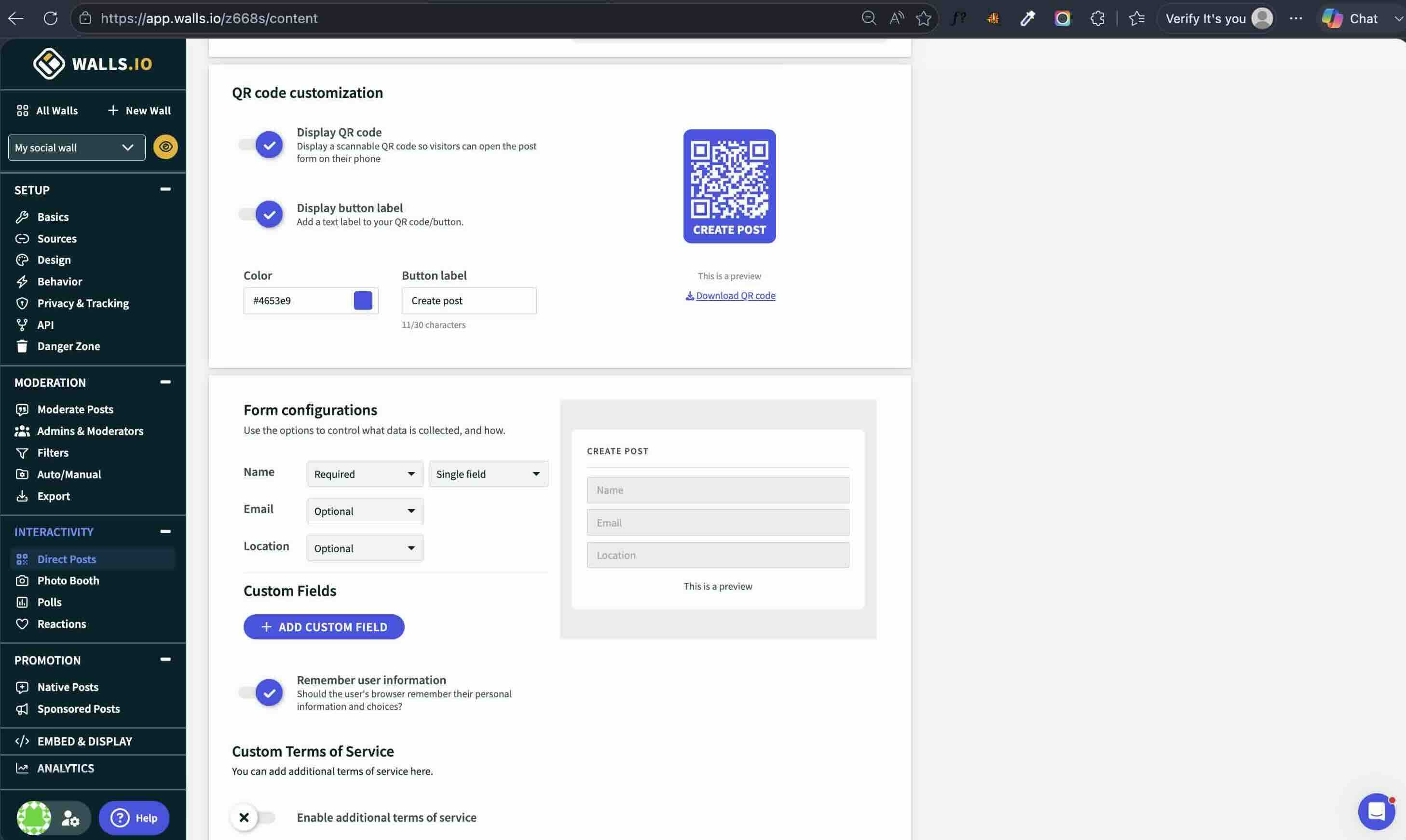
On 17 July 2026 I scanned the QR card on a trial wall from a phone. The code resolves to the wall's own address with a create-post parameter, so the submission form is part of the wall page rather than a separate app, and there is no account to make and nothing to install. Step one offers a photo booth, a media upload, or plain text. Step two shows the media preview with a text box, a required Name field, optional Email and Location fields, and a consent checkbox.
That consent line is worth reading in full, because it is the entire rights posture of a direct post, and it puts the copyright question on the person submitting:
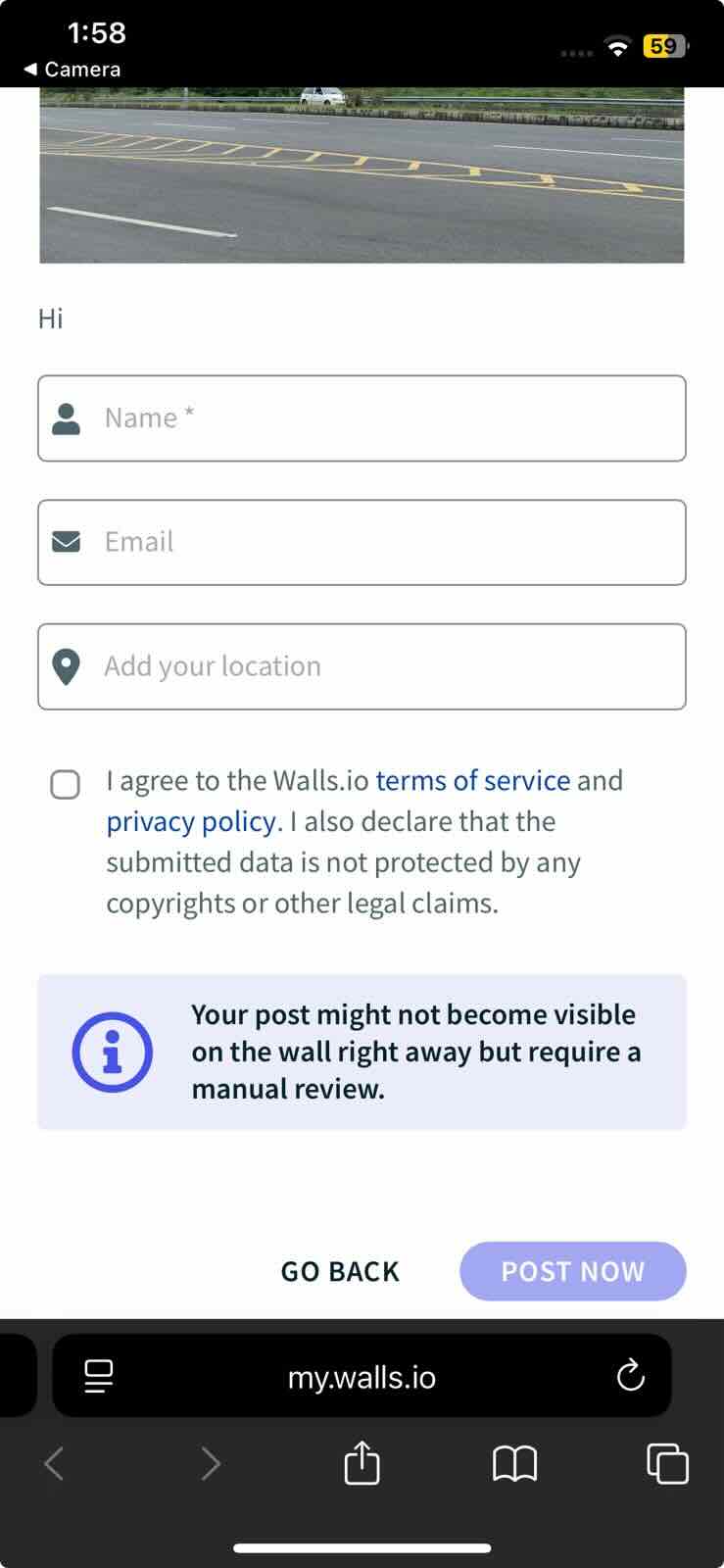
We ask for the same self-declaration, and the tick is enforced on the server rather than in the form alone, so a submission that arrives without a name and a consent flag is rejected rather than displayed. Our form puts three submission types in front of the attendee rather than one, and the camera booth is a button on it, not a separate product.
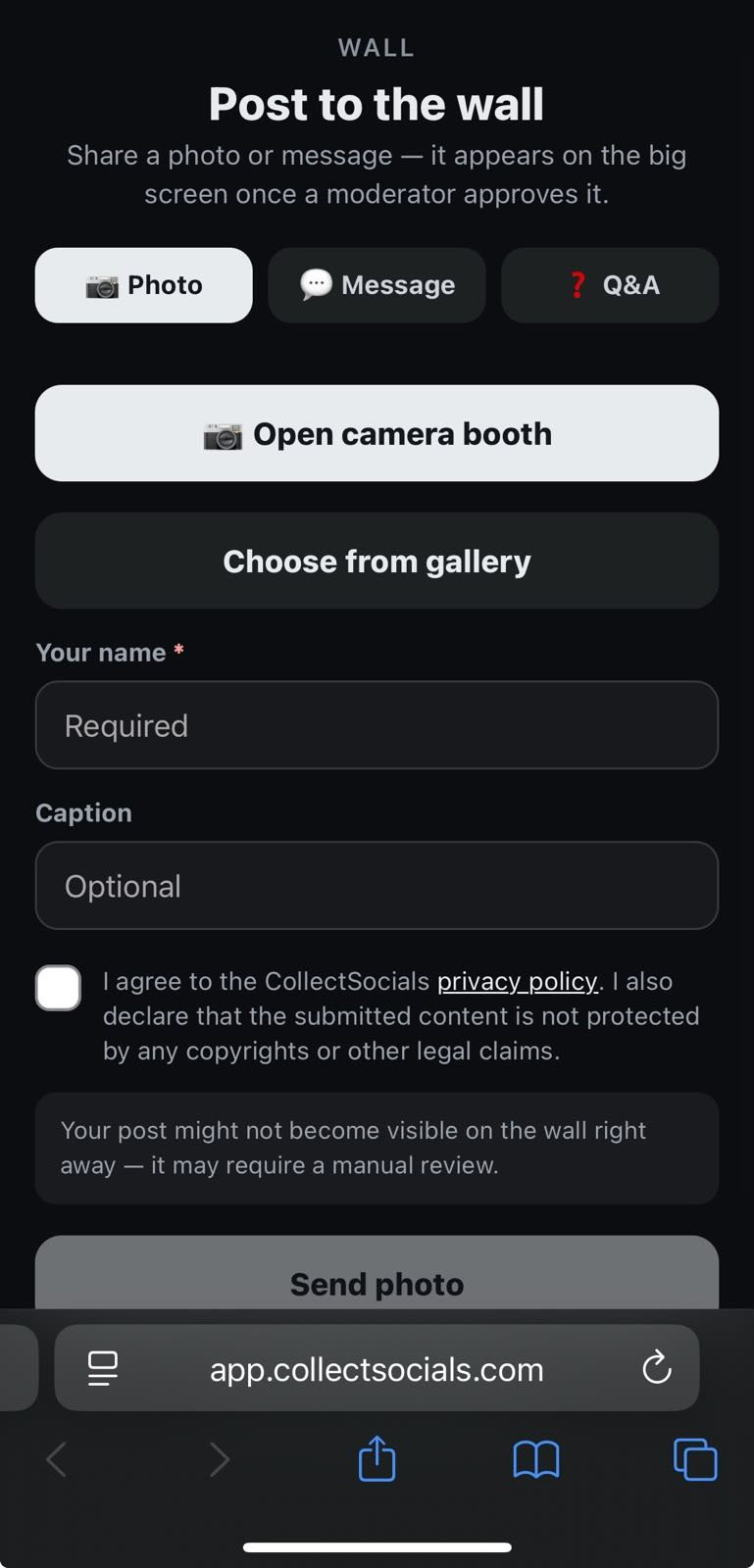
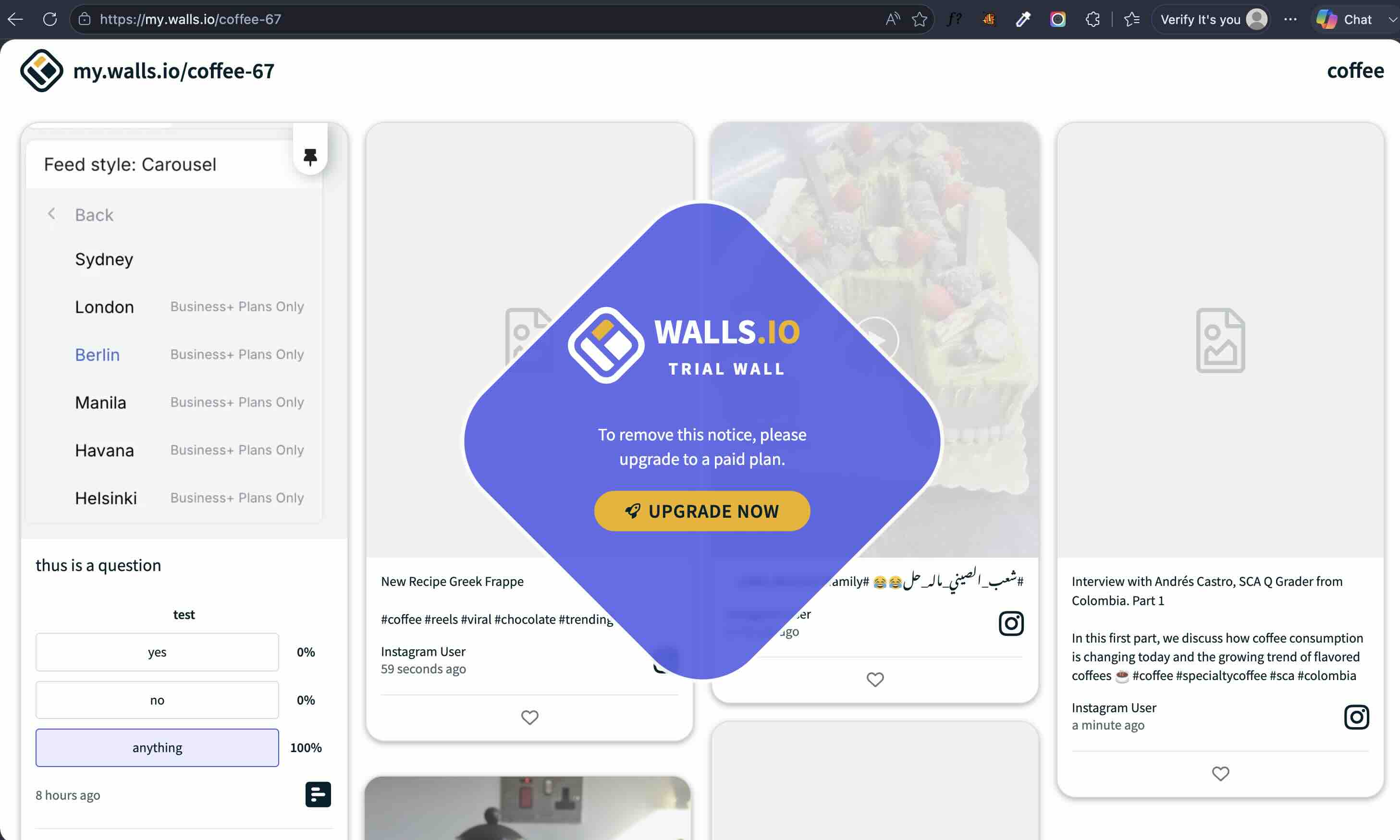
Underneath their submit button sits a notice saying the post "might not become visible on the wall right away but require a manual review". Ours went live immediately, because that wall was in Automatic mode. The notice is conditional copy, not a guarantee, and the gap between those two readings is the gap between an unattended screen that is safe and one that is not. Whatever tool you use, check the moderation mode the wall is actually in rather than trusting the reassurance printed on the submission form. Our post appeared attributed by name with a relative timestamp and the Walls.io glyph as its network icon, so direct posts are a first-class source on their side rather than a bolt-on. One practical note if you plan to rehearse on a trial: the trial wall carries a large diamond "TRIAL WALL, upgrade to remove" watermark across the display.
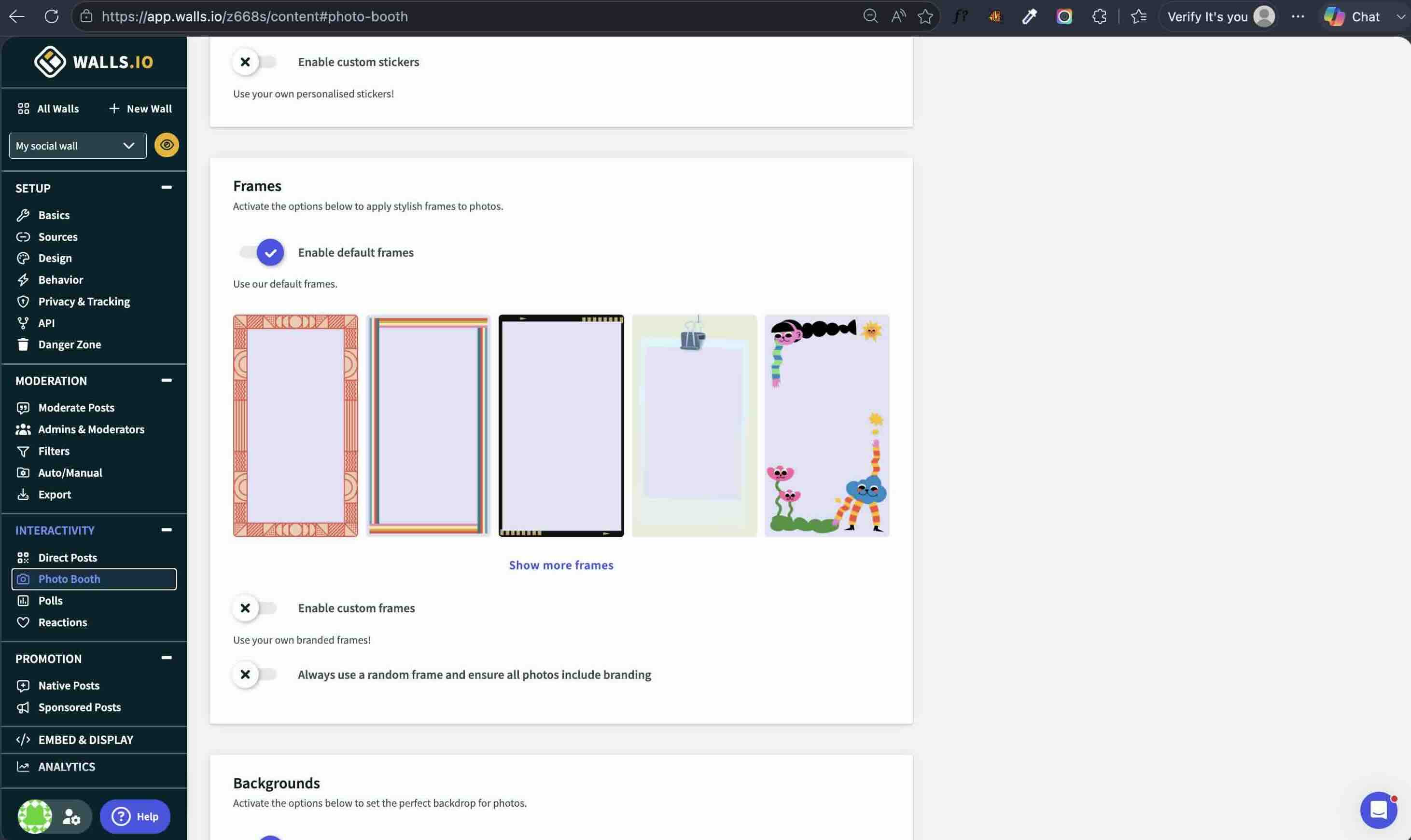
Their photo booth composites stickers, frames and backgrounds onto the attendee's photo, including an option that forces branding onto every photo taken. That is a real gap on our side and we say so plainly further down this page: our booth captures, downscales and uploads the photo, it does not brand it.
One more thing worth knowing if consent matters to you. The organiser side of that form is where the terms live, and additional terms of service are an optional toggle that ships switched off. Out of the box an attendee agrees to the vendor's own terms and privacy policy, and the event organiser collecting the content adds none of their own unless they go and turn it on.
We timed moderation on a live wall, theirs and ours
Same session, 17 July 2026. I left the wall open on one screen, hid a post from the moderation console on another, and watched. The post left the open wall in about one second. That is not a polling interval, that is a hide being pushed to connected screens. Un-hiding is not symmetrical: a restored post does not come straight back, it re-enters through the queued "New Posts" batch the wall merges in. Their removal path is treated as safety-critical and their restore path is not, which is the right way round.
Our wall is built the same way, and it is worth being exact about it. Pulling a post in our moderation room does not wait for a refresh. The room pushes that hide over a websocket to every screen showing the wall, each screen repaints without the card in under a second, and a confirming fetch two seconds later reconciles it against the database. The refresh interval, 60 seconds by default and settable down to 15 with a parameter on the screen URL, is the fallback that still catches the hide if a venue network has eaten the websocket. It is not the path a moderator stands and waits on. Restoring is the faster half on our side: an approve or an undo puts the post back on the next fetch, roughly two seconds, rather than queueing behind a batch a viewer has to merge in.
One limit worth stating plainly. That instant path carries the posts pulled from your own connected accounts. Content sent in by people in the room is governed by the queue in front of the screen instead: attendee submissions land in human review before they are displayed, on by default, which is fail-closed rather than fast-hide. That queue is the control that decides what a room actually sees, because removal speed only matters once something is already on the screen. Turn review off for an unattended screen and that is the protection you are giving up.
Two other things that session explained. Posts we had never touched carried the label "hidden by multiple images filter", which is their gallery-collapse filter folding album duplicates rather than a moderator decision, and it accounted for a large share of the automatically hidden slice in their analytics. And their public wall batches arrivals behind a "New Posts" pill, so viewers merge new content when they choose rather than having it appear under them.
We measured the motion in their demo videos
Nobody publishes competitor motion design, so we measured it. We ran scene detection and frame extraction across the four demo videos in Walls.io's own published asset library, which cover three of their layouts. We are not republishing or linking those files. These are the timings.
- Bricks, the full-bleed photo tile look with thick brand-colour gutters, rotates the whole page every six to nine seconds, with a two to three second staggered crossfade through the background colour. It is a whole-page fade rather than a reshuffle: every tile leaves and a fresh batch arrives.
- Kiosk, one post fullscreen at a time over a muted backdrop with a large translucent network watermark, is metronomic at almost exactly five seconds per post.
- Map, posts pinned geographically, holds each post for about ten seconds behind a "1 of 70" counter and pans between regions between cycles.
This is worth measuring rather than admiring, because a wall on a TV is judged on whether it looks alive between posts, and those numbers are their answer to that problem: five to ten seconds per page or per post, two to three second transitions. It is a fair cadence to hold any candidate against, ours included, and it is testable on any vendor's public demo before you pay anyone.
Their showcase gallery repays the same treatment. One venue capture, a concert screen, shows the wall flanked by sponsor side-rails: the screen real estate around the wall is itself being sold. Inside the product, sponsored posts loop into the wall rotation at a frequency the organiser sets. Both surfaces exist on our side too. A rotating sponsor strip carries up to eight sponsors with a cross fade, and if a sponsor image fails to load the strip drops that slot rather than showing a broken image on a screen the whole room is watching. Sponsor cards can also be woven into the post rotation after every N posts, with N set by you between three and fifty.
What the $270 event pass includes, and what it gates
The events screenshot above carries more information than its price. The 30 Day Event Pass is $270 as a one-time payment and covers one event, for 30 days, with a 500 attendee maximum and five sources included. The annual event subscription is $270 for one event included, same 500-attendee cap and five sources, with a stepper to buy more events. Enterprise event plans start at $2,400 one-time.
Three lines sit at the foot of both non-enterprise event cards with a cross beside them rather than a tick: Full Content Export, GDPR Data processing agreement and Security assessments & NDA. The last two of those, the data processing agreement and the security assessments, are crossed out on both website plans as well, Professional at $270 per month and Premium at $455 per month. A data processing agreement is the document a European organiser's legal team asks for before attendee photographs go anywhere near a screen, and on this price sheet it is an Enterprise line item on every product. If you are buying for a university, a hospital, a public body or anyone with a procurement checklist, price the Enterprise plan rather than the pass, and ask the same question of every vendor on your shortlist.
One further privacy detail from their own embed documentation: the Walls.io embed transfers the visitor's IP address and cookie information to Walls.io, and they supply customers a ready-made disclaimer to paste into their own privacy policy saying exactly that. Handing customers the wording is a transparent way to deal with it. It is also a line item for whoever maintains your privacy policy, and it is better to know before the widget goes on the page than after.
What happens to the wall when the event ends
We asked their support assistant directly on 17 July 2026. In their words: when the event ends the wall "stops collecting new posts", embedded walls "will stop updating", and "posts that were already collected stay visible, so the wall becomes a static gallery".
That is a defensible way to end a rented event, and it is worth knowing up front because it defines what you are left holding: a frozen page. No highlight reel, no recap, no archive experience is attached to the pass. If the wall is part of how you report the event to a sponsor, a dean or a board, ask any vendor, us included, two questions before you pay. What exists on day 31, and in what format can I take it away? On this price sheet, Full Content Export is the Enterprise line.
The Real Cost: Dollar-Per-Feature Pricing Comparison
Walls.io's pricing makes sense for its target customer, enterprise event organizers. But for the website embedding use case that most users searching for alternatives actually need, the cost-to-value ratio is dramatically out of line with the market. Here is how Walls.io's pricing compares to tools built for website embedding:
| Tool | Plan | Price | Sources/Feeds | CSS Isolation | Live Event Features |
|---|---|---|---|---|---|
| Walls.io | Websites | $270/mo ($215 annual) | 14+ platforms | Iframe ✓ | Yes: polls, QR codes, photo booths |
| CollectSocials | Free | $0 | 1 source, 7 layouts, all 16 themes (3 in trial) | Shadow DOM ✓ | First event free (24h window) |
| CollectSocials | Pro | $29/mo | 5 sources, unlimited feeds | Shadow DOM ✓ | First event free (24h window) |
| CollectSocials | Business | $59/mo | 15 sources, unlimited feeds | Shadow DOM ✓ | Yes: attendee posts, live polls, QR pair-to-TV |
| Curator.io | Professional | $25/mo | 5 sources | None ✗ | No |
| Flockler | Basic | $129/mo | Unlimited layouts | Iframe (optional) | Digital signage |
| Juicer.io | Lite | $15/mo | 3 sources | Iframe (optional) | No |
1. CollectSocials: Affordable Website Embedding Alternative
Best for: Businesses that want premium design quality and affordable pricing, and that need the same feed running on their website all year and on a venue screen the weeks they hold an event.
CollectSocials turns one curated feed of posts, reviews and video from ten live platforms into two outputs: a widget on your website, and a full-screen social wall for events that the whole room can post to, with a name and a consent tick recorded and server-enforced against every attendee submission. The sources are Google Reviews, YouTube, X/Twitter, TikTok, Instagram, Pinterest, RSS feeds, Vimeo, Tumblr and Facebook. LinkedIn is not live yet. One feed, one account, two places it can run: the wall on the Business plan is the same feed that runs your website widget the rest of the year, not a second subscription. Every team's first event also runs free: the wall previews in test mode for as long as you like, then a one-time 24-hour go-live window puts a clean wall in a real room, on a free account with no card, before you pay anyone anything.
Where CollectSocials wins
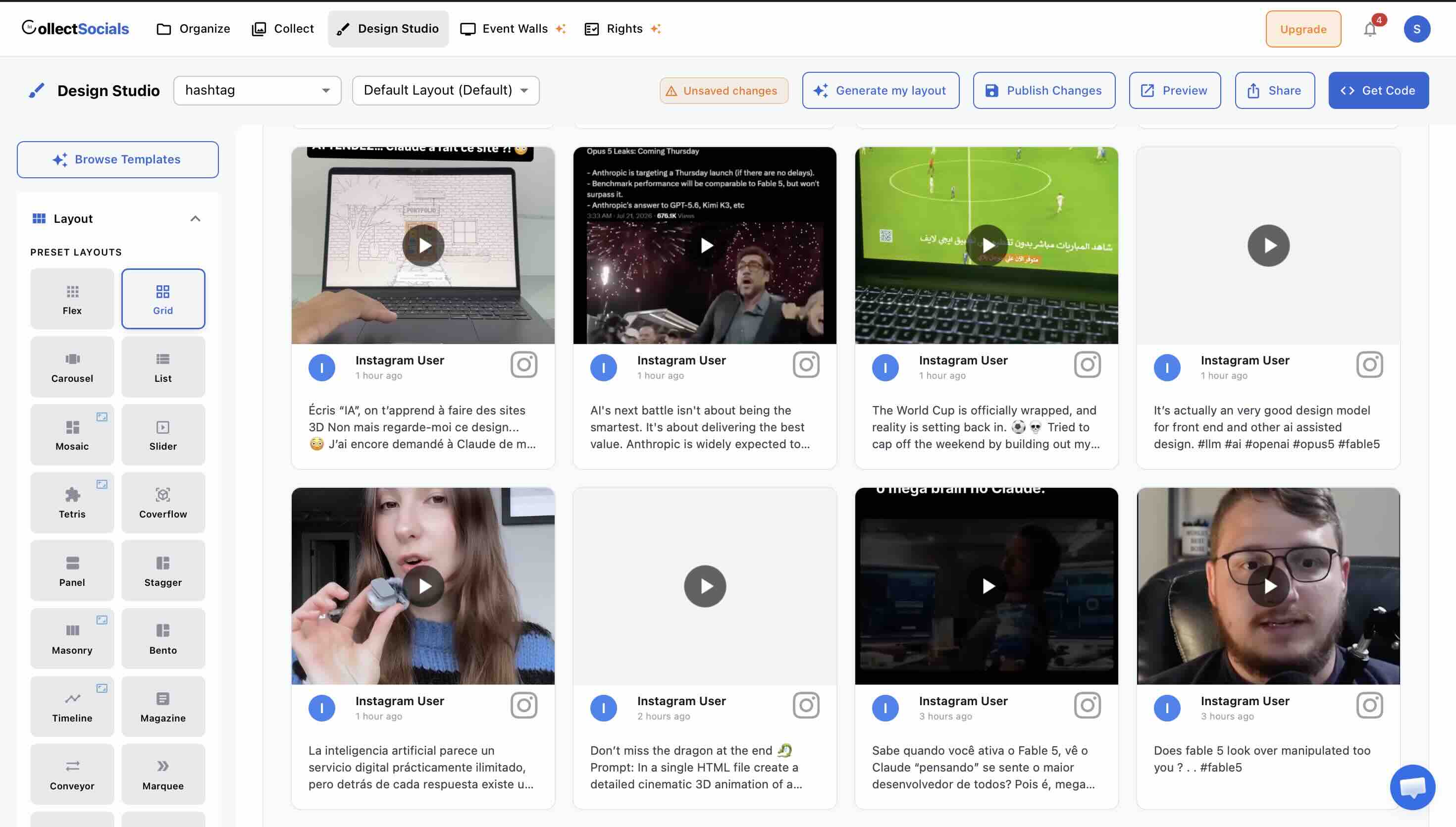
The design library sets it apart immediately. CollectSocials offers forty professionally designed layouts, Grid, Masonry, Carousel, List, Mosaic, Slider, Marquee, Compact, Tetris, Stack, Coverflow, Panel, Stagger, and Layers, paired with sixteen themes including Minimal, Bold, Elegant, Glass, Neon, Brutalist, Midnight, and more. Each combination produces a genuinely polished result without requiring any custom CSS. Walls.io offers layout customization through its style editor, but the out-of-the-box variety and modern design quality of CollectSocials' templates represents a meaningful upgrade for teams without dedicated front-end developers.
How it works
Walls.io offers style customization through its editor, but achieving results beyond basic color and font changes requires custom CSS or JavaScript. For a $270 monthly product (or $215/mo if billed annually), this level of technical barrier is surprising. The animation above shows how modern alternatives approach design: multiple professional layouts and themes available instantly, without writing code.
When you are already paying premium event pricing, you should not need a developer to make your social feed match your website. The design flexibility shown here represents what you should expect at any price point, let alone at rates over ten times the category average. If visual polish matters and your budget is not unlimited, this capability gap becomes a decision point.
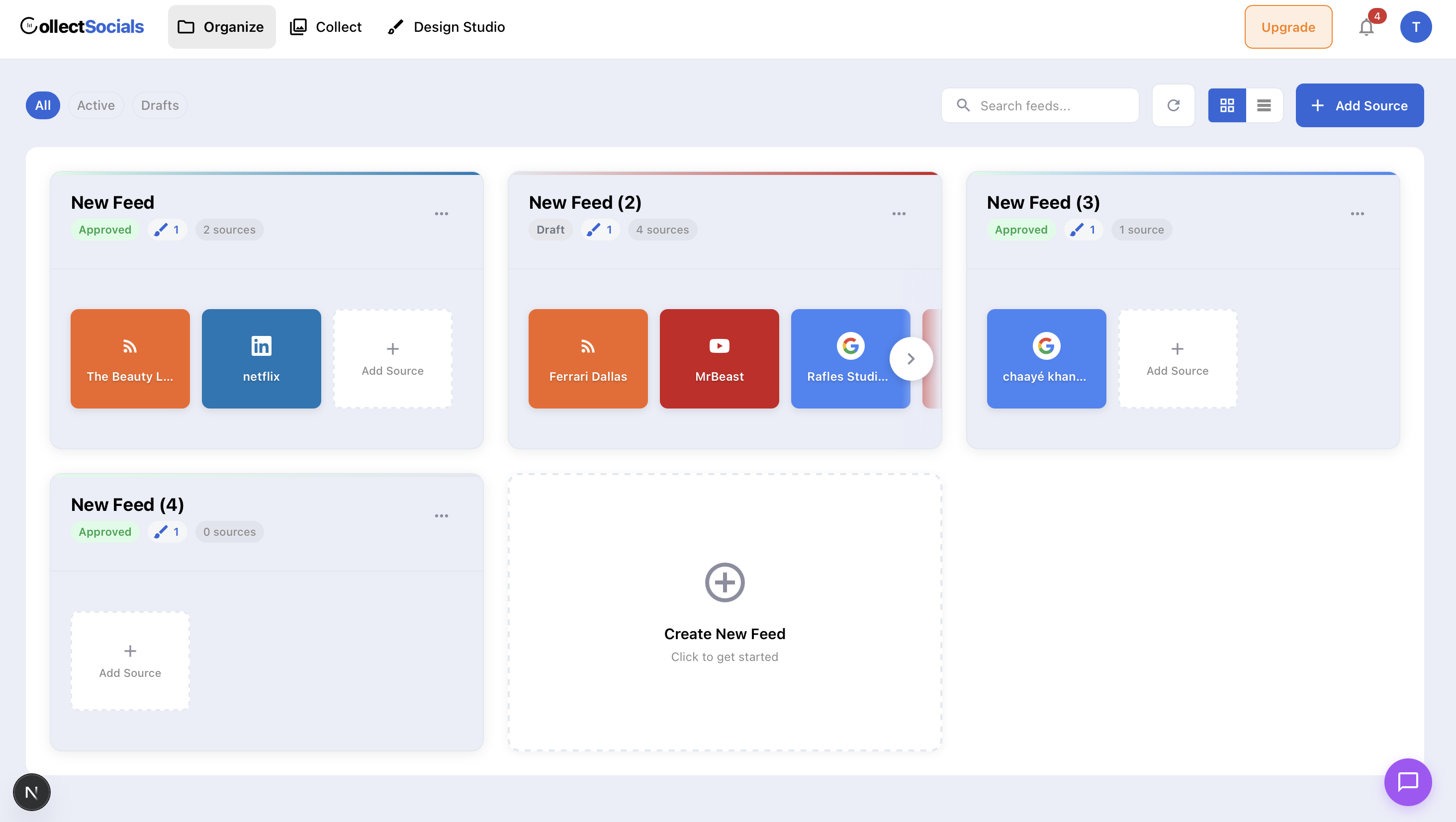
Feeds are unlimited on every plan, including free. This is a structural difference that changes how you think about your social content. On Walls.io, each wall is a separate entity tied to your plan. On CollectSocials, you can create as many feeds as you need, different feeds for different pages, different campaigns, different website sections, and you only pay based on the number of sources you connect. A business on the free plan can still point separate feeds at its homepage, about page and testimonials page without hitting a paywall, all drawn from the one source it has connected. For a deeper look at how this works in practice, see our guide on embedding social feeds on any website.
Multiple layouts per source save real money. One of the most common frustrations with many social wall tools is that displaying the same content in a different layout on a different page requires consuming another source slot or creating a separate wall. CollectSocials allows you to apply multiple layouts and themes to the same source feeds. Show your Google Reviews in a Carousel on your homepage and in a Grid on your testimonials page without using an extra source. This alone can prevent businesses from needing to upgrade to a more expensive plan.
The pricing undercuts Walls.io dramatically. CollectSocials' free plan includes one connected source, unlimited feeds, and 2,000 monthly page views with seven layouts and all 16 themes. Every new account starts with a 7-day trial that opens three sources and the full design studio, all 40 layouts plus the custom card builder, so you can design the whole widget before deciding. The Pro plan at $29 per month unlocks all 40 layouts, five sources, 30,000 page views, a separate mobile layout, and removes CollectSocials branding. The Business plan at $59 per month includes fifteen sources, unlimited page views, AI vision moderation and the event wall, and annual billing is two months free at $590 a year. Several things a rival would charge for are not on that list because they are not gated at all: keyword and profanity filters, all 16 themes and the theme builder, custom colours and fonts, and caption editing all run on the free plan. UGC rights and consent tracking runs on the free plan too, at five requests a month on Free and Pro and uncapped from Business, with pinning the one curation control that is paid and included in the 7-day trial. For context, Walls.io's cheapest paid plan at $270 per month (or $215/mo if billed annually) costs more than four times CollectSocials' Business tier, and the Business tier is likely more than sufficient for most companies that just need social content on their website.
Shadow DOM isolation means zero style conflicts. On WordPress, Webflow, Shopify and hand-built sites the embed is a single script tag that renders inside a Shadow DOM, keeping its CSS completely isolated from your site's styles. No broken layouts, no conflicts with your theme. Wix and Squarespace sandbox or strip custom scripts, so the dialog hands those two a self-resizing iframe instead, which isolates the feed harder still. For platform-specific instructions, see our guide to embedding feeds without plugins.
How it works
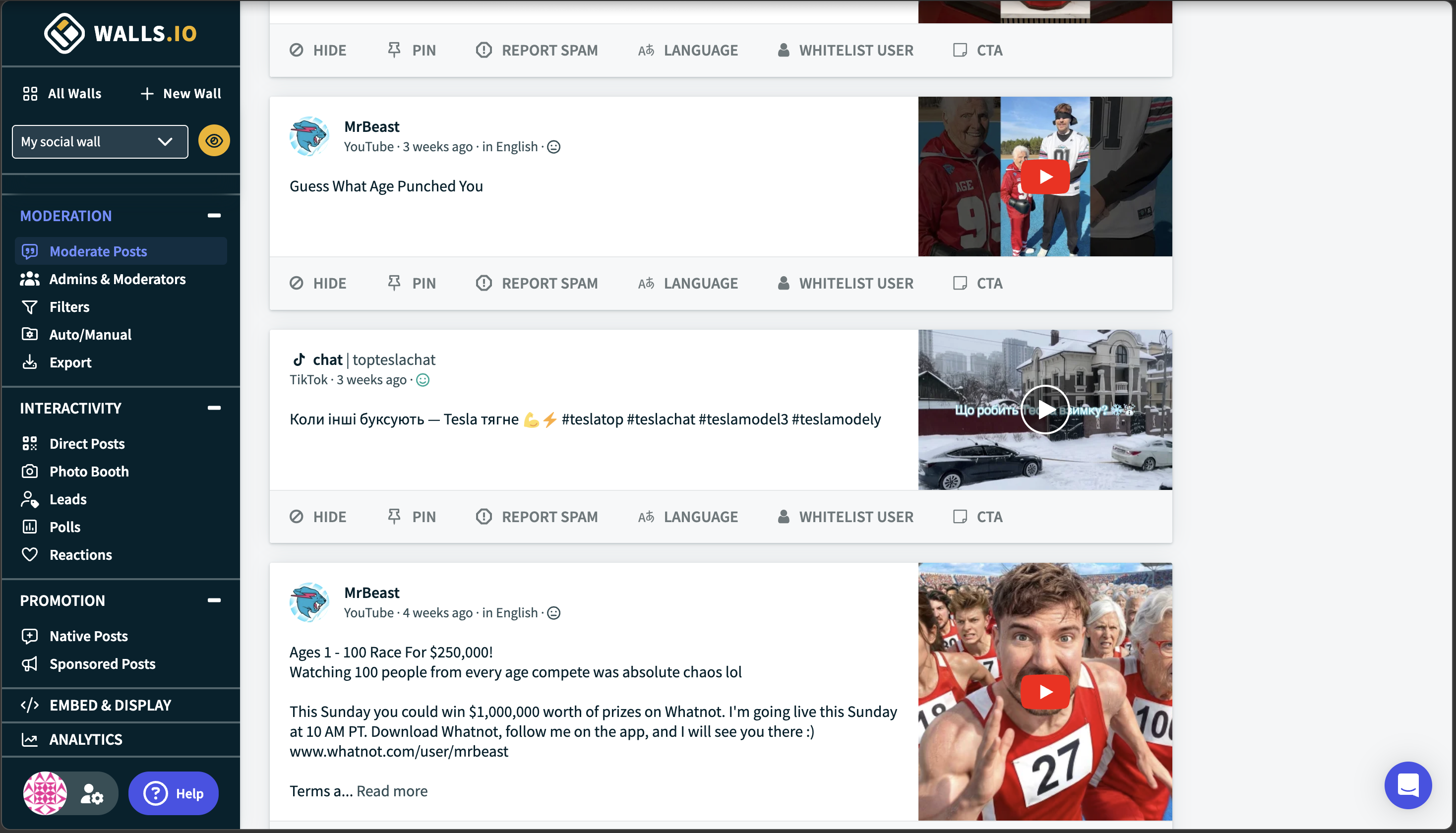
Content curation is table stakes for any social aggregator, but Walls.io prices it like a premium enterprise feature. The animation demonstrates the curation workflow: approve posts you want visible, hide content that does not fit your brand, and watch changes reflect on your site instantly. This is basic functionality, not a conference-specific capability.
At $270 per month, or $215 if you pay a year up front, Walls.io includes robust moderation alongside QR-code contributions and live polls. If you are running a 5,000-person event, that bundle makes sense. But for a marketing manager who just needs to control which Instagram posts appear on the company website, that is an event platform bought for a website feed. The alternatives below offer identical curation capabilities without the event-tier pricing.
The event wall is not a separate product. On the Business plan the same feed opens full screen for a venue, in eleven wall modes rendered by the screen page itself, so the website widget never loads on the TV. There is a portrait mode for expo totems, a broadcast lower-third that runs transparent so it drops into a stream, and a stage spotlight with a live up-next rail. Anyone in the room can scan the code on the screen and send a photo, a message or a question from their phone, with no login, no app and no social account. The phone opens a camera booth with a three-second countdown and a front-or-back flip, or they can pick a photo from the gallery instead. A name and a consent tick are both required, and both are enforced on the server, not just in the form.
Attendees vote from the same page they post from. Live multiple-choice polls run one vote per device, and the results render as animated bars on the big screen. Submissions land in a human review queue before anything reaches the display, which is the default and can be turned off per feed, and an emergency stop pulls already-approved submissions back off the screen within a minute. Nothing is installed and nobody signs into an account on the venue machine: the screen shows a pairing code that expires after fifteen minutes and mints a fresh one, and the phone that is already signed in claims it. The QR code is rendered by us, server-side, so the venue screen never loads a third-party script.
Where to keep in mind
Beyond that first event the wall sits on the $59 Business plan rather than on every tier, so a free or Pro account that has spent its window is a website feed plus a test-mode wall only. What the Business plan does not include is a branded frame or sticker composited onto an attendee's own photo, emoji reactions, or named integrations with event and signage platforms, which is why the largest on-site productions still have reasons to pay the difference. For businesses whose main need is a polished social feed on their website, CollectSocials is the more efficient choice.
Pricing
Free: 1 source, unlimited feeds, 7 layouts, all 16 themes, 2,000 page views, $0/mo (7-day trial opens 3 sources and the full design studio). Pro: 5 sources, unlimited feeds, all 40 layouts, 30,000 page views, $29/mo. Business: 15 sources, unlimited feeds, unlimited page views, the event wall, $59/mo. Scale: 30 sources, $119/mo. Enterprise: 50+ sources, contact sales.
2. Curator.io: Best Free Plan for Basic Aggregation
Best for: Businesses that need a no-cost starting point with broad platform support and minimal branding.
Curator.io is one of Walls.io's most direct competitors in the social media aggregation space, and it has built a strong reputation for offering a genuinely usable free plan. It currently supports over a dozen content sources, including Instagram, Facebook, YouTube, X/Twitter, TikTok, LinkedIn, Pinterest, Tumblr, RSS, and more. The free plan includes three sources with minimal watermark branding, a small logo rather than a prominent badge, which makes it one of the more professional free tiers available. For a deeper comparison, see our full Curator.io alternatives guide.
Where Curator.io works well
The breadth of supported platforms is its strongest selling point. If you need to aggregate from niche sources like Tumblr, DeviantArt, or RSS feeds alongside your main social accounts, Curator.io likely supports it. The setup process is straightforward. Paid plans start at $25 per month for the Professional tier, which includes five sources and 15,000 page views, significantly cheaper than Walls.io's $270 per month entry point (or $215/mo if billed annually).
Where it falls short
The design templates, while functional, have not evolved as quickly as the market. The default layouts feel dated next to a forty-layout, sixteen-theme library. Curator.io also ties each layout to its content source, meaning that if you want to display the same Instagram feed in a Grid on one page and a Carousel on another, you need to add the source twice, consuming two source slots. The Business plan at $59 per month for fifteen sources is priced level with CollectSocials' Business tier, which adds unlimited page views and a live event wall on the same account.
Pricing
Free: 3 sources, minimal branding, $0/mo. Professional: 5 sources, 15,000 views, $25/mo. Business: 15 sources, $59/mo. Enterprise: custom pricing.
3. Taggbox/Tagembed: Best for UGC Campaigns and Shoppable Feeds
Best for: E-commerce brands running user-generated content campaigns that need shoppable galleries, rights management, and event social walls. For a deeper comparison, see our Taggbox alternatives guide.
Taggbox is Tagembed's sister product under the same parent company. The 2026 merger pulled both brands closer, and Taggbox is the stronger of the two for e-commerce teams running rights-cleared UGC campaigns with shoppable product tagging. Taggbox supports over twenty social media platforms and offers features that go well beyond basic embedding: shoppable galleries that tag products directly in user-generated posts, hashtag campaign tracking, and AI-powered content moderation. Rights management is on their list too, on one of the paid tiers; ours is on every plan including free, at five requests a month on Free and Pro and uncapped from Business, so it is not the line that separates the two tools. The platform integrates with over 120 CMS platforms including WordPress, Shopify, Wix, Squarespace, and many others. If your business model depends on collecting, licensing, and monetizing customer-generated content, Taggbox has deeper functionality for this use case than Walls.io.
Where Taggbox/Tagembed works well
The shoppable feed feature is the standout for e-commerce brands. You can tag products directly in user-generated Instagram or TikTok posts, turning social content into a conversion tool rather than just a display element. The analytics go deeper than what most aggregators provide, tracking impressions, clicks, sentiment, and engagement across your feeds. The platform also supports display across websites, digital signage, email campaigns, and event screens, making it versatile for multi-channel brands. Tagembed's CMS integration list is the longest in this comparison at over a hundred platforms, so whatever your site is built on there is probably a ready-made connector.
Where it falls short
Taggbox separates its pricing into distinct products, Taggbox Widget for websites and Social Walls for events, which means businesses that need both capabilities must purchase two subscriptions. This is the same structural issue that Walls.io has with its separate Events, Websites, and Digital Signage pricing, and it adds cost and complexity. Widget pricing starts at around $19 per month for the Starter plan, but you need the Growth plan at $39 or higher to access automated moderation and meaningful customization. The learning curve is steeper than simpler tools, and users on G2 note that widget customization could be more flexible on lower-tier plans. Customization options are limited on lower-tier plans, and the default templates are basic compared to what CollectSocials or Walls.io offer.
Pricing
Free: 1 feed, 500 views, 4-day refresh, $0/mo. Starter: 2 feeds, 10K views, $19/mo. Growth: 4 feeds, 50K views, auto-mod, $39/mo. Advance: 10 feeds, 1M views, AI mod, $99/mo. Event social wall plans are priced separately.
4. EmbedSocial: Best for Google Reviews and Social Proof
Best for: Local businesses and service providers that want to combine Google Reviews, Facebook Reviews, and social media feeds in a unified widget. For a deeper comparison, see our complete EmbedSocial alternatives guide.
EmbedSocial has carved out a strong niche at the intersection of social media aggregation and review management. While it functions as a general aggregator through its EmbedFeed product, its real strength is in pulling customer reviews from Google, Facebook, Yelp, and other review platforms into polished website widgets. It holds approved API integrations with Google, Instagram, and TikTok, which ensures reliable and official data connections. For more context on what to measure when your feed is live, see our guide on social feed analytics that actually matter.
Where EmbedSocial works well
If reviews are the backbone of your social proof strategy, particularly Google Reviews for restaurants, clinics, legal firms, and service businesses, EmbedSocial handles this better than Walls.io and most pure aggregators. The review widgets are highly customizable, and the platform includes AI-generated reply suggestions to speed up review response workflows. For businesses where star ratings directly drive purchasing decisions, having reviews prominently displayed alongside social content is a meaningful conversion driver.
Where it falls short
EmbedSocial separates its social feed product (EmbedFeed) from its review product (EmbedReviews), which means you may need multiple subscriptions to get full functionality. An all-products bundle is available at $64 per month, but that is significantly more expensive than tools that include both capabilities natively. The standalone social aggregator starts at $29 per month for three sources and 5,000 page views, more expensive than CollectSocials' Pro plan, which offers five sources and 30,000 page views for the same $29. If you primarily need social feed aggregation without deep review management, the pricing-to-value ratio is less competitive.
Pricing
Pro: 3 sources, 5K views, $29/mo. Pro Plus: 6 sources, 20K views, $49/mo. Premium: 15 sources, 100K views, $99/mo. All Products bundle: $64/mo.
5. Elfsight: Best Single-Widget Solution at the Lowest Price
Best for: Website owners who need exactly one social feed or one review widget and want the cheapest path to a polished result. For a deeper comparison, see our complete Elfsight alternatives guide.
Elfsight is a marketplace of eighty-plus website widgets. Its Social Feed and Google Reviews widgets are among the most popular. Each widget is configured through an online visual builder and embeds via a single HTML snippet, no plugins, no accounts to manage within multiple products.
Where Elfsight works well
Per-widget pricing makes Elfsight the cheapest option for single-use needs. A Google Reviews widget or Social Feed widget starts at $6 per month on the Basic plan (three widgets, 5,000 views). Compare that to Walls.io at $270 per month (or $215/mo if billed annually). If all you need is a Google Reviews carousel on your homepage, Elfsight delivers it at a fraction of the price. The visual configurator is intuitive, and G2 reviewers consistently highlight ease of use. Five social feed layouts (Grid, Masonry, List, Slider, Carousel) with dark and light modes look clean without customization.
Where it falls short
Elfsight is a widget tool, not a platform. There is no unified dashboard for managing social feeds and reviews together, no content moderation system, no analytics beyond basic view tracking, and no way to combine social posts and reviews in a single feed. If you need a social feed widget and a review widget, you are purchasing and managing them separately within Elfsight's marketplace, a different kind of product fragmentation. The free plan caps at 200 views per month, and exceeding your view limit deactivates the widget entirely.
Pricing
Free: 1 widget, 200 views/mo. Basic: 3 widgets, 5K views, $6/mo. Pro: 9 widgets, 50K views, $12/mo. Premium: 21 widgets, 150K views, $24/mo.
6. Flockler: Best for Multi-Brand Enterprise Deployments
Best for: Organizations managing multiple websites, language versions, or brand properties that need unlimited layouts from the same content sources under a single subscription.
Flockler's structural advantage is similar to CollectSocials' approach: you pay for sources, not layouts. Once you connect your social accounts, you can create unlimited display layouts, grids, carousels, slideshows, walls, without consuming additional source slots. This makes it dramatically more cost-effective than Walls.io for organizations that need to display the same content in different formats across multiple pages, websites, or even languages.
Where Flockler works well
Multi-brand organizations, universities, and companies with multiple web properties benefit the most from Flockler's architecture. The tag-filtering feature is particularly powerful: connect one Instagram source and then display filtered subsets of that content on different pages based on hashtags or keywords. Content is retained even when you disconnect or change sources, directly addressing a limitation that both Walls.io and Juicer users encounter. A single subscription covers websites, email newsletters, digital screens, and intranets. AI content moderation and UGC rights management are included in higher tiers, which is worth pricing against a tool that carries consent tracking on every plan, five rights requests a month on Free and Pro and uncapped from Business. Customer support is available via email, live chat, and phone.
Where it falls short
Flockler is expensive. Pricing starts at $129 per month for the Basic plan, $229 for Business, and $379 for Pro. There is no free plan, only a 14-day trial. While this is cheaper than Walls.io's $270 per month starting point (or $215/mo if billed annually), it is still prohibitive for small businesses. The interface also has a steeper learning curve than simpler tools. If you need unlimited layouts but do not need enterprise-scale complexity, CollectSocials offers multiple layouts per source at a fraction of the cost.
Pricing
No free plan. 14-day trial. Basic: $129/mo. Business: $229/mo. Pro: $379/mo.
7. Onstipe: Best Budget Option for Events and Websites
Best for: Small businesses and event organizers on tight budgets who need basic social wall functionality at the lowest possible cost. For a deeper comparison, see our complete Onstipe alternatives guide.
Onstipe is a social media aggregator that positions itself as the affordable alternative in the social wall category. It supports aggregation from major platforms including Instagram, X/Twitter, Facebook, LinkedIn, YouTube, Tumblr, and Flickr using hashtags, handles, or page URLs. The platform offers both website embedding and event display capabilities, with layout templates designed for digital screens, projectors, and TV displays alongside standard website widgets.
Where Onstipe works well
The pricing is genuinely budget-friendly. Plans start at just $8 per month for the Nano tier, with the Starter plan at $15 per month offering four sources and 100,000 page views. For businesses that need basic social aggregation without paying Walls.io's premium, Onstipe delivers functional results at a price point that is nearly 95 percent cheaper. The platform also supports event-specific features like hashtag walls for conferences and temporary event plans that you can purchase separately, making it one of the few budget-friendly tools that covers both website and event use cases.
Where it falls short
The design quality reflects the price point. Templates are functional but basic compared to what CollectSocials, Walls.io, or even Curator.io offer. Customization options are limited, and while custom CSS is available on some plans, the default themes are not likely to impress visitors on a polished brand website. Onstipe also does not offer an API, which limits its usefulness for businesses with custom integration needs. The free plan is restrictive and includes Onstipe branding. User reviews on Capterra note that the backend can feel slow, and theme customization options are generic.
Pricing
Free: limited, branded. Nano: $8/mo. Starter: $15/mo. Plus: $25/mo. Economy: $39/mo. Business: $69/mo. Event plans available separately.
8. Juicer.io: Best for Simple Multi-Platform Aggregation
Best for: Small businesses, bloggers, and personal websites that need straightforward social media aggregation from multiple platforms without complexity. For a deeper comparison, see our complete Juicer.io alternatives guide.
Juicer.io is one of the oldest social media aggregators on the market, and it has built a reputation for simplicity and reliability. It supports over fifteen platforms including Instagram, X/Twitter, Facebook, YouTube, TikTok, LinkedIn, Pinterest, Tumblr, Flickr, and more. The setup process is genuinely straightforward, connect your accounts, choose a layout, and embed the code. For users who want to avoid complexity, Juicer delivers functional results without a steep learning curve.
Where Juicer.io works well
The platform is genuinely easy to use, which makes it accessible for non-technical users. The free plan includes one source with Juicer branding, making it viable for personal blogs or small projects. Paid plans start at $15 per month for three sources, and the $25 per month plan includes five sources, significantly cheaper than Walls.io's $270 per month entry point (or $215/mo if billed annually). The platform is stable and reliable, with years of proven uptime. For businesses that just need a simple feed from a few social accounts without advanced features, Juicer delivers at a reasonable price.
Where it falls short
The design templates feel dated next to a forty-layout library. Customization options are limited unless you are comfortable writing custom CSS, and the default layouts have not evolved significantly in recent years. A notable limitation is that Juicer does not retain content when you change sources, switch from one hashtag to another, and the old content disappears. This makes it less suitable for businesses running rotating campaigns. The refresh rate on lower-tier plans is also slower than competitors, with the free plan updating only once per day. Analytics are basic, and customer support on entry-level plans is limited to email only.
Pricing
Free: 1 source, with branding, $0/mo. Medium: 3 sources, $15/mo. Large: 5 sources, $25/mo. Premium: 10 sources, $49/mo. Enterprise: custom pricing from $199+/mo.
Quick Comparison Table
| Tool | Free Plan | Starting Price | Best For | Key Limitation |
|---|---|---|---|---|
| CollectSocials | 1 source, 7 layouts, all 16 themes (7-day full trial, 3 sources) | $29/mo | Design variety, affordable pricing, event walls | 5 sources on Pro; LinkedIn not yet live |
| Curator.io | 3 sources, minimal branding | $25/mo | Source variety | Dated templates, source-tied layouts |
| Taggbox/Tagembed | 1 feed, 500 views | $19/mo | UGC campaigns, shoppable feeds, CMS integration | Feed limits, steep learning curve (merged 2026) |
| EmbedSocial | Free (1 source, 500 views) | $29/mo | Review integration | Split products increase cost |
| Elfsight | 1 widget, 200 views/mo | $6/mo | Single-widget, lowest cost | No unified dashboard, widget-based |
| Flockler | No free plan (14-day trial) | $129/mo | Multi-brand, unlimited layouts | Expensive, steep learning curve |
| Onstipe | 500 views/mo | $8/mo | Budget option | Basic design, slow backend |
| Juicer.io | 1 source, branded | $15/mo | Simple aggregation | Dated templates, slow refresh |
How to Choose the Right Walls.io Alternative
The right tool depends on what you are actually using a social wall for. Here is a decision framework based on the most common scenarios. If you are completely new to social media aggregation, our complete aggregation guide for small businesses covers the fundamentals.
If you want strong value for money with modern design, consider CollectSocials. It offers a permanent free plan with one connected source, and a 7-day trial that opens three sources and the full design studio (Walls.io has no free plan, only a 14-day trial), unlimited feeds on every tier, forty professional layouts on paid plans with all sixteen themes on every plan including free, and a Business plan at $59 against a $270 entry point. For most small to mid-size businesses, this is a strong overall package. The multiple-layouts-per-source feature alone can save you from needing to upgrade to a more expensive plan, and the event wall is included rather than sold as a second product.
If you need the broadest free plan with minimal branding, choose Curator.io. Three free sources with nearly invisible branding is a strong zero-budget start, and its list of niche sources is longer than most tools here. CollectSocials' free plan carries one connected source plus unlimited feeds, so if you need several sources running at zero cost Curator.io has the wider free tier; ours is the better proving ground if you want the design range and a trial that opens all forty layouts. Just be aware that design options on Curator.io are narrower: it ties each layout to its source, and there is no theme library behind it.
If you run large-scale UGC campaigns with shoppable content, choose Taggbox. Shoppable galleries that tag products inside customer photos, and per-campaign hashtag analytics, are the two pieces the general aggregators here do not have. Rights management is not one of them: CollectSocials records UGC consent on every plan including free, at five requests a month on Free and Pro and uncapped from Business, where Taggbox puts it behind a paid tier. If your marketing strategy revolves around turning customer photos into product listings, Taggbox's feature set justifies the investment.
If review management is the job, not just review display, look at EmbedSocial. It pulls Facebook, Yelp and other review sources that most aggregators skip, and it adds the workflow around them, including AI-generated reply suggestions. That workflow is the part we do not build. Google Reviews itself is a source on every CollectSocials plan, free included, so if what you need is your Google rating on the page rather than a review response process, you do not need to pay a review-suite premium for it.
If you manage multiple websites or brand properties at enterprise scale, choose Flockler. The unlimited layouts and tag-filtering features justify the premium pricing for organizations with complex, multi-property needs. For everyone else, CollectSocials offers similar multi-layout capabilities at a fraction of the cost.
If you are on the tightest possible budget, start with Onstipe or CollectSocials' free plan. Onstipe's Nano plan at $8 per month is the cheapest paid option in the category, and its free plan is branded and restrictive. CollectSocials' free plan is a permanent single source with unlimited feeds, 2,000 page views and all sixteen themes, with branding removable on any paid plan.
If you are running a live event, compare the two on what the room can actually do. Walls.io's entry point for events is a $270 one-time pass covering a single event for 30 days, capped at 500 attendees and five sources (Screenshot: March 2026, above). CollectSocials ships an event wall on the $59 Business plan, which is also the plan running your website feed the rest of the year. Before that, every team's first event runs free: a one-time 24-hour go-live window on a free account with no credit card, so you can run a wall, pair a venue screen and take real attendee posts without paying for a pass to find out whether it works in your room. Anyone in the room can scan the code on the screen and send a photo, a message or a question from their phone, with no login, no app and no social account. The phone opens a camera booth with a three-second countdown and a front-or-back flip, attendees vote in live multiple-choice polls whose results render as animated bars on the big screen, and the venue machine pairs by QR without anyone signing into an account on it. Walls.io stays ahead on the pieces we genuinely do not have: branded frames and stickers composited onto an attendee's own photo, emoji reactions, and named integrations with event and signage platforms. For the largest on-site productions that gap is worth the price difference. For most events it is not.
The Bottom Line
Walls.io is built for one job and priced accordingly. What $270 buys is a product designed end to end for events: big-screen walls, a photo booth that brands the attendee's own photo, live polls, QR contributions, and a minute-level refresh reserved for the event plans. The question is not whether that is good, it is how many days a year you use it. If the wall runs four days a year and the plan bills every month, the same money is paying for the other 361 as well, and on those monthly website and signage plans what it is paying for is a fifteen-minute refresh while the event product gets the fast one.
Plenty of buyers need both outputs, just not in the same week. A feed that sits on the website all year and opens full screen for the three days of a conference is one job, and splitting it across two subscriptions priced for the event is the most expensive way to buy either half. The alternatives on this list unbundle that in different ways: some are website tools that will never run a room, some are event tools that bill by the event, and CollectSocials puts the widget and the wall on one feed and one account. Which one is right depends on which half you use more, and on whether you want to buy the other half twice.
If you want to see how a modern social media aggregator compares to what you have been using, CollectSocials offers a free plan with a 7-day trial of the full design studio, no credit card required. Set up your first feed in under five minutes and see the difference for yourself.
Start Using CollectSocials Today
One curated feed from 10+ platforms: on your website in a single line of code, or up on the big screen at your event.