
A quick note on tone before we start, because this is easy to get wrong. This is not a takedown. EmbedSocial is the tool I tested most closely here, and one workflow is not a verdict on a whole product. Everything below is dated (tested July 2026), backed by screenshots, and where I'm inferring how something works under the hood I say so explicitly. The point isn't "this vendor is bad." The point is that comment-based rights requests share a structural weakness, and once you can see it, you can ask any tool, including ours, the right questions.
Why UGC Rights Suddenly Matter More Than They Used To
User-generated content is the most persuasive marketing you can put on a website, and reposting a customer's photo feels casual. It's just a repost, right? Legally and reputationally, it isn't. The person who took the photo owns the copyright to it. Displaying it on your commercial website or a paid event screen without permission is a reuse you can be asked to justify. And under privacy regimes like the GDPR, if that content identifies a person, "we grabbed it because they used our hashtag" is a weak basis for processing it.
So a whole product category exists to solve one job: ask the creator, get a yes, and keep a record of that yes. That last part, the record, is the entire value. A rights tool that collects approvals but can't prove them later is selling you a feeling, not protection. That's the lens I tested with.
How a Comment-Based Rights Request Works
Here's the flow as shipped. You connect an Instagram hashtag or mentions source, and the tool ingests matching posts into a rights table. Each row is a post you might want to reuse, marked "Unrequested" until you ask.
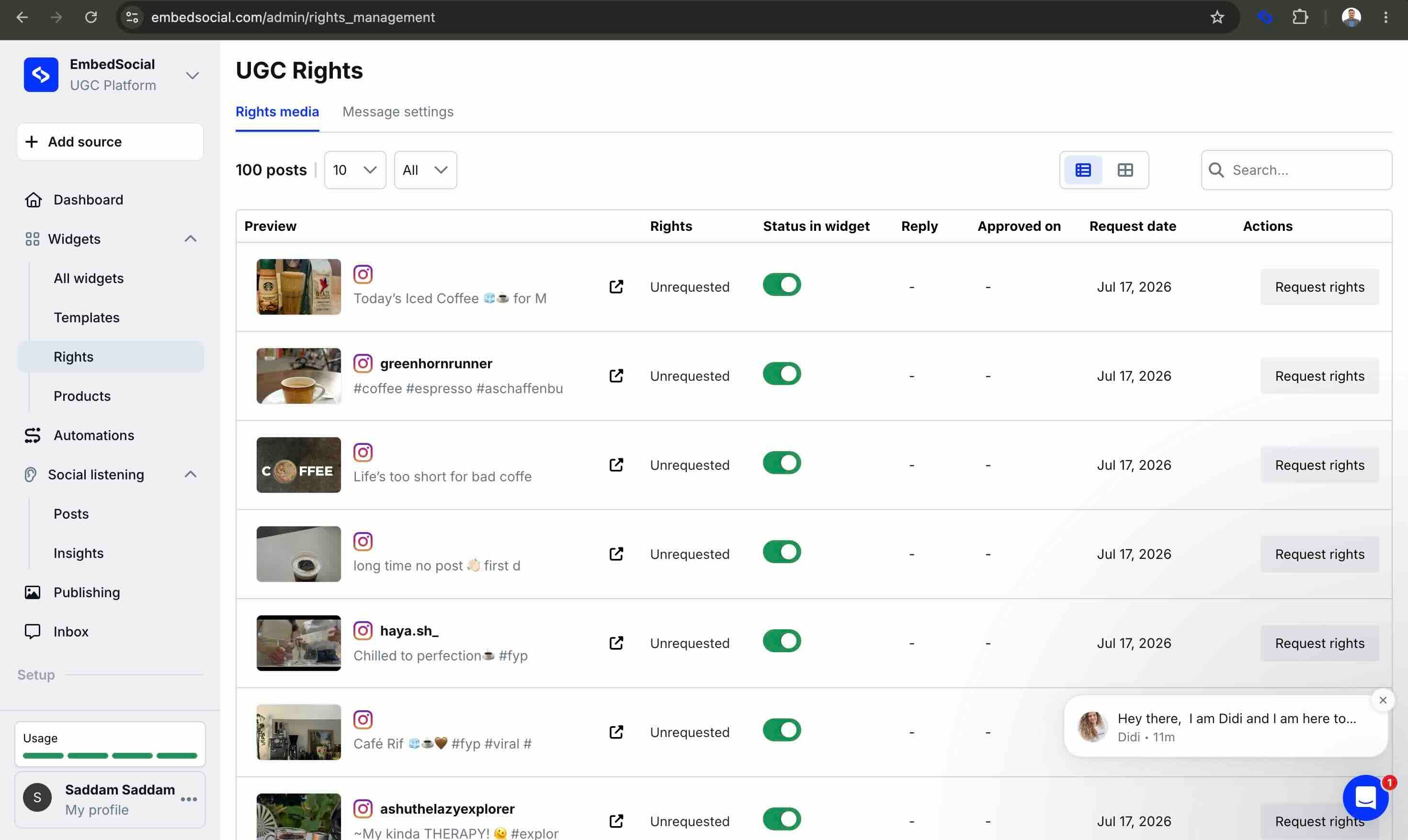
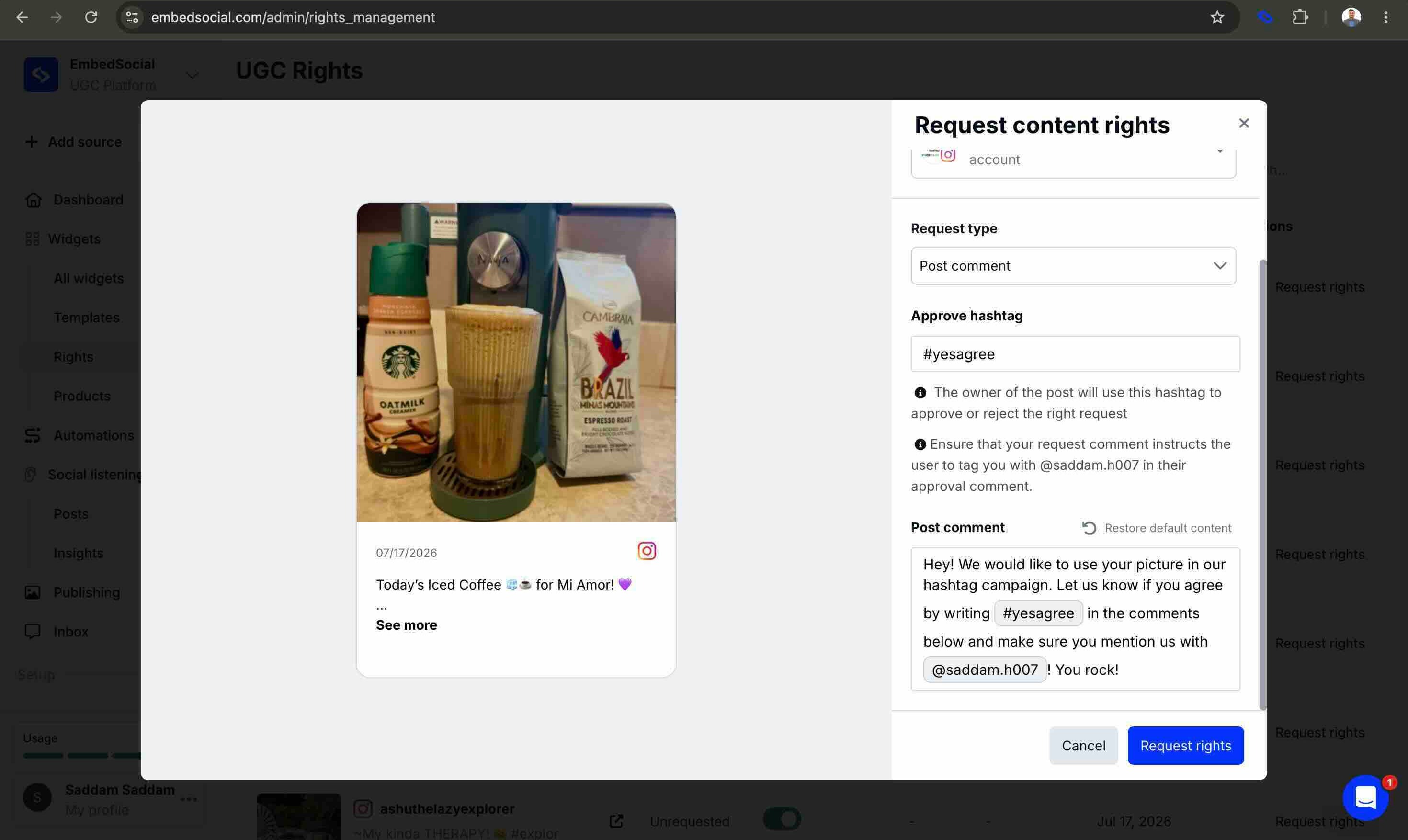
To ask, you pick a post, choose which of your connected Instagram accounts sends the request, and you're handed a message template. The default asks the creator to reply with an approve hashtag (out of the box, #yesagree) and to @mention your brand account. That comment template is the whole agreement. There is no separate terms page, no contract, no sentence of legal text the creator is shown, just a friendly comment with a hashtag in it.
When the creator replies with the hashtag and the mention, the row flips to a green Approved, storing three things: the reply text, the approval date, and the request date. That's the record. No terms version (there are no terms), no snapshot of the post, no expiry, and, hold this thought, no way to represent the approval being withdrawn.
The Part That Surprised Me: It Comments As You, From Your Browser
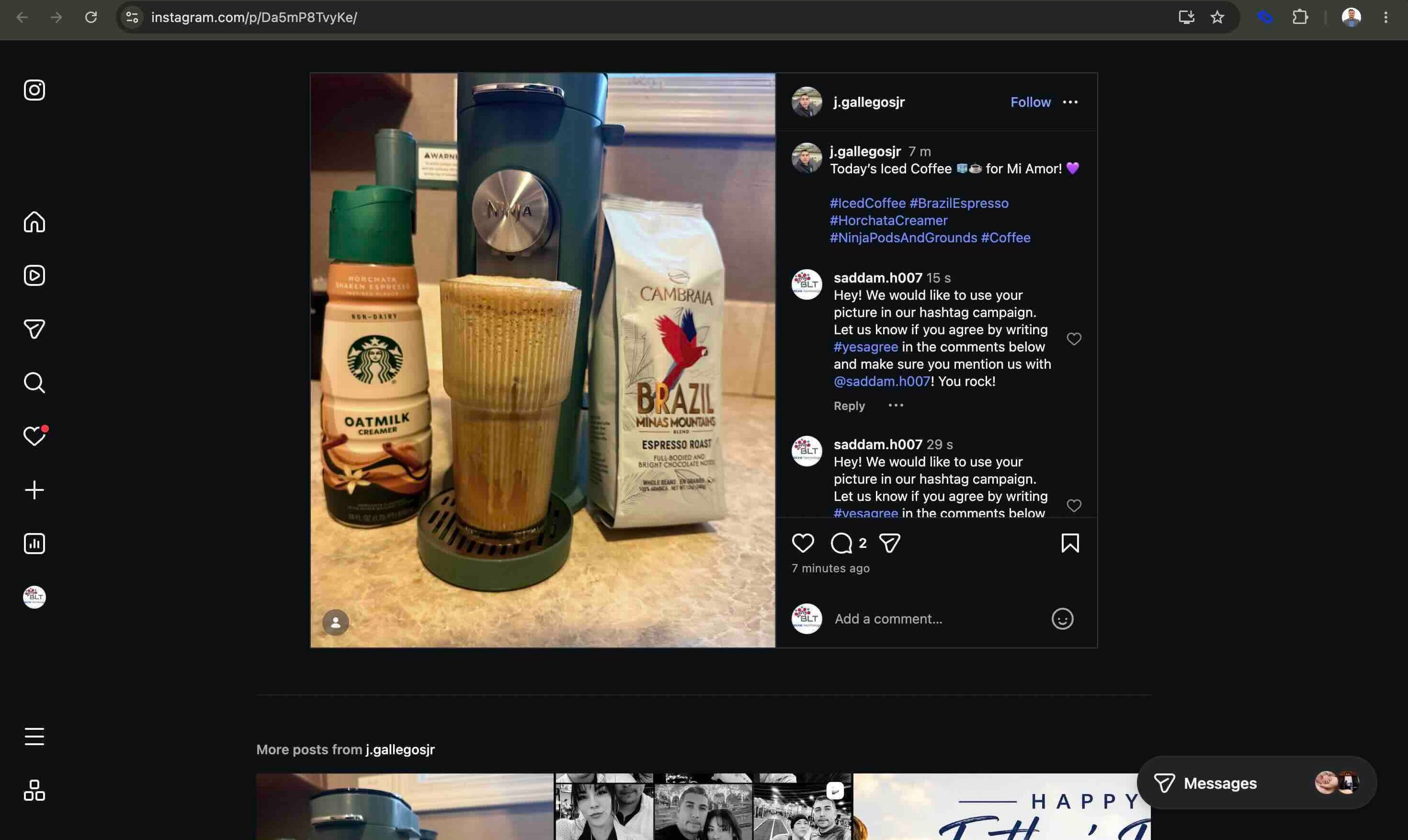
I expected the request to be sent through the official API. Instead, onboarding asks you to install a Chrome extension and be logged into your Instagram business account. When you click "Request rights," the extension opens the Instagram post in your browser and posts the comment through Instagram's normal web interface, as your account, then returns to the dashboard with a success toast. I watched it happen live, twice.
And "twice" is literal. Clicking the button twice posted the same comment twice on a real creator's post. There is no dedupe.
Here's the careful version of why this matters, because it's easy to overstate. Automating actions through Instagram's web UI runs against Instagram's stance on automation. But the account doing the commenting is yours, not the vendor's API app. So if Instagram's anti-automation systems ever take exception to the behavior, it's your Instagram account that absorbs the consequence, not the vendor's platform standing. I'm not claiming anyone is breaking a rule here; I'm pointing out where the risk sits in this architecture, on the customer's account, so you can weigh it deliberately.
An aside worth knowing: the @mention is doing a job
Why does the creator have to @mention you, not just reply with the hashtag? My read (and I'll flag this clearly as analysis, not the vendor's documentation) is that the mention is the sensor. Instagram's API surfaces a third-party's comment to an app most reliably when the connected account is mentioned. Requiring the @mention is what makes the approval comment visible to the tool's backend so it can watch for the hashtag. It's an elegant workaround. It also means approval depends on the creator performing two exact public steps, the right hashtag and the mention, and any deviation means the approval simply isn't detected.
The Experiment: I Deleted My Own Consent
This is the test no marketing page or listicle can run, because it needs both sides of the conversation. I controlled the brand account and the creator account, so I could approve a request and then act as the creator who changes their mind.
I approved a request. The row turned green. Then, on Instagram, I did the most ordinary thing a creator can do: I deleted my approval comment the single artifact that was the consent.
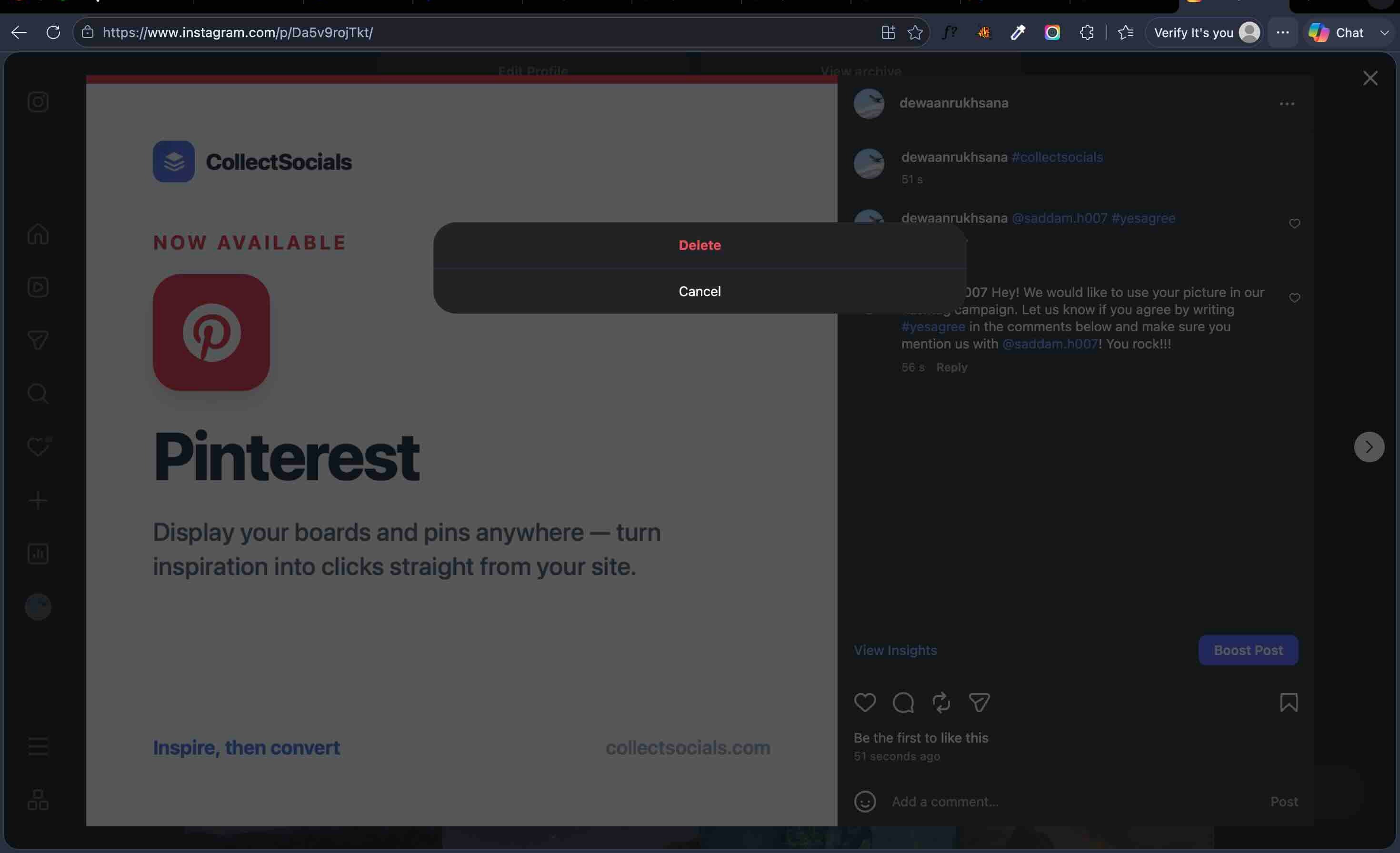
Back in the dashboard, the row still said Approved. Nothing re-checked. Nothing flagged. There is no "revoked" state in the product at all. The consent artifact was gone, and the record kept asserting consent anyway.
Sit with what that means for a tool sold on compliance. Withdrawing consent is a first-class right under the GDPR. Here, a creator can withdraw, by deleting the only evidence that ever existed, and the brand's dashboard will keep showing a confident green "Approved" pointing at a comment that no longer exists. The record outlived its own evidence. To be precise: this is a legal-evidence weakness, not a platform-terms violation. But for a record whose entire purpose is to survive a dispute, it's the weakness that matters most.
A Second Thing I Didn't Expect: A Confident Success That Wasn't True
Once a post is approved, the tool offers to repost it to your own Instagram account, a full publishing composer. I tried it. The dashboard showed a green banner: "Your post is published and visible to your followers!"
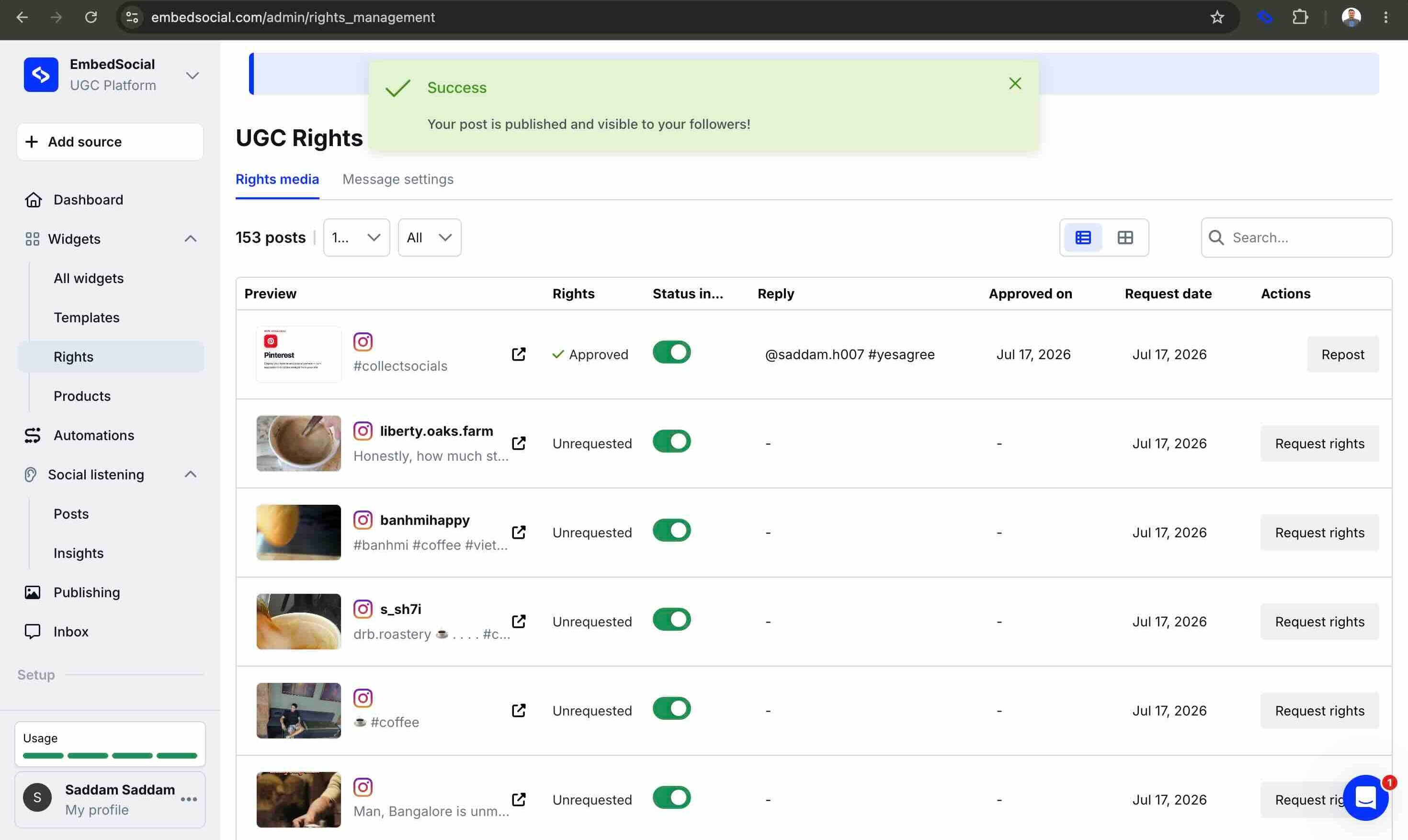
Except it wasn't. No post appeared on Instagram. And at the same time as the success banner, this email arrived:
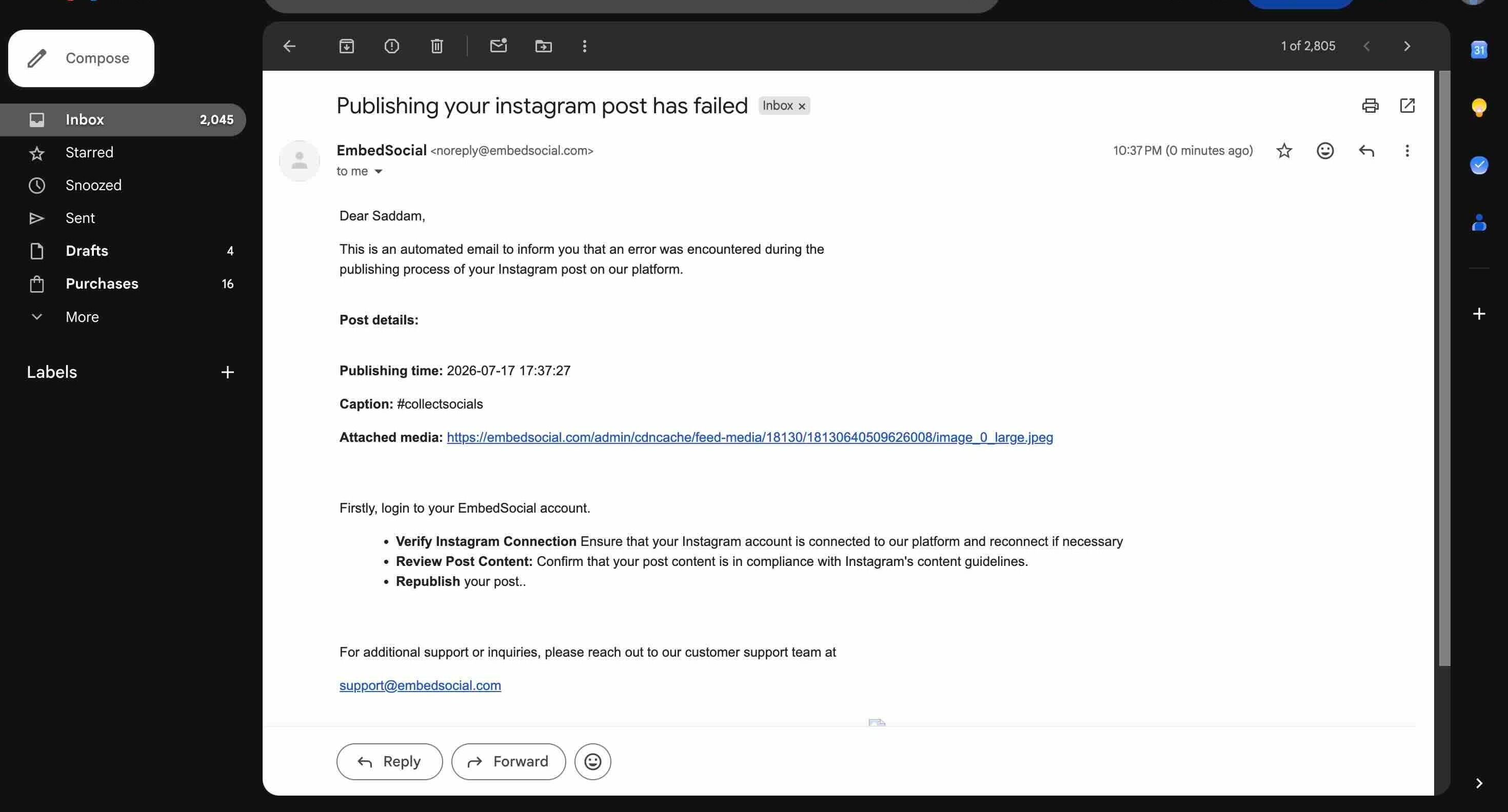
I'm including this not to dunk (production bugs happen to everyone, and I'd want the same fairness) but because it reinforces the through-line of the whole test: a green checkmark is not proof. An interface can tell you an action succeeded while the underlying system knows it failed. If you're going to rely on a tool's word about something as consequential as consent, the word has to be backed by a record you can inspect, not a toast you have to trust.
One More Finding: When a Connection Quietly Dies
This one is separate from rights, but it comes from the same test session and it's about the same theme, how a tool behaves when its confident UI and reality drift apart. I wanted to see what each product does when the Meta connection is severed. There are two ways to sever it, and they're treated very differently.
Remove the connection inside the tool and it knows immediately that's its own state. But remove the app the security-conscious way, from Facebook's own Settings → Business Integrations, and the tool didn't notice. The next day, its Add-source picker still listed all four of my Facebook Pages as if nothing had changed.
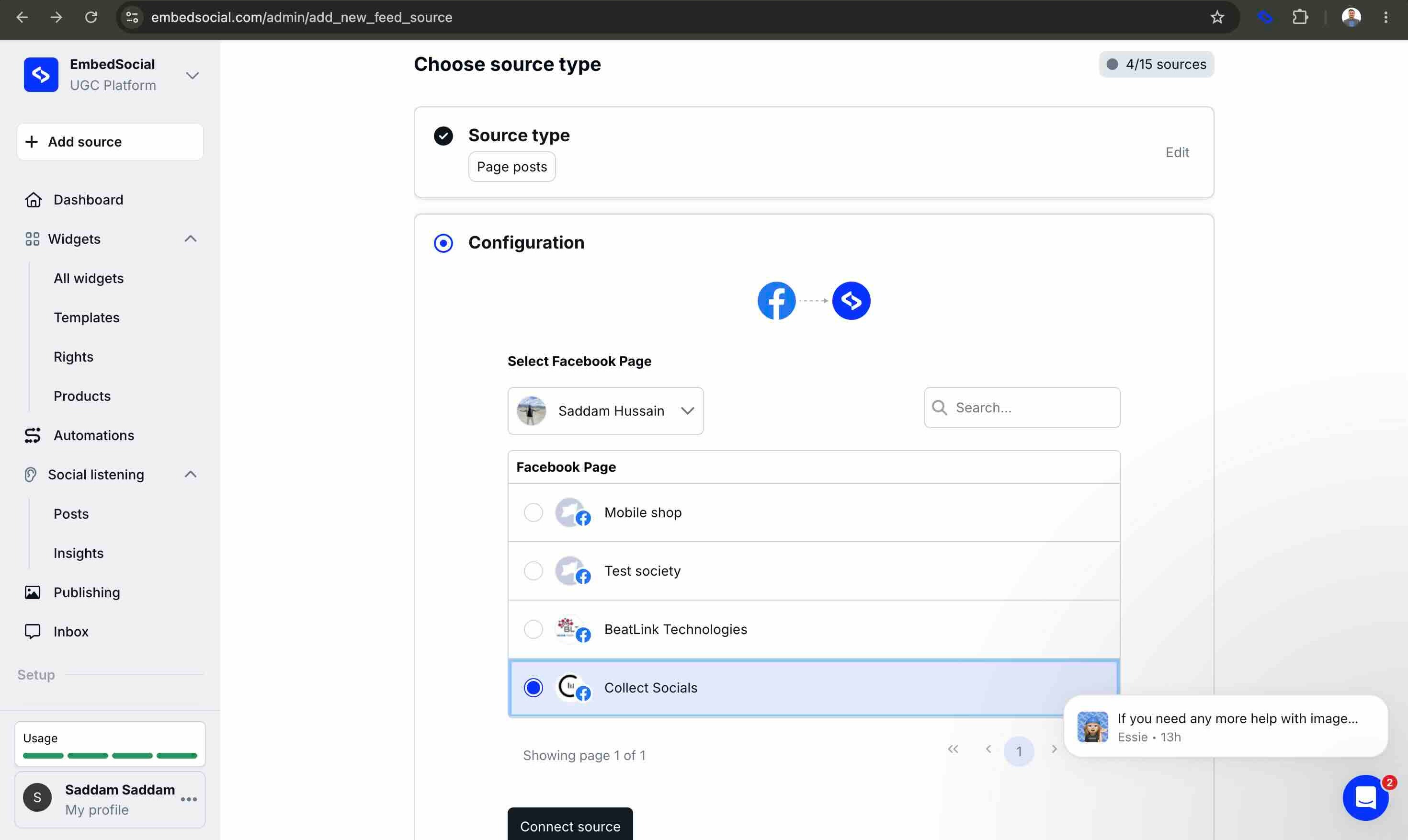
I selected a Page. It reported "Source added successfully." Only then, when the widget tried to load, did anything go wrong and even then, the message was misleading:
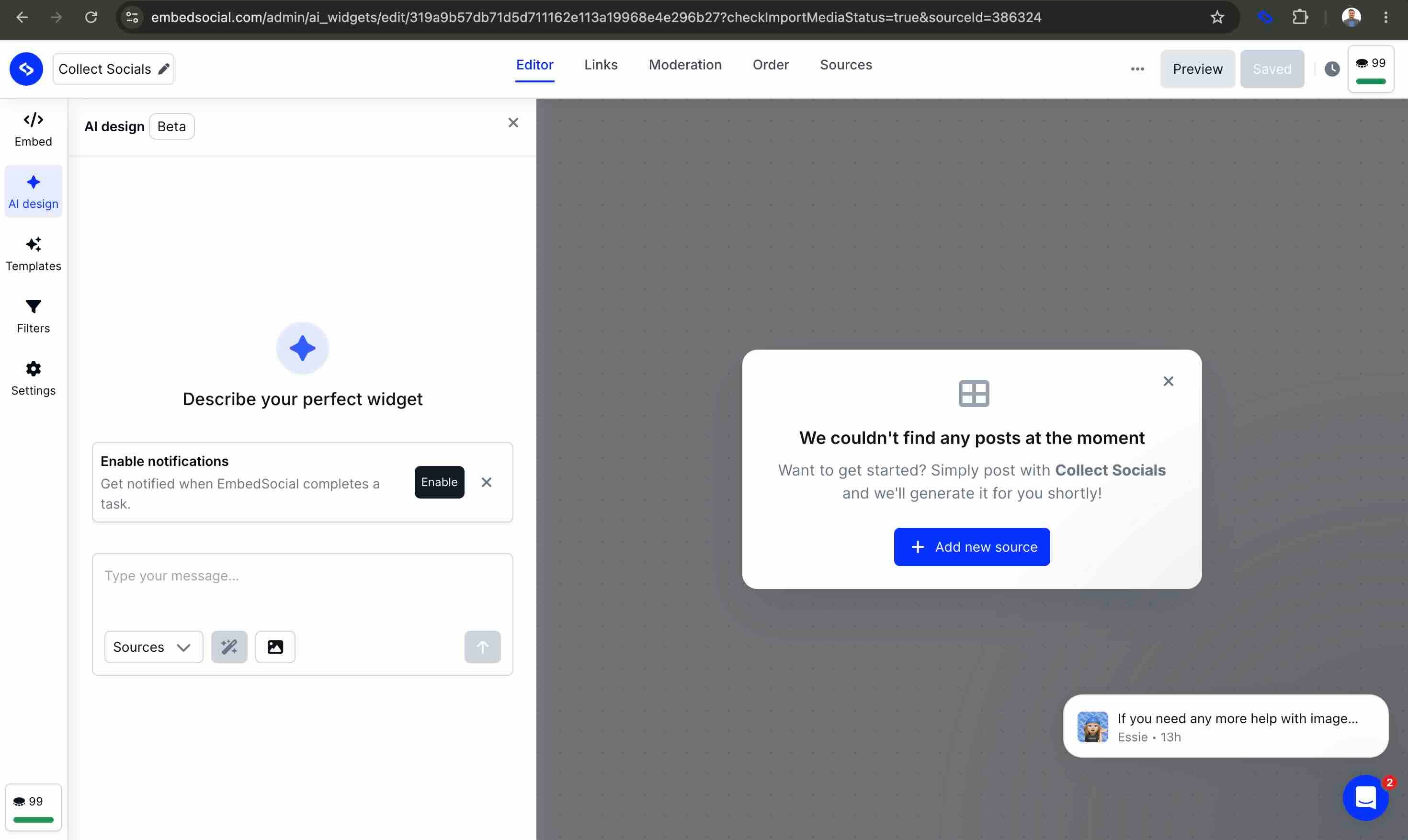
Scope discipline matters here, so let me be exact about what this is and isn't. This is a connection-health and UX finding: a Facebook-side revocation goes undetected, the tool reports success on a dead grant, and the user is left at an empty widget with a diagnosis ("no posts") that points them at the wrong problem. It is not a claim that anyone keeps pulling data after revocation. (Facebook and Instagram are separate Meta grants, and I have no evidence of continued fetching, only that the disconnection was reported as success.) My read is simply that connection state is tracked internally and not re-validated against Facebook at connect time.
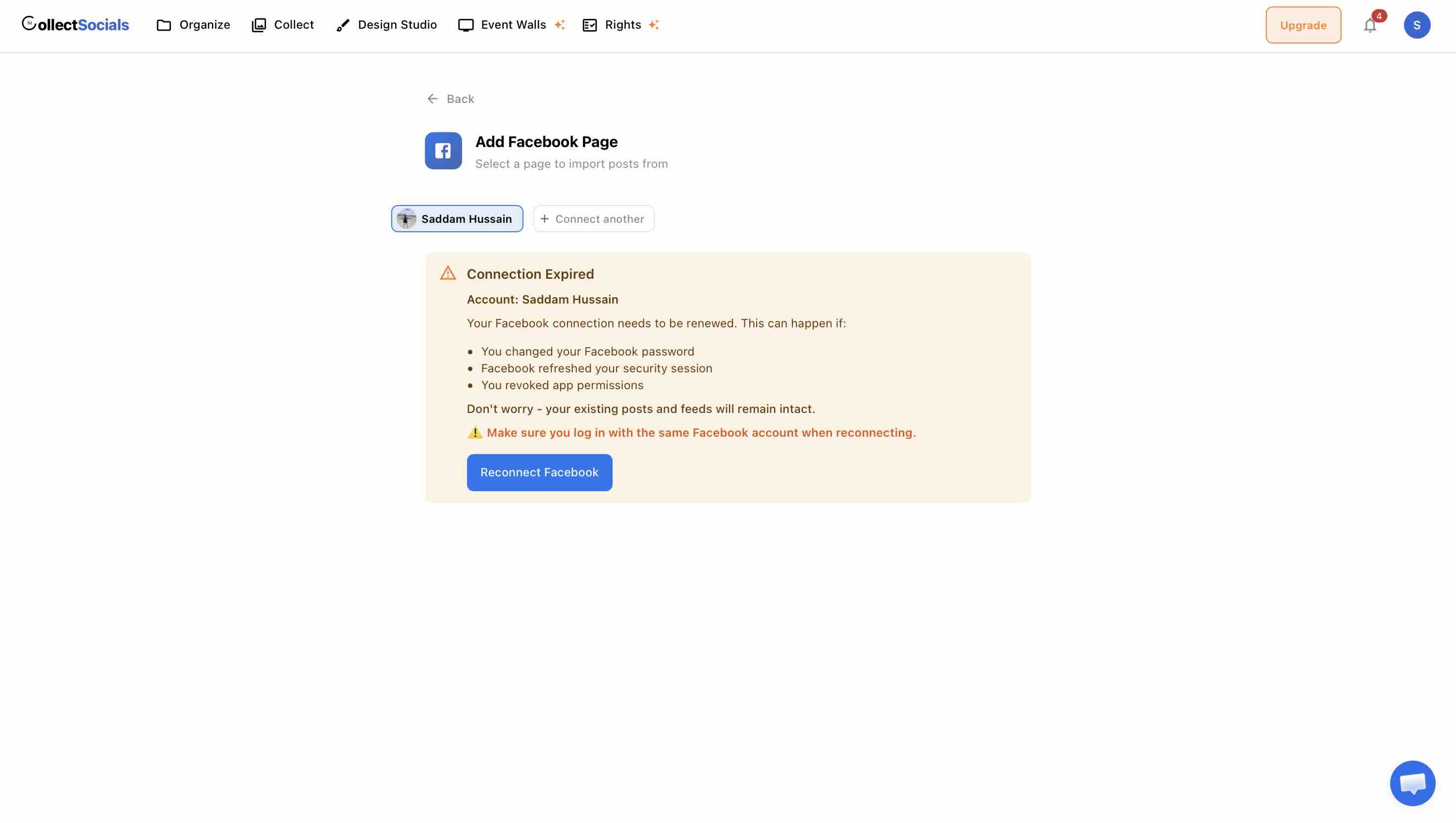
I raise it because it's the exact same lesson as the deleted comment and the false success: a tool should tell you the truth about its own state, especially when the news is bad. The behavior I wanted to see, and built into ours, is the opposite one: on that same Facebook-side revocation, CollectSocials detects the dead token and, instead of listing Pages, shows a "Connection Expired" panel that names the likely causes, tells you what survives the outage and what does not (the posts and captions keep serving; Facebook signs its photo links, so those expire within days), and gives you a "Reconnect Facebook" button. Same event, opposite outcome: one path hands you a silent empty feed; the other hands you the fix.
The Deeper Pattern: Comment-Based Consent Is at War With the Platform
It would be unfair to pin all of this on one vendor, because the comment-request pattern is industry-standard, and the better implementations actually make the point sharper. Another tool I looked at does ship real hosted terms pages linked from the request comment, which proves that when legal genuinely matters, terms links do appear in this industry. It also names the failure modes out loud, with statuses like "Soft Approval" (the creator replied but botched the exact wording) and "Rights Expired."
That second status is a gap on our side, and it belongs here rather than buried: our records carry no expiry. A permission granted last year still reads as current today, because nothing in the product ages an approval out. If your campaigns need time-boxed rights, put that question to every vendor on your list, this one included, and ask them to show you the state a stale approval lands in.
But look at what its own best-practice guidance asks customers to do to keep the flow working: rotate 15–20 different comment variations, refresh them every few months, rotate the terms-page links because reusing one trips spam detection, watch your typing speed and comment volume, sometimes drop the @mention, and switch browsers if you get blocked. That is a spam-filter-evasion manual, written not for anything shady, but simply to ask people for consent.
That's the synthesis worth taking away: even the best-engineered comment-based rights flow is permanently at odds with the platform's automated defenses, because it works by scripting public actions the platform is actively trying to rate-limit. Asking for consent on neutral ground, a link, off-platform, isn't a clever workaround for that war. It's the exit from it.
The Real Question: Would a Database Row Hold Up?
When I showed an early version of these findings around, the sharpest pushback was fair: "Okay, but your record is also just a value in a column in your database. Would that stand up? To a layman, proof means a third-party site nobody can alter." It's the right question, and answering it honestly is what shaped our design, so let me answer it plainly rather than sell past it.
Every e-signature product is "a row in a database." DocuSign, Adobe Sign, all of them. Courts don't accept those records because they're on a blockchain; they accept them as business records when the process that produced them is credible. That's literally what the e-signature statutes are for ESIGN and UETA in the US, eIDAS in the EU. Nobody can honestly promise "court-proof." The bar isn't magic; it's a credible, documented, tamper-resistant process. What good vendors actually sell is evidence quality.
So the useful question isn't "is it a database row?" It's "what makes this particular database row credible?" Three things do:
- An append-only event log. Status changes add new rows; nothing updates or deletes in place. The history can't be quietly rewritten after the fact, including by us.
- Evidence captured at the moment of consent. The exact terms version the creator saw and a hash of that text, a server-side timestamp, a hashed IP, the user agent, and a snapshot of the post. You can reconstruct precisely what was agreed to, and when.
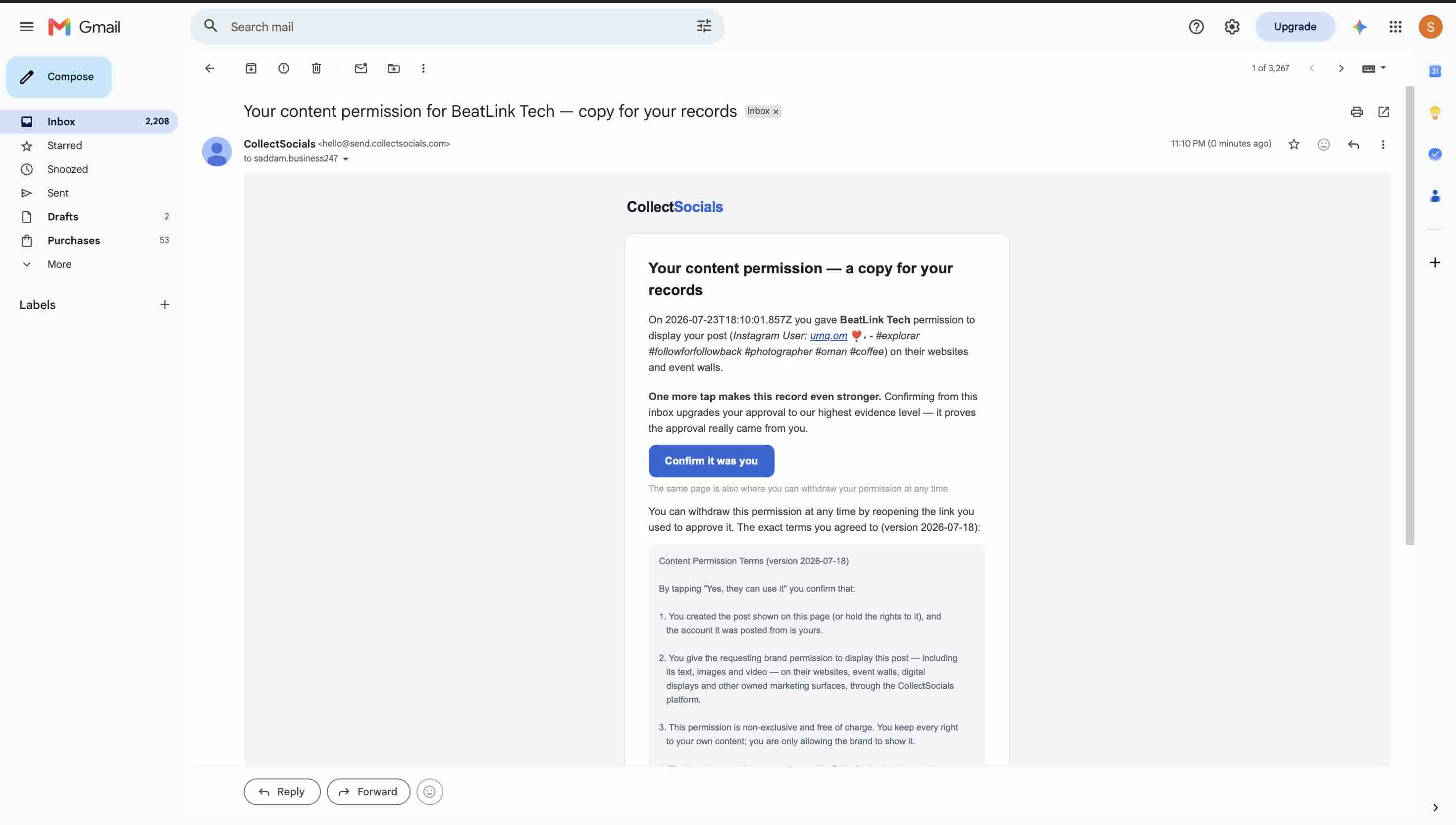
- A copy in the creator's own inbox, when they leave an address. The email field on the consent page is optional, so this one is the creator's choice rather than something I can promise happens every time. When they do fill it in, a confirmation email sends them a contemporaneous copy of exactly what they agreed to, and a record now exists somewhere we cannot touch: their mail provider. Tapping the confirm button in that email goes further and upgrades the approval to our highest evidence level, because it proves the approval came from the person who holds that inbox. That's the layman's "third-party site" instinct, satisfied with boring, trusted infrastructure, and it's how a DocuSign completion certificate works. Ask for the address in your request message: the creators who fill it in give you the strongest records you will have.
Contrast that with where we started. The comment-based record is a pointer to a public comment the creator can delete, and I proved the record outlives that evidence. Ours is a self-contained, append-only record with a copy sitting in the creator's inbox. One of those survives a dispute; one of those evaporates the moment someone taps "Delete."
What We Built Instead
Everything above is why our UGC Rights feature works the way it does. The flow has three steps and no browser extension anywhere in it.
One thing to get out of the way first, because it catches people out: rights requests and consent records are on every CollectSocials plan, free included. There is no rights tier, no per-request quota and no upgrade prompt in the middle of the flow. That is not the norm in this category, where rights management is commonly a paid add-on or a top-tier feature, so it is worth checking on whatever else is on your list before you compare anything else about the flow.
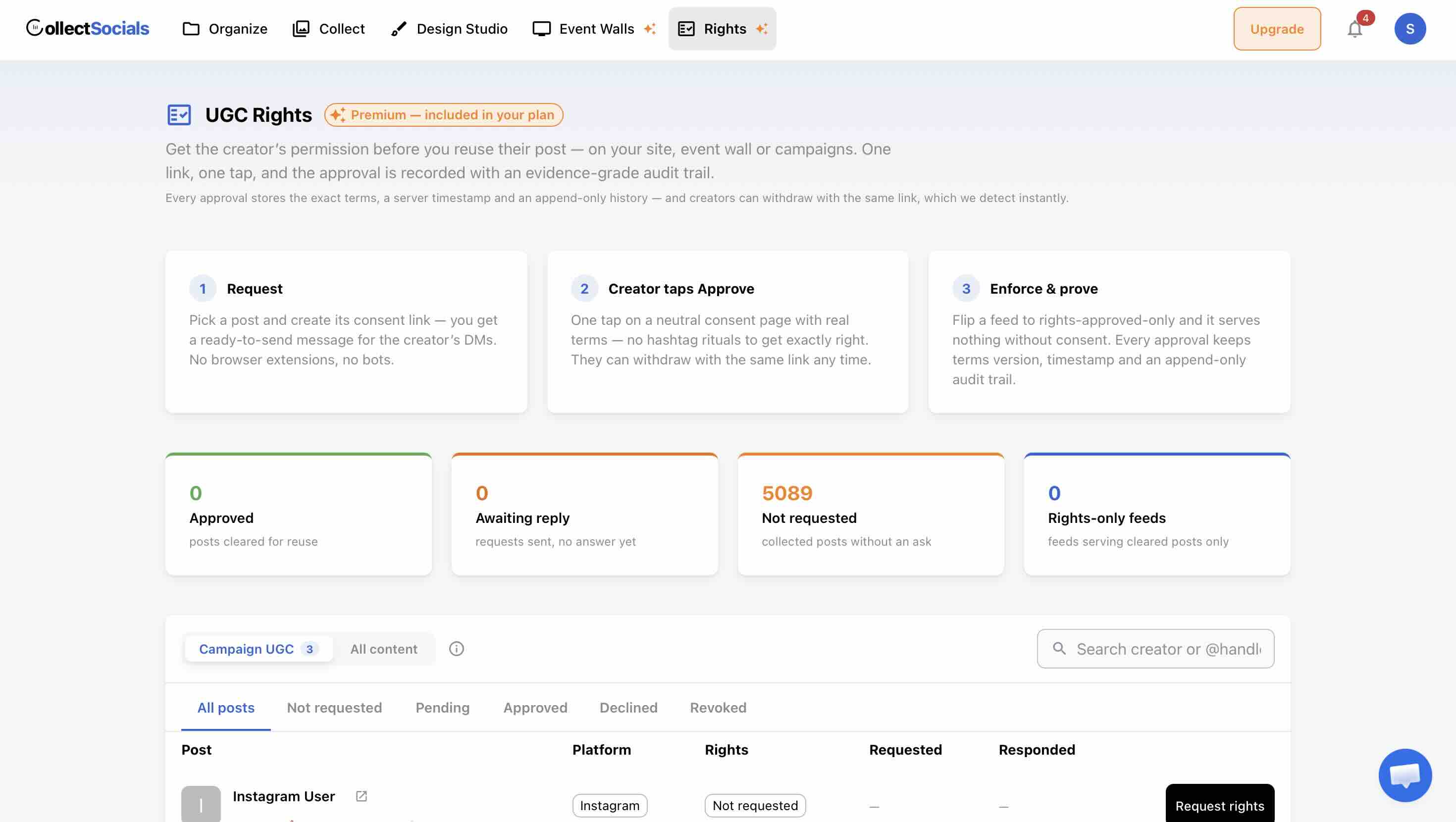
You request by generating a consent link for a post you get a ready-to-send message for the creator's DMs, and nothing is scripted onto anyone's Instagram session. The creator approves with one tap on a neutral page that actually shows them the terms they're agreeing to, no exact hashtag to fumble, no mention to remember.
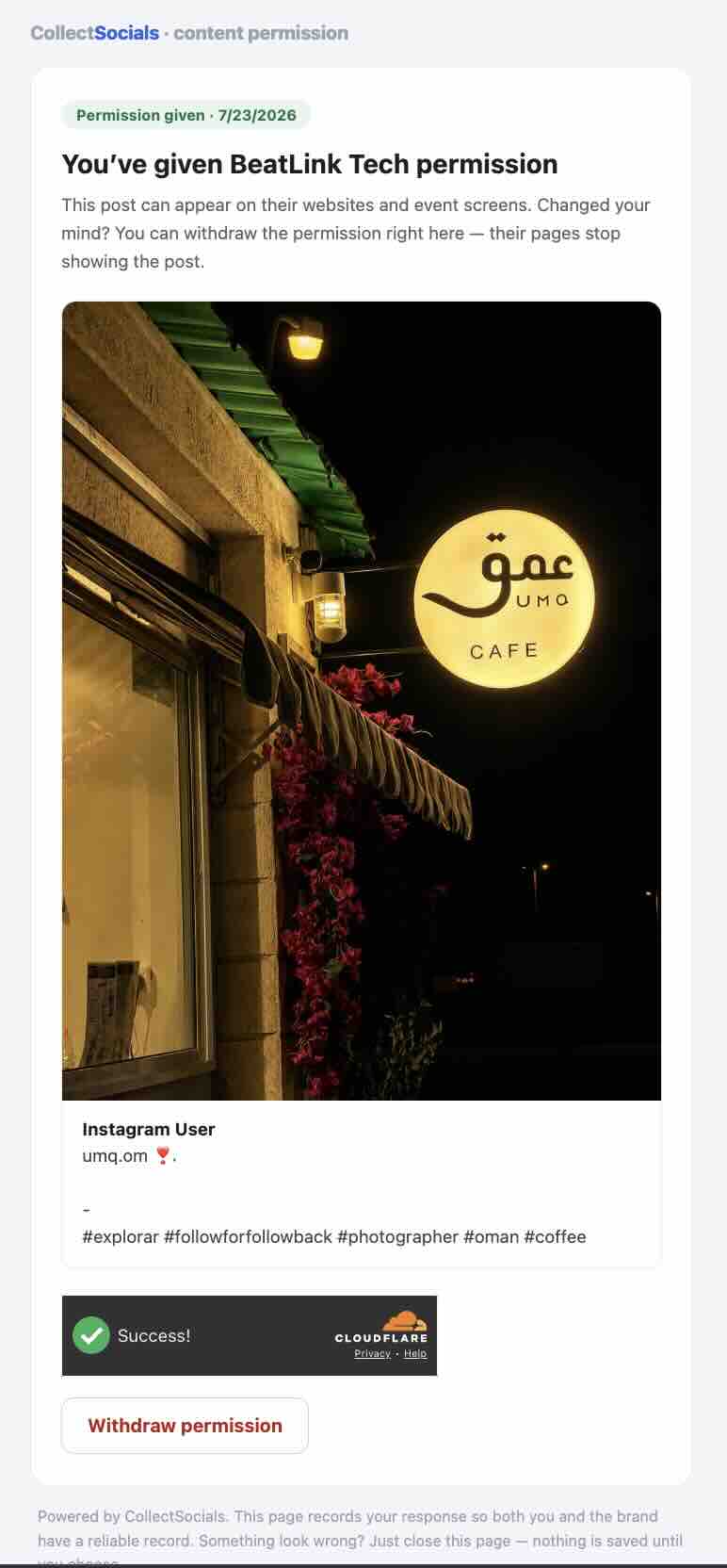
And crucially, withdrawal is a real state, not the absence of evidence. The creator changes their mind, taps withdraw, and the record reflects it, the opposite of a green "Approved" hovering over a comment that no longer exists.
The honest side-by-side
| Comment-based rights (as tested) | CollectSocials UGC Rights | |
|---|---|---|
| Consent artifact | A public Instagram comment with a hashtag | A consent page with real, versioned terms |
| What's stored | Reply text + date | Terms version, text hash, timestamp, response, hashed IP, post snapshot |
| Withdrawal | None; deleting the comment goes undetected | First-class "revoked" state, detected instantly |
| Creator effort | Two exact public steps: hashtag + @mention | One tap on a link |
| Platform surface | Browser bot comments as your account; content-publish API for reposts | No automation, no extensions, no writes to the platform |
| Who carries the risk | The customer's own Instagram account | No automation runs on your account |
Why we deliberately don't do reposting
The one feature I didn't replicate is the flashy one: the one-click repost to your brand account. That's a choice, not an oversight. Reposting means writing to the platform on your behalf and re-hosting a creator's media, and that's exactly the kind of write access we've told the platforms we don't use. Our approach is read-only by design; shipping a publishing feature would contradict our own representations and put the thing that matters most platform trust that keeps every customer's feeds alive at risk to add a convenience. The payoff of an approved right, in our product, is simpler and safer: flip a feed to approved-content-only, with a rights chip on each post. No new permissions, no new risk.
How to Evaluate Any UGC Rights Tool (Including Ours)
You don't have to take my word for any of this, you can run the same checks on a free trial of whatever you're considering. Here's the checklist I'd use now:
- Does the creator see terms? If the entire agreement is a hashtag in a comment, ask what they actually consented to.
- Can consent be withdrawn, and does the tool notice? Approve something, then remove the approval the way a real creator would. Watch whether the record updates. This one test tells you the most.
- Where does the record live? A value in the vendor's table alone is weaker than one paired with a copy in the creator's inbox. Ask whether the creator can get their own copy, and whether that happens by default or only when the creator opts in.
- Is the history append-only? If a status can be edited in place, the "audit trail" can be rewritten.
- What runs on your account vs. the vendor's? If a browser extension acts as you, understand that the platform risk lands on you.
- Does the UI tell the truth when things fail? Break a connection on purpose. A tool that says "success" on a dead grant, or "no posts" instead of "reconnect," will hide other failures too.
Run those six checks and the marketing melts away pretty fast, on every tool, ours included. That's the point. A rights feature isn't about the green checkmark; it's about what's behind it when someone finally asks you to prove it.
If you want the version built around a record that survives that question, real terms, real withdrawal, an append-only trail, and a copy in the creator's own inbox, that's the one we shipped.
The sector that asks this question hardest is the one publishing photos of the people it serves rather than of customers holding a product. Our feeds for nonprofits and charities page walks the same request, response and withdrawal sequence from that angle, where somebody changing their mind a year later is the case you design for rather than the edge case.
Start Using CollectSocials Today
One curated feed from 10+ platforms: on your website in a single line of code, or up on the big screen at your event.